1
Page 4
QuodDB users manual
2) Using the Application
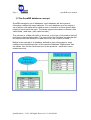
QuodDB is a set of tree main modules :
- Data definition : Where you can define the structure of your database.
- Data edition : Where you can insert information, in this case rows in a
defined table.
- Reports : The output module where you can access the inserted
information.
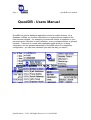
The main screen will give you information about the current selected database
& table and access ( if possible ) to the tree main modules. You will also have
an exit option and a “switch table” utility that will allow you a “fast” switch
between tables in the same database . To change the current database you
must use the data definition module.
2.1) Data Definition
This module is used to define the structure of your database. This module
works with tree different lists :
2.1.1) Database List - Used to create or delete a new database, when creating
a new database you must define the new database name according to the
restrictions explained in the note 2.4.1., Selecting a database or edit will jump to
the point bellow.
2.1.2) Tables List – Used to create or delete a new table inside the database.
when creating a new table you must define is name according to the restrictions
explained in the note 2.4.1. Selecting a table or edit will jump to the point
bellow.
2.1.3) Columns List – Used to define the structure of a table, defining the
columns that will be available. Here you can add a new column, edit or delete
an existing one. The details related to the column creation screen are discussed
bellow.
2.1.4) Creating and Editing Columns / Fields –
For each new column you can define :
Name : Name that will follow the restrictions explained in point 2.4.1
Length : Size of the new column that will be greater than 0 and less than 128.
Note that depending on the type this field might be changed in run-time,
Type : that will be one of the following list.
Number ( int ) – Integer small number ( 32 bits ).
Text – Generic Text.
QuodSoftware / J.C.R. All Rights Reserved v1.1 08/04/2004