1
(or press the UNDO key) which will progressively delete each layer, starting with the
most recent one.
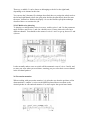
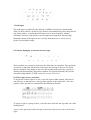
Selectively deleting layers according to layer number: while in record mode, you can
right-click a track number, whose number corresponds to the layer you wish to delete.
The sequencer distinguishes between the layers by internally assigning to each cycle
layer’s events their own internal MIDI Channel, corresponding to the layer number.
As usual, though, the track’s CHANNEL parameter on the main page determines
which instrument you are actually addressing live — being a playback-type of
parameter it overrides what’s going on internally. The master keyboard’s transmit
channel is completely replaced by the above process.
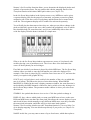
Having different channels in the track’s event list means you can visually pick out
each layer’s events, but also allows you to use functions such as Extract One Channel
or Demix All Channels (in the Functions menu) to split off each layer to its own track.
This distinguishing between layers is not available if the track where you are
recording is set to CHANNEL original.
Be careful: the layering of events other than notes, such as pitch-bend data, can lead
to weird results. Also, do not record-cycle System Exclusive data.
You may need to use the Check function in the Functions menu to delete duplicated
notes after recording in the cycle mode. Duplicated notes are easily avoided if you are
clear as to where your cycle starts and stops.
Changing tracks in record mode: another neat way of achieving instant creative
results in or out of Record-Cycle mode (though it is at its best using the Record-cycle
method of recording) is the ability to change tracks within a pattern and alter track
parameters, all without ever leaving the record mode.
To change tracks in record mode, left-click in the new track or press the up/down
cursor arrows.
4.2 Punch-cycle overdub (menu is ticked): MERGES!
Punch-cycle overdub is intended for manually replacing part of a track on-the-fly,
with the advantage of being able to add layers as you cycle: the rest of the track
remains unharmed.
Its long title is Manual Punch drop in cycle mode with merging of successive layers.
— set up a cycle around the track segment you wish to replace (with a couple
of extra bars either side for clarity — though not if you are using
AUTODROP, see below)
— tick the above menu option and press PUNCH
— start playback mode with START or CONT
— at the place you wish to start replacing, click DROP (or press Spacebar):
what was there is now deleted. Play the new notes until you use DROP again,
at which point the deleting of the original track ceases
— the cycling continues, you are still in PUNCH mode: this means that if you
DROP into the same part of the track again, this time you will not delete the
last notes, but will start merging. You can DROP in and out as often as you