1
You could also use the transmit channel of your MIDI keyboard as a way of
allocating notes to channels: playing in real time using Record-Merge means you can
play in your different voices one after the other, each time adjusting the transmit
channel (see Chapter 7: Recording, section 3.2 Merging into an already-recorded
track).
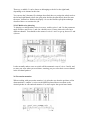
25.5 Allocating notes to voices after entering them
The allocation of existing notes to voices can be determined by changing their
channels. Apart from being able to alter the channels of notes on an individual basis in
the event list, there are various other methods you can use to alter channels for use in
the polyphonic function.
25.5.1 Changing the channels of selected notes
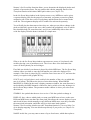
To change the channel of a group of selected notes, hold [Alternate] while tapping
keys [1] to [8] in the typewriter pad (channels 1 to 8).
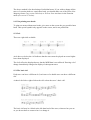
25.5.2 Pitch-dependent voice allocation in a double stave
In a double stave, with voices 1 and 3 set to different channels, Notator will assign
notes to channels automatically if you press [Alternate-S]: the split point will
determine which notes belong to which voice (above the split point, voice 1: below
the split point, voice 3).
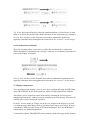
25.5.3 Voice allocation using the flexible split point
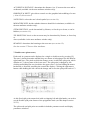
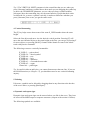
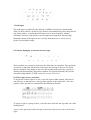
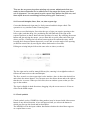
The assignment of notes to voices can also be determined by drawing a Voice
Separation Line in the stave with the mouse.
With polyphonic mode enabled, and a different MIDI channel assigned to each voice,
click and hold with the mouse in the area just below, almost touching, the clef (if v )U
are working in a double stave, between the clef). The pointer arrow becomes a
pointing finger. Now drag the mouse along the score, drawing the line around the
notes to determine whether they belong to the upper voice or the lower one. On
releasing the mouse button, all the notes on the wrong side of the line will be
changed.
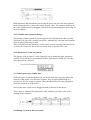
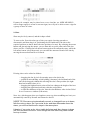
The control line reads Voice Separation — draw separation line and tells you whether
you are deciding between voices 1 and 2, 2 and 3 or 3 and 4 (though this depends on
the number of voices enabled in the parameter mode window). You decide between
which voices you wish to draw by clicking the right mouse button while holding the
left one.
You do not have to continue drawing the line all the way to the other side of the