1
Using the Headset
Headset Ring Alert
The Ring Alert in the headset varies
depending on your telephone model.
With some phones, your own ring tone
will play through the headset. In this
case, the volume and ring tone can be
adjusted on the phone.
With other telephone models, the
headset's internal Ring Alert will be
used when you receive an incoming
call. You can choose between two
different internal Ring Alerts.
6
BSET-HS1 Wireless Headset
Using the Headset
Changing the Headset Ring Alert
In order to change the Ring Alert:
•• Disconnect the Bluetooth wireless
technology enabled device from
the phone.
•• Press and HOLD the Volume
Up and Volume Down buttons
simultaneously for 1 second.
A short melody will play in
the earpiece.
•• To resume the default setting,
press the Volume Up and Volume
Down buttons simultaneously.
A short melody will play in
the earpiece.
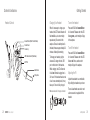
Volume Adjustment
Press Volume Up or Volume Down
to adjust the listening volume. There is
a small notch on each volume button
that makes them easy to find. The
headset listening volume can also be
adjusted on the phone.
Note: High listening volume settings
may cause echo or other noise for one
or both parties on the line. Try to lower
the listening volume if this occurs.
Notches
Volume Control Buttons
Caution! - High listening volume
settings may be harmful to your hearing.
Using the Headset
7