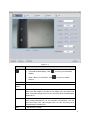
1
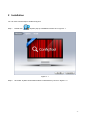
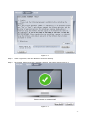
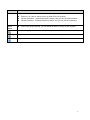
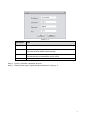
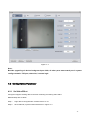
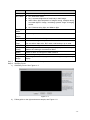
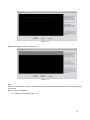
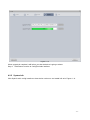
ConfigTool User’s Manual V3.1.0 Important Safeguards and Warnings Please read the following safeguards and warnings carefully before using the product in order to avoid damages and losses. Note: Do not expose the device to lampblack, steam or dust. Otherwise it may cause fire or electric shock. Do not install the device at position exposed to sunlight or in high temperature. Temperature rise in device may cause fire. Do not expose the device to humid environment. Otherwise it may cause fire. The device must be installed on solid and flat surface in order to guarantee safety under load and earthquake. Otherwise, it may cause device to fall off or turnover. Do not place the device on carpet or quilt. Do not block air vent of the device or ventilation around the device. Otherwise, temperature in device will rise and may cause fire. Do not place any object on the device. Do not disassemble the device without professional instruction. Warning: Please use battery properly to avoid fire, explosion and other dangers. Please replace used battery with battery of the same type. Do not use power line other than the one specified. Please use it properly. Otherwise, it may cause fire or electric shock. Special Announcement This manual is for reference only. All the designs and software here are subject to change without prior written notice. All trademarks and registered trademarks are the properties of their respective owners. If there is any uncertainty or controversy, please refer to the final explanation of us. Please visit our website for more information. ii Table of Contents 1 Product Overview .........................................................................................................................- 1 - 2 Installation ....................................................................................................................................- 2 - 3 Login ............................................................................................................................................- 4 - 4 General Operation ........................................................................................................................- 6 4.1 4.2 4.3 4.4 Login Config Interface ........................................................................................................- 6 4.1.1 Auto Login Config Interface .....................................................................................- 6 - 4.1.2 Manually Login Interface .........................................................................................- 6 - Config Device Parameter ...................................................................................................- 8 4.2.1 Set Video Effect.......................................................................................................- 8 - 4.2.2 Set Network Parameter .........................................................................................- 13 - 4.2.3 Encoding Parameter..............................................................................................- 14 - 4.2.4 Upgrade ................................................................................................................- 16 - 4.2.5 System Info ...........................................................................................................- 17 - Batch Mode .....................................................................................................................- 18 4.3.1 Batch Config Parameter ........................................................................................- 19 - 4.3.2 Batch Modify IP .....................................................................................................- 20 - 4.3.3 Batch Upgrade ......................................................................................................- 21 - View Log Info ...................................................................................................................- 22 - iii 1 Product Overview ConfigTool is a system tool with the following functions: Real time monitoring preview of IP C and other devices, and support setting of video effects. Set network, encoding parameter of IPC and other devices. View device SN, version and model. Upgrade device program. View device log info. Batch config device parameters. -1- 2 Installation You can refer to these steps to install ConfigTool. Step 1. Double click . System pops up installation int erface as in Figure 2- 1. Figure 2- 1 Step 2. Click Next. System shows Please select a install directory box as in Figure 2- 2. -2- Figure 2- 2 Step 3. Check I agree box, and click Browse to choose a directoty. Step 4. Click Install. Install ConfigTool, and aft er it finishes, the system shows Figure 2- 3. Figure 2- 3 -3- Step 5. Click Close. 3 Login After installation completes, double click , system pops up the software interface as in Figure 3- 1. Figure 3- 1 Parameter Note Device List Includes device type, model, IP, port, gateway, MAC address, SN, version, config and WEB login shortcut key. Refresh Refresh devices in current segment. Login Login device config interface by inputting IP address, username , password and port. -4- Parameter Note Setting Multicast: check, search device in the same segment with current PC. Search by IP: Check, search device by initial IP and IP quantity. Default Username:Default username is admin, and you can set new username. Default Password:Default password is admin, and you can set new password. Enter batch setup interface, you can batch set device, modify IP and upgrade. Batch Mode Input device type or IP address, search currently matched devices. Login config interface. You can double click device in list to login. Login WEB interface of the device. -5- 4 General Operation 4.1 Login Config Interface By logging in IP Installation config interface, you can quickly view and modify devic e info without logging in devic e’s WEB interfac e. 4.1.1 Auto Login Config Interface If your device and the PC where ConfigTool is installed are in the same segment, then ConfigTool will automatically searc h devices and display devices it finds in device list. Double click IP address of the devic e or click , system pops up login progress bar as in Figure 4- 1. Figure 4- 1 Login the system with default username and password: admin/admin. If login failed, please click Login in the upper-left, and input the correct username and password. 4.1.2 Manually Login Interface If the device is not displayed in devic e list of ConfigTool, then you can manually input its IP, port, username and password to login config interface. Note: Before you manually login config interface, you shall make sure the device can communicate with PC where ConfigTool is installed. Detailed steps are as follows: Step 1. Click Login on the upper-left. System pops up a login box as in Figure 4- 2. -6- Figure 4- 2 Parameter Note IP Device IP address. Username Username to login device. This user must be added in device setup. Password Password of the username you enter to login. This password must be added in device setup. Port Device port no. Step 2. Input IP, username, password and port. Step 3. Click OK. After login, system shows interface as in Figure 4- 3. -7- Figure 4- 3 Note: Besides upgrading via device background port 3800, all other ports must match port in system config> network> TCP port, otherwise, it cannot login. 4.2 Config Device Parameter 4.2.1 Set Video Effect ConfigTool supports viewing device real time monitoring and setting video effect. Detailed steps are as follow: Step 1. Login device config interface. Please refer to Ch 4.1 Step 2. Click Video tab, system shows interface as in Figure 4- 4. -8- Figure 4- 4 Parameter Note In normal window display, click display. When video is in full screen, click window. , you can go to full screen to return to default Channel Color Select channel to monitor There are three modes: standard, soft and bright. Mode Brightness It adjusts brightness of image. When you find image is too dark to too bright, you can adjust this value. The value ranges from 0 to 100, and 40 to 60 is recommended. Default is 50. Contrast It adjusts contrast of image. When image brightness is ok, but contrast is insufficient, you can adjust this value. The value ranges from 0 to 100, and 40 to 60 is recommended. Default is 50. Hue It adjusts hue of image. -9- Parameter Note Saturation It adjusts saturation of image. BLC Mode Off: Close BLC mode. BLC: Increase brightness of main body in dark image. WDR: When light comparison of image is strong, it adjusts strong and weak lights in image, increasing dynamic range of imaging model. HLC: Reduce string light, and balance light. Day/Night Mode Set video into color, black/white, or auto mode. Easy Assist to adjust focus. Focus Default Save It restores default value of brightness, contrast, hue and saturation. Save current config as template to local. Temp You can select video color, BLC mode, code and sync pc to save. Apply To Apply current config to all devices as batch Clear Clear config of current device. System will pop up box to inform you Config Return whether the clearing is successful or failed. Click it to return to ConfigTool’s main interface. Zoom In Zoom in image with your mouse wheel. Original After image is zoomed in, right click mouse to go to original image Image display. Step 3. View preview and set channel and color parameters. Step 4. Set Easy Focus. 1) Click Easy Focus. See Figure 4- 5. Figure 4- 5 2) Follow guide on the right and start to sample, see Figure 4- 6. - 10 - Figure 4- 6 Adjust until image is clear as in Figure 4- 7. Figure 4- 7 Note: Red line is the definition value of current image. Green line the definition value when focus changes from min to max. Step 5. Save as template 1) Click Save Temp. See Figure 4- 8. - 11 - Figure 4- 8 2) 3) Check designated item, select template path. Click save. Step 6. Apply to all devices. 1) Click Apply To. See Figure 4- 9 - 12 - 2) Check designated item. 3) 4) Click OK, system goes to Batch Mode interface. Select device and click Start. 4.2.2 Set Network Parameter ConfigTool supports setting of device IP type, IP address, port and etc. Detailed steps are as follows: Step 1. Click Net tab in Config interface. System shows interface as in Figure 4- 10. Figure 4- 10 Parameter Note Ethernet Card Select device Ethernet card. DHCP Set whether to enable DHCP or not. (Currently only support IP Version IPV4) Device IP version, you can select IPv4 and IPv6. IP Address Device IP address. When you check DHCP, you cannot set IP Subnet Mask address. Set device subnet mask. Only when IP Version is IPv4, you need to set subnet mask. When you check DHCP, you cannot set subnet mask. - 13 - Parameter Note Link Address Each host in LAN allocated with an exclusive link address for LAN access. This address cannot be modified. Gateway Only when IP version is IPv6, you need to set link address. Set device gateway. When you check DHCP, you cannot set Mac gateway. Device Mac address, you cannot set it. TCP Device TCP port, default port is 37777. You can set it according to actual condition. Note: After you modify port no. and save it, you need to reboot. Port no. cannot overlay each other. HTTP Device HTTP port, except port 80, port no. from 1 to 1024 are not recommended. Note: After you modify port no. and save it, you need to reboot. Port UDP no. cannot overlay each other. Device UDP port, default port is 37778. You can set it according to actual condition. RTSP Device RTSP port, default port is 554. You can set it according to actual condition. Save Return Save parameter to the device. Return to ConfigTool main interface. Note: ConfigTool provides only network card parameter of current connection. After network parameter config is complete, a box will pops up saying config is successful and now device will reboot. Please do not login the device during rebooting, otherwise, parameter config may fail. Step 2. Set corresponding parameter. Step 3. Click Save Net to finish setup. 4.2.3 Encoding Parameter ConfigTool supports setup of device main stream, encode mode, resolution and etc. Detailed steps are as follows: Step 1. Click Code tab in config interface. System shows interface as in Figure 4- 11. - 14 - Figure 4- 11 Parameter Channel Note Select corresponding channel no. Main Stream Device main stream type, including common, motion, alarm. Encode Mode Video compression format, including: MPEG4, MS-MPEG4, MPEG2, MPEG1, H.263, MJPG, FCC-MPEG4, H.264 Resolution Resolution of current channel Frame Rate Frame rate of current channel Rate Control PAL: 1 fps ~ 25 fps; NTSC: 1 fps ~ 30 fps. Including CBR and VBR. Bit Rate Bit rate of current channel. Enable Check, enable sub stream. Sub Stream Save Set sub stream type. Save parameters to the device. Return Return to ConfigTool main interface Step 2. Set corresponding parameter. Step 3. Click Save Code to finish setup. - 15 - 4.2.4 Upgrade You can upgrade device via ConfigTool. Detailed steps are as follows: Step 1. Click Upgrade tab in config interface. System shows interfac e as in Figure 4- 12. Figure 4- 12 Step 2. Click Open File. System pops up Open box. Step 3. Select upgrade file and click Upgrade. System shows file transmission. When file transmission is done, system will automatically start to upgrade and show current progress as in Figure 4- 13. - 16 - Figure 4- 13 When upgrade is complete, it will inform you that the device is going to reboot. Step 4. Click Return to return to ConfigTool main interface. 4.2.5 System Info Click SysInfo tab in config interface to view device version no. and model info as in Figure 4- 14. - 17 - Figure 4- 14 Parameter Note Serial No. Version Device serial no. Device current software version Build Date Type Device build date. Device mode type. Sync PC Sync PC time to device. Manual Sync Return Manually set system time, and sync time to device. Return to ConfigTool main interface 4.3 Batch Mode ConfigTool supports device setup, modify IP and upgrade as batch. In ConfigTool main interface, click batch mode, see Figure 4- 15. - 18 - Figure 4- 15 Parameter Note Return Quit batch mode, and return to main interface. Manual Add Manually add device, you may add a single IP or IP segment. Successfully added device will be shown in list. Delete Delete device. Import Dev Import device list into batch mode. Export Dev Export current device list to local. Modify User Modify device login user, password and port. 4.3.1 Batch Config Parameter Step 1. In Batch Mode, select one or more devices. Step 2. In dropdown list on the right, select Config. Step 3. Click Start. See Figure 4- 16. - 19 - Figure 4- 16 Step 4. Click Open, select config file. You can check Default to reset device parameters. Step 5. Click OK. System config will be as in Figure 4- 17. Figure 4- 17 4.3.2 Batch Modify IP Step 1. In Batch Mode interface, select one or more devices. - 20 - Step 2. In dropdown list on the right, select Modify IP. Step 3. Click Start. See Figure 4- 18. Figure 4- 18 Step 4. Set initial IP, subnet mask and gateway. Step 5. Click OK. 4.3.3 Batch Upgrade Step 1. In Batch Mode interface, select one or more devices. Step 2. In dropdown list on the right, select Upgrade. Step 3. Click Start. See Figure 4- 19. Figure 4- 19 Step 4. Click Open, select upgrade file. Step 5. Click OK. - 21 - 4.4 View Log Info You can view log info in ConfigTool int erface. Step 1. In ConfigTool main interface, click . See Figure 4- 20. Figure 4- 20 By default, system shows all logs. Step 2. Search and clear log. In dropdown list, select time and type. Click search, to search all matched log info. Click clear to clear all log info. - 22 -