1
-5-
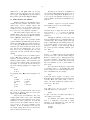
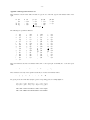
same width as a digit. When printed, this will produce
1
40
700
2
50
800
3
60
900
It is also possible to fill up tabbed-over space
with some character other than blanks by setting the
‘tab replacement character’ with the .tc command:
.ta 1.5i 2.5i
.tc \(ru
(\(ru is "_")
Name tab Age tab
produces
Name ___________________ Age ___________
To reset the tab replacement character to a blank, use
.tc with no argument. (Lines can also be drawn with
the \l command, described in Section 6.)
troff also provides a very general mechanism
called ‘fields’ for setting up complicated columns.
(This is used by tbl). We will not go into it in this
paper.
6. Local Motions: Drawing lines and characters
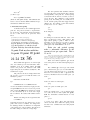
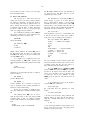
Remember ‘Area = πr2’ and the big ‘P’ in the
.in +0.6i
(move paragraph in)
.ll – 0.3i
(shorten lines)
.ti – 0.3i
(move P back)
\v´2´\s36P\s0\v´– 2´ater noster qui est
in caelis ...
A minus sign causes upward motion, while no sign or
a plus sign means down the page. Thus \v′– 2′ causes
an upward vertical motion of two line spaces.
There are many other ways to specify the
amount of motion —
\v´0.1i´
\v´3p´
\v´– 0.5m´
and so on are all legal. Notice that the scale specifier
i or p or m goes inside the quotes. Any character can
be used in place of the quotes; this is also true of all
other troff commands described in this section.
Since troff does not take within-the-line vertical motions into account when figuring out where it is
on the page, output lines can have unexpected positions if the left and right ends aren’t at the same vertical position. Thus \v
\v, like \u and \d
\d, should always
balance upward vertical motion in a line with the
same amount in the downward direction.
Paternoster. How are they done? troff provides a
host of commands for placing characters of any size
at any place. You can use them to draw special characters or to tune your output for a particular appearance. Most of these commands are straightforward,
but messy to read and tough to type correctly.
Arbitrary horizontal motions are also available
— \h is quite analogous to \v
\v, except that the default
scale factor is ems instead of line spaces. As an
example,
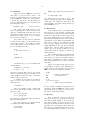
If you won’t use eqn, subscripts and superscripts are most easily done with the half-line local
motions \u and \d
\d. To go back up the page half a
point-size, insert a \u at the desired place; to go
down, insert a \d
\d. (\u
\u and \d should always be used in
pairs, as explained below.) Thus
causes a backwards motion of a tenth of an inch. As
a practical matter, consider printing the mathematical
symbol ‘>>’. The default spacing is too wide, so eqn
replaces this by
Area = \(∗pr\u2\d
produces
Area = πr2
To make the ‘2’ smaller, bracket it with \s– 2...\s0
2...\s0.
Since \u and \d refer to the current point size, be sure
to put them either both inside or both outside the size
changes, or you will get an unbalanced vertical
motion.
Sometimes the space given by \u and \d isn’t
the right amount. The \v command can be used to
request an arbitrary amount of vertical motion. The
in-line command
\v´(amount)´
causes motion up or down the page by the amount
specified in ‘(amount)’. For example, to move the ‘P’
down, we used
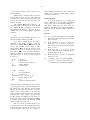
\h´– 0.1i´
>\h´– 0.3m´>
to produce >>.
Frequently \h is used with the ‘width function’
\w to generate motions equal to the width of some
character string. The construction
\w´thing´
is a number equal to the width of ‘thing’ in machine
units (1/432 inch). All troff computations are ultimately done in these units. To move horizontally the
width of an ‘x’, we can say
\h´\w´x´u´
As we mentioned above, the default scale factor for
all horizontal dimensions is m
m, ems, so here we must
have the u for machine units, or the motion produced
will be far too large. troff is quite happy with the
nested quotes, by the way, so long as you don’t leave
any out.
As a live example of this kind of construction,
all of the command names in the text, like .sp
.sp, were