1
5
Board Status LEDs
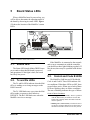
When a MultiFlex board is powered up, you
will be able to determine the operating status of
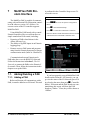
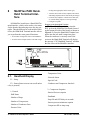
the board by observing its status LEDs. Figure
5-1 shows the location of the MultiFlex’s status
LEDs.
Figure 5-1 - MultiFlex Status LED Locations
5.1.
Status LED
The Status LED simply blinks GREEN once
per second to show that the board is powered
and operational. If this light is dark, the board
has likely lost power.
5.2.
Tx and Rx LEDs
The Tx and Rx LEDs indicate when the MultiFlex is sending or receiving messages on the
RS485 network.
The Tx LED blinks once every time the MultiFlex sends a response to the Einstein or
REFLECS. The Rx LED blinks once when the
MultiFlex receives a message.
If the MultiFlex is connected to the network
and set up to communicate with the controller,
you should see these lights blinking regularly. If
they do not, there may be a problem with the network.
5.3.
Code A and Code B LEDs
The MultiFlex PAK has two LEDs labeled
Code A and Code B. These LEDs indicate failure conditions. When these LEDs are OFF, there
are no failures active. When one or both of these
LEDs are blinking, there are failure conditions.
The rate of blinking indicates the type of failure:
Code A Failure Conditions
• Blinking fast (4 times/second) - There is a problem
with the flash memory or hardware clock on this
board. This generally means the board is bad and
must be replaced.
• Blinking slow (1 time/second) - The board is not receiving any messages addressed to it. This means either the I/O network is down or it has not yet been
Status LED
Board Status LEDs • 15