1
eIDS
User Manual
First Data Learning Organization
User Manual
eIDS
Table of Contents
EIDS USER MANUAL ................................................................................................................................. 5
ABOUT THIS MANUAL ................................................................................................................................ 5
CONVENTIONS USED IN THIS MANUAL ............................................................................................................ 5
HOW THIS MANUAL IS ORGANIZED ................................................................................................................ 6
ICONS USED IN THIS MANUAL ...................................................................................................................... 6
CHAPTER 1: PRODUCT OVERVIEW AND BENEFITS ...................................................................................... 9
IN THIS CHAPTER ...................................................................................................................................... 9
CHAPTER DEFINITIONS................................................................................................................................ 9
PRODUCT OVERVIEW ................................................................................................................................. 9
PRODUCT BENEFITS ................................................................................................................................... 9
CHAPTER 2: TECHNICAL REQUIREMENTS ................................................................................................. 11
IN THIS CHAPTER .................................................................................................................................... 11
CHAPTER DEFINITIONS.............................................................................................................................. 11
HARDWARE REQUIREMENTS ...................................................................................................................... 12
SOFTWARE REQUIREMENTS ....................................................................................................................... 12
CHAPTER 3: ENROLLMENT ...................................................................................................................... 14
IN THIS CHAPTER .................................................................................................................................... 14
CHAPTER DEFINITIONS.............................................................................................................................. 14
ENROLLMENT ........................................................................................................................................ 14
CHAPTER 4: LOGGING IN & OUT OF THE SYSTEM ..................................................................................... 15
IN THIS CHAPTER .................................................................................................................................... 15
CHAPTER DEFINITIONS.............................................................................................................................. 15
LOGGING IN .......................................................................................................................................... 15
LOGGING OUT ....................................................................................................................................... 15
CHAPTER 5: THE CONTROL PANEL ........................................................................................................... 16
IN THIS CHAPTER .................................................................................................................................... 16
CONTROL PANEL..................................................................................................................................... 16
SEARCHING ........................................................................................................................................... 17
TIPS .................................................................................................................................................... 18
CHAPTER 6: THE MESSAGE SCREEN ......................................................................................................... 19
IN THIS CHAPTER .................................................................................................................................... 19
CHAPTER DEFINITIONS.............................................................................................................................. 19
THE MESSAGE SCREEN ............................................................................................................................. 19
NAVIGATING THE MESSAGE SCREEN ............................................................................................................. 20
CHAPTER 7: THE QUEUES SCREEN ........................................................................................................... 23
IN THIS CHAPTER .................................................................................................................................... 23
THE QUEUE SCREEN ................................................................................................................................ 23
WORK TRACKER ..................................................................................................................................... 24
QUEUE SELECTOR ................................................................................................................................... 25
THE QUEUE WORKLIST ............................................................................................................................. 26
CHAPTER 8: THE CASES SCREEN ............................................................................................................... 28
Rev: 09/01/2009 V1.0
Page 2 of 70
First Data Learning Organization
Confidential & Proprietary to First Data Corporation
Developed by: 02
eIDS_User_Manual.doc
eIDS
User Manual
IN THIS CHAPTER..................................................................................................................................... 28
CHAPTER DEFINITIONS .............................................................................................................................. 28
THE CASES SCREEN .................................................................................................................................. 28
CASE FILES (A) ....................................................................................................................................... 29
CASE INFORMATION (B) ............................................................................................................................ 30
CASE INFORMATION CHARGEBACKS .............................................................................................................. 30
CASE INFORMATION RETRIEVALS DEFINED ...................................................................................................... 31
TABS (C ) .............................................................................................................................................. 32
USER NOTES TAB .................................................................................................................................... 32
TRANS/CREDIT TAB ................................................................................................................................. 33
AUTH RECORDS TAB................................................................................................................................. 34
ACTIONS TAB ......................................................................................................................................... 34
CHARGEBACK ACTIONS ............................................................................................................................. 35
RETRIEVAL ACTIONS ................................................................................................................................. 36
ADDITIONAL HELPFUL HINTS....................................................................................................................... 38
CHAPTER 9: FREQUENTLY ASKED QUESTIONS ........................................................................................... 39
IN THIS CHAPTER..................................................................................................................................... 39
WHAT DOES EIDS STAND FOR?.................................................................................................................... 39
CAN I USE EIDS ANYTIME I WANT? ............................................................................................................... 39
WHERE CAN I SEE MY NEW CHARGEBACK AND RETRIEVAL CASES THAT I NEED TO WORK?............................................... 39
WHY ARE SOME OF MY CASES IN THE QUEUE WORKLIST DISPLAYED IN RED FONT? ....................................................... 39
WHERE CAN I FIND THE ISSUING BANK’S CARDHOLDER DISPUTE LETTER? ................................................................... 39
HOW DO I FIND A SPECIFIC DISPUTE CASE? ...................................................................................................... 40
HOW CAN I TRACK OF MY DISPUTE CASES THAT ARE WORKED DAILY? ....................................................................... 40
WHEN IS THE DAILY CUT OFF TIME FOR PROCESSING MY DISPUTES ON TODAY’S DATE? .................................................. 40
WHO CAN I CONTACT IF I AM EXPERIENCING TECHNICAL DIFFICULTIES WITH EIDS? ...................................................... 40
WHO CAN I CONTACT IF I HAVE A QUESTION REGARDING A SPECIFIC DISPUTE? ............................................................ 40
CHAPTER 10: USER BEST PRACTICES ......................................................................................................... 41
IN THIS CHAPTER..................................................................................................................................... 41
CHECK YOUR MESSAGES DAILY FOR ANY CHARGEBACK AND RETRIEVAL ALERTS. .......................................................... 41
USE THE PRINTER VERSION OR DOWNLOAD SPREADSHEET OPTION LOCATED WITHIN THE QUEUE WORKLIST. ...................... 41
USE EIDS TO ELECTRONICALLY RESPOND TO YOUR DISPUTES. ................................................................................ 41
CHECK THE TRANS/CREDIT TAB TO VERIFY IF YOU HAVE ALREADY ISSUED A CREDIT TO YOUR CUSTOMER’S ACCOUNT FOR THEIR
DISPUTE................................................................................................................................................ 41
TAKE FULL ADVANTAGE OF THE ONLINE HELP FUNCTIONALITY. .............................................................................. 41
APPENDIX A ........................................................................................................................................... 42
THE IMAGE VIEWER SCREEN ....................................................................................................................... 42
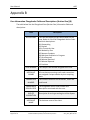
APPENDIX B ............................................................................................................................................ 44
CASE INFORMATION CHARGEBACKS FIELDS AND DESCRIPTIONS (SECTION ONE) (B) ............................. 44
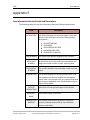
APPENDIX C ............................................................................................................................................ 47
CASE INFORMATION CHARGEBACKS FIELDS AND DESCRIPTIONS (SECTION TWO) (B) ............................. 47
APPENDIX D ........................................................................................................................................... 48
CASE INFORMATION CHARGEBACKS FIELDS AND DESCRIPTIONS (SECTION THREE) (B).......................... 48
APPENDIX E ............................................................................................................................................ 49
CASE INFORMATION RETRIEVAL FIELDS AND DESCRIPTIONS ................................................................. 49
Developed by: 02
eIDS_User_Manual.doc
First Data Learning Organization
Confidential & Proprietary to First Data Corporation
Rev: 09/01/2009 V1.0
Page 3 of 70
User Manual
eIDS
APPENDIX F ........................................................................................................................................... 52
TRANS/CREDIT TAB COLUMN FIELDS AND DESCRIPTIONS .................................................................... 52
APPENDIX G ........................................................................................................................................... 53
TRANS/CREDIT TAB DETAIL FIELDS AND DESCRIPTIONS ....................................................................... 53
APPENDIX H ........................................................................................................................................... 58
AUTH RECORDS TAB COLUMN FIELDS AND DESCRIPTIONS ................................................................... 58
APPENDIX I ............................................................................................................................................ 61
AUTH RECORDS TAB DETAIL FIELDS AND DESCRIPTIONS ..................................................................... 61
APPENDIX J ............................................................................................................................................ 70
RETRIEVAL STATUS CODES AND DESCRIPTIONS .................................................................................. 70
Rev: 09/01/2009 V1.0
Page 4 of 70
First Data Learning Organization
Confidential & Proprietary to First Data Corporation
Developed by: 02
eIDS_User_Manual.doc
eIDS
User Manual
eIDS User Manual
About This Manual
eIDS (Electronic Integrated System) is a highly secure web enabled front-end user
interface that helps merchants and or clients effectively manage sales disputes.
This manual is designed to help you find answers fast when working with the eIDS
system. It is not a training guide or overview of the system requiring you to start
at page one and not miss a word through the end. Instead it is a logically
organized cheat sheet full of information to help you quickly meet the needs of
the eIDS end user.
Conventions Used in This Manual
In order to help you find what you’re looking for fast, several conventions have
been used in this manual.
What You Will See…
What You Will Do…
Click the START button.
When an action on your part is required such as clicking
on a button or hyperlink, the name of the button or link
will always be CAPITALIZED and bold.
Click START > ALL PROGRAMS
> EIDS.
When a series of actions is required, for functions such as
drilling down a menu of options, the individual selections
will be separated by a “>.”
Type John Q Public in the USER
NAME field.
When the directions are asking you to type something
specific into a field, the field will appear in ALL CAPS and
the text to be typed will appear in italics.
Developed by: 02
eIDS_User_Manual.doc
First Data Learning Organization
Confidential & Proprietary to First Data Corporation
Rev: 09/01/2009 V1.0
Page 5 of 70
User Manual
eIDS
How This Manual is Organized
So that you can quickly and easily find the topic that you need when you need it, this
manual has been divided into three parts:
Part 1: Getting Started
o Chapters 1 – 4: In Part 1 you will learn the basics of getting started with
eIDS. Information included in this section tells you about eIDS; what it
does and what you need to use it.
Part 2: Jumping In
o Chapters 5 – 8: In Part 2 you jump right in and get started with the details
of how to make the system work for you. This part of the manual tells you
what you need to know to use all the great features eIDS has to offer and
when is the right time to use what.
Part 3: Fine Tuning
o Chapters 9 – 10: Part 3 gives you all the extras such as experienced user
tips and short cuts as well as answers to some of the most frequently
asked questions about the system.
Icons Used in This Manual
To make your experience with this manual easier, various icons have been
placed in the margins to indicate particular points of interest.
Tech Talk: Information related to this icon tends to be technical in
nature. It lets you know what you’re looking at refers to items such
as system requirements or back-end information that may come in
handy for troubleshooting in the future.
Caution: Watch Out! This icon lets you know that the information
you’re looking at is critical to the success of the procedure or
function you’re reading about. Ignoring the warning could cost you
valuable time.
Security: This icon is a reminder that the type of information being
discussed is of a sensitive nature (Account numbers, passwords,
merchant IDs) and needs to be handled with care.
Tip: This icon indicates a best practice such as time saving short cuts
or hints about how to work smarter instead of harder.
Rev: 09/01/2009 V1.0
Page 6 of 70
First Data Learning Organization
Confidential & Proprietary to First Data Corporation
Developed by: 02
eIDS_User_Manual.doc
eIDS
User Manual
Remember: This icon is used to indicate important and critical
details. It gives you a heads up that the corresponding information is
something you should read carefully and pay close attention to.
Missing the information pointed out by this icon could mean missing
an important step necessary to function or procedure your reading
about.
Developed by: 02
eIDS_User_Manual.doc
First Data Learning Organization
Confidential & Proprietary to First Data Corporation
Rev: 09/01/2009 V1.0
Page 7 of 70
eIDS
User Manual
Chapter 1: Product Overview and Benefits
In This Chapter
Product Overview
Product Benefits
Chapter Definitions
eIDS: Electronic Integrated Dispute System(eIDS) is a highly secure web
enabled front- end interface to help merchants and or clients effectively
manage sales disputes.
Product Overview
What is eIDS?
Electronic Integrated Dispute System (eIDS) is a highly secure web enabled frontend interface to help merchants and or clients effectively manage sales disputes
(chargebacks and retrievals) with greater efficiency in a real-time environment.
Merchant Services created this web-based tool to help merchants simplify back
office processes and expedite response time on retrieval and chargeback disputes.
The eIDS service can also provide data and information to merchants to help them
gain control of their sales dispute expense management.
Product Benefits
Sales Dispute Management
• Automated presentment of sales dispute cases includes comprehensive
documentation explaining how to resolve chargeback.
• On-Line Help provides detailed sales dispute information for educational
purposes and possible preventative point-of-sale practices.
• Merchants have the ability to make informed and educated sales dispute
decisions to help gain control of sales dispute expense management.
• Sales dispute management becomes faster, easier and requires less
support (resources). Postage and/or telecom expenses are reduced.
Developed by: 02
eIDS_User_Manual.doc
First Data Learning Organization
Confidential & Proprietary to First Data Corporation
Rev: 09/01/2009 V1.0
Page 9 of 70
User Manual
eIDS
Decreased Chargebacks
• Electronic delivery method ensures chargebacks and retrievals are
not “lost” via the mail or fax.
• Faster response times and Alert messages for retrieval requests result in a
reduction of non-response chargebacks.
Enhanced Financial Controls
• Ability to effectively manage back office workflow.
• Provides queue prioritization and sales dispute inventory control.
• Protect cardholder information by eliminating paper.
Ease of Use
• Simplifies back office tasks associated with the management of
chargebacks and retrievals.
• Merchants receive acknowledgements and comprehensive messages
clarifying required documentation for fulfillment.
Rev: 09/01/2009 V1.0
Page 10 of 70
First Data Learning Organization
Confidential & Proprietary to First Data Corporation
Developed by: 02
eIDS_User_Manual.doc
eIDS
User Manual
Chapter 2: Technical Requirements
In This Chapter
Hardware Requirements
Software Requirements
Chapter Definitions
PC: Also known as a personal computer is a microcomputer designed for
individual use, as by a person in an office or at home or school, for such
applications as word processing, data management, financial analysis, or
computer games.
Processor: An electronic device designed to accept data, perform
prescribed mathematical and logical operations at high speed, and display
the results of these operations.
RAM: RAM (Random Access Memory) The memory used by the operating
system and software to perform tasks. The phrase random access refers to
the ability of the processor to access any part of the memory.
Hard Disk Drive: A disk drive that reads and writes data stored on hard
disks.
Screen Resolution: The screen resolution signifies the number of dots
(pixels) on the entire screen. A smaller resolution (ex. 640 X 480) creates
larger text and images. A larger resolution (ex. 1024 X 768) creates smaller
text and images, allowing more content to be viewed on one screen.
Scanner: A device that can read text or illustrations printed on paper and
translate the information into a form the computer can use.
Operating System: The Operating System (OS), is the most important
software program that runs on a computer. Every general-purpose
computer must have an operating system to run other programs. Operating
systems perform basic tasks, such as recognizing input from the keyboard,
sending output to the display screen, keeping track of files and directories
on the disk, and controlling peripheral devices such as disk drives and
printers.
Web Browser: A software application used to locate and display Web
pages.
Developed by: 02
eIDS_User_Manual.doc
First Data Learning Organization
Confidential & Proprietary to First Data Corporation
Rev: 09/01/2009 V1.0
Page 11 of 70
User Manual
eIDS
TIFF: Acronym for tagged image file format, one of the most widely
supported file formats for storing bit-mapped images on personal
computers (both PCs and Macintosh computers). TIFF graphics can be any
resolution, and they can be black and white, gray-scaled, or color. Files in
TIFF format often end with a .tif extension.
Hardware Requirements
The eIDS system has been designed to work on today’s standard office computing
equipment.
The following table displays the minimum hardware requirements and
recommendations to access the system.
Hardware
Requirements
PC
IBM Compatible
Processor
Pentium 90 MHz
RAM
16 MB
Hard Disk Drive
15 MB free disk space
Screen Resolution
1024 X 768 (Recommended)
Scanner (Optional)
The images must be submitted as “tif” compressed images.
This can be set using Page Properties through the image
software configuration.
Software Requirements
The following table displays the minimum software requirements and
recommendations to access the system.
Software
Requirements
Operating System
Microsoft Windows 95 or higher
Web Browser
Either one of the following:
Internet Explorer 5.1 or higher
Netscape 6.0 or higher
Rev: 09/01/2009 V1.0
Page 12 of 70
First Data Learning Organization
Confidential & Proprietary to First Data Corporation
Developed by: 02
eIDS_User_Manual.doc
eIDS
User Manual
Software
Requirements
Tiff Compressed
Image
File Type: TIFF
Compression: CCITT Group 3 (1d) or CCITT Group 4 (2d)
Resolution: 200 dpi
Color: Black and White
Size: 8 ½ X 11 inches (Portrait)
Internet Service
Provider (ISP)
A company that provides direct access to the Internet. The
connection to the Internet can be dial-up (analog) or a highspeed digital service. Any business that wants to connect to
the Internet is required to contract with an ISP.
Developed by: 02
eIDS_User_Manual.doc
First Data Learning Organization
Confidential & Proprietary to First Data Corporation
Rev: 09/01/2009 V1.0
Page 13 of 70
User Manual
eIDS
Chapter 3: Enrollment
In This Chapter
Enrollment
User ID Security
Chapter Definitions
User ID: A User ID or User Name is a name used to gain access to a
computer system or secure application.
Password: A secret series of characters that enables a user to access a file,
computer, or program. On multi-user systems, each user must enter his or
her password before the computer will respond to commands. The
password helps ensure that unauthorized users do not access the
computer, network or application.
o Note: Ideally, passwords should be something that nobody could
guess, be at least 8 characters in length and contain both alpha and
numeric characters as well as one non-alphanumeric character such
as an ampersand (&).
Enrollment
Prior to accessing the eIDS system, you will need to enroll as an approved user of
the system. eIDS security controls the rights to the application, certain screens
and the allowed actions for those screens. eIDS is accessed through your
merchant reporting tool website. Please contact your Relationship Manager,
Account Executive and Customer Service Representative for more information
about how to enroll in eIDS.
Rev: 09/01/2009 V1.0
Page 14 of 70
First Data Learning Organization
Confidential & Proprietary to First Data Corporation
Developed by: 02
eIDS_User_Manual.doc
eIDS
User Manual
Chapter 4: Logging In & Out of the System
In This Chapter
Logging In to eIDS.
Logging Out of eIDS.
Chapter Definitions
Log In (Log On): To make a computer system, network or application recognize
you so that you can obtain access and/or execute programs by entering a
username and password.
Log Out (Log Off): Logging Out ends a session at the computer or in the program.
On networks or applications, where you share computer resources with other users,
there is generally an operating system command or link that allows you log off.
Logging In
eIDS users will need to log in to the eIDS product from their merchant reporting
tool website. For more information regarding the eIDS log in process please
contact your Relationship Manager, Account Executive or your Customer Service
Representative.
Logging Out
To log out of the system, locate the Control Panel at the bottom left corner of the
eIDS screen.
Step
1
Action
Click the LOG OUT icon located on the Control Panel.
Result: You will be returned to your merchant reporting tool
portal HOME page.
Developed by: 02
eIDS_User_Manual.doc
First Data Learning Organization
Confidential & Proprietary to First Data Corporation
Rev: 09/01/2009 V1.0
Page 15 of 70
User Manual
eIDS
Chapter 5: The Control Panel
In This Chapter
Using the Control Panel.
Using the Search function.
Control Panel
The Control Panel is at the bottom left corner of the eIDS screen. Each icon
performs a common task in eIDS.
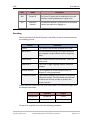
The following table lists the Control Panel options, the icon and a description.
Icon
Name
Description
Refresh
Clicking the refresh icon will reload all items
currently displayed and updates any new data
available from the Merchant Services back office.
Help
Clicking the Help icon will access the Online Help
system specific to the business use or functionality
of the product.
Search
Clicking the Search icon launches a window
providing search functionality for specific cases. You
can choose to search Chargeback or Retrieval cases
by selecting the appropriate radio button.
Logout
Clicking the Logout icon allows you to sign out of the
product and return to your portal Home page.
Switch Merchant Clicking the Switch Merchant icon allows you to
switch to a different merchant location. This link will
not appear if your profile has not been enabled with
this functionality.
Rev: 09/01/2009 V1.0
Page 16 of 70
First Data Learning Organization
Confidential & Proprietary to First Data Corporation
Developed by: 02
eIDS_User_Manual.doc
eIDS
User Manual
Icon
Name
Description
N/A
Screen ID
The Screen ID shows which combination of screen
elements are being displayed at a given time.
N/A
Merchant
Number
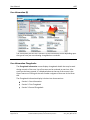
The Merchant Number represents which merchant
number was used when logging on.
Searching
One of the features of the eIDS system is the ability to search accounts based on
the following criteria.
Criteria
Definition
Case #
The Unique Case Number assigned to the case.
Merchant #
All merchants processing credit card transactions
are assigned a unique number by their acquiring
bank.
Cardholder #
This number identifies the cardholder, issuer and
card brand.
Reference #
This is the 23-digit Outgoing Acquirer reference
number.
Dispute Amount
The chargeback or retrieval amount that is in
dispute or is being requested.
Transaction Locator
This number identifies the merchant’s transaction
reference number. This information must be sent
to Merchant Services in order to perform the
search function.
Search Retention Timeframes are in the table below. The timeframes begin after
the dispute closed date.
Archived
Purged
Chargebacks
14 Months
3 Years
Retrievals
N/A
2 Years
To search for a specific record use the following procedure.
Developed by: 02
eIDS_User_Manual.doc
First Data Learning Organization
Confidential & Proprietary to First Data Corporation
Rev: 09/01/2009 V1.0
Page 17 of 70
User Manual
eIDS
Step
Action
1
Click the SEARCH icon.
Result: A new window launches providing search functionality
for specific cases.
2
Select the appropriate search type, Chargebacks or Retrievals.
3
Select one of the following criteria from the SEARCH field:
Case #
Merchant #
Cardholder #
Reference #
Dispute Amount
Transaction Locator
4
Enter the criteria information into the box provided.
5
Click the SEARCH button.
Tips
There is a five (5) case limit when accessing cases via the Search function.
Once the limit has been met, you will need to select the ‘Release’ button in
order to access another case.
At the time of merchant enrollment in eIDS, 45 days worth of dispute
information will be immediately accessible via the Search function in eIDS.
The search option for Transaction Locator is case sensitive if inputting alpha
characters.
Rev: 09/01/2009 V1.0
Page 18 of 70
First Data Learning Organization
Confidential & Proprietary to First Data Corporation
Developed by: 02
eIDS_User_Manual.doc
eIDS
User Manual
Chapter 6: The Message Screen
In This Chapter
Introduction to the Message screen.
Navigating the Message screen.
Reviewing Chargeback and Retrieval Messages.
Chapter Definitions
Alerts (Red Exclamation Point): alert the user information provided to
Merchant Services requires additional information
Acknowledgements ( Green Check Mark): acknowledge receipt and/or
provide a status regarding the response provided to Merchant Services
The Message Screen
The Message screen provides you with important information regarding
Chargeback and Retrieval requests you have already fulfilled. Merchant Services
provides specific Acknowledgements and Alerts for all your Chargeback and
Retrieval disputes. Review and work them daily to ensure you have the most up to
date case status information.
Developed by: 02
eIDS_User_Manual.doc
First Data Learning Organization
Confidential & Proprietary to First Data Corporation
Rev: 09/01/2009 V1.0
Page 19 of 70
User Manual
eIDS
Navigating the Message Screen
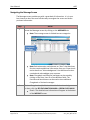
The Message screen provides you with a great deal of information. It is in your
best interest to learn the most efficient way to navigate the screen and locate
pertinent information.
Step
1
Action
Access the Messages screen by clicking on the MESSAGES tab.
Note: The message screen is divided into two categories:
Chargeback
Messages
Retrieval
Messages
Note: Red exclamation marks denote an “Alert” that Merchant
Services requires additional information from you. Green check
marks denote an “Acknowledgement” that Merchant Services
received and acknowledges your response.
Note: Chargeback and Retrieval messages can be sorted by
clicking on the Date, User ID or Case Number fields. The
Previous and Next buttons can be used to view additional
Chargeback or Retrieval messages.
2
To view Chargeback and/or Retrieval details of the acknowledgements
or alerts, click the RED EXCLAMATION MARK or GREEN CHECK MARK.
Result: The detailed case information will appear at the bottom
of the MESSAGE screen.
Rev: 09/01/2009 V1.0
Page 20 of 70
First Data Learning Organization
Confidential & Proprietary to First Data Corporation
Developed by: 02
eIDS_User_Manual.doc
eIDS
User Manual
Step
Action
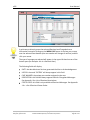
A quick way to directly access the selected Retrieval and Chargeback case
information instead of clicking on the WORK CASE button is to place your mouse
over the selected Case Number (the case number will change to red font) and left
click your mouse.
The type of message you selected will appear in the upper left hand corner of the
bottom pane (for example: this is a Retrieval Alert).
The following fields will display:
DATE- the date Merchant Services generated the Alert or Acknowledgement
USER ID- the word “SYSTEM” will always appear in this field
CASE NUMBER- the unique case number assigned to the case
DESCRIPTION- this field will always appear blank for Chargeback Messages.
See Appendix J for a list of Retrieval descriptions
STATUS CODE- this field is only available on Retrieval Messages. See Appendix
J for a list of Retrieval Status Codes.
Developed by: 02
eIDS_User_Manual.doc
First Data Learning Organization
Confidential & Proprietary to First Data Corporation
Rev: 09/01/2009 V1.0
Page 21 of 70
User Manual
eIDS
The Comment section of the MESSAGES screen will allow you to view notes
specific to this case. The notes will be written by Merchant Services and will
explain what you will need to do to resolve the disputed item.
The bottom pane contains two buttons:
Delete Message – This button provides you with the ability to delete the
message you have selected. Messages that are not deleted by a user will
be systemically deleted the the system after 60 days.
Work Case – This button provides you with the ability to directly access the
Retrieval or Chargeback case information related to the message.
Rev: 09/01/2009 V1.0
Page 22 of 70
First Data Learning Organization
Confidential & Proprietary to First Data Corporation
Developed by: 02
eIDS_User_Manual.doc
eIDS
User Manual
Chapter 7: The Queues Screen
In This Chapter
Introduction to the Queues screen.
Navigating Work Tracker.
Navigating Queue Selector.
The Queue Worklist.
The Queue Screen
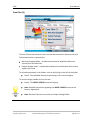
The Queues screen is where you should go to view your new Retrieval and
Chargeback disputes.
The QUEUES screen provides you two options:
1. Queue Selector
2. Work Tracker
Below is an example of the screen.
Queue
Selector
Developed by: 02
eIDS_User_Manual.doc
Work
Tracker
First Data Learning Organization
Confidential & Proprietary to First Data Corporation
Rev: 09/01/2009 V1.0
Page 23 of 70
User Manual
eIDS
Work Tracker
The Work Tracker allows the user the ability to view cases worked and either
accepted or disputed for that day.
At the outlet store location level, Work Tracker will be automatically
populated as actions are taken on cases within the outstanding Chargeback
or Retrieval queues.
At corporate or chain level, Work Tracker will populate with cases in which
actions are taken, within the outstanding Chargeback or Retrieval queues,
upon refreshing the Work Tracker. The refresh button located between the
Queue Selector and the Work Tracker is specifically designed to update the
cases in which action has been taken when responses/actions are worked
in centralized back office locations with high Chargeback and Retrieval
volume.
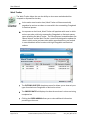
The FILTER BY CASE TYPE drop down menu list allows you to view only one
type of worked case Chargeback or Retrieval at a time.
The PROCESS DATE field displays the date the merchant’s actions are being
completed on.
Clicking the GREEN ARROW allows you to view additional information
pertaining to that case.
Rev: 09/01/2009 V1.0
Page 24 of 70
First Data Learning Organization
Confidential & Proprietary to First Data Corporation
Developed by: 02
eIDS_User_Manual.doc
eIDS
User Manual
Queue Selector
The QUEUE SELECTOR screen separates all open casework into queues.
The Queue types are as follows:
All Retrievals
All Chargebacks
Visa Chargebacks
MasterCard Chargebacks
Diners Chargebacks
JCB Chargebacks
Discover Chargebacks
American Express Chargebacks
Proprietary Card Chargebacks
Wright Express Chargebacks
Voyager Chargebacks
Fleet Cor Chargebacks
Incoming Arbitration
Incoming Compliance
Incoming Collection
When the green arrow is selected, all cases in that queue will appear at the
bottom of the screen.
Developed by: 02
eIDS_User_Manual.doc
First Data Learning Organization
Confidential & Proprietary to First Data Corporation
Rev: 09/01/2009 V1.0
Page 25 of 70
User Manual
eIDS
The Queue Worklist
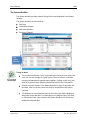
The Queue Worklist provides a detail listing of the cases displayed in the Queue
Selector.
The Queue Worklist can be sorted by:
Due Date
Cardholder Number
Merchant Number
Amount in Dispute
The
Queue
Worklist
Things to Note!
The red asterisks denote “new” unopened cases. Once the user opens the
case, the icon will change to a green arrow. The icon column is sortable,
grouping unopened and opened cases together. Clicking on the icon, (red
asterisk or green arrow) will open/display the specific case information.
Dispute cases will remain in the Queue Worklist for up to 5 days after the
due date. After the 5th day cases scan only be accessible via the Search
function.
The Preferences icon allows the user to select the type of data displayed
within the Queue Worklist. The Data options are Request Date, Due Date,
or Transaction Date. Upon selection the Queue Worklist will refresh and
display the selected data.
Rev: 09/01/2009 V1.0
Page 26 of 70
First Data Learning Organization
Confidential & Proprietary to First Data Corporation
Developed by: 02
eIDS_User_Manual.doc
eIDS
User Manual
The Printer Version icon, when selected, will pop-up a window that will
show the current Queue Worklist content including all dates (Due, Request,
and Transaction).
The Download Spreadsheet icon will download the current Queue Worklist
window into a comma delimited file.
The Due Date font color will change to red once the due date has past.
Developed by: 02
eIDS_User_Manual.doc
First Data Learning Organization
Confidential & Proprietary to First Data Corporation
Rev: 09/01/2009 V1.0
Page 27 of 70
User Manual
eIDS
Chapter 8: The Cases Screen
In This Chapter
What are Case Files?
How to use Case Information.
Tabs found on the Cases screen.
The User Notes tab.
The Trans Credit tab.
The Auth Records tab.
The Actions tab.
Chapter Definitions
Case Files: A collection of information related to the investigation of a case.
Dispute: A formal request to question the validity of a charge.
The Cases Screen
The CASES screen provides all detailed documentation and information related to
the investigation of this case.
B
A
C
Rev: 09/01/2009 V1.0
Page 28 of 70
First Data Learning Organization
Confidential & Proprietary to First Data Corporation
Developed by: 02
eIDS_User_Manual.doc
eIDS
User Manual
Case Files (A)
The Case Files section allows the user the view documentation related to the case.
The documentation is separated by:
Merchant Supplied folder – Includes documentation supplied to Merchant
Services from the Merchant.
Output Package folder – Includes documentation from Merchant Services that
applies to the case.
To view documentation in the folders, click on the (+) sign to the left of the folder.
Result: The individual documents pertaining to this case will appear.
To view the image, double-click on the item.
Result: The IMAGE VIEWER screen will appear.
Note: Detailed information regarding the IMAGE VIEWER screen can be
found in Appendix A.
Note: Retrieval Cases do not contain an Output Package folder.
Developed by: 02
eIDS_User_Manual.doc
First Data Learning Organization
Confidential & Proprietary to First Data Corporation
Rev: 09/01/2009 V1.0
Page 29 of 70
User Manual
eIDS
Case Information (B)
The information you will see in section B (Case Information) varies depending upon
the type of case you are reviewing: chargebacks or retrievals.
Case Information Chargebacks
The Chargeback Information screen displays chargeback details that may be used
during research of the case. Up to five cases can be reviewed at one time. After
each case has been opened, it is displayed above at the top of the screen in the
Open Cases area. Clicking on the case number navigates to that case in the Cases
tab.
The Chargeback Information display is broken into three sections:
Section 1: Case Information
Section 2: First Chargeback
Section 3: Second Chargeback
Rev: 09/01/2009 V1.0
Page 30 of 70
First Data Learning Organization
Confidential & Proprietary to First Data Corporation
Developed by: 02
eIDS_User_Manual.doc
eIDS
User Manual
Frequently used fields are listed in the Section 1, but you can easily navigate
through the three sections by clicking on the SECTION LINKS or by using the
vertical scroll bar below.
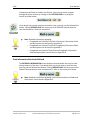
If you decide that you do not want to work this case, you may use the Release Case
button. Clicking RELEASE CASE will return you to the QUEUES tab and close the
case simultaneously. Refer the icon below.
Note: Detailed information regarding:
o Chargeback case (Section One/Case Information) information fields
and descriptions can be found in Appendix B.
o Chargeback case (Section Two/First Chargeback) information fields
and descriptions can be found in Appendix C.
o Chargeback case (Section Three/Second Chargeback) information
fields and descriptions can be found in Appendix D.
Case Information Retrievals Defined
The RETRIEVAL INFORMATION screen displays retrieval details that may be used
during research of the case. If you decide that you do not want to work this case,
you may use the Release Case button. Clicking RELEASE CASE will return you to the
Queues Tab and close the case simultaneously. Refer to the screen print below.
Note: Detailed information regarding Case Information Retrieval fields and
descriptions can be found in Appendix E.
Developed by: 02
eIDS_User_Manual.doc
First Data Learning Organization
Confidential & Proprietary to First Data Corporation
Rev: 09/01/2009 V1.0
Page 31 of 70
User Manual
eIDS
Tabs (C )
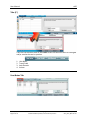
There are four different tabs on the CASES screen that allow the user to investigate
and/or resolve the case in question.
1.
2.
3.
4.
User Notes
Trans/Credit
Auth Records
Actions
User Notes Tab
Rev: 09/01/2009 V1.0
Page 32 of 70
First Data Learning Organization
Confidential & Proprietary to First Data Corporation
Developed by: 02
eIDS_User_Manual.doc
eIDS
User Manual
The most recent merchant note is displayed by default. By clicking on the ARROW
in the date column, you can reverse the note order. A vertical scroll bar is available,
if needed.
The notes are not editable once the note is added to support the chargeback/
reversal or retrieval case. User notes can only be cancelled prior to responding to
the chargeback or retrieval. To cancel the note, choose the 'Clear Notes' button,
which is located in the lower left -hand corner of the screen. The User notes area
contains up to 1000 character spaces.
Clicking on the GREEN ARROW displays the actual note. The user notes will also
display the case number, date, timestamp and user id of the note’s creator.
Trans/Credit Tab
The Trans/Credit tab displays any transaction information (sales or credits) relating
to the cardholder account number in the last 6 months. The most recent
transactions will be displayed first in the listing.
Clicking on the GREEN ARROW displays additional transaction detail in a pop-up
window that can be reviewed and printed. The Close button closes this window.
The Top button returns the user to the top of the screen.
Up to forty transactions can be displayed at one time. The Previous and Next
buttons can be used to review and print additional transactions. The 'Report
Beginning From' dates will document the start date for the transaction data that is
available online for research purposes.
Note: Detailed information regarding:
o Trans/Credit Tab column fields and descriptions can be found in
Appendix F.
o Trans/Credit Tab column fields and descriptions can be found in
Appendix G.
Developed by: 02
eIDS_User_Manual.doc
First Data Learning Organization
Confidential & Proprietary to First Data Corporation
Rev: 09/01/2009 V1.0
Page 33 of 70
User Manual
eIDS
Auth Records Tab
The Auth Records information can be used to research a chargeback or reversal
case, which is related to an authorization or fraud related chargeback reason code.
The authorization information is available for 6 months. The most recent
authorizations are displayed first in the listing.
Clicking on the GREEN ARROW displays additional authorization details in a pop-up
window that can be reviewed and printed. The Close button closes this window.
The Top button returns the user to the top of the screen.
Up to forty authorizations can be displayed at one time. The Previous and Next
buttons can be used to review and print additional authorization records. The
'Report Beginning From' (located at the bottom of this screen) dates document the
start date for the transaction data that is available online for research purposes.
Note: Detailed information regarding:
o Auth Records Tab column fields and descriptions can be found in
Appendix H.
o Auth Records Tab detail fields and descriptions can be found in
Appendix I.
Actions Tab
Rev: 09/01/2009 V1.0
Page 34 of 70
First Data Learning Organization
Confidential & Proprietary to First Data Corporation
Developed by: 02
eIDS_User_Manual.doc
eIDS
User Manual
The ACTIONS tab allows you to respond to a chargeback/reversal, retrieval request
or just add notes/images to a case. The ACTION drop down list presents you with
response options to select.
The actions available in the drop down list are:
Chargeback Actions
Dispute/Reverse Chargeback- Use this option if you wish to respond back to
Merchant Services. The case will be removed from the Queue Worklist once
selected.
Accept Chargeback- Use this option is you wish to accept this dispute. The
case will be removed from the Queue Worklist once selected.
Add User Notes/Images- Use this option to communicate within your own
internal merchant areas. Using this option does not send a response back to
Merchant Services and the case will remain in the Queue Worklist.
Retrieval Actions
Retrieval Response- Use this option is you wish to respond back to
Merchant Services. The case will be removed from the Queue Worklist once
selected.
Unable to Fulfill Retrieval Request- Use this option if you are unable to fulfill
the retrieval request. The case will be removed from the Queue Worklist
once selected.
Add User Notes/Images- Use this option to communicate within your own
internal merchant areas. Using this option does not send a response back to
Merchant Services and the case will remain in the Queue Worklist.
Chargeback Actions
Dispute/Reverse Chargeback
Step
Action
1
Select DISPUTE/REVERSE CHARGEBACK from the ACTIONS drop-down
box.
2
Enter Notes into ADD NOTES box (optional).
3
Click BROWSE button to locate tiff document to attach (optional).
Developed by: 02
eIDS_User_Manual.doc
First Data Learning Organization
Confidential & Proprietary to First Data Corporation
Rev: 09/01/2009 V1.0
Page 35 of 70
User Manual
eIDS
Step
Action
4
Click ADD to LIST button. Tiff document will appear in Files box.
5
Click the SUBMIT ACTION button.
Accept Chargeback
Step
Action
1
Select ACCEPT CHARGEBACK from the ACTIONS drop-down box.
2
Click the SUBMIT ACTION button.
Add User Notes/Images
Step
Action
1
Select ADD USER NOTES/IMAGES from the ACTIONS drop-down box.
2
Enter notes in the ADD NOTES box (optional).
3
Click the BROWSE button to locate Tiff document to attach (optional).
4
Click the SUBMIT ACTION button.
Retrieval Actions
Retrieval Response
Step
Action
1
Select RETRIEVAL RESPONSE from the ACTIONS drop-down box.
2
Enter Notes into ADD NOTES box (optional).
3
Click BROWSE button to locate the tiff document to attach (optional).
4
Click ADD to LIST button. Tiff document will appear in the Files box.
5
Click the SUBMIT ACTION button.
Rev: 09/01/2009 V1.0
Page 36 of 70
First Data Learning Organization
Confidential & Proprietary to First Data Corporation
Developed by: 02
eIDS_User_Manual.doc
eIDS
User Manual
Unable to Fulfill Retrieval Request
Step
Action
1
Select UNABLE TO FULLFILL RETRIEVAL REQUEST from the ACTIONS
drop-down box.
2
Click the SUBMIT ACTION button.
Add User Notes/Images
Step
Action
1
Select ADD USER NOTES/IMAGES from the ACTIONS drop-down box.
2
Enter notes in the ADD NOTES box (optional).
3
Click the BROWSE button to locate Tiff document to attach (optional).
4
Click the SUBMIT ACTION button.
Uploading Multiple Images
To add a folder of images or multiple images to a case at one time follow the below
steps:
Step
Action
1
Click the BROWSE MULTIPLE button and navigate to the multiple
scanned images. Users can select a folder that may contain multiple
images of files to upload by using the CTRL or SHIFT key plus mouse
clicks.
2
Click OK once you have selected the correct images or folders.
3
Click the ADD to LIST button.
4
Click the SUBMIT ACTION button to complete.
Note: Prior to selecting the SUBMIT ACTION button you may
remove an image or file from the LIST OF IMAGES field by
selecting the CLEAR ALL or CLEAR SELECTED buttons.
Developed by: 02
eIDS_User_Manual.doc
First Data Learning Organization
Confidential & Proprietary to First Data Corporation
Rev: 09/01/2009 V1.0
Page 37 of 70
User Manual
eIDS
Additional Helpful Hints
If all required steps are not completed prior to submitting the response, an error
message will be displayed. After all required steps have been completed; the
Submit Action button must be selected in order to complete your request. If you
need to change your action (prior to selecting Submit Action) you may click the
CANCEL ACTION button. This option will cancel the most recent action.
The CLEAR SELECTED button will remove from the list the specific Tif image
selected to be cleared.
The CLEAR ALL button will remove all Tif files from the list of images to
upload.
The CANCEL ACTION button will allow users to select another action rather
than continuing with the current action.
The SUBMIT ACTION button will apply the action chosen to the case
together with any notes and/or images selected to be uploaded.
Prior to the End of Day batch process (which transmits your responses to the
Merchant Services back office) you may upload additional images. You will need to
access the case through your work tracker or through the Search Icon and repeat
your previous action and steps.
Rev: 09/01/2009 V1.0
Page 38 of 70
First Data Learning Organization
Confidential & Proprietary to First Data Corporation
Developed by: 02
eIDS_User_Manual.doc
eIDS
User Manual
Chapter 9: Frequently Asked Questions
In This Chapter
In this chapter we will review some of the most frequently asked questions related
to eIDS and their corresponding answers.
What does eIDS stand for?
eIDS is an acronym for electronic Integrated Dispute System.
Can I use eIDS anytime I want?
The eIDS service is available 24 hours a day, seven days a week, less scheduled
maintenance time.
Where can I see my new Chargeback and Retrieval cases that I need to work?
New disputes are located on the Queues screen within the Queue Selector.
Disputes that need to be reworked can be found on the Messages screen as
Chargeback and Retrieval Alerts.
Why are some of my cases in the Queue Worklist displayed in red font?
Chargeback and Retrieval cases will display in red font once they are past the Due
Date. These cases will remain in the Queue Worklist for 5 days after the Due Date.
After the five days, these cases can be located using the Search function only.
Where can I find the issuing bank’s cardholder dispute letter?
The cardholder letter and other issuing bank documentation can be found in the
Case Files- Merchant Output Package section of eIDS.
Developed by: 02
eIDS_User_Manual.doc
First Data Learning Organization
Confidential & Proprietary to First Data Corporation
Rev: 09/01/2009 V1.0
Page 39 of 70
User Manual
eIDS
How do I find a specific dispute case?
Select the Search icon (magnifying glass) located on the Control Panel. The Search
screen will appear. This screen provides you with the ability to search by
Chargeback or Retrieval case options.
How can I track of my dispute cases that are worked daily?
Disputes that are actioned will appear in either the Retrieval Work Tracker or the
Chargeback Work Tracker. The Work Tracker can be printed by placing your mouse
in this section and right clicking your mouse.
When is the daily cut off time for processing my disputes on today’s date?
The daily cut off time is at approximately 5:15 PM EST. At this time the Work
Tracker will be cleared and the Process Date will change to the next day’s date.
Who can I contact if I am experiencing technical difficulties with eIDS?
You can contact the Technical Assistance Center at 1-800-285-3978 between the
hours of 8:00 AM EST-10:00 PM EST, Monday through Friday.
Who can I contact if I have a question regarding a specific dispute?
You can contact the Merchant Services number located on your Dispute
Notification form.
Rev: 09/01/2009 V1.0
Page 40 of 70
First Data Learning Organization
Confidential & Proprietary to First Data Corporation
Developed by: 02
eIDS_User_Manual.doc
eIDS
User Manual
Chapter 10: User Best Practices
In This Chapter
The following chapter will cover some “Best Practices” related to the use and
navigation of the eIDS system.
Check your Messages daily for any Chargeback and Retrieval Alerts.
Alerts can be reworked and sent back to Merchant Services for review again.
Use the Printer Version or Download Spreadsheet option located within the
Queue Worklist.
These options can be helpful to send outstanding dispute information via fax or
email to one of your contacts for further research.
Use eIDS to electronically respond to your disputes.
Responding with eIDS will ensure Merchant Services receives your response in a
timely manner and will result in a more timely resolution of your dispute.
Check the Trans/Credit tab to verify if you have already issued a credit to
your customer’s account for their dispute.
The Trans/Credit tab displays all transaction (sale or credit) information for the last
6 months that is related to the same credit card number and merchant number of
the dispute.
Take full advantage of the OnLine Help functionality.
Click on Online Help if you need assistance with navigating within eIDS or if you
need a dispute related questioned answered.
Developed by: 02
eIDS_User_Manual.doc
First Data Learning Organization
Confidential & Proprietary to First Data Corporation
Rev: 09/01/2009 V1.0
Page 41 of 70
User Manual
eIDS
Appendix A
The Image Viewer Screen
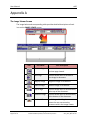
The image below and corresponding table provides detailed descriptions of each
icon on the IMAGE VIEWER screen.
Icon
Icon Name
Icon Description
Previous Page
Function allows user to return to
previous page viewed.
Next Page
Function allows user to forward to
next image in document.
Magnify Image
Magnifies image in increments.
Reduce Image
Reduces image in increments.
Top of Page
Function allows user to return directly
to the top of the document.
Bottom of Page
Function allows user to return directly
to the bottom of the document.
Pan Scroll Cursor By clicking and holding the mouse
button the user can move the
document within the Image Viewer.
Rev: 09/01/2009 V1.0
Page 42 of 70
First Data Learning Organization
Confidential & Proprietary to First Data Corporation
Developed by: 02
eIDS_User_Manual.doc
eIDS
User Manual
Icon
Developed by: 02
eIDS_User_Manual.doc
Icon Name
Icon Description
Zoom Rectangle
Cursor
By clicking and dragging the mouse
the user can create a rectangle that
will zoom and fill the Image Viewer
with the information contained in the
rectangle.
Rotate Left
Rotates the document left.
Flip Image
Flips document upside-down.
Rotate Right
Rotates the document right.
Print
Prints documents in Image Viewer.
Save
Allows user to Save case
documentation to their desktop.
Image Size Drop
Down
Allows user to decide what
percentage of magnification or
reduction to view the image.
First Data Learning Organization
Confidential & Proprietary to First Data Corporation
Rev: 09/01/2009 V1.0
Page 43 of 70
User Manual
eIDS
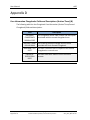
Appendix B
Case Information Chargebacks Fields and Descriptions (Section One) (B)
The table below lists the Chargeback Case (Section One) Information fields and
descriptions.
Field
Description
ACTION CODE
This field will display the last action taken on the
case. Below is a list of all Chargeback Action Codes
and their descriptions:
01-Outstanding
02-Expired
03-In Process by User
04-Worked by User
05-Request Complete
06-Merchant Resolution in Progress
07-Case Reversed
10-Rebuttal Received
11-Rebuttal Rejected
12-Pre-Note
CASE NUMBER
The Unique Case Number assigned to the case.
MERCHANT
NUMBR
All merchants processing credit card transactions
are assigned a unique number by their acquiring
bank.
CARDHOLDER
NUMBER
This number identifies the cardholder, issuer and
card brand.
CHARGEBACK
REASON CODE
The chargeback reason code number and
description associated with the case.
DISPUTE
JURISDICTION
Description of card type and region of the dispute.
MERCHANT
NAME
Rev: 09/01/2009 V1.0
Page 44 of 70
The business name of the client.
First Data Learning Organization
Confidential & Proprietary to First Data Corporation
Developed by: 02
eIDS_User_Manual.doc
eIDS
User Manual
Field
Description
CATEGORY CODE
A 4-digit code designating the principal trade,
profession or line of business in which a merchant
is engaged.
CHARGEBACK
AMOUNT
DUE DATE
REQUEST DATE
PROCESSING
DATE
Developed by: 02
eIDS_User_Manual.doc
The chargeback dollar amount that is in dispute
along with the respective currency indicator
determined by the transaction currency code
table. Credits are displayed in red text.
The date a merchant has to respond to a
chargeback or reversal advice.
The date the request was generated to the
merchant.
The transaction central processing date that
defines when the transaction was processed to the
Association.
TRANSACTION
DATE
The date the transaction occurred. Also known as
the sale date.
TRANSACTION
AMOUNT
The amount of the sale along with the respective
currency indicator determined by the transaction
currency code table.
CHARGEBACK
CYCLE
This field indicates the specific processing cycles of
a Presentment or Chargeback.
First Chargeback
First Chargeback Reversal
Second Chargeback
Second Chargeback Reversal
Incoming Pre-arbitration
Incoming Pre-compliance
Incoming Arbitration
Incoming Compliance
Incoming Collections
Outgoing Pre-arbitration
Outgoing Filed Arbitration
Outgoing Pre-Compliance
Outgoing Filed Compliance
Outgoing Collections
Re-presentment Reject
First Data Learning Organization
Confidential & Proprietary to First Data Corporation
Rev: 09/01/2009 V1.0
Page 45 of 70
User Manual
eIDS
Field
Rev: 09/01/2009 V1.0
Page 46 of 70
Description
TRANSACTION
LOCATOR
Merchant cross-reference number used by
merchants to locate a transaction in their batch.
FOREIGN
AMOUNT
The amount of the sale along with the respective
currency indicator determined by the transaction
currency code table.
REFERENCE
NUMBER
This is the 23-digit Outgoing Acquirer reference
number.
AIRLINE TICKET
NUMBER
A number placed on a passenger's ticket to help
the merchant identify the sale/ticket record.
CUSTOM DATA
Field that can be client defined.
First Data Learning Organization
Confidential & Proprietary to First Data Corporation
Developed by: 02
eIDS_User_Manual.doc
eIDS
User Manual
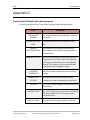
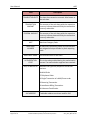
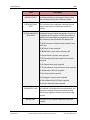
Appendix C
Case Information Chargebacks Fields and Descriptions (Section Two) (B)
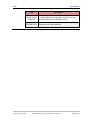
The following table lists the Chargeback Case Information (Section Two/First
Chargeback) fields and descriptions.
Developed by: 02
eIDS_User_Manual.doc
Field
Description
INCOMING
CHARGEBACK
REASON CODE
The chargeback reason code number and description
associated with the first chargeback case.
MESSAGE FROM
ISSUING BANK
The incoming member message text the issuer
provided with their First Chargeback.
MERCHANT DUE
DATE
The date a merchant has to respond to the first
chargeback or reversal case.
FINANCIAL
DISPOSITION
DATE
The date funds were taken from the merchant
account.
First Data Learning Organization
Confidential & Proprietary to First Data Corporation
Rev: 09/01/2009 V1.0
Page 47 of 70
User Manual
eIDS
Appendix D
Case Information Chargebacks Fields and Descriptions (Section Three) (B)
The following table lists the Chargeback Case Information (Section Three/Second
Chargeback) fields and descriptions.
Field
Description
INCOMING
CHARGEBACK
REASON CODE
The chargeback reason code number and description
associated with the second chargeback case.
MESSAGE FROM
ISSUING BANK
The incoming member message text the issuer
provided with their Second Chargeback.
MERCHANT DUE
DATE
The date a merchant has to respond to the second
chargeback or reversal case.
FINANCIAL
DISPOSITION
DATE
Rev: 09/01/2009 V1.0
Page 48 of 70
The date funds were taken from the merchant
account.
First Data Learning Organization
Confidential & Proprietary to First Data Corporation
Developed by: 02
eIDS_User_Manual.doc
eIDS
User Manual
Appendix E
Case Information Retrieval Fields and Descriptions
The following table lists the Case Information Retrieval fields and descriptions.
Field
ACTION CODE
Description
This field will display the last action taken on the case.
Below is a list of all Retrieval Action Codes and their
descriptions:
01/OUTSTANDING
02/EXPIRED
03/IN PROCESS BY USER
04/WORKED BY USER
05/REQUEST COMPLETE
CASE NUMBER
MERCHANT
NUMBER
All merchants processing credit card transactions are
assigned a unique number by their acquiring bank.
CARDHOLDER
NUMBER
This number identifies the cardholder, issuer and card
brand.
REASON CODE
This field will display the retrieval request code if the
item pertains to a retrieval request and chargeback
reason code if the item pertains to a request associated
with an open chargeback case. The description of that
code will also appear.
DISPUTE
JURISDICTION
Description of card type and region of the dispute.
MERCHANT
NAME
TRANSACTION
AMOUNT
Developed by: 02
eIDS_User_Manual.doc
The unique case number assigned to the retrieval.
The business name of the client.
The amount of the sale along with the respective
currency indicator determined by the transaction
currency code table.
First Data Learning Organization
Confidential & Proprietary to First Data Corporation
Rev: 09/01/2009 V1.0
Page 49 of 70
User Manual
eIDS
Field
MERCHANT
DUE DATE
Description
The date a merchant has to respond to a retrieval
request.
MERCHANT
The date the request was generated to the merchant.
REQUEST DATE
TRANSACTION
DATE
FOREIGN
AMOUNT
REFERENCE
NUMBER
TRANSACTION
LOCATOR
REQUEST
STATUS
REQUEST TYPE
Rev: 09/01/2009 V1.0
Page 50 of 70
The date the transaction occurred. Also known as the
sale date.
The amount of the sale along with the respective
currency indicator determined by the transaction
currency code table.
This is the 23-digit Outgoing Acquirer reference
number.
Merchant cross-reference number used by merchants
to locate a transaction in their batch.
Status 1 – Merchant Response
Status 2 – Missing Media
Status 3 – Second Request
Status 4 – Illegible-Missing –Incorrect Values
Status 5 – Wrong Item Supplied
Status 6 – Merchant Response
Status 7 – Merchant Issued Gift
Status 8 – In-house – Missing Media
Status 9 – Sales Ticket Required
Status 10 – In-house – Missing Media
Status 11 – Pending Credit
Status 14 – Missing Media
Status 15 – Subdraft
Status 16 – Unable to fulfill
Status 18 – Draft with Signature
This field will display the type of retrieval request. It will
indicate whether the retrieval is a result of an
issuer/cardholder request or a request related to the
chargeback retrieval request. The two values in this
field will be: Retrieval or Chargeback.
First Data Learning Organization
Confidential & Proprietary to First Data Corporation
Developed by: 02
eIDS_User_Manual.doc
eIDS
User Manual
Field
Description
AIRLINE TICKET A number placed on a passenger's ticket to help the
NUMBER
merchant identify the sale/ticket record.
CUSTOM DATA Field that can be client defined.
Developed by: 02
eIDS_User_Manual.doc
First Data Learning Organization
Confidential & Proprietary to First Data Corporation
Rev: 09/01/2009 V1.0
Page 51 of 70
User Manual
eIDS
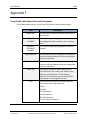
Appendix F
Trans/Credit Tab Column Fields and Descriptions
The following table lists the Trans/Credit Tab column fields and descriptions.
Rev: 09/01/2009 V1.0
Page 52 of 70
Field
Description
TRANS DATE
The date the transaction occurred. Also known as
the sale date.
MERCHANT
NUMBER
All merchants processing credit card transactions
are assigned a unique number by their acquiring
bank.
ACQUIRER
REFERENCE
NUMBER
This is the 23-digit Outgoing Acquirer reference
number.
TRANS AMOUNT
The amount of the sale along with the respective
currency indicator determined by the transaction
currency code table.
FOREIGN AMOUNT
The amount of the sale along with the respective
currency indicator determined by the transaction
currency code table.
TRAN TYPE
Transaction description which identifies the
transaction as a sale, credit, cash advance, Sale
Reversal, Credit Reversal or Cash Advance
Reversal. This is based on the transaction code
transmitted in the chargeback record.
CODE
The numeric code which corresponds with the
Trans Type. These code values are:
5=Sale
6=Credit
7=Cash Advance
25=Sale Reversal
26=Credit Reversal
27=Cash Advance Reversal
First Data Learning Organization
Confidential & Proprietary to First Data Corporation
Developed by: 02
eIDS_User_Manual.doc
eIDS
User Manual
Appendix G
Trans/Credit Tab Detail Fields and Descriptions
The following table lists the Trans/Credit Tab detail fields and descriptions.
Developed by: 02
eIDS_User_Manual.doc
Field
Description
CARDHOLDER
NUMBER
This number identifies the cardholder, issuer and
card brand.
CARDHOLDER EXP
DATE
The expiration date of the cardholder’s credit
card.
CENTRAL
PROCESSING DATE
The transaction central processing date that
defines when the transaction was processed to
the Association.
TRANSACTION TYPE
Transaction description & code which identifies
the transaction as a Sale, Credit, Cash Advance,
Sale Reversal, Credit Reversal, or Cash Advance
Reversal. This is based on the transaction code
transmitted in the chargeback record.
ACQUIRER
REFERENCE #
This is the 23-digit Outgoing Acquirer reference
number.
TRANSACTION
LOCATOR
Merchant cross-reference number used by
merchants to locate a transaction in their batch.
INVOICE#
The unique number assigned to the transaction by
the merchant.
CURRENCY CODE
This is the 3-digit currency code that is associated
with the foreign amount. The country code is
derived from this.
PRODUCT CODE
The value representing the type of card brand.
First Data Learning Organization
Confidential & Proprietary to First Data Corporation
Rev: 09/01/2009 V1.0
Page 53 of 70
User Manual
eIDS
Field
Description
TRANSACTION DATE The date the transaction occurred. Also known as
the sale date.
TRANSACTION
AMOUNT
The amount of the sale along with the respective
currency indicator determined by the transaction
currency code table.
FOREIGN AMOUNT
The amount of the sale along with the respective
currency indicator determined by the transaction
currency code table.
MCC
MERCHANT
NUMBER
MERCHANT NAME
AUTHORIZATION
CODE
MO/TO INDICATOR
Merchant Category Code.
All merchants processing credit card transactions
are assigned a unique number by their acquiring
bank.
The business name of the client.
This is the code provided during the authorization
process if an authorization approval was received.
Identifies the type mail/telephone transaction
business.
M=Mail Order
T=Telephone Order
1=Single Transaction of a Mail/Phone order
2=Recurring Transaction
3=Installment Billing Transaction
4=Unknown Classification
AVS ADDRESS
Rev: 09/01/2009 V1.0
Page 54 of 70
Cardholder address merchant used for AVS.
First Data Learning Organization
Confidential & Proprietary to First Data Corporation
Developed by: 02
eIDS_User_Manual.doc
eIDS
User Manual
Field
Description
ELECTRONIC
COMMERCE
INDICATOR
An indicator that identifies a transaction between
a merchant and a cardholder that occurred over
the Internet and other networks using a
cardholder access Devise. An Electronic
Commerce Transaction is one of the following:
(ECI)
1=Single Transaction for a Mail/Phone Order
2=Recurring Transaction
3=Installment Billing Transaction
4=Unknown Classification/Other Mail Order
5=Secure Electronic Commerce Transaction with
cardholder certificate
6=Non-Authenticated Security Transaction with
set merchant certificate
7=Non-Authenticated Security Transaction
without set merchant certificate
8=Non Secure Transaction
9=Non Auth Sec Trans Non-Comply with set
merch is set capable
11=Set encryption; cardholder certification not
used
12=Set encryption; cardholder certification used
13=Set encryption; chip used and cardholder
certification not used
14= Set encryption; chip and cardholder
certificate used
21=Channel encryption; cardholder certificate not
used
23=Channel encryption; chip used and cardholder
certificate not used
91=No security protocol; cardholder certificate
not used
Developed by: 02
eIDS_User_Manual.doc
First Data Learning Organization
Confidential & Proprietary to First Data Corporation
Rev: 09/01/2009 V1.0
Page 55 of 70
User Manual
eIDS
Field
Description
AIRLINE TICKET #
A number placed on a passenger's ticket to help
the merchant identify the sale/ticket record.
CHECK-IN/PICKUP
DATE
This is the date the cardholder checked into the
hotel or the date the cardholder rented the
vehicle.
INTERCHANGE RATE
INDICATOR
A two digit numeric value that appears in the first
2 positions of the acquirer's reference number to
identify the interchange rate program for which
the transaction was presented for MasterCard.
75,85,95 Consumer Standard-auth needed if over
floor limit
70,80 Merit III-auth required
78,88,98 Merit I-auth required except QPS
23 Convenience Purchase-auth required
77,87 Petroleum/Card Activated Terminal-auth
required
71,81 Supermarket-auth required
97 Travel Industries Premier Service-auth required
91 Warehouse Club-auth required
92 Key Entered-auth required
93 Passenger Transport-auth required
96 World MasterCard T&E-auth required
90 Service Industries-auth required
GUARANTEE FLAG
BATCH DATE
Rev: 09/01/2009 V1.0
Page 56 of 70
An indicator, which identifies merchants who, are
eligible for chargeback protection due to using
the Surepay Signature Capture terminal/storage
process.
The date for the merchant deposits (sales and
credits).
First Data Learning Organization
Confidential & Proprietary to First Data Corporation
Developed by: 02
eIDS_User_Manual.doc
eIDS
User Manual
Field
Developed by: 02
eIDS_User_Manual.doc
Description
BATCH #
The number assigned to the total deposits (sales
and credits).
POS ENTRY MODE
Code which identifies how the cardholder’s
account information was entered or captured at
the point of sale.
First Data Learning Organization
Confidential & Proprietary to First Data Corporation
Rev: 09/01/2009 V1.0
Page 57 of 70
User Manual
eIDS
Appendix H
Auth Records Tab Column Fields and Descriptions
The following table lists the Auth Records tab column fields and descriptions.
Field
Description
AUTH DATE
This is the date the transaction was submitted for
authorization approval.
MERCHANT
NUMBER
All merchants processing credit card transactions are
assigned a unique number by their acquiring bank.
AUTH CODE
This is code provided during the authorization process
if an authorization approval was received.
AUTH AMOUNT The amount of the authorization request along with
the respective currency indicator determined by the
transaction currency code table.
FOREIGN
AMOUNT
Rev: 09/01/2009 V1.0
Page 58 of 70
The amount of the authorization request along with
respective currency indicator determined by the
transaction currency code table.
First Data Learning Organization
Confidential & Proprietary to First Data Corporation
Developed by: 02
eIDS_User_Manual.doc
eIDS
User Manual
Field
AVS INDICATOR
Description
This field displays the Association supported Address
Verification Service Response code provided to the
merchant when the cardholder's billing address was
validated as being correct before completion of a
mail/telephone transaction:
A=STREET ADDRESS MATCH, ZIP CODE DOES NOT
B=INTL ADDRESS MATCHES, ZIP CODE DOES NOT
C=INTL ADDRESS AND ZIP CODE DO NOT MATCH
D=INTL ADDRESS AND ZIP CODE MATCH
E=ERROR RESPONSE FOR MERCHANT CATEGORY CODE
F=ADDRESS AND ZIP CODE MATCH (UK ONLY)
G=ADDRESS NOT VERIFIED, INTERNATIONAL
I=INTL ADDRESS NOT VERIFIED
M=INTL ADDRESS AND ZIP CODE MATCH
N=STREET ADDRESS AND ZIP CODE DO NOT MATCH
P=INTL ZIP CODE MATCHES, ADDRESS DOES NOT
MATCH
R=ISSUER SYSTEM UNAVAILABLE OR TIMEOUT, RETRY
S=SERVICE NOT SUPPORTED BY ISSUER
U=ADDRESS INFORMATION UNAVAILABLE, DOMESTIC
W=9-DIGIT ZIP CODE MATCHES, BUT ADDRESS DOES
NOT MATCH
Y=STREET ADDRESS AND 5 OR 9 DIGIT ZIP CODE
MATCH
Z=5-DIGIT ZIP CODE MATCHES, ADDRESS DOES NOT
MATCH
Developed by: 02
eIDS_User_Manual.doc
First Data Learning Organization
Confidential & Proprietary to First Data Corporation
Rev: 09/01/2009 V1.0
Page 59 of 70
User Manual
eIDS
Field
Description
POS
A two-digit code, which identifies how the cardholder
account information was entered or captured at the
point of sale.
00=Unknown
01=Manual key entry
02=Magnetic Stripe Terminal
05=Chip Card Read (data is reliable)
90=Magnetic Stripe Terminal Full Unaltered Track
Read
95=Chip Card Read (Unreliable Data)
AUTH
RESPONSE
CODE
The issuer's reply to an Authorization Request. The
following are types of authorization responses:
Declined Response, Pick-up Response, Reenter
Response, Referral Response
The numeric code which corresponds with the Trans
Type. These code values are:
5=Sale
6=Credit
7=Cash Advance
25=Sale Reversal
26=Credit Reversal
27=Cash Advance Reversal
Rev: 09/01/2009 V1.0
Page 60 of 70
First Data Learning Organization
Confidential & Proprietary to First Data Corporation
Developed by: 02
eIDS_User_Manual.doc
eIDS
User Manual
Appendix I
Auth Records Tab Detail Fields and Descriptions
The following table lists the Auth Records detail fields and descriptions. Click the
GREEN ARROW to access the detailed records.
Field
Description
CARDHOLDER
NUMBER
This number identifies the cardholder, issuer and card
brand.
AUTHORIZATION This is the date the transaction was submitted for
DATE
authorization approval.
AUTHORIZATION An issuer's reply to an Authorization Request. The
REPONSE
following are types of authorization responses:
Approval Response
Declined Response
Pick-up Response
Referral Response
AUTHORIZATION This is the code provided during the authorization
CODE
process if an authorization approval was received.
AUTHORIZATION This identifies the source of the authorization
SOURCE
obtained.
INAS/Issuer=Issuing Bank
Base Below LCS limit=Visa
Banknet MIP=MasterCard International
Host=First Data Merchant Services
ATR=Assured Transaction Response
Non NaBanco (FDMS)=Other Source
Developed by: 02
eIDS_User_Manual.doc
First Data Learning Organization
Confidential & Proprietary to First Data Corporation
Rev: 09/01/2009 V1.0
Page 61 of 70
User Manual
eIDS
Field
ORIGIN
INDICATOR
Description
This field identifies the type of point of sale entry
which occurred at the time of the sale.
D/T SW=Dial Swipe merchant
Dial ky=Dial authorization keyed transaction
POS/ECR=Point-of-sale/electronic cash register keyed
POS/SW=Point of sale/electronic cash register swiped
Batch=Authorization given to a batch of items (Direct
Marketing)
CRT=Voice Authorization
Voice=Voice Authorization
Dial Term=Terminal Keyed
D/T Term=Terminal Keyed
T1=Track 1
T2=Track 2
CO2=Track data read but discretionary data was not
sent to Visa/MasterCard
C90=Track data read & discretionary data was sent to
Visa/MasterCard
Swiped=Swipe Merchant
D/SW TZ/90=Dial swipe merchant Track 2 (code 90)
POS TERMINAL
CAPABILITY
Rev: 09/01/2009 V1.0
Page 62 of 70
This identifies the basic type and capability of a point
of sale terminal.
First Data Learning Organization
Confidential & Proprietary to First Data Corporation
Developed by: 02
eIDS_User_Manual.doc
eIDS
User Manual
Field
Description
POS ENTRY
CAPABILITY
A code indicating the type of electronic terminal used
at the point of sale and the capability of the terminal
to electronically read account numbers and
expiration dates from credit cards.
Position 1 Values
0=Unspecified
1=Limited Amount Terminal
2=Unattended Terminal (ATM)
3=Unattended Terminal (Automated Dispensing
Machine or Self Service Terminal)
4=Electronic Cash Register
7=Telephone Device
Position 2 Values
0=Unknown
1=Terminal Not Used
2=Magnetic Stripe Read Capability
5=Chip Card Read (data is reliable)
9=Terminal does not read card data
FLOOR LIMIT
INDICATOR
Indicator that denotes the limit that merchant must
authorize for transaction.
AVS RESPONSE
This field displays the Association supported Address
Verification Service Response Code provided to the
merchant when the cardholder's billing address was
validated as being correct before completion of a
mail/telephone transaction.
AVS ADDRESS
Cardholder address merchant used for AVS.
CARDHOLDER
EXP. DATE
The expiration date of the cardholder's credit card.
AUTHORIZATION The time the authorization was submitted for
TIME
authorization approval.
Developed by: 02
eIDS_User_Manual.doc
First Data Learning Organization
Confidential & Proprietary to First Data Corporation
Rev: 09/01/2009 V1.0
Page 63 of 70
User Manual
eIDS
Field
Description
AUTHORIZATION The amount of the authorization request along with
AMOUNT
the respective currency indicator determined by the
transaction currency code table.
FOREIGN
AMOUNT
MERCHANT #
The amount of the sale along with the respective
currency indicator determined by the transaction
currency code table.
All merchants processing credit card transactions are
assigned a unique number by their acquiring bank.
MERCHANT
NAME
The business name of the client.
POS ENTRY
CODE
A code indication how the cardholder account
information was entered/captured at the point of
sale.
00=Unknown
01=Manual key entry
02=Magnetic Stripe Terminal
05=Chip Card Read
90=Magnetic Stripe Terminal Full Unaltered Track
Read
95=Chip Card Read (Unreliable Date)
Rev: 09/01/2009 V1.0
Page 64 of 70
First Data Learning Organization
Confidential & Proprietary to First Data Corporation
Developed by: 02
eIDS_User_Manual.doc
eIDS
User Manual
Field
Description
ELECTRONIC/CO
MMERCE
INDICATOR
An indicator that identifies a transaction between a
merchant and a cardholder that occurred over the
Internet and other networks using a cardholder
access Devise. An Electronic Commerce Transaction is
one of the following:
1=Single Transaction for a Mail/Phone Order
2=Recurring Transaction
3=Installment Billing Transaction
4=Unknown Classification/Other Mail Order
5=Secure Electronic Commerce Transaction with
cardholder certificate
6=Non-Authenticated Security Transaction with set
merchant certificate
7=Non-Authenticated Security Transaction without
set merchant certificate
8=Non Secure Transaction
9=Non Auth Sec Trans Non-Comply with set merch is
set capable
11=Set encryption; cardholder certification not used
12=Set encryption; cardholder certification used
13=Set encryption; chip used and cardholder
certification not used
14= Set encryption; chip and cardholder certificate
used
21=Channel encryption; cardholder certificate not
used
23=Channel encryption; chip used and cardholder
certificate not used
91=No security protocol; cardholder certificate not
used
Developed by: 02
eIDS_User_Manual.doc
First Data Learning Organization
Confidential & Proprietary to First Data Corporation
Rev: 09/01/2009 V1.0
Page 65 of 70
User Manual
eIDS
Field
CAT INDICATOR
Description
This field displays an indicator, which advised that
this transaction occurred at a cardholder activated
terminal.
Visa
0 or space=Not applicable to this transaction
1=Limited Amount Terminal
2=Automated Dispensing Machine
3=Self Service Terminal
MasterCard
1= Automated Dispensing Machine
2= Self Service Terminal
3= Limited Amount Terminal
4=Inflight Commerce (IFC) Terminal
6=Electronic Commerce Transaction
7=Transponder Transaction
Rev: 09/01/2009 V1.0
Page 66 of 70
First Data Learning Organization
Confidential & Proprietary to First Data Corporation
Developed by: 02
eIDS_User_Manual.doc
eIDS
User Manual
Field
Description
ACI AUTH
A value that indicates if a card was present at the
CHARACTERISTIC point of sale.
S INDICATOR
A=Card Present
E=Card Present with merchant name and location
data
C=Card Present with merchant name and location
data(cardholder activated, self service terminal)
F= Card not Present-Account Funding
K=Card Present with Key-Entry
M=Card not Present-Direct Marketing
N=Not a payment service transaction
P=Card not Present(Preferred Customer participation
requested)
R=Card not Present(Address Verification Service not
required
U=Card not Present-3D Secure Electronic Commerce
V=Card not Present (Address Verification Service
Requested)
X=Disqualified custom payment service transaction
W=Card not Present –Non 3D Secure Electronic
Commerce
CVV2/CVC2
A unique check value that is indent printed on the
back of the credit card and can be validated through
the magnetic stripe.
M=CVV2 Match
N=CVV2 Does Not Match
P=Not Present
S=CVV2 Should be on the card, but the merchant has
indicated that CVV2 is not present.
U=Issuer Not Participating
Developed by: 02
eIDS_User_Manual.doc
First Data Learning Organization
Confidential & Proprietary to First Data Corporation
Rev: 09/01/2009 V1.0
Page 67 of 70
User Manual
eIDS
Field
VISA
CAVV/MASTERC
ARD UCAF
VALUE
Description
This field displays to the user the CAVV (Card
Authentication Verification Value-Visa) and/or the
UCAF (Universal Cardholder Authentication FieldMaster Card) values and descriptions.
Visa CAVV Results Code Values:
Blank or not present-CAVV not validated
0-CAVV not validated, erroneous data
1-CAVV failed validation
2-CAVV passed validation
3-CAVV validation could not be performed
4-CAVV validation could not be performed
5-Acquirer participation, issuer is not
6-Issuer Bin participation for authentication, not
verification
MasterCard UCAF Coded Values:
0-UCAF Not Supported
1-UCAF Supported by not provided by Issuer
2-UCAF is present
Rev: 09/01/2009 V1.0
Page 68 of 70
First Data Learning Organization
Confidential & Proprietary to First Data Corporation
Developed by: 02
eIDS_User_Manual.doc
eIDS
User Manual
Field
LEGEND FIELD
DESCRIPTIONS
Description
Authorization Source
INAS/Issuer=Issuing Bank
Base Below LCS limit=Visa
Banknet MIP=MasterCard International
Host=First Data Merchant Services
ATR=Assured Transaction Response
Non NaBanco (FDMS)=Other Source
Origin Indicator
D/T SW=Dial Swipe merchant
Dial KY=Dial authorization keyed transaction
POS/ECR=Point-of-sale/electronic cash register
swiped
POS/SW=Point-of-sale/electronic cash register swiped
Batch=Authorization given to a batch of items (Direst
Marketing)
CRT=Voice Authorization
Voice=Voice Authorization
Dial Term=Terminal Keyed
D/T Term=Terminal Keyed
T1=Track 1
T2=Track 2
CO2=Track data read but discretionary data was not
sent to Visa/MasterCard
C90=Track data read & discretionary data was sent to
Visa/MasterCard
Swiped=Swipe Merchant
D/SW TZ/90=Dial swipe merchant Track 2 (code 90)
Developed by: 02
eIDS_User_Manual.doc
First Data Learning Organization
Confidential & Proprietary to First Data Corporation
Rev: 09/01/2009 V1.0
Page 69 of 70
User Manual
eIDS
Appendix J
Retrieval Status Codes and Descriptions
The following table lists Retrieval Status Codes and descriptions.
Status
Rev: 09/01/2009 V1.0
Page 70 of 70
Description
1
Merchant Response
2
Missing Media
4
Illegible
5
Wrong Item
6
Merchant Response
7
Merchant Response
16
Unable to Fulfill
18
Merchant Response Signature Present
First Data Learning Organization
Confidential & Proprietary to First Data Corporation
Developed by: 02
eIDS_User_Manual.doc