1
RUNNING THE PROGRAM WITH THE DIFFRACTOMETER
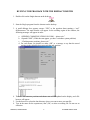
1. Double-click on the Single shortcut on the desk top:
Single04.ico
2. Start the Single program from the shortcut on the desktop
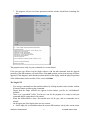
3. A small dialogue box appears; answer “YES” to the question about running a “real”
diffractometer. The main window will appear. In the scrolling region of the window, the
following messages will appear in order:
a. “OPENING COMMUNICATIONS ON COM1 ....please wait ”.
b. “Opened COM1” (If this does not appear, you have a windows system problem)
c. “Checking motor positions, please wait:”
d. For each motor you should see either “OK” or a message to say that the stored
position in the controller does not match the park position.
4. Then the diffractometer positions and shutter state will be updated on the display, and a file
browser will appear.
5. Use the browser to select the data directory where you want to store your mat file.
6. Type in the name for the experiment (“mat”) file, or select an existing file. Do not use an
extension.
SINGLE04, USER MANUAL:
4
RJ ANGEL MARCH 2006