1
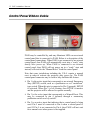
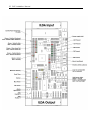
19 With the PASS board in this orientation, Switch 4 is at the top. When this switch is moved to the left (on), the light sensor input is ignored. You would move the switch to this position if you are not using a light sensor. When this switch is moved to the right (off), the light sensor input is monitored, and an additional level of safety is provided. Pangolin ships the PASS board with this switch turned on. With the PASS board in this orientation, Switch 3 is next in line. When this switch is moved to the left (on), the Horizon control is monitored and PASS will only allow static or slow beams above the horizon. If there is a slow-moving, or non-moving beam below the horizon, it will be extinguished by PASS. When this switch is moved to the right (off), the Horizon control is ignored, and PASS will not allow a slow-moving or non-moving beam anywhere within the scan field. Pangolin ships the PASS board with this switch turned on. With the PASS board in this orientation, Switch 2 is next in line. This switch controls the interpretation of an advanced feature of PASS called the S-coordinate. At this time, we recommend this switch be placed in the left position (on). Pangolin ships the PASS board with this switch turned on. With the PASS board in this orientation, Switch 1 is on the bottom. This switch controls where PASS gets the light sensor signal. ILDA pin 12 is defined by the ILDA standard as possibly providing feedback from a light sensor. However, since the vast majority of projectors do not use this part of the ILDA standard, we recommend that this switch be moved to the right (off). Pangolin ships the PASS board with this switch turned off.