1
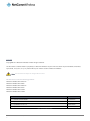
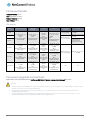
NetComm Wireless M2M Family Firmware Release Notes Copyright Copyright© 2014 NetComm Wireless Limited. All rights reserved. The information contained herein is proprietary to NetComm Wireless. No part of this document may be translated, transcribed, reproduced, in any form, or by any means without prior written consent of NetComm Wireless. Note: This document is subject to change without notice. This document covers the following products: NetComm Wireless NTC-6200-02 NetComm Wireless NTC-6908 NetComm Wireless NTC-6908-02 NetComm Wireless NTC-6520 NetComm Wireless NTC-30WV NetComm Wireless NTC-40WV DOCUMENT VERSION DATE 1.0 – Initial document release 27/02/2014 1.1 – Updated for v2.0.4.2 07/05/2014 1.2 – Updated for v2.0.11.2 23/07/2014 1.3 – Updated for v2.0.19.1 and added NTC-6200-02 19/09/2014 Table 1 - Document Revision History NetComm Wireless M2M Family Firmware Release Notes 2 www.netcommwireless.com Firmware Details Firmware Version: 2.0.19.1 Date: September 19, 2014. Generic / Custom: Generic Beta / Official: Official File Names MAIN SYSTEM FIRMWARE FILENAME MODEL RECOVERY SYSTEM FIRMWARE FILENAME U-BOOT SDK u-boot.bin (207KB) SDK_Bovine_ntc_69 08_2.0.19.1.tar.bz2 NTC-6908 NTC-6908-02 NTC-6520 NTC-30WV NTC-40WV ntc_6908_2.0.19.1.cdi (29.6MB) MD5: 523e4e13c2e3755e9a4 c67a0e235eb99 MD5: 280306d023a67e252 908852cbfd2a07e ntc_30wv_2.0.19.1.cdi (31.9MB) ntc_30wv_2.0.19.1_r. cdi (11.6MB) MD5: 95f0250c17b52c59f24c fd76f11afac5 MD5: 60bab220195f075f83 1fcc9695bfac3a MD5: c6d68b469f3f63 317e514162685 7dfa8 u-boot.bin (248KB) MD5: 9dab6a9ec3e3de5eb 70cbe867f98d547 MD5: c6d68b469f3f63 317e514162685 7dfa8 MD5: a31964b5594d1d72 e425bcecf81ca4ca u-boot.bin (248KB) SDK_Bovine_ntc_40 wv_2.0.19.1.tar.bz2 (173MB) MD5: 402be34ac6f2de066b3 3bc535ae5395a MD5: cbc0c65257b68797b 91b0bd7f5c425e1 MD5: a5e37cbbb36fb1 d172b4ec5c8dc 498cc MD5: 23bbe13d77f83e88c e62cb830570cbf9 ntc_6200_2.0.19.1.cdi ntc_6200_2.0.19.1_r. cdi u-boot.sb (297KB) SDK_Bovine_ntc_62 00_2.0.19.1.tar.bz2 (13.5MB) MD5: e7c8fba18dac88 2ba8ae3ce4d75c 703c (262MB) MD5: f529d7c67e1e6f0aa9 d3f6e0e430aa88 MC8790_DLEX_K2.0 .7.28.cwe (609KB) MC8790_K2.0.7.30.cwe (15.3MB) MC8704_T3_0_2_2.cwe (21.3MB) MC8704_DLEX_T3_ 0_2_2.cwe (492KB) R3B01 (Note: Ericsson module does not support firmware upgrade via web GUI) SDK_Bovine_ntc_30 wv_2.0.19.1.tar.bz2 (173MB) ntc_40wv_2.0.19.1_r. cdi (11.6MB) MD5: 2ac6107fbab4441c5b2 cfc0958c8822f MODULE FIRMWARE FILENAME (168MB) ntc_40wv_2.0.19.1.cdi (31.5MB) (31.3MB) NTC-6200-02 ntc_6908_2.0.19.1_r. cdi (10.9MB) MODULE BOOTLOADER FILENAME MC8704_DLEX_T3_ 0_2_2.cwe (492KB) MC8704_T3_0_2_2.cwe (21.3MB) N/A N/A MD5: b4c598f9367149324 573f9988a559ffc Firmware Upgrade Instructions Please refer to the steps described in the NetComm M2M Family Firmware Upgrade Instructions.pdf document. Warning: It is not possible to downgrade the router from firmware version 2.x.x.x to an older 1.x.x.x version due to the improvement made to the u-boot for environment redundancy. Configuration files exported from a router on FW 2.x.x.x to a router on FW 1.x.x.x will not work properly due to the updated Web 2.0 interface. The RIP Setting cannot be preserved when upgrading from firmware 1.9.x.x to 2.x.x.x due to a known bug in 1.9.x.x. where the RIP setting was not persistently saved in the configuration file. www.netcommwireless.com NetComm Wireless M2M Family Firmware Release Notes 3 v2.0.19.1 New Features 1. Event Notification: this feature allows SMS, TCP, UDP or email notifications to be sent when certain system events occur on the device. See the user guide for more information. Bug Fixes / Modifications 1. RDB variables can now store longer values (up to 4096 characters). 2. The RDB header rdb_operations.h and rdb_lib.a have now been deprecated in favour of rdb_ops.h and rdb.a. The newer library contains an updated API that is similar to the old API but now functions include a session handle so that calls are thread-safe. Note that rdb_set is binary clean now, so it should be passed zero-terminated arguments. A new API rdb_set_string will add zero-termination to the end of strings. 3. Wireless client mode now supports WPA/WPA2-EAP/TLS network authentication. 4. The OpenSSL library has been updated to version 1.0.1h. 5. The Net-SNMP package updated to version 5.7.2.1. 6. The system log now defaults to 'Error' level, so that errors are not obscured in the log. It is also now possible to capture logs at one level, and display them at another level. 7. Fixed: manual band selection sometimes does not persist across power-cycles. 8. On networks that support this option, it is now possible to request a static IP address on WWAN connection via the profile settings page. Note that some networks may ignore or even reject this request. 9. Fixed: If the modem emulator feature is enabled, it may prevent the data stream manager from bringing a stream back up after disconnection. The workaround is to disable modem emulator when not in use. 10. Fixed: The Wireless client scan list appears unsorted on some browsers. 11. Fixed: The Wireless station list sometimes does not show the IP address of connected stations. 12. Due to the migration of the wireless drivers in firmware v2.0.11.2, the WDS feature is no longer available. Known Issues 1. Data Usage display on NTC-6520 incorrect where not all online sessions are recorded after device is power cycled. 2. Telnet password not preserved when upgrading from firmware 1.9.x.x (NTC-40WV 1.9.108.8; NTC-6908 1.9.107.26; NTC-6908-02 1.9.107.25; NTC-6520 1.9.79.6) to firmware 2.0.0.x /2.0.4.x where settings were not persistently saved in the configuration file. This is not an issue upgrading from 2.0.0.x to 2.0.4.x or later. 3. The NTC-6200-02 User Guide does not display correctly using Google Chrome on Mac/Linux. v2.0.11.2 New Features 1. Updated: Migrated from proprietary Ralink Wireless drivers to open-source Linux Wireless drivers. 2. Added Wireless client mode, which allows the device to connect to an upstream Wireless AP and use Wireless as the device's WAN connection 3. Added: Wireless hotspot functionality. The Wireless network can be configured as a public hotspot, with captive portal functionality that allows 'Terms of Service' to be displayed, and also the initial HTTP page visited to be redirected. 4. Added: WAN connection failover. This allows multiple WAN connections to be defined and prioritised. If the highest priority WAN interface goes down, the device will automatically start using the next highest priority WAN interface. The WAN interface in use will always be the highest priority available interface. 5. Added: Support for HTTPS configuration restore via SMS 6. Updated: SDK package is now versioned with the release number. 7. Updated: When browsing to a web UI page requires a login, a successful login will now continue to the page requested instead of redirecting back to the status page. 8. Added: 'scp' command is now available for transferring files to and from the device via SSH. 9. Updated: OpenSSL library has been updated to 0.9.8y. NetComm Wireless M2M Family Firmware Release Notes 4 www.netcommwireless.com Bug Fixes / Modifications 1. Fixed: When upgrading NTC-40WV from 1.9.x.x to 2.X.X.X and unit is configured with a custom SSID, wireless network mode is set to “11b/g mixed mode” and Broadcast SSID is “On”, the SSID is not broadcast unless the Broadcast SSID option is toggled off and on. 2. Fixed: When editing an already existing Modbus Data stream, the Mode field displays “Raw”. This does not affect the behaviour of the stream. 3. Various cosmetic changes to the web user interface. Known Issues 1. Data Usage display on NTC-6520 incorrect where not all online sessions are recorded after device is power cycled. 2. Telnet password not preserved when upgrading from firmware 1.9.x.x (NTC-40WV 1.9.108.8; NTC-6908 1.9.107.26; NTC-6908-02 1.9.107.25; NTC-6520 1.9.79.6) to firmware 2.0.0.x /2.0.4.x where settings were not persistently saved in the configuration file. This is not an issue upgrading from 2.0.0.x to 2.0.4.x or later. 3. If the modem emulator feature is enabled, it may prevent the data stream manager from bringing a stream back up after disconnection. The workaround is to disable modem emulator when not in use. 4. The Wireless client scan list appears unsorted on some browsers. 5. The Wireless station list sometimes does not show the IP address of connected stations. 6. Due to the migration of the wireless drivers (see above), the WDS feature is not available. v2.0.4.2 New Features 1. Updated: Data stream manager to have “Endpoints” and “Streams” in two separate configuration pages in all five models: NTC-6908, NTC-6908-02, NTC-6520, NTC-40WV and NTC-30WV. 2. Updated: Data stream manager to exclude PADD and modem emulator in all five models: NTC-6908, NTC-6908-02, NTC-6520, NTC-40WV and NTC-30WV. 3. Updated: Re-located PADD and Modem emulator configuration pages. PADD on NTC-6908, NTC-6520, NTC-6908-02 is now grouped together under Services > Legacy Data > PADD and Modem emulator is now grouped together under Services > Legacy Data > Modem Emulator. PADD is now present in a separate configuration page under Services > PADD for NTC-40WV and NTC-30WV only. There is no modem emulator feature for NTC-30WV and NTC-40WV. 4. Updated: Embedded device user manual on web GUI for all five models: NTC-6908, NTC-6908-02, NTC-6520, NTC40WV, and NTC-30WV with user manual version 1.1. 5. Updated: Dynamic DNS support list to include: no-ip.com (currently the only free DYNDNS server) on top of the existing list: ww.dhs.org,www.dyndns.org,www.dyns.cx,www.easydns.com,www.justlinux.com,www.ods.org,www.tzo.com,www.zon eedit.com 6. Updated: PADD configuration page to remove UDP port option as it is not supported. 7. Added: Data Stream Manager > Data Streams validation diagnostic message to show if end point data is valid or not. If an end point is added, but details are not entered, then that particular data stream will stop working. 8. Added enhancement: Parameters validation check: Host name only accepts valid characters OVPN (client) only accepts valid characters OVPN (peer) only accepts valid characters SNMP trap destination only accepts valid characters ACS URL only accepts valid characters 9. Included SDK with Firmware version 2.0.4.2 with embedded SDK document 4.0 in this family release with file named “SDK_Bovine_ntc_6908.tar.bz2”; “SDK_Bovine_ntc_40wv.tar.bz2” and “SDK_Bovine_ntc_30wv.tar.bz2” www.netcommwireless.com NetComm Wireless M2M Family Firmware Release Notes 5 Bug Fixes / Modifications 1. Fixed: PAD mode and PADD Settings not preserved when upgrading from 1.x.x.x 2. Fixed: Custom band settings not preserved on NTC-6908, NT-6908-02, NTC-6520 when upgrading from 1.x.x.x, where user will need to wait for at least 1 minute for the fixes to take effect after firmware upgrade 3. Fixed: Non-volatile memory system log time stamp formatting. 4. Fixed: MAC/IP/Port Filtering Rules issue where the router does not allow wild card entries for source IP address mask, destination address mask and source port range when configured via GUI. 5. Fixed: WiFi Open authentication does not allow WEP encryption issue where the drop-down option was grey-out and disabled. 6. Fixed: If SIM is in roaming mode, incoming voice calls can’t be received on NTC-40WV and NTC-30WV. 7. Fixed: Uboot.bin file type update via TR-069 is not supported. Both uboot.bin and uboot.sb file type are now supported via web GUI management interface and TR-069. 8. Fixed: Wireless Distribution System (WDS) not working in all Encryption Modes. 9. Fixed: Some Wireless SSID alias settings for interfaces “ra1” to “ra4” remained on the NTC-40WV/NTC-30WV when running ‘ifconfig’ from Telnet after upgrading from 1.x.x.x to 2.0.0.3. User must disable then enable the “Broadcast SSID” option from the GUI to clear these left over settings. 10. Fixed: WiFi Ralink driver related issue where the router would select non-standard channels when set to Auto. Now, when set to Auto, the router only selects standard channels (1, 6, 11). 11. Fixed: Changing the GUI settings on some pages without credentials required. 12. Fixed: When IPsec Remote ID and Local ID fields are configured, IPsec tunnel does not connect. Known Issues 13. Data Usage display on NTC-6520 incorrect where not all online sessions are recorded after device is power cycled. 14. When upgrading NTC-40WV from 1.9.x.x to 2.0.4.2 and unit is configured with a custom SSID, wireless network mode is set to “11b/g mixed mode” and Broadcast SSID is “On”, the SSID is not broadcast unless the Broadcast SSID option is toggled off and on. 15. When editing an already existing Modbus Data stream, the Mode field displays “Raw”. This does not affect the behaviour of the stream. 16. Telnet password not preserved when upgrading from firmware 1.9.x.x (NTC-40WV 1.9.108.8; NTC-6908 1.9.107.26; NTC-6908-02 1.9.107.25; NTC-6520 1.9.79.6) to firmware 2.0.0.x /2.0.4.x where settings were not persistently saved in the configuration file. Not an issue upgrading from 2.0.0.x to 2.0.4.x or later. v2.0.0.3 New Features 1. M2M Family Firmware Release that covers five models: NTC-6908, NTC-6908-02, NTC-6520, NTC-40WV, NTC-30WV in a single firmware. 2. Updated: Web GUI with NetComm Wireless Branding and Web 2.0 GUI layout Style on NTC-30WV, NTC-40WV. 3. Added embedded device user manual on web GUI for all five models: NTC-6908, NTC-6908-02, NTC-6520, NTC-40WV, NTC-30WV 4. Added USB Serial to IP data stream manager support in the NTC-30WV and NTC-40WV; USB port is turned ON by default. 5. Added warning message when the user clicks “Install” on a router firmware image (main or recovery), check the first digit of the version number in the filename; if it is less than 2, give a warning pop-up explaining that downgrades to 1.x.x.x images are not supported and will cause device failure. Give "ok" or "cancel" options (future Family Releases will have uboot file version control and warning message when installing different uboot) 6. Added common new features to the NTC-30WV / NTC-40WV: a. Added improvement to uboot for environment redundancy for frequent power cycling scenarios b. Added enhancement to uboot for reset button LED display and timing for the three modes (reboot; recovery and reset to default) as described in the embedded user manual c. Added MAC/Port/IP filtering under the web management interface > Networking > Routing NetComm Wireless M2M Family Firmware Release Notes 6 www.netcommwireless.com d. Added Data Stream Manager under web management interface > Services, including PAD mode, PADD and Modbus Gateway; e. Added support to show the Last Inform Status under TR-069 Configuration Page. f. Added URL HTTP / HTTPS://192.168.1.1/tr-069paramterlist.html to show all supported TR-069 parameters of the device g. Added support to “Allow advanced RDB variables” and “Allow execution of advanced commands” under SMS Messaging > Diagnostic Configuration page h. Added options to select route options: packet-switched, circuit-switched under SMS Messaging > General SMS configuration page. i. Added web-UI toggle to save system logs to non-volatile memory j. Added support for HTTPS access to web management interface and self-signed HTTPS certificate generator k. Added SSH Server and host/client key management where it support user name / password and key authentication with SSH client l. Added LED operation mode support: Always on, turn all LEDs off after timer period m. Added OpenVPN: RSA key length to support 2048 and 4096 7. 8. n. Added support for Open VPN Certificate PKCS#12 format file o. Added support for OpenVPN TAP mode connection p. Added support for changing telnet and SSH password via web GUI up to 126 characters in length q. Added “Profile Routing” under APN Configuration page r. Added “Allow Data Roaming” options on Wireless WAN configuration page Added New Enhancements: a. Forcing a particular band/network from the operator settings web GUI setting persists across reboot b. Remote Web GUI device management for file types: Configuration files, router main and recovery images, u-boot images, IPK packages, module firmware images (Sierra modules only), boot loader images (Sierra modules only), SSL certificates, PDF files for help menu c. Remote TR-069 device management for file types: Configuration files, router main and recovery images, u-boot images, IPK packages, module firmware images (Sierra modules only), boot loader images (Sierra modules only), SSL certificates, PDF files for help menu. d. Remote SMS commands device management for file types: Configuration files (the assumption that no password is used during the backup of the configuration file), router main and recovery images, u-boot images, IPK packages, module firmware images (Sierra modules only), boot loader images (Sierra modules only), PDF files for help menu. e. Renamed “System monitor” in NetComm Web 1.0 GUI to “Watchdogs” in Web 2.0 GUI layout and with enhancement for automatic address validation for Ping monitor Web-UI configuration page f. GPS Configuration page now separated to three sub-menu: GPS configuration, MSB (A-GPS), Odometer and GPS Page is only applicable to device using Sierra module MC8790V g. Log file: change the default setting for display level = debug which is the most detailed log level. Included SDK with Firmware version 2.0.0.3 with embedded SDK document 4.0 in this family release with file named “SDK_Bovine_ntc_6908.tar.bz2”; “SDK_Bovine_ntc_40wv.tar.bz2” and “SDK_Bovine_ntc_30wv.tar.bz2” Bug Fixes / Modifications 1. Fixed: Custom APN Configuration settings not preserved when upgrading from last official release firmware 1.x.x.x to 2.x.x.x 2. Fixed: Device LAN IP address - does not accept a valid IP host address under mask 255.255.255.248 3. Fixed: SNMP Settings not preserved issue when upgrading from last official release firmware 1.x.x.x to 2.x.x.x 4. Fixed: SMS Configuration and Remote Diagnostic Settings not persevered issue when upgrading from last official release firmware 1.x.x.x to 2.x.x.x found in NTC-40WV and NTC-30WV 5. Fixed: VRRP Master and Slave Mode Switching problem 6. Fixed: IPsec cosmetic issued that only shows class C subnet mask in ipsec.conf 7. Fixed: IPsec certificate mode doesn’t show the file upload status correctly 8. Fixed: NTC-40WV TR-069 product class naming issue where it should be “40WV Series” www.netcommwireless.com NetComm Wireless M2M Family Firmware Release Notes 7 9. Fixed: Inbound SNMP (161/162) port issue when firewall is enabled 10. Fixed: Port Forwarding Rules that were removed not reflected on the iptables unless device is rebooted 11. Fixed: Multicast packets not forwarded by Router under RIPv2 12. Fixed: WiFi MAC Filtering issue where it only allows 7 rules, if you add an 8th rule the list goes blank. th 13. Fixed: DHCP issue where router fails to renew lease when the client sends a "DHCP REQUEST" to renew, the device only is able to renew by resending starting the process again with a "DHCP DISCOVER". 14. Fixed: Unable to change Admin login password when logged in as admin/admin 15. Fixed: Password fields do not allow the special characters @#$%^& 16. Fixed: SMS remote configuration restore issue. (Only applicable to configuration file with no password) 17. Fixed: LED Operation Mode: Turn all LEDs off after timer period not working 18. Fixed: “Automatic APN selection” under Data Connection Profile Settings page should be set to 'ON' by when reset device to factory default. 19. Fixed: Outbound call Voice Roaming on NTC-40WV and NTC-30WV (Inbound call Voice roaming still has some issue to be fixed in the future release) 20. Fixed: Custom band selection setting isn't recalled after restoring backup config file. The factory default band selection option is used, not the manual band selection setting that was set and saved in the backup configuration file. 21. Fixed: Ethernet and Speed not updating on the GUI status page 22. Fixed: Routing > Static Route should allow network destination address entry: 0.0.0.0 to represent all networks Known Issues 1. DHCP relay doesn't work in special scenarios where WWAN and LAN are using the same IP address. 2. The following settings not preserved when upgrading from 1.x.x.x to 2.0.0.3, these bugs will be fixed in the future family release PAD mode and PADD Settings not preserved Custom band settings not preserved in NTC-6908, NT-6908-02, NTC-6520 when upgrading from 1.x.x.x to 2.0.0.3 3. Modem emulator not working on the NTC-40WV and NTC-30WV via USB serial port. 4. Wireless Distribution System (WDS) not working. 5. Some Wireless SSID alias settings for interfaces “ra1” to “ra4” remained on the NTC-40WV/NTC-30WV when issuing ‘ifconfig’ from Telnet after upgrading from 1.x.x.x to 2.0.0.3. User must disable then enable the “Broadcast SSID” option from the GUI to clear these left over settings. 6. Non-volatile memory system log time stamp formatting issue. 7. If SIM is in roaming mode, incoming voice calls can’t be received on NTC-40WV and NTC-30WV. 8. Data Usage display on NTC-6520 incorrect where not all online sessions are recorded after device is power cycled. 9. Cannot access router from LAN interface using Telnet or SSH when MAC/IP/Port Filtering Rule = Drop and the Telnet and SSH setting under System > Administration > Administration Settings > Local Router Access Control is set to ON 10. MAC/IP/Port Filtering Rules does not allow wild card entries for source IP address mask and destination address mask and source port range when configured via GUI. 11. Uboot.bin update via TR-069 is not supported, only Uboot.sb file type update is supported via TR-069; both uboot.bin or uboot.sb file type is supported via web GUI management upgrade. 12. IPsec Issue: Remote ID and Local ID field when configured, tunnel to Cisco router no longer connected v2.0.0.1 New Features 1. First M2M Family Firmware Release that covers models: NTC-6908, NTC-6908-02, NTC-6520 in a single firmware. 2. Updated Web GUI with NetComm Wireless Branding and Web 2.0 GUI layout style. NetComm Wireless M2M Family Firmware Release Notes 8 www.netcommwireless.com 3. Added New Features: a. Added improvement to uboot for environment redundancy for frequent power cycling scenarios b. Added MAC/Port/IP filtering under the web management interface > Networking > Routing c. Added Data Stream Manager under web management interface > Services, including PAD mode and Modbus Gateway d. Added support to show the Last Inform Status under TR-069 Configuration Page. e. Added URL HTTP / HTTPS: 192.168.20.1/tr-069paramterlist.html to show all supported TR-069 parameters of the device f. Added support to “Allow advance RDB variables” and “Allow execution of advanced commands” under SMS Messaging > Diagnostic Configuration page g. Added options to select route options: packet- switched, circuit-switched under SMS Messaging > General SMS configuration page. h. Added web-UI toggle to save system logs to non-volatile memory i. Added support for HTTPS access to web management interface and self-signed HTTPS certificate generator j. Added SSH Server and host/client key management k. Added LED operation mode support: Always on, turn all LEDs off after timer period l. Added OpenVPN: RSA key length to support 2048 and 4096 m. Added support for Open VPN Certificate PKCS#12 format file 4. n. Added support for OpenVPN TAP mode connection o. Added support for changing telnet and SSH password via web GUI up to 126 characters in length p. Added “Profile Routing” under APN Configuration page q. Added “Allow Data Roaming” options on Wireless WAN configuration page r. Added embedded Help menu place holder on web GUI for future family release Added New Enhancements: a. Forcing a particular band/network from the operator settings web GUI setting persists across reboots b. Various enhanced file management functionalities, including consistent TR-069, SMS and Web-UI handling of file uploads to the device for all supported file types: configuration files (TR-069 and Web GUI only), router main and recovery images, IPK packages, module firmware images (Sierra modules only), boot loader images (Sierra modules only), SSL certificates, PDF files for help menu) c. Renamed “System monitor” in NetComm Web 1.0 GUI to “Watchdogs” in Web 2.0 GUI layout and with enhancement of automatic address validation for Ping monitor Web-UI configuration page d. GPS Configuration page now separated into three sub-menus: GPS configuration, MSB (A-GPS), Odometer e. Log file: change the default setting for display level = debug which is the most detailed log level. 5. Included SDK version 2.0.0.1 with embedded SDK document 4.0 in this family release with file named “SDK_Bovine_ntc_6908.tar.bz2” 6. Changed Factory Default Settings if device set to factory default: a. SIM pin protection = OFF Bug Fixes / Modifications 1. Fixed: Changing the NTP Timezone settings does not require the user to reboot the device 2. Fixed: DHCP Relay not working 3. Fixed: NTC-6520 band selection is not persistent after a power cycle 4. Fixed: Unable to change Admin login password when logged in as admin/admin 5. Fixed: Firewall is enabled but the router still replies to DNS request on WAN interface 6. Fixed: SNMP OID "linkSessionState" doesn't update, always returns "0" 7. Fixed: When Ethernet cable is disconnected and then reconnected, the Ethernet link is sometimes not re-established 8. Fixed: SMS diagnostics-SMS responses have garbage characters using GSM 7-bit & UCS2 encoding with Telecom network www.netcommwireless.com NetComm Wireless M2M Family Firmware Release Notes 9 Known Issues 1. Importing a configuration file saved from the web 2.0 FW2.0.0.1 to the Web 1.0 official firmware 1.9.107.26 / 1.9.79.6 / 1.9.107.25 doesn’t work. 2. DHCP relay doesn't work in special scenarios where WWAN and LAN interfaces are using the same IP address. 3. LED Operation Mode: turn all LEDs off after time period not working NetComm Wireless M2M Family Firmware Release Notes 10 www.netcommwireless.com