1
Notes:
•
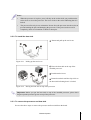
When the processor is in place, press it firmly on the socket while you push down the
socket lever to secure the processor. The lever clicks on the socket indicating that it is
locked.
•
The processor fits only in one orientation. Do not force the processor into the socket to
prevent bending the pins and damaging the processor. If the processor does not fit
completely, check its orientation or check for bent pins.
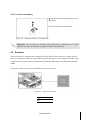
2.5.2 To install the heat sink
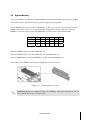
Rotate and pull up the two levers.
Figure 2-11
Pulling up the two levers
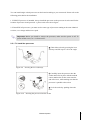
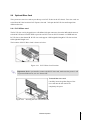
Place the heat sink on the top of the
installed processor.
Push down the levers.
Rotate them back until the clips click on
the heat sink indicating that it is locked.
Figure 2-12
Placing the heat sink on top of the processor
Important: Before you put the heat sink on top of the installed processor, please don’t
forget to put the processor grease on top of the processor.
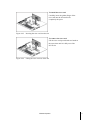
2.5.3 To remove the processor and heat sink
Reverse the above steps to remove the processor and heat sink from the board.
Hardware Operation
2-4