1
MAC3 S.p.A.
Via Baldanzese 149
50041 Calenzano (FI)
TEL. 055.8877372-055.8877672-055.8879276
FAX. 055.8877068
E-mail: [email protected] - Sito Web: www.mac3.it
LOW AND HIGH THRESHOLD SETTING
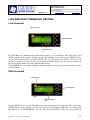
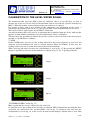
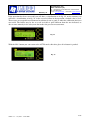
LOW threshold
Current mode
High threshold
Fig.4
Low threshold
set
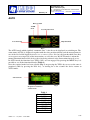
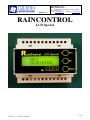
In LOW Mode, the minimum relay intervention point is set in cetimetres. The name of the state
(LOW) appears on the display; and the current high threshold state set by the user (HIGH:156 cm)
and the low threshold to be set (LOW LEVEL: 031 cm). By pressing the YES/+, NO/- keys it is
possible to increase or reduce the low intervention threshold required; the increase or reduction in
the low threshold cannot exceed the high threshold value.
Use the MENU key to actually change the functional mode: if not key is pressed the device returns
to AUTO mode.
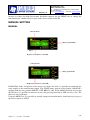
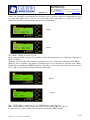
HIGH threshold
Current mode
Low threshold
Fig.5
High threshold
set
Use the HIGH mode to set the maximum relay intervention point in centimetres. The status name
(HIGH) appears on the display, as well as the current low threshold (LOW: 031 cm) and the high
threshold to be set (HIGH LEVEL: 156 cm). By pressing the YES/+, NO/- keys it is possible to
edition 1.1 – 01/2007 - code 5880
6/16