1
WMBX-3011-2701 series
User Manual
Rev.01 Jun. 2011
Statement
All rights reserved. No part of this publication may be reproduced in any forms or by
any means without prior written permission of the publisher.
All trademarks are property of the respective owners.
All product specifications are subject to change without prior notice.
Packing List
□
□
□
□
□
□
□
□
WMBX-3011-2701 x 1
60W DC12V Adapter x 1
Power cord (US) x 1
Food pad x 4
Screws pack x 1
Wall mount kit x 1
VESA mount kit x 1 (option)
Driver CD (Include user manual) x 1
Ordering Information
STANDARD:
□ WMBX-3011-2701
Mini-BOX with Atom N270 CPU with 1xVGA, 5xCOM, 2xLAN, 4xUSB, DDR2
SODIMM max up to 2GB, CF and 2.5" HDD support, mini-PICe for WLAN
expansion(option), wall mount kit, 60W DC12V Adapter, smart fan design.
OPTION:
□ VESA mount kit for WMBX-3011 series
WMBX-3011-2701 series User Manual
2
Contents
Chapter 1 Product Information..........................................................................................4 1.1 General Description.......................................................................................................4 1.2 Features ............................................................................................................................5 1.3 Dimensions ......................................................................................................................6 1.4 I/O Outlets.........................................................................................................................7 1.5 M/B PCB Layout..............................................................................................................9 1.6 Jumper Setting..............................................................................................................10 1.7 Connector Function List.............................................................................................13 1.8 Internal Connector Pin Define...................................................................................14 Chapter 2 Hardware installation......................................................................................18 2.1 Install the memory module ........................................................................................18 2.3 Installing the memory module ..................................................................................19 Chapter 3 BIOS Setup ........................................................................................................21 3.1 Main Menu ......................................................................................................................21 3.2 Standard CMOS Features...........................................................................................22 3.3 Advanced BIOS Features ...........................................................................................23 3.4 Advanced Chipset Features ......................................................................................26 3.5 Integrated Peripherals.................................................................................................28 3.6 Power Management Setup .........................................................................................34 3.7 PnP/PCI Configurations..............................................................................................36 3.8 PC Health Status...........................................................................................................37 3.9 Frequency/Voltage Control ........................................................................................38 3.10 Load Fail-Safe Defaults.............................................................................................39 3.11 Load Optimized Defaults ..........................................................................................40 3.12 Set Supervisor Password ........................................................................................41 3.13 Set User Password ....................................................................................................42 3.14 Save & Exit Setup.......................................................................................................43 3.15 Exit Without Saving ...................................................................................................44 Chapter 4 Drivers Installation ..........................................................................................45 4.1 Intel Chipset Device Software ...................................................................................45 4.2 Intel Graphic Media Accelerator Driver ..................................................................48 4.3 LAN Driver ......................................................................................................................51 4.4 Audio Driver ...................................................................................................................53 Appendix-A Watchdog .......................................................................................................54 Appendix-B GPIO ................................................................................................................56 WMBX-3011-2701 series User Manual
3
Chapter 1 Product Information
This chapter introduces product features, jumper and connector information.
1.1 General Description
The WMBX-3011-2701 series is a Mini BOX PC system that can support Atom N270
processors. WMBX-3011-2701 series support Windows® 2000, Windows® XP,
Windows® XP embedded, and Windows® 7, which is suitable for the most endurable
operation.
WMBX-3011-2701 series User Manual
4
1.2 Features
Construction
Heave duty steel
CPU
Intel Atom N270 1.6GHz processor onboard
System memory
1 x 200-pin DDR2 400/533/667 SO DIMM SDRAM, max.
up to 2GB
FSB
533MHz
Chipset
Intel 945GSE + ICH7M
BIOS
Award 16MB SPI
System I/O
Front I/O:
2 x USB
Rear I/O:
2 x USB, 2 x LAN, 1 x VGA,
5 x COM(4 x RS-232, 1 x RS-232/422/485),
1 x Audio(Mic-in, Audio-out, Line-in),
1 x WLAN (optional)
Watch dog timer
Interval: Programmable 1~255 sec.
Storage support
1 x CF and 1 x 2.5" HDD
Expansion slot
1 x mini-PCIe
System Indicators
1 x Power LED, 1 x HDD LED
System controls
1 x Power on switch, 1 x Reset switch
Mounting Kit
Wall mount kit
VESA mount kit (option)
Power Supply
AC 60W adapter, Input: AC 100~240V~2A 50-60Hz,
Output: DC12V@5A
Operating Temperature
0°C~45°C (32°F~140°F)
Storage temperature
-20°C~80°C (-68°F~176°F)
Relative Humidity
0%~90% (non-condensing)
Dimensions
160mm(W) x 140mm(D) x 70mm(H)
6.3"(W) x 5.5"(D) x 2.75"(H)
Weight
Gross: 2.6Kg/5.72Lb
Net: 2.0Kg/4.4Lb
Standard Color
Black
WMBX-3011-2701 series User Manual
5
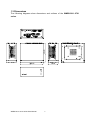
1.3 Dimensions
The following diagrams show dimensions and outlines of the WMBX-3011-2701
series.
WMBX-3011-2701 series User Manual
6
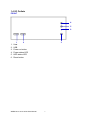
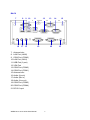
1.4 I/O Outlets
FRONT
4
5
6
1.
2.
3.
4.
5.
6.
1
2
USB
USB
Power on button
Power status LED
HDD status LED
Reset button
WMBX-3011-2701 series User Manual
3
7
BACK
7
8
16
9 10
11
17 18
12
19
20
7. Antenna hole
8. LAN Port (LAN2)
9. COM Port (COM3)
10. LAN Port (LAN1)
11. USB Port (2 port)
12. VGA Port
13. COM Port (COM2)
14. COM Port (COM1)
15. Antenna hole
16. Audio (Line in)
17. Audio (Mic in)
18. Audio (Line out)
19. COM Port (COM5)
20. COM Port (COM4)
21. DC12V input
WMBX-3011-2701 series User Manual
13
8
14
15
21
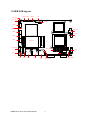
1.5 M/B PCB Layout
FP
2
8
2 8
JCF_SEL
KB/MS
16
USB3 USB2
JIDE_SEL
2
6
1
1
1
7
15
7
2
1
JCMOS
9
AUDIO
10
DC12V_IN1
1
2
CF
(Bottom Side)
10
9
2
COM5
CPUFAN
1
1
2
10
9
COM4
COM3
Mini PCI-E
9
1
1
30
29
2
10
1
9
INV18
5
S7
S7
JCOM1
6
11
5
10
2
DIO
COM2
2
1
J1
2
1
6
S4
9
10
S1
2
1
S4
LVDS18
JCOM_SEL
1
S1
2
1
10
9
SATA_PWR1
VGA
SATA1 SATA2
LAN2
LAN1
WMBX-3011-2701 series User Manual
USB1
USB0
DIMM
(Bottom Side)
9
COM1
JLVDS_VDD18
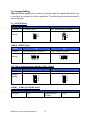
1.6 Jumper Setting
WNA-3011-2701 series has a number of jumpers inside the chassis that allows you
to configure the system to suit the application. The table below lists the functions of
various jumpers.
J1:AT/ATX Select
Pin No.
Function
1-2
2-NA
AT Power mode
Jumper
Setting
ATX Power mode (Default)
1
2
1
2
JCMOS:CMOS Clear
Pin No.
Function
1-2
2-3
Normal Operation (Default)
Clear CMOS Contents
Jumper
Setting
1 2 3
1 2 3
JCF_SEL:Compact Flash ( Master / Slave ) Select
Pin No.
Function
1-2
2-3
Master Mode
Slave Mode (Default)
Jumper
Setting
1
2
3
1
2
3
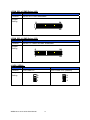
JCOM1:COM1 (5V/12V/RI) Select
Pin No.
Function
1-2
+5V
WMBX-3011-2701 series User Manual
3-4
Modem Ring In
(Default)
10
5-6
+12V
JCOM_SEL:COM2 Select (1/5)
Pin No.
Function
5-6, 11-13, 12-14, 19-21, 20-22
RS-232 (Default)
Jumper
Setting
2
24
1
23
JCOM_SEL:COM2 Select (2/5)
Pin No.
Function
3-4, 9-11, 10-12, 17-19, 18-20
RS-422
Jumper
Setting
2
24
1
23
JCOM_SEL:COM2 Select (3/5)
Pin No.
Function
1-2, 9-11, 10-12, 23-24
RS-485
Jumper
Setting
WMBX-3011-2701 series User Manual
2
24
1
23
11
6 4 2
5 3 1
6 4 2
5 3 1
6 4 2
5 3 1
Jumper Setting
JCOM_SEL:COM2 Select (4/5)
Pin No.
Function
15-16
RS-422 RX 100Ω Termination
Jumper
Setting
2
24
1
23
JCOM_SEL:COM2 Select (5/5)
Pin No.
Function
7-8
RS-422 TX 100Ω / RS-485 Termination
Jumper
Setting
2
24
1
23
JLVDS_VDD18:
Pin No.
Function
1-2
2-3
LCD Power 5V
Jumper
Setting
WMBX-3011-2701 series User Manual
LCD Power 3.3V (Default)
3
2
1
3
2
1
12
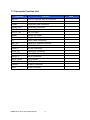
1.7 Connector Function List
Connector
Function
AUDIO
Line-in, Line-out, MIC-In Connector
CF
Compact Flash Connector
COM1
COM port DB9 Connector
COM2,3,4,5
COM port Connector
CPU FAN
System FAN
DC12V_IN1
DC12V Input
DIMM
DDR2 SO-DIMM
DIO
Digital Input/output
FP
Front Panel Connector
INV_18
18bit LCD Inverter connector
KB/MS
KB/MS PS2 Connector
LAN1-2
RJ-45 Connector
LVDS_18
18bit LCD Connector
Mini PCI-E
Mini PCIE Connector
SATA1-2
SATA Connector
SATA_PWR1
SATA Power
USB1
USBx2 Stack Connector
USB2-3
USBx2 Connector
VGA
VGA Connector
WMBX-3011-2701 series User Manual
13
Note
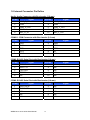
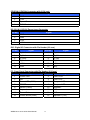
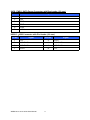
1.8 Internal Connector Pin Define
Audio: Audio Connector with Box-header (2.0 mm)
Pin No.
Signal
Pin No.
Signal
1
LINE_R_IN
2
LINE_L_IN
3
GND
4
GND
5
LINE_R_OUT
6
LINE_L_OUT
7
GND
8
GND
9
MIC_R_IN
10
MIC_L_OUT
COM2-5: COM Connector with Box-header (2.0 mm)
Pin No.
Signal
Pin No.
Signal
1
DCD
2
DSR
3
RXD
4
RTS
5
TXD
6
CTS
7
DTR
8
RI
9
GND
10
N/A
COM2: RS 422 Serial Port with Box-header (2.0 mm)
Pin No.
Signal
Pin No.
Signal
1
DCD TX-
2
NC
3
RXD TX+
4
NC
5
TXD RX+
6
NC
7
DTR RX-
8
NC
9
NC
10
NC
COM2: RS 485 Serial Port with Box-header (2.0 mm)
Pin No.
Signal
Pin No.
Signal
1
DCD DATA-
2
NC
3
RXD DATA+
4
NC
5
NC
6
NC
7
NC
8
NC
9
NC
10
NC
WMBX-3011-2701 series User Manual
14
CPUFAN: CPUFAN Connector with (2.54 mm)
Pin No.
Signal
1
GND
2
+12V
3
Speed Sense
4
PWM Control
DC12V_IN1: DC12V Power Input Connector
Pin No.
Signal
1
GND
2
GND
3
+12V
4
+12V
DIO: Digital IO Connector with Pin Header (2.0 mm)
Pin No.
Signal
Pin No.
Signal
1
D_Out0
2
D_IN0
3
D_Out1
4
D_IN1
5
D_Out2
6
D_IN2
7
D_Out3
8
D_IN3
9
+12V
10
+5V
11
GND
12
Key
FP: Front Panel Connector with Pin Header (2.54 mm)
Pin No.
Signal
Pin No.
Signal
1
Power LED+
2
HDD LED+
3
N/C
4
HDD LED-
5
Power LED- (GND)
6
Suspend LED+
7
RESET+
8
Suspend LED-
9
RESET-(GND)
10
Speaker-
11
Key
12
N/C
13
Power Button+
14
N/C
15
Power Button-(GND)
16
Speaker +(+5V)
WMBX-3011-2701 series User Manual
15
INV18: LCD Inverter Connector with Box-header (2.5 mm)
Pin No.
Signal
1
+12V
2
+12V
3
GND
4
Back Light Control
5
Back Light Enable#
KB/MS: Keyboard and Mouse Connector with Box-header (2.0 mm)
Pin No.
Signal
1
+5V
2
Mouse Data
3
Mouse Clock
4
Keyboard Data
5
Keyboard Clock
6
GND
LVDS_18: 18 bit LCD Connector with Box-header(1.0mm)
Pin No.
Signal
Pin No.
Signal
1
GND
2
GND
3
N/C
4
N/C
5
A_CLK+
6
A_CLK-
7
A_DATA2+
8
A_DATA2-
9
A_DATA1+
10
A_DATA1-
11
A_DATA0+
12
A_DATA0-
13
GND
14
GND
15
NC
16
NC
17
B_CLK+
18
B_CLK-
19
B_DATA2+
20
B_DATA2-
21
B_DATA1+
22
B_DATA1-
23
B_DATA0+
24
B_DATA0-
25
DDC_CLK
26
DDC_DATA
27
+3.3V
28
+3.3V
29
+3.3V
30
+3.3V
WMBX-3011-2701 series User Manual
16
SATA_PWR1: SATA Power Connector with Box-header (2.0 mm)
Pin No.
Signal
1
+5V
2
+5V
3
GND
4
GND
5
+12V
6
+12V
USB2-3:USB Connector with Pin Header (2.0 mm)
Pin No.
Signal
Pin No.
Signal
1
+5V
2
GND
3
USB DATA-
4
USB DATA+
5
USB DATA+
6
USB DATA-
7
GND
8
+5V
WMBX-3011-2701 series User Manual
17
Chapter 2 Hardware Installation
WMBX-3011-2701 series are convenient for various hardware configurations, such
as Memory Module, HDD, Compact Flash. The chapter 2 will show you how to install
the hardware. The information is shown as bellow:
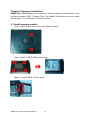
2.1 Install memory module
Step 1: Remove the cover screws at the bottom (2pcs).
Step 2: Add 2.5” SATA HDD screws (4pcs).
Step 3: Connect SATA + Power cable.
WMBX-3011-2701 series User Manual
18
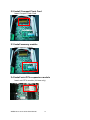
2.2 Install Compact Flash Card
Insert Compact Flash Card.
2.3 Install memory module
Insert memory module.
2.4 Install mini-PCIe expansion module
Insert mini-PCIe module (full size only).
WMBX-3011-2701 series User Manual
19
2.5 Install wall mount kit
Connect wall mount kit screws (4pcs).
2.6 Installing the foot pad
Connect foot pad screws (4pcs).
Note: Wall mount kit and foot pad only can select one
2.7 Install the VESA mount kit
Connect VESA mount kit screws (4pcs).
Connector Wall mount kit screws on VESA mount kit (4pcs).
WMBX-3011-2701 series User Manual
20
Chapter 3 BIOS Setup
This chapter introduces BIOS setup information.
Power on or reboot the system board, when screen appears message as “Press DEL
to enter SETUP“. Press <DEL> key to run BIOS SETUP Utility.
Note: The BIOS configuration for reference only, it may subject to change without
prior notice.
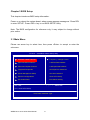
3.1 Main Menu
Please use arrow key to select item, then press <Enter> to accept or enter the
sub-menu.
Phoenix – AwardBIOS CMOS Setup Utility
Standard CMOS Features
Frequency / Voltage Control
Advanced BIOS Features
Load Fail-Safe Defaults
Advanced Chipset Features
Load Optimized Defaults
Integrated Peripherals
Set Supervisor Password
Power Management Setup
Set User Password
PnP/PCI Configurations
Save & Exit Setup
PC Health Status
Exit Without Saving
Esc : Quit
↑↓ ← → : Select Item
F10 : Save & Exit Setup
Time, Date, Hard Disk Type…
WMBX-3011-2701 series User Manual
21
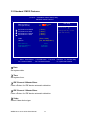
3.2 Standard CMOS Features
Phoenix – AwardBIOS CMOS Setup Utility
Standard CMOS Features
Date (mm:dd:yy)
Time (hh:mm:ss)
Item Help
Tue. Jan 15 2010
16 : 20 : 20
Menu Level
IDE Channel 0 Master
IDE Channel 0 Slave
IDE Channel 1 Master
IDE Channel 1 Slave
[
[
[
[
Video
Halt On
[ EGA / VGA ]
[ All , But Keyboard ]
Base Memory
Extended Memory
Total Memory
None ]
None ]
None ]
None ]
640K
1038336K
1039360K
↑↓→ ← :Move Enter:Select +/-/PU/PD:Value
F5: Previous Values
Change the day, month,
year and century
F10:Save
F6: Fail-Safe Defaults
□ Date
Set system date.
□ Time
Set system time.
□ IDE Channel 0 Master/Slave
Press <Enter> for IDE device automatic detection.
□ IDE Channel 1 Master/Slave
Press <Enter> for IDE device automatic detection.
□ Video
Select Video device type.
WMBX-3011-2701 series User Manual
22
ESC:Exit
F1: General Help
F7: Optimized Defaults
□ Halt on
Select stop procedure or ignore it when error detected during POST (Power On Self
Test).
3.3 Advanced BIOS Features
Phoenix – AwardBIOS CMOS Setup Utility
Advanced BIOS Features
x
x
CPU Feature
Hard Disk Boot Priority
Virus Warning
CPU L1 & L2 Cache
CPU L3 Cache
Hyper-Threading Technology
Quick Power On Self Test
First Boot Device
Second Boot Device
Third Boot Device
Boot Other Device
Boot Up NumLock Status
Gate A20 Option
Typematic Rate Setting
Typematic Rate (Chars/Sec)
Typematic Delay (Msec)
Security Option
MPS Version Control For OS
OS Select For DRAM > 64MB
Report No FDD For WIN 95
Full Screen LOGO Show
Small Logo(EPA) Show
[ Press Enter ]
[ Press Enter ]
[ Disabled ]
[ Enabled ]
[ Enabled ]
[ Enabled ]
[ Enabled ]
[ USB-CDROM ]
[ Hard Disk ]
[ USB-FDD ]
[ Enabled ]
[ On ]
[ Fast ]
[ Disabled ]
6
250
[ Setup ]
[ 1.4 ]
[ Non-OS2 ]
[ No ]
[ Disabled ]
[ Disabled ]
▲
Item Help
Menu Level
▼
↑↓→ ← :Move Enter:Select +/-/PU/PD:Value
F5: Previous Values
F10:Save
F6: Fail-Safe Defaults
□ CPU Feature
Press <Enter> to select CPU parameter.
□ Hard Disk Boot Priority
Press <Enter> to select Hard Disk boot device priority.
□ Virus Warning
Select “Virus Warning” Enabled/Disabled.
□ CPU L1 & L2 Cache
Select “CPU L1 & L2 Cache” Enabled/Disabled.
WMBX-3011-2701 series User Manual
23
ESC:Exit
F1: General Help
F7: Optimized Defaults
□ CPU L3 Cache
Select “CPU L3 Cache” Enabled/Disabled.
□ Hyper-Threading Technology
Select “Hyper-Threading Technology” Enabled/Disabled.
□ Quick Power On Self Test
Select “Quick Power On Self Test” Enabled/Disabled.
□ First/Second/Third Boot Device
Select boot device priority.
□ Boot Other Device
Select “Boot Other Device” Enabled/Disabled.
□ Boot Up NumLock Status
Select <NumLock> key ON/Off when system boot up.
□ Gate A20 Option
Select Gate A20 controlled by Keyboard controller (Normal) or Port 92 (Fast).
□ Typematic Rate Setting
Select “Typematic Rate Setting” enabled to set.
Typematic Rate (Chars/Sec): Number of characters repeated in one second.
Typematic Delay (Msec): When hold one key, set the time between the first and
second character displayed.
□ Security Option
Select security mode.
Setup: Require password to permit BIOS setup utility.
System: Require password to permit boot-up and BIOS setup utility.
□ MPS Version Control For OS
Select MPS (Multiprocessor Specification) Version 1.4 to add extended configuration
tables to improve support for multiple PCI bus configurations and improve future
expandability. It is also required for a secondary PCI bus to work without the need for
a bridge. Select Version 1.1 for older Operation Systems.
WMBX-3011-2701 series User Manual
24
□ OS Select For DRAM > 64M
Select “OS2” only if you are running older version of IBM OS/2 Operating System with
greater than 64MB of RAM on the system. Otherwise select “Non-OS/2” setting.
□ Report No FDD For WIN 95
If running Windows 95/98 without floppy disk drive, select “Enabled” to release IRQ6.
This is required to pass Windows 95/98's SCT test, if select “Disabled”, BIOS will not
report missing floppy drive to Win95/98.
□ Full Screen Logo Show
Select the full screen logo appears during the system boot-up process.
□ Small Logo (EPA) Show
Select EPA (Environmental Protection Agency) Energy Star logo appears during the
system boot-up process.
WMBX-3011-2701 series User Manual
25
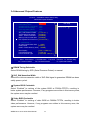
3.4 Advanced Chipset Features
Phoenix – AwardBIOS CMOS Setup Utility
Advanced Chipset Features
x
x
x
x
x
DRAM Timing Selectable
CAS Latency Time
DRAM RAS# to CAS# Delay
DRAM RAS# Precharge
Precharge delay (tRAS)
System Memory Frequency
SLP_S4# Assertion Width
System BIOS Cacheable
Video BIOS Cacheable
Memory Hole At 15M-16M
PCI Express Root Port Func
[ By SPD ]
Auto
Auto
Auto
Auto
Auto
[ 1 to 2 Sec. ]
[ Enabled ]
[ Disabled ]
[ Disabled ]
[ Press Enter ]
▲
Item Help
Menu Level
** VGA Setting **
On-Chip Frame Buffer Size [ 8MB ]
[ DVMT ]
DVMT Mode
DVMT / FIXED Memory Size [ 128MB ]
[ CRT + LVDS-18 ]
[ LVDS-18]
[ 1024x768 18bit SC ]
Boot Display
LVDS Panel Setting
LVDS-18 Panel Type
↑↓→ ← :Move Enter:Select +/-/PU/PD:Value
F5: Previous Values
▼
F10:Save
F6: Fail-Safe Defaults
ESC:Exit
F1: General Help
F7: Optimized Defaults
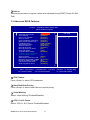
□ DRAM Timing Selectable
Select DRAM timing by SPD (Serial Presence Detect) or manual.
□ SLP_S4# Assertion Width
Select the minimum assertion width of SLP-S4# signal to guarantee DRAM has been
safely power-cycled.
□ System BIOS Cacheable
Select “Enabled” to caching of the system BIOS at F0000h-FFFFFh, resulting in
better system performance. However, if any programs are written in this memory area,
the system error may be resulted.
□ Video BIOS Cacheable
Select “Enabled” to caching of video BIOS at C0000h-F7FFFh, resulting in better
video performance. However, if any programs are written in this memory area, the
system error may be resulted.
WMBX-3011-2701 series User Manual
26
□ Memory Hole at 15M-16M
Select “Enabled” to improve performance, certain space in memory can be reserved
for ISA cards. The memory must be mapped into the memory space below 16 MB.
□ PCI Express Root Port Func
Press <Enter> to set PCI Express function.
□ On-Chip Frame Buffer Size
Select share system memory 1MB or 8MB.
□ DVMT Mode
DVMT (Dynamic Video Memory Technology) allows the system to dynamically
allocate memory resources according to the demands of the system at any points in
time, that improves efficiency of the memory allocated to either system or graphics
processor.
□ DVMT/Fixed Memory Size
Select DVMT/Fixed Memory Size 64MB/128MB/224MB.
□ Boot Display
Select boot display device type.
□ LVDS Panel Setting
Select LCD panel type.
□ LVDS-18 Panel Type
Select LCD 18 bit resolution.
WMBX-3011-2701 series User Manual
27
3.5 Integrated Peripherals
Phoenix – AwardBIOS CMOS Setup Utility
Integrated Peripherals
OnChip IDE Device
Onboard Device
Super IO Device
Second IO Device
USB Device Setting
[ Press Enter ]
[ Press Enter ]
[ Press Enter ]
[ Press Enter ]
[ Press Enter ]
↑↓→ ← :Move Enter:Select +/-/PU/PD:Value
F5: Previous Values
F10:Save
F6: Fail-Safe Defaults
WMBX-3011-2701 series User Manual
28
Item Help
Menu Level
ESC:Exit
F1: General Help
F7: Optimized Defaults
□ OnChip IDE Device
Press <Enter> to set IDE and SATA device configuration.
Phoenix – AwardBIOS CMOS Setup Utility
OnChip IDE Device
IDE HDD Block Mode
On-Chip Primary PCI IDE
IDE Primary Master PIO
IDE Primary Slave PIO
IDE Primary Master UDMA
IDE Primary Slave UDMA
On-Chip Secondary PCI IDE
IDE Secondary Master PIO
IDE Secondary Slave PIO
IDE Secondary Master UDMA
IDE Secondary Slave UDMA
x
x
x
[ Enabled ]
[ Enabled ]
[ Auto ]
[ Auto ]
[ Auto ]
[ Auto ]
[ Enabled ]
[ Auto ]
[ Auto ]
[ Auto ]
[ Auto ]
Item Help
Menu Level
*** On-Chip Serial ATA Setting ***
IDE
SATA Mode
[ Auto ]
On-Chip Serial ATA
Disabled
SATA PORT Speed Settings
Secondary
PATA IDE Mode
P0,P2 is Primary
SATA Port
↑↓→ ← :Move Enter:Select +/-/PU/PD:Value
F5: Previous Values
F10:Save
F6: Fail-Safe Defaults
WMBX-3011-2701 series User Manual
29
If your IDE hard drive
supports block mode
select Enabled for
automatic detection of
the optimal number of
block read/writes per
sector the drive can
support
ESC:Exit
F1: General Help
F7: Optimized Defaults
□ Onboard Device
Phoenix – AwardBIOS CMOS Setup Utility
Onboard Device
Azalia/AC97 Audio Select
Onboard Lan Boot ROM
[ Auto ]
[ Disabled ]
Item Help
Menu Level
↑↓→ ← :Move Enter:Select +/-/PU/PD:Value
F5: Previous Values
F10:Save
F6: Fail-Safe Defaults
ESC:Exit
F7: Optimized Defaults
□ Azalia/AC97 Audio Select
Select Azalia/AC97 Auto/All Disabled.
□ Onboard Lan Boot ROM
Decide whether to invoke the boot ROM of onboard LAN chip.
WMBX-3011-2701 series User Manual
30
F1: General Help
□ Super IO Device
Press <Enter> to select Serial, Parallel and “l” configuration.
Phoenix – AwardBIOS CMOS Setup Utility
Super IO Device
x
x
x
x
Onboard Serial Port 1
Onboard Serial Port 2
UART Mode Select
RxD , TxD Active
IR Transmission Delay
UR2 Duplex Mode
Use IR Pins
PWRON After PWR-Fail
[ 3F8/IRQ4 ]
[ 2F8/IRQ3 ]
[ Normal ]
Hi , Lo
Enabled
Half
IR-Rx2Tx2
[ Off ]
Watch Dog Timer Select
[ Disabled ]
↑↓→ ← :Move Enter:Select +/-/PU/PD:Value
F5: Previous Values
Item Help
Menu Level
F10:Save
F6: Fail-Safe Defaults
ESC:Exit
F1: General Help
F7: Optimized Defaults
□ Onboard Serial Port 1/2
Select serial port address.
□ UART Mode Select
Select UART mode: IrDA (Infrared) / ASKIR (Amplitude Shift Keyed Infrared) / Normal
(RS232C).
□ PWRON After PWR-Fail
Select Power ON after Off/On.
□ Watch Dog Timer Select
Select Watch dog Disabled or set timer value.
WMBX-3011-2701 series User Manual
31
□ Second IO Device
Phoenix – AwardBIOS CMOS Setup Utility
Second IO Device
Onboard Serial Port 3
Serial Port 3 Use IRQ
Onboard Serial Port 4
Serial Port 4 Use IRQ
Onboard Serial Port 5
Serial Port 5 Use IRQ
[ 3F8 ]
[ IRQ10 ]
[ 2E8 ]
[ IRQ11]
[ 4F8 ]
[ IRQ5 ]
↑↓→ ← :Move Enter:Select +/-/PU/PD:Value
F5: Previous Values
Item Help
Menu Level
F10:Save
F6: Fail-Safe Defaults
□ Onboard Serial Port 3/4/5
Select serial port address.
□ Serial Port 3/4/5 Use IRQ
Select serial port IRQ.
WMBX-3011-2701 series User Manual
32
ESC:Exit
F1: General Help
F7: Optimized Defaults
□ USB Device Setting
Press <Enter> to select USB device configuration.
Phoenix – AwardBIOS CMOS Setup Utility
USB Device Setting
USB 1.0 Controller
[ Enabled ]
USB 2.0 Controller
[ Enabled ]
USB Operation Mode
[ High Speed ]
USB Keyboard Function
[ Enabled ]
USB Mouse Function
[ Enabled ]
USB Storage Function
[ Enabled ]
Item Help
Menu Level
*** USB Mass Storage Device Boot Setting ***
↑↓→ ← :Move Enter:Select +/-/PU/PD:Value
F5: Previous Values
F10:Save
F6: Fail-Safe Defaults
WMBX-3011-2701 series User Manual
33
[Enable] or [Disable]
Universal Host
Controller Interface
for Universal Serial
Bus.
ESC:Exit
F1: General Help
F7: Optimized Defaults
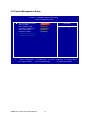
3.6 Power Management Setup
Phoenix – AwardBIOS CMOS Setup Utility
Power Management Setup
x
x
PCI Express PM Function
ACPI Function
ACPI Suspend Type
Soft-Off by PWR-BTTN
Power On by Ring
Resume by Alarm
Date(of Month) Alarm
Time(hh:mm:ss) Alarm
[ Press Enter ]
[ Enabled ]
[ S1(POS) ]
[ Instant-Off ]
[ Disabled ]
[ Disabled ]
0
0 : 0 : 0
↑↓→ ← :Move Enter:Select +/-/PU/PD:Value
F5: Previous Values
F10:Save
F6: Fail-Safe Defaults
WMBX-3011-2701 series User Manual
34
Item Help
Menu Level
ESC:Exit
F1: General Help
F7: Optimized Defaults
□ PCI Express PM Function
Press <Enter> to select “Wake-up by LAN” Enabled/Disabled.
Phoenix – AwardBIOS CMOS Setup Utility
PCI Express PM Function
[ Disabled ]
Wake-up by LAN
Item Help
Menu Level
↑↓→ ← :Move Enter:Select +/-/PU/PD:Value
F5: Previous Values
F10:Save
F6: Fail-Safe Defaults
ESC:Exit
F1: General Help
F7: Optimized Defaults
□ ACPI Function
Select ACPI (Advanced Configuration and Power Management) Enabled/Disabled.
□ ACPI Suspend Type
Select S1 (POS)/S3 (STR)/S1&S3.
□ Soft-Off by PWR_BTTN
Select power button function,
Instant-off: Press power button will turn off instantly.
Delay 4 Sec: Press power button 4 seconds to turn off.
□ Power On by Ring
Select Power on by Ring Indicator signal from Modem.
WMBX-3011-2701 series User Manual
35
□ Resume by Alarm
Set date and time to power on system from soft-off state.
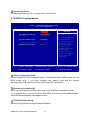
3.7 PnP/PCI Configurations
Phoenix – AwardBIOS CMOS Setup Utility
PnP / PCI Configurations
x
Reset Configuration Data
[ Disabled ]
Resources Controlled By
IRQ Resources
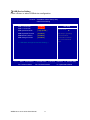
[ Auto(ESCD) ]
Press Enter
PCI/VGA Palette Snoop
[ Disabled ]
Item Help
Default is Disabled.
Select Enabled to
reset Extended System
Configuration Data
ESCD) when you exit
Setup if you have
Installed a new add-on
and the system
reconfiguration has
caused such a serious
conflict that the OS
cannot boot
** PCI Express relative items **
Maximum Payload Size
[ 128 ]
↑↓→ ← :Move Enter:Select +/-/PU/PD:Value
F5: Previous Values
Menu Level
F10:Save
F6: Fail-Safe Defaults
ESC:Exit
F1: General Help
F7: Optimized Defaults
□ Reset Configuration Data
Select Enabled to reset Extended System Configuration Data (ESCD) when you exit
BIOS setup utility, if you have installed new add-on card and the system
reconfiguration has caused a serious conflict that OS cannot boot.
□ Resources Controlled By
BIOS can automatically configure all boots, Plugs and Play compatible devices.
If you choose Auto, you cannot select IRQ DMA and memory base address fields,
since BIOS automatically has assigned them.
□ PCI/VGA Palette Snoop
Select PCI/VGA Palette Snoop Enabled/Disabled.
WMBX-3011-2701 series User Manual
36
□ Maximum Payload Size
Set maximum TLP payload size for the PCI Express devices. The unit is byte.
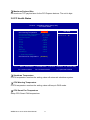
3.8 PC Health Status
Phoenix – AwardBIOS CMOS Setup Utility
PC Health Status
[ Disabled ]
Shutdown Temperature
[ Disabled ]
CPU Warning Temperature
46℃/ 114℉
Current SYSTEM Temperature
49℃/ 120℉
Current CPU Temperature
0 RPM
CPU Fan Speed
0.88 V
Vcore
11.86 V
+12 V
1.49 V
+1.5 V
1.83 V
+1.8 V
5.05 V
+5 V
3.31 V
+3.3 V
3.08 V
VBAT (V)
3.31 V
3.3VSB (V)
** Smart FAN Setting **
CPU Smart Fan Temperature
Menu Level
[ Disabled ]
↑↓→ ← :Move Enter:Select +/-/PU/PD:Value
F5: Previous Values
Item Help
F10:Save
F6: Fail-Safe Defaults
ESC:Exit
F1: General Help
F7: Optimized Defaults
□ Shutdown Temperature
If CPU temperature reaches the setting value will automatic shutdown system.
□ CPU Warning Temperature
If CPU temperature reaches the setting value will beep in DOS mode.
□ CPU Smart Fan Temperature
Setup CPU Smart FAN temperature.
WMBX-3011-2701 series User Manual
37
3.9 Frequency/Voltage Control
Phoenix – AwardBIOS CMOS Setup Utility
Frequency / Voltage Control
Auto Detect PCI Clk
Spread Spectrum
[ Enabled ]
[ Disabled ]
Item Help
Menu Level
↑↓→ ← :Move Enter:Select +/-/PU/PD:Value
F5: Previous Values
F10:Save
F6: Fail-Safe Defaults
□ Auto Detect PCI Clk
Select “Auto Detect PCI Clk” Enabled/Disabled
□ Spread Spectrum
Select “Spread Spectrum” Enabled/Disabled.
WMBX-3011-2701 series User Manual
38
ESC:Exit
F1: General Help
F7: Optimized Defaults
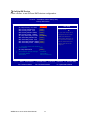
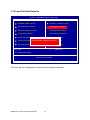
3.10 Load Fail-Safe Defaults
Phoenix – AwardBIOS CMOS Setup Utility
Standard CMOS Features
Frequency / Voltage Control
Advanced BIOS Features
Load Fail-Safe Defaults
Advanced Chipset Features
Load Optimized Defaults
Integrated Peripherals
Set Supervisor Password
Power Management Setup
Set User Password
PnP/PCI Configurations
& Exit
Load Fail-Safe Defaults Save
(Y/N)?
N Setup
Load Fail-Safe Defaults (Y/N)? N
PC Health Status
Exit Without Saving
Esc : Quit
↑↓ ← → : Select Item
F10 : Save & Exit Setup
Load Fail-Safe Defaults
This item will set configuration for non-optimized system operation.
WMBX-3011-2701 series User Manual
39
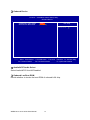
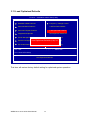
3.11 Load Optimized Defaults
Phoenix – AwardBIOS CMOS Setup Utility
Standard CMOS Features
Frequency / Voltage Control
Advanced BIOS Features
Load Fail-Safe Defaults
Advanced Chipset Features
Load Optimized Defaults
Integrated Peripherals
Set Supervisor Password
Power Management Setup
Set User Password
PnP/PCI Configurations
& Exit
Load Optimized DefaultsSave
(Y/N)?
N Setup
Load Optimized Defaults (Y/N)? N
PC Health Status
Exit Without Saving
Esc : Quit
↑↓ ← → : Select Item
F10 : Save & Exit Setup
Load Optimized Defaults
This item will restore factory default setting for optimized system operation.
WMBX-3011-2701 series User Manual
40
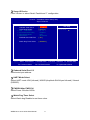
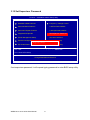
3.12 Set Supervisor Password
Phoenix – AwardBIOS CMOS Setup Utility
Standard CMOS Features
Frequency / Voltage Control
Advanced BIOS Features
Load Fail-Safe Defaults
Advanced Chipset Features
Load Optimized Defaults
Integrated Peripherals
Set Supervisor Password
Power Management Setup
Set User Password
PnP/PCI Configurations
Save & Exit Setup
Ente r P a s s word:
PC Health Status
Exit Without Saving
Esc : Quit
↑↓ ← → : Select Item
F10 : Save & Exit Setup
Change/Set/Disabled Password
If set supervisor password, it will request typing password to enter BIOS setup utility.
WMBX-3011-2701 series User Manual
41
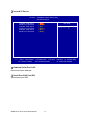
3.13 Set User Password
Phoenix – AwardBIOS CMOS Setup Utility
Standard CMOS Features
Frequency / Voltage Control
Advanced BIOS Features
Load Fail-Safe Defaults
Advanced Chipset Features
Load Optimized Defaults
Integrated Peripherals
Set Supervisor Password
Power Management Setup
Set User Password
PnP/PCI Configurations
Save & Exit Setup
Ente r P a s s word:
PC Health Status
Exit Without Saving
Esc : Quit
↑↓ ← → : Select Item
F10 : Save & Exit Setup
Change/Set/Disabled Password
If set user password will request typing password to enter BIOS setup utility, it does
not allow modifying configuration.
WMBX-3011-2701 series User Manual
42
3.14 Save & Exit Setup
Phoenix – AwardBIOS CMOS Setup Utility
Standard CMOS Features
Frequency / Voltage Control
Advanced BIOS Features
Load Fail-Safe Defaults
Advanced Chipset Features
Load Optimized Defaults
Integrated Peripherals
Set Supervisor Password
Power Management Setup
Set User Password
PnP/PCI Configurations
Save
& ExitYSetup
SAVE to CMOS and EXIT
(Y/N)?
SAVE to CMOS and EXIT (Y/N)? Y
PC Health Status
Exit Without Saving
Esc : Quit
↑↓ ← → : Select Item
F10 : Save & Exit Setup
Save Data to CMOS
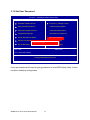
This item confirms save configuration or not before exiting BIOS setup utility.
Press <Y> and <Enter> to save configuration, then reboot system.
Press <N> and <Enter> will back to BIOS setup utility.
WMBX-3011-2701 series User Manual
43
3.15 Exit Without Saving
Phoenix – AwardBIOS CMOS Setup Utility
Standard CMOS Features
Frequency / Voltage Control
Advanced BIOS Features
Load Fail-Safe Defaults
Advanced Chipset Features
Load Optimized Defaults
Integrated Peripherals
Set Supervisor Password
Power Management Setup
Set User Password
PnP/PCI Configurations
Save &NExit Setup
Quit Without S a ving (Y/N)?
Quit Without S a ving (Y/N)? N
PC Health Status
Exit Without Saving
Esc : Quit
↑↓ ← → : Select Item
F10 : Save & Exit Setup
Abandon all Data
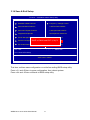
This item confirm save configuration or not before quit BIOS setup utility.
Press <Y> and <Enter> will not save configuration, then reboot system.
Press <N> and <Enter> will back to BIOS setup utility.
WMBX-3011-2701 series User Manual
44
Chapter 4 Drivers Installation
This chapter introduces driver installation information.
Please insert utility CD to CD-ROM drive, the install menu will appear automatically. If
the install menu does not list suitable driver of Operate System or appear
automatically, please select corresponding driver of utility CD to install.
Windows XP driver installation steps are as below.
4.1 Intel Chipset Device Software
Step 1. Click “Next” to continue
WMBX-3011-2701 series User Manual
45
Step 2. Read License Agreement and click “Yes” to continue.
Step 3. Click “Next” to continue.
WMBX-3011-2701 series User Manual
46
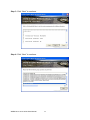
Step 4. Click “Next” to continue.
Step 5. Click “Finish” to complete setup.
WMBX-3011-2701 series User Manual
47
4.2 Intel Graphic Media Accelerator Driver
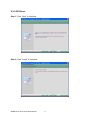
Step 1. Click “Next” to continue.
Step 2. Read License Agreement and click “Yes” to continue.
WMBX-3011-2701 series User Manual
48
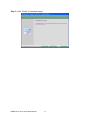
Step 3. Click “Next” to continue.
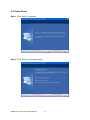
Step 4. Click “Next” to continue.
WMBX-3011-2701 series User Manual
49
Step 5. Click “Finish” to complete setup.
WMBX-3011-2701 series User Manual
50
4.3 LAN Driver
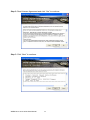
Step 1. Click “Next” to continue.
Step 2. Click “Install” to continue.
WMBX-3011-2701 series User Manual
51
Step 3. Click “Finish” to complete setup.
WMBX-3011-2701 series User Manual
52
4.4 Audio Driver
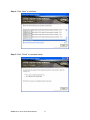
Step 1. Click “Next” to continue.
Step 2. Click “Finish” to complete setup.
WMBX-3011-2701 series User Manual
53
Appendix-A Watchdog
The working algorithm of WDT function can be simply described as a counting
process. The Time-Out Interval can be set through software programming. The
availability of the time-out interval set by software.
The System Board allows users to control WDT through dynamic software
programming. WDT starts counting when it is activated. It sends out a signal to
system reset, when time-out interval ends. To prevent time-out interval from running
out, a re-trigger signal will need to be sent before counting reaches its end. This
action will restart the counting process.
WDT program should keep counting process running under normal condition. WDT
should never generate a system reset unless the system runs into troubles.
The related Control Registers of WDT are all included in the following sample
program that is written in C language. User can fill a non-zero value into the Time-out
Value Register to enable/refresh WDT. System will be reset after Time-out Value to be
counted down to zero; or user can directly fill a zero value into Time-out Value
Register to disable WDT immediately.
To ensure a successful accessing to the content of desired Control Register, the
sequence of following program codes should be step-by-step run again when each
register is accessed.
For more information about WDT, please refer to Winbond W83627EHF data sheet.
There are two PnP I/O port addresses that can be used to configure WDT.
1) 0x2E:EFIR (Extended Function Index Register, for identifying CR index number)
2) 0x2F:EFDR (Extended Function Data Register, for accessing desired CR)
Belows are some example codes, which demonstrate the use of WDT.
WMBX-3011-2701 series User Manual
54
// Enter Extended Function Mode
outp(0x002E, 0x87);
outp(0x002E, 0x87);
// Assign Pin 77 to be a WDTO# Signal
outp(0x002E, 0x2D);
outp(0x002F, inp(0x002F) & 0xFE);
// Select Logic Device 8
outp(0x002E, 0x07);
outp(0x002F, 0x08);
// Active Logic Device 8
outp(0x002E, 0x30);
outp(0x002F, 0x01);
//Clear WDTO# Status
outp(0x002E, 0xF7);
outp(0x002F, inp(0x2F) & 0xEF);
// Select Count Mode (Second / Minute)
outp(0x002E, 0xF5);
outp(0x002F, (inp(0x002F) & 0xF7) | ( Count-mode Register
// Set Time-out Value
outp(0x002E, 0xF6);
outp(0x002F, Time-out Value Register );
// Exit Extended Function Mode
outp(0x002E, 0xAA);
Definitions of Variables:
Value of Count-mode Register :
1) 0x00 -- Count down in seconds (Bit3=0)
2) 0x08 -- Count down in minutes (Bit3=1)
Value of Time-out Value Register :
1) 0x00 -- Time-out Disable
2) 0x01~0xFF -- Value for counting down
WMBX-3011-2701 series User Manual
55
& 0x08));
Appendix-B GPIO
The System Board provides 4 dedicated output ports and 4 programmable I/O ports
that can be individually configured to perform a simple I/O function. Users can
configure 4 programmable I/O ports to become an input or output port by
programming register bit of I/O Selection .To invert port value, the setting of Inversion
Register has to be made (Note). Port values can be set to read or write through Data
Register.
Note: Only 4 programmable I/O ports support.
Additionally, 4 Digital Output ports amplified signals from GPIO ports. There are
open-drain buffers, which can offer greater driving capacity up to 100mA.
For more information about GPIO, please refer to Winbond W83627EHF data sheet.
The related Control Registers of GPIO are all included in the following sample
program that is written in C language. To ensure a successful accessing to the
content of desired Control Register, the sequence of following program codes should
be step-by-step run again when each register is accessed.
There are two PnP I/O port addresses that can be used to configure GPIO ports,
1) 0x2E - EFER (Extended Function Enable Register, for entering Extended Function
Mode)
- EFIR (Extended Function Index Register, for identifying CR index number)
2) 0x2F - EFDR (Extended Function Data Register, for accessing desired CR)
Belows are some example codes, which demonstrate the use of GPIOs.
// Enter Extended Function Mode
outp(0x002E, 0x87);
outp(0x002E, 0x87);
// Assign Pin121-128 to be GPIO port
outp(0x002E, 0x29);
outp(0x002F, inp(0x002F) | 0x01);
WMBX-3011-2701 series User Manual
56
// Select Logic Device 7
outp(0x002E, 0x07);
outp(0x002F, 0x07);
// Active Logic Device 7
outp(0x002E, 0x30);
outp(0x002F, 0x01);
// Select Inversion Mode
outp(0x002E, 0xF2);
outp(0x002F, (inp(0x002F) & 0x3C) | ( Inversion Register
& 0xC3));
// Select I/O Mode
outp(0x002E, 0xF0);
outp(0x002F, (inp(0x002F) & 0x3C) | ( I/O Selection Register
// Access GPIO ports
outp(0x002E, 0xF1);
outp(0x002F, (inp(0x002F) & 0x3C) | ( Output Data
or
Input Data = inp(0x002F);
& 0xC3));
& 0xC3));
// Exit Extended Function Mode
outp(0x002E, 0xAA);
Definitions of Variables:
Each bit in the lower nibble of each Register represents the setting of a GPIO port.
Super IO Pin
Bit
GPIO DIO
128
0
GPIO DIO-Out0
127
1
GPIO DIO-Out1
126
2
GPIO DIO-In0
125
3
GPIO DIO-In1
124
4
GPIO DIO-In2
123
5
GPIO DIO-In3
122
6
GPIO DIO-Out2
121
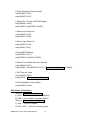
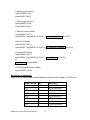
7
GPIO DIO-Out3
WMBX-3011-2701 series User Manual
57
Value of Inversion Register :
When set in ‘1’, the incoming/outgoing port value is inverted.
When set in ‘0’, the incoming/outgoing port value is the same as in Data
Register.
Value of I/O Selection Register :
When set in ‘1’, respective GPIO port is programmed as an input port.
When set in ‘0’, respective GPIO port is programmed as an output port.
Value of Output Data / Input Data :
If a port is assigned to be an output port, then its respective bit can be
read/written.
If a port is assigned to be an input port, then its respective bit can be read only.
Note :
DIO_IN0/DIO_IN1/DIO_IN2/DIO_IN3 is programmed as Inputs by BIOS default.
Parameter
Conditions
VinH
min +1.857V
VinL
max +0.525V
Rated Vin
-8V ~ +12V
NC Status
High by Default
** Attention : If DIO_IN0/DIO_IN1/DIO_IN2/DIO_IN3 are programmed as Output signal, they
can only offer a normal signal transfer (NOT amplified signals).
Parameter
Conditions
VoutH
3.3V thru 10k
VoutL
0V thru 1k
DIO_OUT0/DIO_OUT1/DIO_OUT2/DIO_OUT3 is fixed as Outputs by BIOS.
Parameter
Conditions
Open-drain buffer
Power-on default = Open
Driving Capacity
max 100mA continue
WMBX-3011-2701 series User Manual
58