1
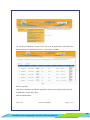
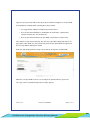
Type the current password then enter the new password and retype the new password. A few guidelines to follow while selecting the new password: • It is suggested to avoid the mentioned special characters. • The new password should be a combination of small letters, capital letters, numbers and any one special character. • The new password cannot be the password assigned the last three times. If the details are not entered correctly, the error message will be displayed and ask to type again. If the details are entered correctly, then the password will be changed and the message will be displayed as below. Enter the code displayed in the image. Then click on ‘Change Password’ button When the new password has been successfully been updated on the system, the message “Your Password Changed Successfully” appears. Version 1.2 Release: 03/09/2014 Guidelines for Integrated e-Services Delivery Manual Page 17 of 19