1
1. INTRODUCTION
1.1 NOTE APPLICABILITY
If you have a Supervisor V3.61 and your units versions are 3.5 or later for VT200 and 1.8 or later for VT100
the configuration to control domes using the Supervisor software handset will be carried out by using the
application interface and it is not required to change any file manually.
If the versions of your unit and your software are included in the paragraph above continue reading this note.
Otherwise, consult the note “Configuration process to control domes in VT200 units” (old versions) or
upgrade your units and software up to the latest versions.
Note: The VT100 units with previous versions to 1.8 do not support the dome control.
There are two different methods to control domes using VT units:
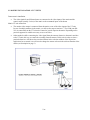
1. Using a real handset connected to a Supervisor PC
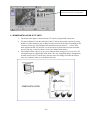
2. Using the application control panel or software handset
You can choose anyone, but not both at the same time. The first option is only supported by certain
manufacturers. Please consult the supported domes table in the web:
http://www.videosafe.net/ProductDocsNotes/VT_ProductDocsNotes/VTRNGPN05SP_DomeTable.PDF
If your dome is not in the table or despite of being included you would prefer to use a real handset you have
to choose the first option called “Transparent Channel”. If you want to get more information see the note:
“The transparent channel in VideoSafe System”.
1.2 TIPS, COMMUNICATIONS AND LIMITATIONS
You can connect up to 16 domes all of them from the same manufacturer or a matrix that can sometimes
support different manufacturers.
In order to control domes you will have to configure both, the Supervisor and the VT units.
The connection can be established with whatever communication mode being used other than GSM and
nullmodem in VT200, and nullmodem in VT100 (incompatible with domes control), although for a faster
transmission the TCP/IP communication through a local area network (LAN) or an ISDN connection are
recommended.
2/18