1
B. Setup and Testing Apply Profiles
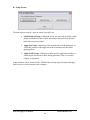
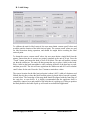
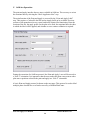
Apply profiles tell the unit how to apply a label to a specific plate type. The Apply Profile
setup screen is available through the main Setup screen of the Print and Apply interface.
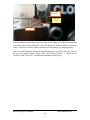
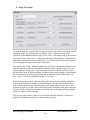
To define an apply profile, the user must specify where to apply a label on each side of a
specific plate, by specifying the apply height on each side. The Apply Height is the
distance between the bottom of the plate and the bottom of the desired location of the
label, in millimeters.
To save the apply profile, enter 4 apply heights for the plate – even if a side would not be
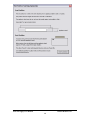
used. Press the “Save Profile” button. The user will be prompted to place the plate into
the nest to allow the unit to calibrate the profile.
Additional graphical help is available by clicking the “How do I do this?” button.
Note: If the user wishes to label a plate when lidded, and a plate without, the user will
have to create two separate apply profiles for that plate – one for plates with lids, one
without. Multiple apply profiles can be made for a single plate type.
Users may also test the profile with labels created from Codesoft.
Print and Apply User Manual
Hudson Robotics, Inc.
24