1
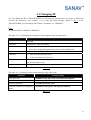
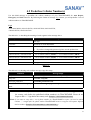
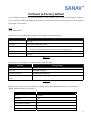
4.2 Predefine Cellular Number(s)
Use this SMS message to predefine the cellular number(s) of your TRACKSTARIII for Auto Report,
Emergency and Park functions. By following the format of message, E.g.2 below, you will predefine 5 sets of
cellular numbers in TRACKSTARIII.
E.g.2
#Username,0000,2,+886123456789,+492234567890,+866323456789,
+886423456789,+886523456789*
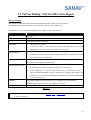
The table 4.2.1 is describing the meaning of each segment in the message above.
Text Keyed In SMS
Description
#
Start sign.
Username
Default ID of TRACKSTARIII.
0000
Default password.
If you have changed the password, please use the updated one.
2
Mode 2 is representing the ID setup
+886123456789, +492234567890
1st set of cellular numbers, PH-01, 2nd set of cellular numbers, PH-02
+866323456789, +886423456789
3rd set of cellular numbers, PH-03, 4th set of cellular numbers, PH-04
+886523456789
5th set of cellular numbers, PH0-5
*
End sign.
Table 4.2.1
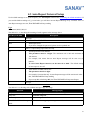
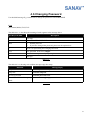
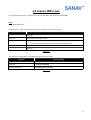
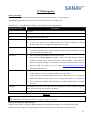
The table 4.2.2 is showing each confirm message reply after setup.
Situation
Message Reply
Setup Succeeds
Username setup OK. TRACKSTARIII phone updated.
Setup Fail
Username setup fail.
Incorrect password
Username password error
TRACKSTARIII is in Emergency
Username in emergency, phone setup not allowed.
Mode
Table 4.2.2
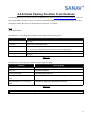
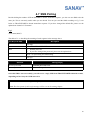
Note1: In order to be compatible with GSM Network Service in different countries, it is suggested to add
the country code before the predefined cellular number(s) in TRACKSTARIII. Please do not
forget to add a “+” sign before the country code. Example: +491783496936 (German)
Note2: If you want to setup only 1 set of phone number for TRACKSTARIII to report, you need to add 4
commas ”,” straight after the phone number. TRACKSTARIII needs to recognize and separate different
built-in numbers. Example: #Username,0000,2, +886123456789,,,,*
15