1
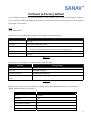
4.5 Reset to Factory Default
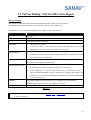
Use this SMS message to reset TRACKSTARIII to factory default. You can just send the SMS according to
E.g.5 seen below to TRACKSTARIII to do resetting. If you have changed the default ID, please use the updated
one instead of “Username”.
E.g.5
#Username,0000,5*
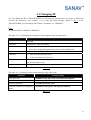
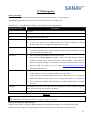
The table 4.5.1 is describing the meaning of each segment in the message above.
Text Keyed In SMS
Description
#
Start sign.
Username
Default ID of TRACKSTARIII.
0000
Default password.
If you have changed the password, please use the updated one.
5
Mode 5 is representing the Reset.
*
End sign.
Table 4.5.1
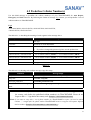
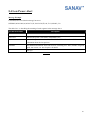
The table 4.5.2 is showing each confirm message reply after setup.
Situation
Message Reply
Setup Succeeds
Username setup OK. TRACKSTARIII reset to default.
Setup Fail
Username setup fail.
Incorrect password
Username password error
TRACKSTARIII is in Emergency Username in emergency, reset not allowed.
Mode
Table 4.5.2
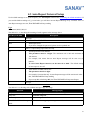
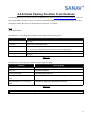
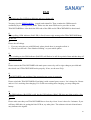
When the reset setup is successful, all the user setting data in TRACKSTARIII will be erased and reset to
default. Default settings are seen below.
Setting
Default Value
ID
Username
Password
0000
Time Interval (in minutes)
000
Total Number of Report
12
Predefined Cellular Number
Non
Parking
Disable
18