1
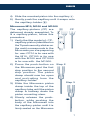
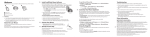
ENGLISH 4) Slide the mounted piston into the capillary . 5) Gently push the capillary until it snaps onto the capillary-holder . Microman M10, M100 and M1000 The capillary-pistons (CP) are delivered already assembled. To fit a capillary-piston, follow this procedure: 1) Verify that the model of - CP capillary-piston (identified on the Tipack security sticker on the rack) corresponds to the Microman you are preparing for use: CP10 is for use with the M10, CP100 is for use with the M100 and CP1000 is for use with the M1000. CP 2) Press the push-button on Step 2 the Microman past the first stop position to the second stop position. The piston clamp should now be open and protruding from the capillary-holder. 3) Slide the Microman piston clamp inside the top of the capillary tube until the piston clamp is halfway down the piston mounting stem. 4) Slowly release the pushbutton, while pushing the body of the Microman into the capillary-piston until it is firmly seated on the Microman. Step 3 7