1
Publishing and Registering Data with GBIF
Version 1.0
You must complete both step 2 and 3 to make your data ready to be registered.
Using Spreadsheet Processor or Make-Your-Own Darwin Core Archive (DwC-A)
If you selected to use Spreadsheet Processor or you have made your own DwC-A, you
should have had a zip file as the product of the preparing procedure.
Now, to publish it, all you need to do is to put it in a web server that constantly
connected to the Internet and serving contents to the public. For operations on a web
server, it is strongly suggested to contact your web administrator to assist in making the
file available online.
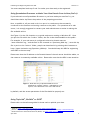
See Figure 1 for the file location on a typical web server running on Windows XP. Once
you put the file within the “htdocs” folder, the file is then downloadable to the public.
For example, if your web server is configured to have its domain name as
“some.insitution.org,” and the DwC-A file is named as “Specimen_NHM.zip,”, once this zip
file is put into the “htdocs” folder, people can download it by pointing their browsers to
http://some.institution.org/Specimen_NHM.zip. You should keep this URL for registering
with GBIF in the next step.
Please note that the IP address or the Domain Name of the web server should be stable, so
the resource is constantly available online. Please also note that the URL is case sensitive
Figure 1. Web directory of Apache2 Web Server on
Windows XP. Usually “htdocs,” indicated by a red
square, is the document root of the web server.
by default, and the access permission of the file should be properly set.
Using TapirLink5, BioCASe6 or DiGIR7
Please refer to the software guides for these tools to publish your data.
5
6
7
TapirLink. http://wiki.tdwg.org/twiki/bin/view/TAPIR/TapirLinkManual
BioCASe is a protocol designed by Biological Collection Access Services. See http://www.biocase.org/
Distributed Generic Information Retrieval (DiGIR). See http://digir.sourceforge.net/
April 2011
2