1
Keyboard Controller Introduction
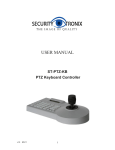
Keyboard PTZ Controller is a remote RS-232 & RS-422 control tool for operating Marshall’s
CV620/CV350/CV360/CV342/CV500 cameras and other model cameras on the market. This
controller can be programmed to control Pan, Tilt, Zoom, Focus, Iris, Presets, OSD Menu, Lights,
Wipers and other control features allowable on RS-232/RS-422 enabled cameras. This product is
designed with Number Keys, Function Keys, LCD Screen, and PTZ Joystick. Included in this box is
a RS-232 cable that will connect directly to the RS-232 IN on the rear of the Marshall PTZ CameraCV620, 12V Power Cable, and RS-422 harness.
Features of Keyboard Controller
* Pan, Tilt, Zoom simultaneous control via RS-232
* Unique control code learn function, which enables users to customize control codes.
* Devices connected to RS-422/RS-485 harness can be set with different protocols and control codes.
* Update new firmware online by connecting controller via RS-485 bus on rear panel to computer.
* One Key Control to retrieve the protocol and baudrates assigned to each ID addresses.
* All parameters can be set to individual control key operations.
Basic Features of Keyboard Controller
* RS-485 control bus can control 255 cameras or control devices.
* RS-232 port can control 7 cameras in a daisy chain setup.
* Standard RS-422/RS-485 I/O ports are lightning-proof, low interference, and can be run at distances of 1200m.
* Uplink port can provide links to maximum 15 slave keyboard controllers in other areas of operation.
* Password protected LOCK/UNLOCK.
* Key Sound ON/OFF
* Progressive speed dome control
* Multi-dimensional PTZ knob control
* Rugged industrial build
2
Marshall Electronics