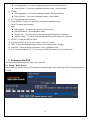
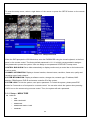
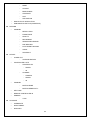
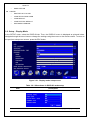
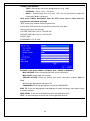
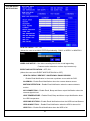
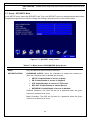
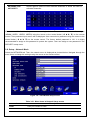
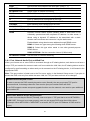
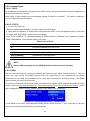
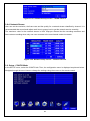
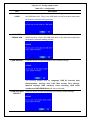
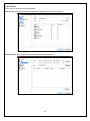
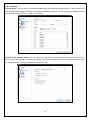
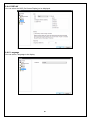
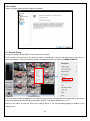
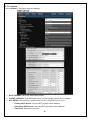
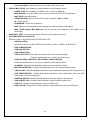
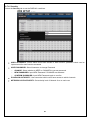
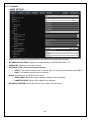
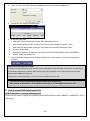
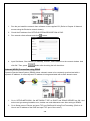
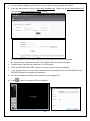
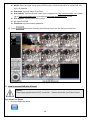
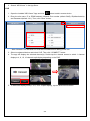
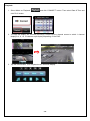
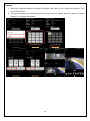
1
INSTRUCTION MANUAL (MDR-AHxxxx Series _Ver. 1.0) H.264 Video Compression Analog HD Digital Video Recorder User Manual About this user guide Before installing and using this unit, please read this user guide carefully. Be sure to keep it handy for later reference. Safety Precautions Explanation of Graphical Symbols This symbol indicates the presence of important operating and maintenance (servicing) instructions in the literature accompanying the product. This symbol indicates the presence of Uninsulated ”dangerous voltage” within the product’s enclosure that may be of sufficient magnitude to constitute a risk of electric shock to persons. WARNING To reduce a risk of fire or electric shock, do not expose this product to rain or moisture. CAUTION Changes or modifications not expressly approved by the manufacturer may void the user’s authority to operate this equipment. CAUTION It is danger of explosion if battery is incorrectly replaced. Replace only with the same or equivalent type recommended by the manufacturer. Discard used batteries according to the manufacturer’s instructions. 2 These precautions must be followed for safety reasons. Warning Do not uses if the unit emits smoke, strange sounds are heard, or odor is emitted. Make sure the power cable is not damaged. Make sure there is no dust accumulation on the power plug or the outlet. Disassembly prohibited Do not place any foreign objects inside the unit. Do not place a container holding water or other liquids above the unit when it is connected to power. Do not allow the unit to get wet. Do not use during thunder/thunder storms. Do not place in an unstable position. Do not expose to shock or vibration. Do not use this unit in areas where it is exposed to the possibility of explosion. Caution Do not pull on the power cable when removing the power plug from the outlet. Do not touch the power plug with wet hands. Do not sit on. Make sure the cables are connected properly. Do not place heavy objects on connected units. Never move this unit while the power is turned on. Remove the power plug from the outlet when the unit is going to remain unused for long periods of time. Do not block the cooling fans or air ducts. Do not expose to extreme temperatures or humidity changes. Warning Installation and servicing should be performed only by qualified and experienced personnel. Turn off the power of the DVR when connecting cameras, audio or sensor cables. The manufacturer is not responsible for any damage caused by improper use of the product or failure to follow instructions for the product. The manufacturer is not responsible for any problems caused by or resulting from the user physically opening the DVR for examination or attempting to fix the unit. The manufacturer may not be held liable for any issues with the unit if the warranty seal is removed. 3 Product Components The package contains the main unit and its components as specified below. When you purchase the unit, Please check to ensure the components specified below are included. DVR Set (4/8/16ch) Client Software CD Remote Control Battery1.5V (AAA x 2EA) Quick Guide HDD data power cable(SATA) HDD mounting bracket & Screw / HDD fixing screw Adaptor (DC12V 3A or 5A) & Power Cable Mouse Audio cable (16CH only) optional DIDO Terminal Block(2EA) 4 Mounting the HARD DISK (4/8/16ch) Remove the screws and the top cover How to mount HDD x 1 1. Mount the HDD into bottom 2. Mount the HDD into bottom 3. Connect the HDD SATA and case as specified above case as specified above HDD power cable as specified above How to mount HDD x 2 1. Mount the HDD into the 2. Mount the HDD into bottom case 3. Mount the HDD into bottom mounting bracket as specified as specified above case as specified above above 4. Connect the HDD SATA and HDD power cable as specified above 5 Basic function of the MOUSE ①: Left button: SELECT function ②: Wheel: MOVEMENT function on a drop-down menu Compatible HDD Models 제조회사 Seagate 모델명 용량 SATA Type RPM BUFFER ST4000VM000-1F3168 [fw: SC25] 4 TB SATA 3 5900 RPM 64 MB ST3000VX000-1CU166 3 TB SATA 3 7200 RPM 64 MB ST3000VM002-1F316N [fw: SC25] 3 TB SATA 3 5900 RPM 64 MB ST3000DM001 [fw: CC43] 3 TB SATA 3 7200 RPM 64 MB ST3000DM001 [fw: CC24] 3 TB SATA 3 7200 RPM 64 MB ST2000VM003-1CT164 [fw: SC23] 2 TB SATA 3 5900 RPM 64 MB ST2000VM003 2 TB SATA 3 5900 RPM 64 MB ST2000VM002 2 TB SATA 2 5900 RPM 64 MB ST2000VX000-1CU164 [fw: CV22] 2 TB SATA 3 7200 RPM 64 MB ST2000DL003 2 TB SATA 3 5900 RPM 64 MB ST32000641AS 2 TB SATA 3 7200 RPM 64 MB ST2000DM001 2 TB SATA 3 7200 RPM 64 MB ST1000VX000 1 TB SATA 3 7200 RPM 64 MB ST1000VM002 [fw: SC12] 1 TB SATA 3 5900 RPM 64 MB ST1000DM003 1 TB SATA 3 7200 RPM 64 MB ST31000524AS 1 TB SATA 3 7200 RPM 32 MB ST31000322CS 1 TB SATA 2 5900 RPM 8 MB ST31000526SV 1 TB SATA 3 7200 RPM 32 MB ST31000524AS 1 TB SATA 3 7200 RPM 32 MB ST31000340SV 1 TB SATA 2 7200 RPM 32 MB ST31000528AS 1 TB SATA 2 7200 RPM 32 MB ST1000VM002-1CT162 [fw: SC23] 1 TB SATA 3 5900 RPM 64 MB ST3500312C8 500 GB SATA 2 5900 RPM 8 MB ST500DM002 500 GB SATA 3 7200 RPM 16 MB ST3500312CS 500 GB SATA 2 5900 RPM 8 MB ST3500411SV 500 GB SATA 3 7200 RPM 16 MB 6 HITACHI Western Digital ST3500413AS 500 GB SATA 3 7200 RPM 16 MB ST3500830SCE 500 GB SATA 2 7200 RPM 8 MB ST3500418AS 500 GB SATA 2 7200 RPM 16 MB ST3500410AS 500 GB SATA 2 7200 RPM 16 MB ST3500312CS [fw: SC13] 500 GB SATA 2 5900 RPM 8 MB ST250DM000 250 GB SATA 3 7200 RPM 16 MB ST3250312CS 250 GB SATA 2 5900 RPM 8 MB ST3250410AS 250 GB SATA 2 7200 RPM 16 MB ST3250310SV 250 GB SATA 2 7200 RPM 8 MB ST3250318AS 250 GB SATA 2 7200 RPM 8 MB ST3160815AS 160 GB SATA 2 7200 RPM 8 MB HDS723020BLA642 2 TB SATA 3 7200 RPM 64 MB HDS722020ALA330 2 TB SATA 2 7200 RPM 32 MB HDS721010DLE630 1 TB SATA 3 7200 RPM 32 MB HDS721010KLA330 1 TB SATA 2 7200 RPM 32 MB HDT721010SLA360 1 TB SATA 2 7200 RPM 16 MB HDS721010CLA332 1 TB SATA 2 7200 RPM 32 MB HDS721050DLE630 500 GB SATA 3 7200 RPM 32 MB HDS721050CLA362 500 GB SATA 2 7200 RPM 16 MB HDP725050GLA360 500 GB SATA 2 7200 RPM 16 MB HDS721032CLA362 320 GB SATA 2 7200 RPM 16 MB HDS721025CLA382 250 GB SATA 2 7200 RPM 8 MB HDT721025SLA380 250 GB SATA 2 7200 RPM 8 MB HDP725025GLA380 250 GB SATA 2 7200 RPM 8 MB 4 TB SATA 3 WD30EURS-63SPKY0 3 TB SATA 2 5400 RPM 64 MB WD30EZRX-00MMM 3 TB SATA 3 5400 RPM 64 MB WD30EURS-63R8UYO 3 TB SATA 2 5400 RPM 64 MB WD30PURX-64P6ZY0 3 TB SATA 3 64 MB 2 TB SATA 3 64 MB WD20EURS-63SPKY0 2 TB SATA 2 5400 RPM 64 MB WD20EURX-63T0FY0 2 TB SATA 3 5400 RPM 64 MB WD20EARS 2 TB SATA 2 5900 RPM 64 MB WD20EARX-00PASB0 2 TB SATA 3 5900 RPM 65 MB WD20EADS 2 TB SATA 2 5400 RPM 32 MB WD20EURS 2 TB SATA 2 5400 RPM 64 MB WD10EZEX-00RKKA0 1 TB SATA 3 7200 RPM 64 MB WD40PURX-64GVNY0 64 MB / WD40EURX-64WRWY0 / WD30EURX-64HYZY0 WD20PURX-64P6ZY0 / WD20EURX-64HYZY0 7 WD10PURX-64D85Y0 1 TB SATA 3 64 MB WD10EURX-63FH1Y0 1 TB SATA 3 5400 RPM 64 MB WD10EZRX-00A8LB0 1 TB SATA 3 5400 RPM 64 MB WD10EARS-00Y5B1 1 TB SATA 3 5400 RPM 64 MB WD10EVDS-63U8B1 1 TB SATA 3 7200 RPM 32 MB WD10EALX-229BA1 1 TB SATA 3 7200 RPM 32 MB WD10EALX-009BA0 1 TB SATA 3 7200 RPM 32 MB WD10EVVS 1 TB SATA 2 5400 RPM 8 MB WD10EACS 1 TB SATA 2 16 MB WD10EUCX 1 TB SATA 3 16 MB WD10EURS-630AB1 1 TB SATA 2 5900 RPM 64 MB WD5000AAKX-00ERMA0 500 GB SATA 3 7200 RPM 16 MB WD5000AVCS-632DY1 500 GB SATA 2 5400 RPM 32 MB WD5000AAKX-221CA1 500 GB SATA 2 7200 RPM 16 MB WD5000AAKX-001CA0 500 GB SATA 3 7200 RPM 16 MB WD5000AVCS 500 GB SATA 2 WD5000AACS 500 GB SATA 2 WD2500AVVS-63L2B0 250 GB SATA 3 WD2500AAKX 250 GB SATA 3 WD2500AVVS 250 GB SATA 2 WD2500AAKS 250 GB SATA 2 7200 RPM 16 MB HDS723020BLE640 / DT01ACA200 2 TB SATA 3 7200 RPM 64 MB DT01ABA200V 2 TB SATA 3 5700 RPM 32 MB / WD10EURX-64RPPY0 TOSHIBA 16 MB 5400 RPM 7200 RPM 16 MB 16 MB 8 MB NOTICE The brands and models of all HDD should be the same. If the brands and models of each HDD are different with others, the DVR may not recognize HDD. 8 Specifications Please note that specifications and unit exterior design are subject to change without notification MODEL 4CH Description 8CH 16CH 960H / AHD 2.0 (720p & 1080p) Hybrid DVR Number of Channels 4 8 16 Input Camera 720p25/30/50/60, 1080p25/30 or NTSC/PAL Main Monitor HDMI and VGA(Max. 1920x1080) Video Output Sub Monitor CVBS or SPOT CVBS and SPOT Input / Output 4/1 Audio Codec G.711 Sensor Input 4 Alarm Output 1 RS-485 1 Audio Alarm H.264 Compression (Main Profile) H.264 (High Profile) 1920x1080 15fps/ch 1920x540 15fps/ch 1280x720 15fps/ch 640x360 15fps/ch 1280x720 AHD Camera 1280x720 25/30fps/ch Input (PAL/NTSC) 640x360 25/30fps/ch 960H 25/30fps/ch D1 25/30fps/ch CIF 25/30fps/ch 1920x1080 Camera Input Recording Analog Camera Input (PAL/NTSC) Recording Quality Grade 5 Levels Recording Mode Continuous / Motion / Sensor / Schedule / Manual Pre Recording Max. 20 Minutes Post Recording Max. 60 Seconds Search Date/Time, Event, Archive, Log Playback Multi-Decoding Backup 1, 4 1, 4, 9, 16 Playback Speed x0.25, x0.5, x2, x4, x8, x16, x32 & x64 Media USB drive, External HDD, Network Format BMP, AVI, Proprietary Format Huge Backup Yes (Max. 24 hours) Capacity of 1 HDD Storage 1, 4, 8 4TB HDD Internal HDDs 2 9 2 2 e-SATA None Front 1 Rear 1 USB User I/F Input Method IR, Mouse, Keyboard Controller Network Interface Network 10/100 Base-T 10/100/1000 Base-TX Dynamic DNS Yes (Free DDNS) Dual Encoding for Network Yes Digital Zoom Yes DLS (Day Light Saving) Yes NTP (Network Time Protocol) Yes S.M.A.R.T Yes Internal Beep Yes Multi-Language Yes e-mail Notification Yes Mobile iPad / iPhone / Android Network Web Viewer Windows (IE, Chrome, Firefox, Safari) Access PC Client Single / Multi Client and CMS (64 channels) Remote Setup and Upgrade Yes Power Supply Voltage DC 12V 5A Operation 5°C ~ 40°C Storage -10°C ~ 50°C Humidity Operation 20% ~ 80% (Non-condensing) Weight Unit Weight (Gross weight) 4.1Kgs (6.0Kgs) Dimension Unit Dimension (W x H x D) 380mm x 340mm x 72mm Features Power Temperature Please note that specifications and unit exterior design are subject to change without notification 10 Table of Contents 1. Main Features ............................................................................................................ 14 2. Name, Function and Connection ................................................................................ 15 2-1. Front Panel................................................................................................................................... 15 2-2. Rear Panel ................................................................................................................................... 15 2-3. Remote control ............................................................................................................................. 16 3. Setting up the DVR ..................................................................................................... 17 3-1. Setup – Main Screen .................................................................................................................... 17 3-1-1. Setup – MENU TREE ................................................................................................................ 18 3-2. Setup – Display Mode .................................................................................................................. 21 3-3. Setup – Recording Mode .............................................................................................................. 22 3-3-1. Recording Schedules ................................................................................................................ 24 3-4. Setup – Device Mode ................................................................................................................... 24 3-4-1 Controller & PTZ Setup .............................................................................................................. 26 3-4-2. Motion Zone Setup .................................................................................................................... 27 3-5. Setup – Storage Mode .................................................................................................................. 28 3-6. Setup – System Mode .................................................................................................................. 29 3-7. Setup – SECURITY Mode ............................................................................................................ 34 3-8. Setup – Network Mode ................................................................................................................. 36 3-8-1. Port, Network Audio Port and Web Port ..................................................................................... 37 3-8-2. Network Types .......................................................................................................................... 38 3-8-2-1. DHCP ..................................................................................................................................... 38 3-8-2-2. STATIC................................................................................................................................... 38 3-8-3. DDNS ........................................................................................................................................ 38 3-8-4. Network Stream......................................................................................................................... 39 3-9. Setup - CONFIG Mode ................................................................................................................. 39 4. Live, Search and Playback ......................................................................................... 41 4-1. Live Viewing Screen ..................................................................................................................... 41 4-2. SEARCH Screen .......................................................................................................................... 44 4-2-1. TIME-LINE Search .................................................................................................................... 44 4-2-2. Event Search............................................................................................................................. 45 4-2-3. Go To First Time ........................................................................................................................ 46 4-2-4. Go To Last Time ........................................................................................................................ 46 4-2-5. Go To Specific Time ................................................................................................................... 46 4-2-6. Archive Search .......................................................................................................................... 46 4-2-7. Log Search ................................................................................................................................ 47 4-3. Play mode .................................................................................................................................... 48 11 4-4. Digital Zoom in Live and Playback Screen .................................................................................... 49 5. PTZ Control ................................................................................................................... 50 6. Back up ......................................................................................................................... 51 6-1. Still Image backup onto USB flash Drive....................................................................................... 51 6-2. Video backup onto USB flash Drive .............................................................................................. 51 6-3. Transferring still images or video from the ARCHIVE list .............................................................. 52 6-4. Playback of Backup Video ............................................................................................................ 53 7. Upgrading Firmware ...................................................................................................... 54 8. Network access using the Exclusive network viewer, UMS single .................................. 58 8-1. PC requirements .......................................................................................................................... 58 8-2. Installing the network viewer ......................................................................................................... 59 8-3. Live monitoring mode and functions. ............................................................................................ 60 8-4. Bi directional audio ....................................................................................................................... 62 8-5. Remote search mode and functions ............................................................................................. 62 8-6. PC System configuration .............................................................................................................. 65 8-7. UMS Client Connection ................................................................................................................ 70 9. Network access using the Exclusive network viewer, UMS Multi ................................... 71 9-1. Overview ...................................................................................................................................... 71 9-2. Minimum PC requirements ........................................................................................................... 71 9-3. Installing the program ................................................................................................................... 72 9-4. Live Window ................................................................................................................................. 73 9-4-1. Main user interface .................................................................................................................... 73 9-4-2. Control buttons .......................................................................................................................... 73 9-5. Search and Playback Window ...................................................................................................... 75 9-5-1. Main user interface .................................................................................................................... 75 9-5-2. Main control panel ..................................................................................................................... 75 9-6. Setup of UMS Multi Client............................................................................................................. 77 9-6-1. General ..................................................................................................................................... 77 9-6-2. Event ......................................................................................................................................... 78 9-6-3. Record ...................................................................................................................................... 79 9-6-4. DISPLAY ................................................................................................................................... 80 9-6-5. Language .................................................................................................................................. 80 9-6-6. About ......................................................................................................................................... 81 9-7. Remote Setup .............................................................................................................................. 81 9-7-1. Display ...................................................................................................................................... 82 9-7-2. Record ...................................................................................................................................... 83 9-7-3. Device ....................................................................................................................................... 84 9-7-4. Storage...................................................................................................................................... 85 9-7-5. System ...................................................................................................................................... 86 9-7-6. Security ..................................................................................................................................... 88 9-7-7. Network ..................................................................................................................................... 89 12 9-7-8. Upgrade .................................................................................................................................... 90 9-7-9. Information ................................................................................................................................ 90 9-8. Operation ..................................................................................................................................... 91 9-8-1. Addition, Delete, and modify of DVR sites ................................................................................. 91 9-8-1-1. Addition of sites ...................................................................................................................... 91 9-8-1-2. Delete of sites ........................................................................................................................ 91 9-8-1-3. Modify of sites ........................................................................................................................ 92 9-8-2. Connect and Disconnect ........................................................................................................... 92 9-8-2-1. Connect ................................................................................................................................. 92 9-8-2-2. Disconnect ............................................................................................................................. 93 9-8-3. Still-image capture during Live .................................................................................................. 94 9-8-4. Recording Video on local PC during Live .................................................................................. 95 9-8-5. Local Playback and Remote Playback....................................................................................... 96 9-8-5-1. Playback of recorded video on local PC ................................................................................. 96 9-8-5-2. Playback of recorded video on remote DVR ........................................................................... 97 9-8-6. AVI Backup during playback ...................................................................................................... 98 10. Network – By an web-browser viewer .......................................................................... 99 APPENDIX: How to connect network............................................................................... 102 A. How to set IP address of the DVR and open TCP port of the router?.......................................... 102 B. How to access DVR from Remote PC? ...................................................................................... 103 C. How to access DVR with iPhone? .............................................................................................. 106 D. How to access DVR with Android? ............................................................................................. 110 13 1. Main Features All Video input is detected automatically(Analog / 960H / AHD 720p / AHD 1080p) H.264 Video compression Reliable File system HDMI & VGA Output 4 channel audio recording Individual channel operation Motion detection Automatic video input and video loss detection Covert camera operation provides enhanced security Built-in PTZF camera control Easy and simple user interface Easy scheduler Easy software upgrade Instant and convenient backup via USB flash drive, network Exclusive file format backup AVI backup Various ways of network access via Network client software, Web-viewer, CMS, UMS(Multi-site monitoring software) and Mobile Viewer 14 2. Name, Function and Connection 2-1. Front Panel The following information will help you to operate the front panel controls. 4/8/16 CH Name POWER HDD Description LED light is on when power is applied to the system. LED light is on when the system is recording video data. There is a USB port located on the left side of the front panel. This USB port USB port is used to archive footage into a USB storage device. (USB 2.0 connector) 2-2. Rear Panel 7 2 1 10 3 5 4 6 8 9 3 10 1 2 5 4 3 1 10 7 9 7 2 4 6 5 15 8 6 8 9 Table 2.2.1. Rear panel connections NO Connection Purpose 1 VIDEO IN connectors for video input. (960H & Analog HD) 2 AUDIO IN 4 connectors for audio input. 3 AUDIO OUT 1 connector for audio output. 4 HDMI OUT HDMI connectors for main video output. 5 VGA OUT Connector for VGA monitor. 6 ETHERNET RJ-45 Connector for LAN Connection, used for Internet Connection. 7 USB Port USB terminal for video export or firmware upgrade 8 SENSOR IN 4 connectors for sensor device connection. ALARM OUT 1 connector for alarm device connection. Provides simple On/Off switching by using relay. 0.5A/125V, 1A/30V RS-485 control terminal (+, -) RS-485 9 POWER SOCKET 10 CVBS OUT DC 12V Input terminal CVBS OUT , SPOT OUT 2-3. Remote control Figure 2.3.1. Remote Controller Button ① ID: To set the remote control ID. ② REC: To start and stop manual recording ③ SEARCH: To go to SEARCH menu. ④ F/ADV: 16 During playback – To move the playback position 60 seconds forward . During Pause – To move the playback position moves 1 frame forward ⑤ F/REW: During playback – To move the playback position 60 seconds back. During Pause – To move the playback postion 1 frame back. ⑥ FF: To fast forward the recording. ⑦ PLAY/PAUSE: To play or to pause the recording in playback mode ⑧ REW: To rewind the recording. ⑨ ESC: During setup – To retun to the preivous menu screen. During Playback – To exit playback mode System lock – To lock a system when pressing ESC button for 5 seconds. System unlock – To unlock a system when pressing ESC button for 5 seconds. ⑩ SETUP: To open the SETUP menu. ⑪ Direction buttons: To move menu items or select a channel. ⑫ SEQ: To start auto sequencing the screen in full screen mode. (Toggle) ⑬ BACKUP: To start a backup operations in live or playback mode ⑭ 0~9: To select channel (1,2,3,..) or to enter a DVR ID number or use as number key. 3. Setting up the DVR The following sections detail the initial setup of a DVR. 3-1. Setup – Main Screen When booting a system at first, the following messages display. After initializing, select a language and set the time. 17 To enter the setup menu, select a right button of the mouse or press the SETUP button on the remote control. Table 3.1.1. Setup menu tree When the DVR prompts the LOG-IN window, enter the PASSWORD using the virtual keyboard, or the front panel, or the remote control. The factory default password is 1111. It is highly recommended to assign a new password to protect the system. User can assign a new password in SECURITY setup menu CONTROL BAR SHOW: Set to hide automatically or display continuously a control bar on the bottom side in a live mode. CHANNEL INFORMATION: Display a channel number, channel name, resolution, frame rate, quality and recording type of each channel. SYSTEM INFORMATION: Display a software version, storage size, network type, IP address, MAC address, DDNS status, DVR ID and remote controller ID of the system. SYSTEM LOCK: To lock the system, user input a password. To unlock the system, please press ESC button for 5 seconds on a front panel or a remote control. You can also unlock the system when pressing LOCK icon on the screen using a mouse control. Then, the system will ask a password. 3-1-1. Setup – MENU TREE DISPLAY – OSD – OSD CONTRAST – SEQUENCE – SEQUENCE DWELL TIME – CHANNEL 18 NAME - COVERT - BRIGHTNESS - CONTRAST - HUE - SATURATION – MAIN OUTPUT RESOLUTION – SUB MONITOR OUTPUT(CVBS/SPOT) RECORD – - CHANNEL - RESOLUTION - FRAME RATE - QUALITY - RECORDING - SENSOR RECORDING - PRE RECORD - POST EVENT RECORD - AUDIO - SCHEDULE DEVICE – ALARM OUT - – CONTROLLER & PTZ - - – CONTROLLER - SPEED - ID CHANNEL - CAMERA - SPEED - ID CHANNEL - MOTION ZONE - MOTION SENSITIVITY – KEY TONE – REMOTE CONTROLLER ID – SENSOR - ALARM DURATION TYPE STORAGE – OVERWRITE – DISK FORMAT – DISK INFO 19 – RECORDING LIMIT - RECORDING LIMIT DAYS SYSTEM – DVR-ID – DESCRIPTION – LANGUAGE – DATE FORMAT – SET DATE & TIME - TIME DISPLAY FORMAT - TIME ZONE - DAYLIGHT SAVING - SET DATE & TIME – CLIENT ACCESS – NTP – SEND EMAIL – SYSTEM EVENT NOTIFICATION SECURITY – USER AUTHENTICATION – USER NAME – USER PASSOWRD – PLAYBACK AUTHORITY – NETWORK LIVE AUTHORITY – NETWOR PLAYBACK TIMEOUT NETWORK – PORT – NETWORK AUDIO PORT – WEB PORT – NETWORK TYPE (DHCP, STATIC) – – - IP - SUBNET MASK - GATEWAY - DNS(PRIMARY) - DNS(SECONDARY) DDNS - OFF - DDNS SERVER 1 - DDNS SERVER 2 - DDNS SERVER 3 NETWORK STREAM - RESOLUTION - FRAME RATE 20 – QUALITY WIRELESS LAN CONFIG – SAVE SETUP TO A USB – LOAD SETUP FROM A USB – LOAD DEFAULT – LOAD FACTORY DEFAULT – SOFTWARE UPGRADE 3-2. Setup – Display Mode In the SETUP menu, select the DISPLAY tab. Then, the DISPLAY menu is displayed as pictured below. Navigate through the menu items or change the settings using the mouse or the remote control. To return to the previous setup menu screen, press the ESC button. Figure 3.2.1. Display mode setup screen Table 3.2.1. Menu items in DISPLAY mode setup Item Description OSD Enable/disable on-screen-display. OSD CONTRAST Set the transparency level of the On Screen Display (OSD) (50~100) 21 SEQUENCE Enable/disable sequential display of video in full screen mode. SEQUENCE- Set the dwell time of each, single channel display in sequential display DWELL TIME mode (3~60seconds) CHANNEL Select a channel to apply the name and covert settings change using the mouse or the remote control. Select a channel to apply the following settings using the mouse NAME Set the channel name. Press the right square button and set the channel name and select OK using the mouse. The name can be made up to 10 characters. COVERT Enable/disable display of the specified video channel in live display mode. BRIGHTNESS Change the brightness value of the specified channel. (0~100) CONTRAST Change the contrast value of the specified channel. (0~100) HUE Change the hue value of the specified channel. (0~100) SATURATION Change the saturation value of the specified channel. (0~100) MAIN OUTPUT Select 1280x720 or 1920x1080. RESOLUTION SUB MONITOR CVBS or SPOT output. OUTPUT 3-3. Setup – Recording Mode In the SETUP menu, select the RECORD tab. Then, the RECORD menu is displayed as pictured below. 22 Navigate through the menu items or change the settings using the mouse or the remote control. Figure 3.3.1. Recording mode setup screen Table 3.3.1. Menu items in Recording mode setup Menu item CHANNEL Description Select a channel for applying the following settings using the mouse or the remote control. To change the values of all channels, take the following steps. Select the button to change the values of all channels. (RESOLUTION, FRAME RATE, QUALITY, RECORDING, PRE RECORD, POST EVENT RECORD and AUDIO) RESOLUTION Select 1920x1080, 1920x540, 1280x720, 640x360 using the mouse or the remote control. FRAME RATE Set the frame rate for the specified channel. The sum of the frame rate values from each channel cannot exceed the maximum frame rates for a specific recording resolution. QUALITY Select the recording quality for the specified channel. Options are: LEVEL 1 (Low), 2, 3, 4 and 5 (High) RECORDING Assign the recording mode for each channel. Options are: Continuous, By Motion, By Sensor, By Schedule or Disable. SENSOR Select the sensor setting for the selected channel. 23 RECORDING PRE RECORD Enable/disable pre-event recording. Options are: OFF, 15 seconds, 30 seconds, 1 minute, 3 minutes and 20 minutes. POST EVENT Set the post event recording time duration for the specified channel. (10~60 RECORD seconds) AUDIO Enable/disable audio recording for the specified channel. SCHEDULE Set the recording schedule. Press SEL to go to schedule setup screen. 3-3-1. Recording Schedules To setup a recording schedule, select SCHEDULE in the RECORD menu. Navigate through the menu items or change the settings using the mouse or the remote control. [Channel]: Select the specific channel. [Setup]: Set up using the left button of the mouse to section under the specific day and time. It can set the all section under the specific day or time at a time when pressing the specific day or time. It is also possible to set up recording modes of various type using a Continue (green color), Motion (yellow color) and Sensor button (red color). It can set easy using a drag-and-drop function of a mouse control. [COPY Schedule]: Set the channel 1 schedule and select the square button of CH2 in COPY SCHEDULE section using the mouse. And, press the COPY button. Then the CH1 schedule is copied to CH2. To remove the setting value, press the CLEAR button. Figure 3.3.1.1. Schedule recording setup screen 3-4. Setup – Device Mode In the SETUP menu, select the DEVICE tab. Then, the device menu is displayed as pictured below. Navigate through the menu items or change the settings using the mouse or the remote control. 24 Figure 3.4.1. Device mode setup screen Table 3.4.1. Menu items in Device Setup screen Item Description ALARM OUT Only one Alarm-out is available. /ALARM DURATION Set alarm dwell time from 5 to 60 seconds or infinite. CONTROLLER & PTZ Set the controller and PTZ camera speed, number, type and ID. CHANNEL Select specified channel for motion zone setup. MOTION ZONE Select either Full Zone or Partial Zone for motion detection. MOTION SENSITIVITY Set the motion sensitivity for the selected channel. Control the motion sensitivity from 1 to 9. (9 – Highest sensitivity, 1 – Lowest sensitivity) KEY TONE Enable/disable key tone from front panel usage. 25 REMOTE CONTROL ID Set the remote control ID. 1. Select ID. 2. Input the remote control ID number. 3. An icon will indicate on the Live Screen if the remote control ID is synchronized. The options are from 0 to 99 SENSOR Select the type of each sensor. TYPE Set the type of sensor for the specified channel. Options are: OFF, N/O (normal open), and N/C (normal closed). 3-4-1 Controller & PTZ Setup To control the PTZ functions of the camera, connect the PTZ controller to the RS-485 port on the back of the chassis with CAT5 (or equivalent) cable. ① Connect the RS-485 cables of PTZ camera to the RS-485 port on the rear panel. ② Press the Controller & PTZ menu button. Then PTZ menu screen is displayed. Figure 3.4.1.1. Controller & PTZ Setup Screen Note: Connect PTZ cameras that support RS-485 directly to the RS-485 port. If the camera is controlled through an RS-232C interface, use an RS-232C to RS-485 to RS-232C signal converter. Use the PTZ setup screen to select the following options for the camera PTZ controller: - CHANNEL: Channel connected to a PTZ device - CAMERA: Protocol Type - SPEED: 19200, 14400, 9600, 4800, 2400 (Baud rate) - ID: 0-63 Controller (Keyboard Controller): If a PTZ controller is used, select a controller protocol from Controller menu. Set SPEED (Baud Rate) and ID number. 26 Figure 3.4.1.2. Controller Selection Screen 3-4-2. Motion Zone Setup Select MOTION ZONE using the mouse or the remote control and select either PARTIAL ZONE or FULL ZONE using the mouse control. The default value is FULL ZONE. If FULL ZONE is selected, the motion setting screen is not displayed. Only set the level of sensitivity for MOTION SENSITIVITY. FULL ZONE: The motion sensor is active on the whole screen. PARTIAL ZONE: The motion sensor is active in the set detection frame. Select the motion detection position using the mouse or the remote control. Then left click on the mouse or left click and drag the mouse pointer to select or deselect the area. Highlighted area indicates the partial motion detection zone. Press the ESC button or right click on the mouse to return to the previous menu Figure 3.4.2.1 Motion Zone selection screen 27 3-5. Setup – Storage Mode In the SETUP menu, select the STORAGE tab. Then, the STORAGE menu is displayed as pictured below. Navigate through the menu items or change the settings using the mouse or the remote control. Figure 3.5.1. STORAGE setup screen Table 3.5.1. Menu items in STORAGE Setup screen Item OVERWRITE Description When enabled, the DVR will continue recording and overwrite the oldest existing recorded data once the hard drive is full. When disabled, recording will stop once the hard drive is full. DISK FORMAT You will have an option of YES or NO for formatting the Hard Drive. After formatting HDD, the DVR will reboot. Caution: It is recommended to archive any data that you may need in the future before formatting the hard drive. DISK INFO Hard drive information Displays the following information; 28 RECORDING LIMIT Enable/disable recording limit. RECORDING Set the recording limit days. (1- 90 days) LIMIT DAYS If the RECORDING LIMIT DAYS are set to 1, the data will be overwritten after 24 hours. 3-6. Setup – System Mode In the SETUP menu, select the SYSTEM tab. Then, the SYSTEM menu is displayed as pictured below. Navigate through the menu items using the mouse or the remote control and change the value of the menu 29 Figure 3.6.1. SYSTEM Setup Screen Table 3.6.1. Menu items in SYSTEM Setup screen Item DVR ID Description Name the DVR (e.g. Factory, Library, Store, Location etc) This is to used to identify the name of each DVR under the same network. DESCRIPTION Press the button to view the system information. (Software Version, Storage Size, IP Address, MAC Address and DDNS Status) LANGUAGE Select the display language using the mouse or the remote control. Once a language is selected, the display language will change. (English, Korean, SP Chinese, Japanese, Polish, Portuguese, Turkish, Russian, Croatian, Greek, German, Italian, Spanish, French, Thai, Farsi, Danish, TR Chinese, Finnish, Czech, Dutch and so on) DATE FORMAT Select the date display format using the mouse or the remote control. Options are: (YYYY/MM/DD, MM/DD/YYYY, DD/MM/YYYY, YYYY-MM-DD, MM-DD-YYYY, DD-MMYYYY) SET Select the display date and time using the mouse or the remote control and press OK DATE&TIME button to set the present date and time. 30 DAY LIGHT SAVING Select DAYLIGHT SAVING using the mouse or the remote control and select the appropriate daylight saving time zone. If choosing EU or OTHERS, set the applicable conditions. The options are: OFF / USA / EU / OTHERS OFF: Daylight saving is turned off. USA: Applies the USA daylight saving time. EU: Applies the EU daylight saving time. - Select the GMT AREA using the mouse or the remote control. - Set the time difference with the standard time using the mouse or the button. OTHERS: If the time zone is neither USA nor EU, set the date and time of the daylight saving period. - Select BEGIN or END using the remote and press the SEL button. Caution - Do not set the start time to 23:00 for DLS. - DLS cannot be applied if the date of BEGIN and END is the same. CLIENT Enable/Disable remote access through the network. ACCESS NTP NTP (Network Time Protocol) which synchronizes the time of the computer systems over variable-latency data networks. PRIMARY SNTP SERVER: Input the address of the primary NTP time-server. SECONDARY SNTP SERVER: Input the address of the secondary NTP time-server. TIME ZONE: NTP synchronizes with GMT (Greenwich Mean Time) regardless of Geography user must set their own time difference. CONNECTON MODE: Select the NTP time-server connection mode from TIME, INTERVAL, and ONCE. 31 CONNECTION PERIOD - TIME – Refresh the time at the designated time (e.g. 1AM) - INTERVAL – Every 1 hour ~ 24 hours - ONCE – Synchronizes time only once. NTP will not synchronize unless the Connection Mode is changed. DVR sends E-MAIL Notification when the NTP server time is faster than the system time with bellow message. “NTP server time is faster than the system time. In this case, NTP server time is ignored to protect the user data. User must set the time manually. SYSTEM TIME: Mon Oct 10 13:46:49 2011 SERVER TIME: Mon Oct 10 13:33:12 2011 DVR ID: DVR IP ADDRESS: 172.16.2.46” SEND EMAIL Enable/disable the send e-mail function.(ON/OFF) SERVER TYPE: Select GMAIL, HOTMAIL, AOL, YAHOO or MANUAL) MAIL SERVER: Enter the appropriate mail server information. MAIL PORT: Assign Mail Port number. SECURE OPTION: Select the secure mail server connection method. (SSL or TLS) ID: Enter the appropriate mail server ID. PASSWORD: Enter the appropriate mail server PASSWORD MAIL TO: Enter the appropriate email address to enable sending e-mail reports using a virtual keyboard. MAIL FROM: To set the email address sent to the destination host. TEST : E-mail settings sent a test mail to the registered account 32 SYSTEM EVENT NOTIFICATION HEALTH CHECK – OFF, ON (Allows the user to set MAIL STATUS periodically) : DAILY or WEELY or MONTHLY VIDEO CLIP SETUP – Set video recording time for the e-mail appending Features motion detection or alarm input events only EVENT AND NOTIFICATION – OFF, ON (Allows the user to set EVENT NOFICIATION ON or OFF) HEALTH CHECK / RESTART / SHUTDOWN / PANIC RECORD - Enable Email Notification in the event a problem occurs with the DVR. ALARM-IN – Enable Email Notification when the camera detects sensor. MOTION DETECTION – Enable Email Notification when the camera detects motion. NO CONNECTION – Enable Email, Beep and Alarm output Notification when the camera signal is lost. HDD TEMPERATURE – Enable Email, Beep and Alarm output Notification when the HDD temperature. HDD BAD SECTORS – Enable Email Notification when the HDD has bad Sectors. HDD ALMOST FULL – Enable Email Notification when the HDD is almost full HDD FULL – Enable Email Notification when the HDD is full 33 HDD FAILURE – Enable Email, Beep and Alarm output Notification when the HDD fails. 3-7. Setup – SECURITY Mode In the SETUP menu, select the SECURITY tab. Then, the SECURITY menu is displayed as pictured below. Navigate through the menu items or change the settings using the mouse or the remote control. Figure 3.7.1. SICURITY setup screen Table 3.7.1. Menu Items in PASSWRORD Setup Screen Item Description USER Only the Admin will have access to the menu. AUTHENTICATION PASSWORD CHECK: Select the Checkbox to enable the functions or leave the Checkbox blank to disable the functions. SETUP: Enable/Disable of access to Setup PB: Enable/Disable of access to Playback PTZ: Enable/Disable of access to PTZ Control REC OFF: Enable/Disable of manual Record NETWORK: Enable/Disable of access to Network Selected Checkbox: The DVR will ask for a password when the given function is selected for all users. Blank Checkbox: The DVR will not ask for a password when the given function is selected for all users. 34 ADMIN, NETOWRK, USER1, USER2, USER3: V check: It means the user can access to the function. Blank: It means the user cannot access to the function. USER NAME Change the name of USER1, USER2 and USER3. Click “ENTER” after naming. USER PASSWORD Options are ADMIN, USER1, USER2 and USER3. Select USER PASSWORD using the mouse or the remote control and press SEL button. Select user type and enter the current password. And, enter a new password, enter the same password again to confirm and select OK. Then the message “PASSWORD CHANGED” is displayed. The factory default password is 1111. It is highly recommended to assign a new password to protect the system. PLAYBACK Set authority level of playback on each user. AUTHORITY Checked box: authorized to playback. Blank check box: no authority. 35 NETWORK LIVE AUTHORITY Allows specific users to view selected channels or block the view of selected channels. When user set this function, they can see a user login window. Then, user can select one of user types (ADMIN, USER1, USER2, USER3) using the mouse or the control button (◀ ▲ ▶ ▼) on the remote control. Then password input screen will be displayed. User can select a password using the mouse or the control button (◀ ▲ ▶ ▼) on the remote control. The factory default password is 1111. It is highly recommended to assign a new password to protect the system. User can assign a new password in the SECURITY setup menu. 3-8. Setup – Network Mode Select the NETWORK tab. Then, the network menu is displayed as pictured below. Navigate through the menu items or change the settings using the mouse or the remote control. Figure 3.8.1. NETWORK setup screen Table 3.8.1. Menu items in Network Setup screen Item Description PORT DVR port. Default is 5445. NETWORK AUDIO Set the port for sending audio data via network. Default is 5446 and it 36 PORT has to be the next number of the DVR port. (PORT + 1). WEB PORT Enter the port number for connection using web. Default is 80. NETWORK TYPE Select a type of network connection. DHCP DVR will automatically retrieve an IP address. STATIC Network information must be manually configured IP Enter IP address that is assigned for the DVR SUBNET MASK Enter Subnet Mask that is assigned for the DVR GATEWAY Enter Gateway that is assigned for the DVR. DNS (PRIMARY) The address for the primary DNS server DNS (SECONDARY) The address for the secondary DNS server DDNS Dynamic Domain Name System (DDNS) allows a DNS name to be constantly synchronized with a dynamic IP address. In other words, it allows using a dynamic IP address to be associated with a static domain name so others can connect to it by the static name. Enable/disable using domain name address through DDNS server. DDNS 1: Select one type among the following three DDNS server. DDNS 2: Select this type when wants to use other general-purpose DDNS Server. DDNS INTERVAL: Set the connection interval (5-60minutes) NETWORK STREAM Set the value for network streaming. 3-8-1. Port, Network Audio Port and Web Port When you connect one or more DVRs to a network through an IP sharing device, each device must have a unique TCP port number for access to each unit from outside the LAN. Also, the IP sharing device must be configured for port forwarding so when each port is accessed on the IP sharing device, it will forward to the appropriate DVR. Note: This port number is listed next to the Port menu option in the Network Setup screen. If you plan to access the DVR units only from within the same LAN, the TCP port does not have to be changed. Network access beyond a router In order to access the DVR remotely beyond a router (firewall), the user must open TCP port for command level, live/storage channels. User need to open port number 5445 and 5445. If the DVR supports remote setup and upgrade function over the network, user need to open additional port number 80. Web viewer Network access beyond Router In order to access beyond Router (Firewall), user must open 1 TCP port that is set on NETWORK > WEB PORT. If this port is not open properly, user can not access DVR using direct Web viewer (Example: When NETWORK > WEB PORT is set as 80, 80 TCP port of IP address of DVR must be open.) 37 3-8-2. Network Types 3-8-2-1. DHCP An IP address is automatically assigned by the DHCP server, which automatically assigns IP address and other parameters to new devices. When ADSL or other network being used adopts variable IP method, not fixed IP. This option is used as a way to automatically get IP address. 3-8-2-2. STATIC 1. For the use of fixed IP. (See your network administrator if you do not have this information) 2. When DVR is installed in IP sharer that is connected with ADSL, a user can assign fixed IP to DVR from IP sharer itself using “DMZ” function out of such sharer. Input IP set in DMZ on “IP” field and Gateway of ADSL modem on “Gateway” field. Similarly, for Subnet Mask, DNS address, input relevant values in IP sharer. Table 3.8.2.2. STATIC Item Description IP The fixed IP address of the DVR unit. SUBNET MASK The subnet mask for the LAN GATEWAY The IP address of the Gateway DNS (PRIMARY) The address for the DNS server DNS (SECONDARY) The address for the DNS server NOTE Unless DNS is properly set, the DDNS and the e-mail features will not work. 3-8-3. DDNS User can use the function to connect to a network with a domain name. When it selects a Sever 1, user can select one type among five DDNS Servers which be supporting for free. (okddns.com for Korea, ddnscenter.com for USA and bestddns.com for other area including EU and other areas.) The DDNS interval can be set from 5 to 60 minutes. To connect to a network with a domain name, user also has to register a MAC address and create a unique domain name to http://www.bestddns.com, http://www.okddns.com or http://www.ddnscenter.com. Please refer to Appendix: How to connect network section for the detail of the registration. Figure 3.8.3.1. Network setup screen – DDNS Server 1 If user wants to use other general-purpose DDNS Server, select a Sever 2. Then, user has to input the server name, ID and password using a virtual keyboard. 38 Figure 3.8.3.2. Network setup screen – DDNS Server 2 3-8-4. Network Stream User can set the resolution, the frame rate and the quality for a network stream classified by channel. It is recommended that user should adjust each item to proper level to get the network service smoothly. The maximum value for the network stream is VGA 15fps per channel but the recording resolution and frame rate are sending when only one user connects to the one channel mode via network. Figure 3.8.4. Network setup screen – Network Stream 3-9. Setup - CONFIG Mode In the SETUP menu, select the CONFIG tab. Then, the configuration menu is displayed as pictured below. Navigate through the menu items or change the settings using the mouse or the remote control. 39 Figure 3.9.1. Config setup screen Table 3.9.1. Config setup Item Description SAVE SETUP TO User can save the current configuration (Setting values) of the DVR to A USB the USB flash drive. Plug in the USB flash on the front panel and press the button to start the saving process. LOAD SETUP User can upload the configuration of the DVR to another DVR using the FROM A USB USB Flash drive. Plug in the USB flash drive on the front panel and press the button to start the loading process. LOAD DEFAULT Press the button to reset the system to the default settings. The following settings such as Language, DVR ID, Security User Authentication, Security User P/W, Date format, DLS settings, Network settings, HDD overwrite, Limit recording, HDD serial number, and HDD ERROR time will not be included. LOAD FACTORY Press the button to reset the system to the factory default settings. DEFAULT 40 SOFTWARE UPGRADE Upgrade softeware to the latest version. After connecting USB flash drive to USB port on the DVR, click SEARCH. It will automatically find the upgrade file. Please refer to 7. Upgrading Firmware. 4. Live, Search and Playback 4-1. Live Viewing Screen In the Live screen, video inputs from the cameras are displayed as they are configured in the Display Setup screen. Various on-screen display (OSD) symbols, which indicate the status of the DVR, are described in Table 4.1.1. Figure 4.1.1. Live Viewing Screen The following status bar hides automatically and appears again when putting a mouse pointer to the bar. Table 4.1.1. Status Indicator Icons in Live Viewing Screen Icon Description Displays the current date and time. Remote control ID display. If a remote ID is not set, the message “R: ALL” is displayed. Displays the amount of recording on the hard disk from 0-99%. 41 Indicates that HDD is recycled. Continuous recording in progress. Manual recording in progress. To set the Manual recording mode, press the Record button on the front panel. Motion alarm recording in progress. Sensor recording in progress. Indicates that the lock is set. To Audio mute. To set audio mute, press the Audio button on the front panel. Single audio display. To set audio single for highlighted channel only, press the Audio button on the front panel. Indicates that alarm is set. To set the alarm function, press the Alarm button on the front panel. Indicates that alarm output is activated. Event indicator. When there is an event (motion recording, video loss, HDD fail, S.M.A.R.T), this icon will be highlighted bright. Indicates that a network client is connected to the DVR. Indicates that sequencing mode is enabled. Right click the mouse, and the quick operation window will be displayed as below. Figure 4.1.2. Quick Operation Window 42 Table 4.1.2. Menu Items in Quick Operation Window Icon Description SETUP Select this option to enter the Setup menu. AUDIO Select this option to mute audio on all channels. SEARCH Search button. Click this button to enter the search menu. BACKUP Capture pictures and store as BMP files CAMERA PTZ Pop up the PTZ user interface. SEQUENCE Sequence button. Click this button to use a sequence function. ON MANUAL Manual Record button. Click this button to enable manual recording. RECORD ALARM OUT Click this button to enable/disable Alarm outputs INSTANT Live screen, you can fast search. PLAYBACK (Go Back to 10sec, 20sec, 30sec, 60sec). CONTROL Set to hide automatically or display continuously a control bar on the bottom side in BAR a live mode. SHOW CHANNEL Press the button to view the record setting of a selected channel. INFORMATION SYSTEM Press the button to view the system information. INFORMATION SYSTEM Locks the DVR from unauthorized user access. LOCK SYSTEM Select this option to shutdown system. SHUTDOWN 43 4-2. SEARCH Screen To enter the search screen, select SEARCH menu on the screen using the mouse or press SEARCH icon on live screen. Figure 4.2.1. Search Screen There are 7 ways of search menu such as TIME LINE (Calendar), EVENT, GO TO FIRST TIME, GO TO LAST TIME, GO TO SPECIFIC TIME, ARCHIVE LIST, and LOG LIST on the screen. 4-2-1. TIME-LINE Search The TIME-LINE search window is used to find the stored video by using the time line bar. 44 Figure 4.2.2. Time Line Search screen When it clicks a Timeline menu, user can see a calendar which has recording data. Select a specific date and time. Use a drag-and-drop function of the mouse control. User can select a specific minutes using a button in the above red box. Press a PLAY button after setting a specific time. Press the PREV to return to the SEARCH window. 4-2-2. Event Search The Event Search window is used to find stored video. 45 Figure 4.2.3.1. Event Search screen When the Event menu is selected, the user can see a calendar, which has recorded data. Select a specific date and the event log will be displayed. Press the PLAY button to playback the data or the SAVE button to save the data after selecting the specific data. User can find a data of the specific channel and event using a button in the above red box as following Figure 4.2.3. Press the PREV to return to the SEARCH window. Figure 4.2.3.2. Event Search screen 4-2-3. Go To First Time You can access from the oldest recorded data on the DVR hard drive by selecting GO TO FIRST TIME on the SEARCH window. Press the PREV to return to the SEARCH window. 4-2-4. Go To Last Time You can access from the last minute recorded data on the DVR hard drive by selecting GO TO LAST TIME on the SEARCH window. Press the PREV to return to the SEARCH window. 4-2-5. Go To Specific Time User can search for video data from a specific instance by setting the date and time in the GO TO SPECIFIC TIME menu. Use the mouse or the remote control to change the date and time value and press the PLAY button after setting. If there is no video data in the set date and time, No Data Exist message displays. 4-2-6. Archive Search The ARCHIVE Search window is used to find previously stored video or images. 46 Figure 4.2.6 Archive Search Screen When it clicks an Archive menu, user can see a calendar which has recording data. Select a specific date and then user can see all data. When it presses a Display button, the still image or the first frame of the selected video is opened and user can save the data. 4-2-7. Log Search You can access the LOG list search screen by selecting LOG on the SEARCH window. Figure 4.2.7 Log Search Screen When it clicks a Log menu, user can see a calendar which has recording data. Select a specific date and press NEXT button. Then user can see all log data. Press SAVE button to save the data and then the data is saved to text file format. 47 4-3. Play mode During playback of a recorded event, the mode changes from SEARCH to PLAY. While in PLAY mode, you may return to the SEARCH screen by pressing the X button on the status bar or the ESC button of a remote control. Figure 4.3.1. PLAY Mode Screen The following status bar hides automatically and appears again if a mouse pointer is positioned to the bottom of the screen. Table 4.3.1. Button functions in PLAY Mode Button Description Return to the previous menu screen, search window, or exit from the Menu 2x, 4x, 8x,16x, 32x speeds at 4 split screen 2x, 4x, 8x,16x, 32x at 9 split screen 2x, 4x, 8x, 16x, 32x at 16 split screen Single Channel backward playback speed 1x, 2x, 4x, 8x, 16x, 32x, Jump/Step backward. The playback position moves 60 seconds backward. Press to play or pause recorded video. Jump/Step forward. Playback position moves 60 seconds forward. 2x, 4x, 8x,16x, 32x speeds at 4 split screen 2x, 4x, 8x,16x, 32x at 9 split screen 2x, 4x, 8x, 16x, 32x at 16 split screen Single Channel forward playback speed 1x, 2x, 4x, 8x, 16x, 32x Press to Back up the video. 48 4-4. Digital Zoom in Live and Playback Screen DVR series supports Digital Zoom feature during live and playback mode. 1. Double click the target channel. 2. Click the left button of the mouse and drag to make rectangular shape. 49 5. PTZ Control To control the PTZ functions of the camera, select PTZ menu on the screen using the mouse. Please refer to the table 5.1. for the control. Table 5.1. Button Functions in PTZ Control Item Description INITIALIZE Initialize the PTZ settings of the selected camera. PAN / TILT Select PAN/TILT using the mouse or the control button (◀ ▲ ▶ ▼) and press SEL button on the remote control. Adjust the Tilt(UP/DOWN) / Pan(LEFT/RIGHT) position using the mouse or the control button (◀ ▲ ▶ ▼) on the remote control. ZOOM / Select ZOOM/FOCUS using the mouse or the control FOCUS button (◀ ▲ ▶ ▼) and press SEL button on the remote control. Adjust the Zoom (Mouse Wheel Down or Up/Down button of the remote control)/ Focus (Mouse Wheel Up or Left/Right button of the remote control) position. OSD Select the OSD to enter the menu. Control keys are Right, Left, UP, Down, Select, Far (REW KEY), and Near (FF KEY). Press the ESC button to return to the main menu. Press the PTZ button to escape from the OSD menu. AUTOSCAN Press the right key (▶) on the control button to start auto scan. Press the left key (◀) on the control button to stop auto scan. PRESET Select the PRESET and press the left key (◀) on the control button. Then, number input window will appear. Set the number (3 digits) using the number key and press the SEL to set the preset number for the current position. Press the right key (▶) on the control button and set the number (3 digits) to go to the preset number. TOUR Select the TOUR and press the right key (▶) on the control button. Then, number input window will appear. Set the number (1 digit) using the number key and press SEL to make the group number work. Press the left key (◀) on the control button to stop tour. User can set the preset number in the tour group of the OSD menu. NUMBER Available only on the TOUR and PRESET menu. Press the ESC button to return to the main menu. Preset/ Tour/ OSD/ AUTOSCAN function are available on the specific model AP8777 and PMA-200. (Select it in the NAME of PTZ setup menu) 50 6. Back up 6-1. Still Image backup onto USB flash Drive Still images can be captured and archived onto the USB flash drive or an USB external hard drive in live mode or while playing back recorded video. In live mode, press the BACKUP button to launch the archive function or select BACK UP menu on the screen using the mouse. 1. Select a specific channel which wants to back up on live screen. 2. When you press BACKUP button, the archiving screen will display as Figure 6.1.1. 3. Once you press Backup button, the system will start to archive the data to the selected media. Figure 6.1.1. Still Image Archiving and Backup Screen NOTICE For a backup using a USB stick, a format of the USB stick has to be set to FAT32. 6-2. Video backup onto USB flash Drive Video can be captured and archived onto the USB stick or hard drive while playing back recorded video. In playback mode, press the BACKUP button to launch the archiving function. 1. When you press BACKUP button, the DVR will ask whether to archive a Still Image or Video clip. 2. If the user selects VIDEO, the DVR will ask for the media. To use the Huge Backup, the external USB HDD has to be mounted. 3. After selecting the media, the DVR will ask for the channel and the setting of the archiving duration. If the huge Backup is selected, the duration is from 1 hour to 24 hours. 4. After selecting the channels and setting of the duration, the system will start to archive the data to the selected media. 51 Figure 6.2.1. Video Archiving and Backup Screen 6-3. Transferring still images or video from the ARCHIVE list The stored data onto hard drive will be found in the ARCHIVE list in SEARCH window. User can back up still images or video into the storage device from the ARCHIVE list. 1. Select the date to begin searching and navigate through the days using the mouse or the remote control. 2. Once you have selected the date, press the NEXT button to open the list of stored data. 3. Use the mouse or the remote control to scroll through the archive list. 4. Select a list of stored events in the archive list. 5. Once the desired event has been selected, press the DISPLAY button to view the still image or the first frame of the selected video. 6. Press the BACKUP button to launch the archiving function in playback mode. 7. Press the CLOSE button to return to the SEARCH window. 52 Figure 6.3.1. Archive Search Screen 6-4. Playback of Backup Video NSF format: NSF format video can be played back by the player (the HD player) that the DVR copies on USB flash drive with video. Two folders are copied on USB flash drive - BACKUP DATA: NSF format video file and INDEX file for a title file of date and time - HD PLAYER: Exclusive video viewer. 53 AVI format: It can be played back by Window Media Player™ or other media player that is compatible with AVI format video. Timestamp On AVI. The subtitle is embedded to the video clip file. The subtitle is embedded to the AVI file. 7. Upgrading Firmware In order to upgrade, the firmware upgrade file must first be downloaded and copied into the USB memory drive. Create a new folder in the USB memory drive and name it “upgrade”. Copy the firmware upgrade file “xxxxxx.bin” into the “upgrade” folder. NOTICE A format of the USB Drive has to be set to FAT32. The folder on the USB memory drive must be named “upgrade”. After the firmware upgrade file is copied into the USB memory drive, connect the USB memory drive to the USB port on the front or rear panel and do the followings: 1. Go to CONFIG menu of Setup. 54 2. You can see the following message when pressing the software upgrade menu after putting the USB memory drive on the system. 3. You can see the following message when pressing the scan button. Please check the current firmware version and the firmware version which you want to upgrade. The system will upgrade automatically when pressing the upgrade button. After upgrading, the system should be restarted. At that time, the USB memory drive has to be pulled out on the system. 4. You could see the following warning message if you don’t pull out the USB memory drive. 55 NOTICE 1. If selecting REBOOT LATER, the upgraded software will not be applied until the system reboots. 2. If selecting REBOOT NOW when the USB flash drive is plugged, the following message will pop up. Remove the USB flash drive and select OK. Remote Firmware Upgrade User can upgrade the firmware via Network as follows. 1. Go to the Remote Setup menu on the UMS Single, UMS Multi or Web Viewer. 56 2. Press the password for admin. Just admin is possible to connect to the remote setup menu. 3. Go to the Remote Upgrade menu. Then, you can see the current F/W version as follows. To upgrade a new F/W, insert the F/W in your PC and press the UPGRADE button. 4. Then, you can see the following progress bar and it would be taken around 150 seconds to upgrade. 57 5. When finishing the upgrade, the network streaming would be connected again automatically and you can see the following screen. Please check the current F/W version if the upgrade is succeeded. 8. Network access using the Exclusive network viewer, UMS single The DVR provides a live remote monitoring feature. Remote monitoring requires installation of the network viewer on your PC. NOTICE In a high bandwidth network, a maximum of four users can access one DVR simultaneously. In a low bandwidth network it is recommended that only one user access the DVR at a time. 8-1. PC requirements CPU: Intel Core i3 1.8Ghz or higher Memory: 1GB (1GB or higher is recommended.) VGA memory: 512MB (512MB or higher is recommended.) Resolution: 1280x720 58 O/S: Windows 2000, XP Professional, XP home, Vista, 7(NOTE: Not all versions of Vista and 7 are supported) Direct X: DirectX 9.0c or higher 8-2. Installing the network viewer 1. Insert the provided CD in the CD drive and double-click “UMSClient(XXXX).exe” 2. Select a destination folder and click “Next” 4. Select the program folder and click 5. The setup status screen is displayed. “Next”. After the installation is completed, “UMS Client” icon is displayed on the desktop. 59 8-3. Live monitoring mode and functions. Button Function Description DATE & TIME Displays the current date and time. CONNECT/DISCONNECT Connect/disconnect network connection. SEARCH Switches the live mode to search mode. DISPLAY MODE Select a channel and screen display mode. PAN/TILT/ZOOM/ FOCUS Control the PAN / TILT / ZOOM / FOCUS features on the remote camera. CAPTURE Capture a still image from live screen. PLAY/PAUSE Play/pause live video. BACKUP To start and stop manual recording PRESET Select the Preset Number SETUP Display the setup screen of the network viewer 60 The ON/OFF button of the alarm output of ALARM the DVR. When an alarm of the DVR is output, this button becomes Red. HDD USAGE DVR HDD storage Indicator. NETWORK BANDWIDTH Shows the transferred frames and network bandwidth. Adjust the volume. The audio can be AUDIO turned on or off by clicking the audio icon. Display the connection status of DVR LOG WINDOW Operations of the display mode of the main screen Single channel display - Click the one of channel button or double-click the channel screen. QUAD/-screen display - Click the QUAD button to switch to quad-screen display Full screen display - Click the maximize button to display only screen and hidden the operation panel. 61 Image capture of live screen Still-image of live screen can be captured and saved as BMP or JPEG file. 1. Click the channel to be captured. Then the channel screen is surrounded with a red line. 2. Click the CAPTURE button. Then the IMAGE CAPTURE dialog is displayed. 3. Set the conditions and click OK button. Then still-image is saved. 8-4. Bi directional audio The UMS Client allows for bi directional audio between the client and a DVR unit. On the PC, to use bi directional audio, you will need a sound card of handling a microphone and speakers. On the DVR side, you will need to connect a microphone to the audio in connection, and a pair of amplified speakers to the audio out connection. 8-5. Remote search mode and functions Button Function Description DATE & TIME Displays the recording time of the data selected on the time bar at the bottom of the main user interface. 62 DISCONNECT Disconnect network connection.. LIVE Switches the search mode to live mode. DISPLAY MODE Select a channel and screen display mode. SEARCH The calendar shows dates with recorded video CALENDAR in a light blue and the selected date in dark blue. CAPTURE Capture a still image from live screen. MARK IN Set the start time for video backup. MARK OUT Set the ending time for video backup. SETUP Display the setup screen of the network viewer BACKUP Backup the selected recorded video as AVI format. The timeline shows recorded data in dark blue TIMELINE BAR on the bar. The playback buttons. PLAYBACK BUTTON Select the play button on the remote and local PC/DVR playback Thumbnail search over the network. QSearch - List the thumbnail 24images from 00:00 to 23:00. - Select one of 24 images every 150sec for an hour. - Then play the tile * Click the “PREVIOUS” button to go the previous step. GO BACK Time search settings TIME LINE To change a timeline scale from 24 hours to 60 minutes. 63 The timeline shows recorded data in color on the bar. You can adjust the timeline scale and move it to the time you wish to playback. Then click the play icon to display the recorded video. To display the recorded data of selected CHANNEL channel or all channels on a time line scale. Searching and playing video in the remote DVR Video recorded in the remote DVR or Video recorded on the PC can be searched and played back. 1. Connect the network to the remote DVR and press SEARCH button. Then the mode is changed from the live mode to the search mode. Searching the video recorded in the remote DVR: Connect the network to the DVR. Searching the video recorded in the PC: Do not connect the network to the DVR. 2. Select the date to search the video. 3. Drag the slid on the time scale and drop it between 0 to 24. 4. Press the PLAY button. Then the video recorded in the remote DVR is played back. 64 Backup of video in the remote DVR Video recorded in the remote DVR cab be backed up on the PC HDD as AVI format. 1. Connect the network to the remote DVR and play the video recorded in the remote DVR. 2. Drag the slid on the time scale and drop to the start time for video backup and press the MARK IN button. 3. Drag the slid on the time scale and drop to the end time for video backup and press the MARK OUT button. Then the marked time is displayed in dark green. 4. AVI Backup dialog is displayed. Click the OK button. Then the marked video is backed up. Start time / Stop time: Backup time can be changed. File path: Shows the folder that the backup file is recorded. Channel: Shows backup channel. 8-6. PC System configuration Click the SETUP button. Then the Setup dialog is displayed. 65 Setting General Set the Security Option, Save Path, and Miscellaneous. Security Option: Set a password for security options. When you access any of the selected functions, you will need to enter the password. Save Path: Specify the location to record for backup and still image capture. Automatic reconnection: If a user selects this function, the client S/W will automatically try to connect to the previously connected IP address if the network connection is lost. Display network statistics: If a user selects this function, the client S/W will display network status, Bit rate and Frame rate. Time Format: Change the mode the Client software displays the time. Setting Site The remote DVRs can be added, modified, and removed. Click ADDITION button. And then the following window will be displayed as below. Site Name: Input a name that properly describes a site. IP Address: Input IP address (Public IP address of a router that DVR is connected.) or Domain name Port Number: Default Port Number is “5445”. 66 ID: Input ID of DVR. Default ID is “admin”. Password: Input network password of DVR. Default Password is “1111”. Click OK button. And then the registered site is added on the directory window. Setting Event Set the record path and the size of local disk space for the log files. LOG – Select to save event log into ‘log file’. ICON – Select to display the event on live video. EVENT LIST – Select to show the event in the ‘Event List” window of live mode. Event Search: Event log can be searched from the selected time. 67 Setting Record Record Setup: You can set the recording conditions as the following; Always, Event, or Auto record. And you can also select target DVR/DVRs and channel/channels When you set the recording condition to event, you can set event for motion or alarm with duration. Record Local Storage Setup: You can select the local disk to record and the amount of disk space you want to allow the program to use for recording. You can also select the option to overwrite data or stop recording when the maximum amount of disk space is full. 68 Setting Secondary Monitor Used to calibrate the second monitor image. Setting Language English, French and Spanish is selectable. About “About” provides network client version information. 69 8-7. UMS Client Connection Click CONNECT button to appear on the site registered under the ”OK” button is pressed, the connection to the site. If you want to connect directly to an IP address or Domain address to “OK” button . 70 9. Network access using the Exclusive network viewer, UMS Multi 9-1. Overview The UMS Multi-Client is a multiple site monitoring client software with; video, audio, and alarm signals from the DVRs over networks. The UMS Multi-Client does not limit the number of DVR units to register. The program displays to up 256 live videos on one display and even playback videos window on the same or another display monitor. On the program, user may control PTZF cameras on the DVRs. By attaching a microphone and speaker system to devices on site, user may make bi-directional audio communication over the network. 9-2. Minimum PC requirements Minimum PC Requirements CPU Intel Core i3 1.8Ghz Memory 2GB DDR2 VGA 512MB Resolution 1280x720 Disk Space 1GB OS Windows 2000, XP Professional, XP Home, Vista, 7 (NOTE: Not all versions of Vista and 7 are supported) Network 10/100Base T Others Direct X 9.0c or Higher Recommended PC Requirements CPU Intel Core i5 2Ghz or higher. Memory 4GB DDR3 or higher. VGA 512MB or higher. Resolution 1920x1080 Disk Space 1GB OS Windows 2000, XP Professional, XP Home, Vista, 7 (NOTE: Not all versions of Vista and 7 are supported) Network 10/100/1000Base T Others Direct X 10 or higher. Before installing the program, check the PC specifications. The DVR remote software may not perform correctly if the PC does not meet the minimum requirements. 71 9-3. Installing the program 1. Insert the provided CD in the CD drive and double-click “UMSMultiClient (XXXX).exe” 2. Select a destination folder and click “Next”. 3. Select the program folder and click “Next”. 4. The setup status screen is displayed. 5. After the installation is completed, icon displays on the desktop screen. 72 9-4. Live Window When installation is completed, double click the “UMS Multi Client” icon on your desktop to start the program. 9-4-1. Main user interface 9-4-2. Control buttons Button Description Click this icon to run a playback window to search and play videos that LOCAL PLAYBACK are recorded in local PC. Click this icon to run a playback window to search and play videos that REMOTE PLAYBACK are recorded in remote DVR. THUMBNAIL REFRESH: Click this icon to refresh and renew thumbnail image of every connected site. SITE ADDITION: Click this icon to open ‘Site Addition’ window. SITE MANAGEMENT SITE DELETE: Click this icon to delete site from the index window, after disconnect a site. NET FINDER: Select the site from the index window and click this icon to modify the information of specific site. Click this icon to connect the selected site/sites. CONNECT 73 Click this icon to disconnect the selected site/sites. DISCONNECT Click this icon to setup configuration of UMS MULTI CLIENT. SETUP Click this icon to capture a still image CAPTURE Opens list of events logged by the UMS Multi Client. EVENT LIST Click this icon to play/pause live video. PAUSE Click this icon to turn on/off alarm outputs. ALARM ON Enable or disable recording of live video to local disk which has set in RECORD ON setup menu. AUDIO Use the volume control bar to set the audio level. MIC Use the micro phone volume control bar to set the micro phone level. User can control PRESET/TOUR/SCAN/MENU PRESET/TOUR/SCAN/MENU User can control PAN/TILT & ZOON/FOCUS. PAN left /right ZOOM in/out TILT up/down FOCUS in/out To select the numbers of display channel/channels (Single, quad, 9 CHANNEL SPLIT channels, and 16 channels) of highlighted site. To select the numbers of DVR on main display screen. DVR SITE SPLIT 74 9-5. Search and Playback Window 9-5-1. Main user interface You can access to search window by clicking the search icon (Local Playback / Remote Playback) on the upper left of Live Window. 9-5-2. Main control panel Button Description Click this icon to run a playback window to search and play videos that LOCAL PLAYBACK are recorded in local PC. Click this icon to run a playback window to search and play videos that REMOTE PLAYBACK are recorded in remote DVR. Directory window shows site/sites that are pre-registered. CONNECT DISCONNECT SETUP Click this icon to connect the selected site/sites. Click this icon to disconnect the selected site/sites. Click this icon to setup configuration of UMS MULTI CLIENT. 75 Click this icon to capture a still image. CAPTURE Opens list of events logged by the UMS Multi Client. EVENT LIST Click this icon to set the beginning time for backup of the recorded MARK IN video in AVI format. Click this icon to set the ending time for backup of the recorded video MARK OUT in AVI format. Click this icon to backup the recorded video in AVI format. BACKUP AUDIO Use the volume control bar to set the audio level. To select the numbers of DVR/DVRs (1 DVR, 4 DVRs, 9 DVRs, 16 DVR SITE SPLIT DVRs) on main display screen. To select the numbers of display channel/channels (Single, quad, 9 CHANNEL SPLIT channels, and 16 channels) of highlighted site. To select the channel to playback. The calendar shows dates with recorded video in color. To display the recorded data of selected channel or all channels on a time line scale. To change a timeline scale from 24 hours to 60 minutes. The timeline shows recorded data in color on the bar. You can adjust the time line scale and move it to the time you wish to playback. Then click the play icon to display the recorded video. Playback buttons. Time search settings 76 Thumbnail search over the network. - List the thumbnail 24images from 00:00 to 23:00. - Select one of 24 images every 150sec for an hour. - Then play the tile * Click the “PREVIOUS” button to go the previous step. 9-6. Setup of UMS Multi Client Click the setup icon to setup the configuration of UMS Multi Client software. The Setup window displayed as below. 9-6-1. General Security Option: Set a password for security options. Select security options and set a password. Then when you access any of selected functions, you need to enter the password. You can also set the save path for capturing and backup. Save Path: Specify the location to save captured still image for Capture and Backup data. Miscellaneous Automatic Reconnection: If enabled, the software will automatically try to reconnect to the last successful IP address. But, when CLIENT ACCESS is OFF on the DVR, the software will not try to reconnect even if it is enabled. Always On Top: If enabled, the software display will be continuously on the top of other windows. Time Format: Change the way the Client software displays the time. 77 9-6-2. Event Event log can be archived and searched. Event Log: Specify the location to save event logs and select event to archive. Event Search: Event log can be searched from the selected time. 78 9-6-3. Record Record Setup: You can set the recording conditions as the following; Always, Event, or Auto record. And you can also select target DVR/DVRs and channel/channels. When you set the recording condition to event, you can set event for motion or alarm with duration. Record Local Storage Setup: You can select the local disk to record and the amount of disk space you want to allow the program to use for recording. You can also select the option to overwrite data or stop recording when the maximum amount of disk space is full. 79 9-6-4. DISPLAY You can select the OSD (On Screen Display) to be displayed. 9-6-5. Language You can select a language to be display. 80 9-6-6. About “About” provides network client version information. 9-7. Remote Setup The menu settings for the DVR unit can be set over network. Put the cursor of the mouse on the channel, which is connected to the site and right click on the mouse to open the submenu. Then the following window is displayed as below. Select the REMOTE SETUP. Then the setup window is displayed. The specified menu screen is displayed on the upper left of the screen. Enter the password of the DVR when prompted. (NOTE: The default password is 1111) Setting is the same as with the DVR menu setting. Refer to the corresponding pages for details on the setting items. 81 NOTICE Web Setup is prohibited when DVR is in local Setup Menu. 9-7-1. Display Select the DISPLAY tab to set the DISPLAY conditions. These settings apply to all channels. OSD: Sets whether to display or not date and time as well as channel number on the screen. OSD CONTRAST: Adjust the character contrast on the screen. MAIN MONITOR SEQUENCE: Setting for automatically switching the displayed video. 82 SEQUENCE DWELL TIME: Sets the interval for automatically switching the screens. CHANNEL: Name, Covert, Brightness, Contrast, Hue, Saturation, These settings apply to the specified channel only. 9-7-2. Record Select RECORD tab to set the recording conditions. These settings apply to the specified channel only. Recording Setup o RESOLUTION: Sets the resolution for the recordings. The set value applies to an individual channel. o FRAME RATE: Sets the recording rate. o QUALITY: Sets the image quality in 5 levels. o RECORDING: Sets the recording mode. o RECORDING MODE: CONTINUOS, SCHEDULE, MOTION, SENSOR o SENSOR RECORDING: Select the sensor setting for the selected channel. o PRE RECORD: Sets whether to perform or not pre recording. o POSE EVENT RECORD: Sets the duration of the event recording. o AUDIO: Sets whether to perform or not audio recording. o SECHDULE: Sets the schedule recording. 83 9-7-3. Device Select Device to set Alarm Out, Controller and PTZ, SPOT Out, Motion zone ALARM OUT: Set the Alarm Output Connector. o ALARM DURATION: Set alarm dwell time from 5 to 60 seconds or infinite. CONTROLLER: Set the controller baud rate and ID. PTZ: Set the PTZ baud rate, protocol, and ID. SPOT OUT o SPOT ON EVENT : Spot on/off o SPOT EVENT DWELL TIME : Set Spot dwell time o SEQUENCE : Set sequence o SEQUENCE DWELL TIME : Set sequence dwell time o SPOT CHANNEL : Select Spot Channel MOTION: Setup the motion detection area and the sensitivity. o CHANNEL: Select the channel o MOTION ZONE: FULL Zone or PARTIAL Zone o MOTION SENSITIVITY: 1~9 (High sensitivity level) KEYTONE: Sets On or Off of Key Tone. REMOTE CONTROLLER ID: Sets an ID number of which remote control to receive commands. SENSOR: Select the type of sensor. 84 9-7-4. Storage Select Storage to configure continued recording settings by overwriting the hard disk and the storage period for the recording data. OVERWRITE: DISK INFO: RECORD LIMIT: Sets whether to limit or not the recording data storage period. Select on to continue recording by overwriting when the hard disk becomes full. Hard drive information. 85 9-7-5. System Select System to set system and time settings. DATE FORMAT: Select the date display format. CLIENT ACCCESS: Enable/Disable remote access through network client software. NTP SETUP: Sets whether to synchronize the time using NTP server or not. o Primary SNTP Server: Input the NTP primary server address. o Secondary SNTP Server: Input the NTP secondary server address. o Time Zone: Select the time zone. 86 o Connection Mode: Select the connection mode to NTP time server. SEND E-Mail SETUP: Sets whether to enable/disable e-mail sending function. o SEVER TYPE: Select GMAIL, HOTMAIL, AOL, YAHOO or MANUAL) o MAIL SERVER: Input the SMTP server name as well as the user ID and password. o MAIL PORT: Mail port setting. o SEURE OPTION: Select a secure mail server connection. (SSL or TLS) o ID : Email User ID o PASSWORD : Email User Password o MAIL TO: Input the appropriate email address to enable sending e-mail reports o MAIL FROM (Return Mail Address): Set the source e-mail address to be notified to the destination. SEND MAIL TEST : E-mail settings sent a test mail to the registered account SYSTEM EVENT NOTIFICATION Allows the user to set EVENT NOFICIATION ON or OFF o HEALTH CHECK (Allows the user to set MAIL STATUS periodically) : DAILY or WEELY or MONTHLY o HDD TEMPERATURE o HDD BAD SECTOR o HDD ALMOST FULL o VIDEO CLIP SETUP: Set video recording time for the e-mail appending Features motion detection or alarm input events only o HEALTH CHECK / RESTART / SHUTDOWN / PANIC RECORD Enable Email Notification in the event a problem occurs with the DVR. o ALARM-IN : Enable Email Notification when the camera detects sensor o MOTION DETECTION : Enable Email Notification when the camera detects motion o VIDEO LOSS: Enable Email Beep and Alarm output Notification when the camera signal is lost. o HDD TEMPERATURE : Enable Email Beep and Alarm output Notification when the HDD reaches the maximum temperature o HDD BAD SECTOR: Enable Email Notification when the HDD has bad sectors. o HDD ALMOST FULL: Enable Email Notification when the HDD is almost full. o HDD FULL: Enable Email Notification when the HDD is full. o HDD FAILURE: Enable Email, Beep and Alarm output Notification when the HDD fails. 87 9-7-6. Security Select the Security tab to set the DISPLAY conditions. USER AUTHORITY: Select which users have access to each function, password check can be implemented for each function accessed. USER PASSWORD: Select Username to change Password o CHANGE: Select whether to KEEP or CHANGE the current password. o NEW PASSWORD: Input NEW Password if CHANGE was selected. o CONFIRM PASSWORD: Input NEW Password again to confirm. PLAYBACK AUTHORITY: User can select which users have access to which channels. NETWORK LIVE AUTHORITY: Set authority level of Network Live on each user 88 9-7-7. Network PORT: When connecting multiple DVRs to the network, set a unique port number. NETWORK AUDIO PORT: Display the network audio port (NETWORK PORT + 1). WEB PORT: Set a web server port number. NETWORK TYPE ( Cannot be altered remotely ) o STATIC: The address setting mode is manual. Input IP, Gateway, Subnet Mask, and DNS IP. o DHCP: The address setting mode is automatic. DDNS: Set whether to use DDNS service or not o HOST NAME: Allows the user to setup a domain name manually o SUMBIT/UPDATE: Select ON to submit the settings NETWORK STREAM: Set the Resolution, Frame Rate, and the Quality. 89 9-7-8. Upgrade Shows the current Firmware version installed on DVR. Browse: Select BROWSE to locate the firmware file. Upgrade: Select UPGRADE to upgrade the firmware of the DVR. Please refer to page 59 for the Remote Upgrade. 9-7-9. Information Display general information about the DVR. 90 9-8. Operation 9-8-1. Addition, Delete, and modify of DVR sites 9-8-1-1. Addition of sites 1. Click o SITE ADDITION button. And then the following window will be displayed as below. Model: User has to select surely a suitable type. SDVR series, H series DVR N series DVR, HD DVR IP Camera o Site Name: Input a name that properly describes a site. o IP Address: Input IP address (Public IP address of a router that DVR is connected.) or Domain name that is registered at www.okddns.com (for Korea), www.ddnscenter.com (for USA) or www.bestddns.com (for other area including EU) o Port Number: Input port number of DVR(Default Port Number is “5445”) o ID: Input ID of DVR.(Default ID is “admin”) o Password: Input network password of DVR(Default Password is “1111”) 2. Click OK button. And then the registered site is added on the directory window. 9-8-1-2. Delete of sites 1. Select the site/sites to delete from the directory window. 91 2. Click SITE DELETE button. And then the selected site/sites is/are deleted. 9-8-1-3. Modify of sites 1. Select the site/sites to modify from the directory window. 2. Click NET FINDER button. And then the following window displays. 3. Click MODIFY button. And then the modified information is applied. 9-8-2. Connect and Disconnect 9-8-2-1. Connect 1. Select site/sites to connect from the directory window. 92 2. Click CONNECT button, and then site/sites displays/display as connected. 9-8-2-2. Disconnect 1. Select site/sites to disconnect from the directory window. 2. Click DISCONNECT button, and then selected site/sites disconnected. 93 9-8-3. Still-image capture during Live 1. Double-click a channel to capture from the display screen. (Otherwise all channels will be captured.). 2. Click CAPTURE button. And then a Capture window displays. 3. Set Save path, File Name, and File Format. And then click OK button. 4. Still image is saved as set in Capture window. 94 9-8-4. Recording Video on local PC during Live 1. Click SETUP button. And then a setup window display. 2. Select Record and set the values. 3. Select Disk and set the values. 95 4. Click RECORD ON button. And the color of button is changed. 5. Live video data is recorded as set in Record and Disk setup. These video data can be searched and play-backed with Local Playback. 9-8-5. Local Playback and Remote Playback 9-8-5-1. Playback of recorded video on local PC 1. Click LOCAL PLAYBACK button. And then Playback Window display over Live Window. 2. Select site/sites to connect from the directory window. 3. Click CONNECT button. And then Green bar displays on Search calendar and slide window. 4. Move scroll bar on where there is video data and Play button. 5. Video data that is recorded on local PC will be play-backed. 96 9-8-5-2. Playback of recorded video on remote DVR 1. Click REMOTE PLAYBACK button. And then Playback Window display over Live Window. 2. Select site to connect from the directory window. 3. Click CONNECT button. And then Green bar displays on Search calendar and slide window. 4. Move scroll bar on where there is video data and Play button. 97 5. Video data that is recorded on a remote DVR is play-backed. 9-8-6. AVI Backup during playback You can back up the recorded videos in AVI format during playback. 1. Double-click the target channel to backup. 2. Select the beginning time by using the search calendar and slide bar. 3. Click MARK IN button, when the scale of the timeline is located on the target time as the beginning time of backup. 4. Set the ending time on the blue timeline by dragging the scale on the target time as the ending time of backup and clicking MARK OUT button. Then, color of the timeline between the beginning time and ending time will be changed into dark Green. 5. Click BACKUP. And then the window appears as below. 6. You can also set the beginning time and ending time on this window. After selecting a channel for backup, 98 click the OK button. The backup will begin. 7. AVI video data is recorded as set in AVI Backup window. AVI format video can be played back by Window Media Player™ or other media player that is compatible with AVI format video. Notice When it does a backup with NSF format, user can do a playback using the DVR player. The DVR player is installed with the S/W in user’s PC. 10. Network – By an web-browser viewer The DVR provides a live remote monitoring feature by web-browser viewer. (NOTE: Web-Brower is only available for Internet Explorer) 1. Check the IP address of the DVR from SETUP>SYSTEM>DESCRIPTION>IP ADDRESS. 99 2. Input the IP address or Domain name address that you pre-registered on www.bestddns.com on the address field and press “Go”. Please pre-register on www.okddns.com in Korea and on www.ddnscenter.com in USA. 3. Click this bar. Then the dialog box is displayed. 4. Click “Install” to download ActiveX control. 5. Web Browser Viewer is displayed as bellow. 6. Click CONNECT button on the Left upper corner of web-viewer. Then “Connect” dialog is displayed. Enter IP address (or Domain name address that you pre-registered on www.bestddns.com, www.okddns.com or www.ddnscenter.com, Port number and Password and click “Connect” 100 IP address: Input IP address of the DVR from SETUP>SYSTEM>DESCRIPTION>IP ADDRESS or Domain name address that you pre-registered on www.bestddns.com, www.okddns.com or www.ddnscenter.com, Port No: Input Port number (The number is set on SETUP>NETWORK>PORT.) ID: Input ID of DVR. Password: Input network password of DVR. (The number is set on SETUP>SYSTEM>NETWORK PASSWORD.) 7. Then the cameras connected to the DVR are displayed on the screen. 8. Use mouse scroll to digitally zoom in and out from a single channel display. 101 APPENDIX: How to connect network A. How to set IP address of the DVR and open TCP port of the router? The port forwarding is dependent on the brand and model of the router. The port forwarding is required to allow access to the DVR beyond a router. Connect network cable between DVR and Router or ADSL modem. 1. Default network setting on DVR are - Port: 5445 - WEB Port : 80 - Network : DHCP 2. From PC connected in the same Router, find IP address, Gateway, and Subnet mask by IPCONFIG command in command prompt. 3. But if IP is something else like 192.168.XXX.XXX., you should change IP address, Subnet, Gateway on the DVR. Go to SETUP>NETWORK>LAN of the DVR and change the IP settings to be like IP: 192.168.XXX.XXX and Gateway: 192.168.XXX.XXX. (Refer to the user’s manual of Router.) Open your web browser. Enter the router IP address in the address bar (The router IP address are different with the brand and model.), click GO. 102 4. Enter the user name and password (admin is default) and press the OK button. 5. Select the Port Range Forwarding tab. 6. Enter the each field. i. Application: Enter a description of the DVR (Example: store1) ii. Start: Enter the first number of the port you need to port forward (Example: 5445) iii. End: Enter the last number of the port you need to port forward (Example: 5445) iv. Protocol: Select Both. v. IP address: Enter the IP address of the DVR on SETUP>NETWORK>LAN>IP ADDRESS. vi. Enable: Check the enable box. 7. Select the Save settings button located on the bottom of the window. Then Port forwarding is finished. Network access beyond a router In order to access the DVR remotely beyond a router (firewall), the user must open TCP port for command level, live channels and storage channels. User need to open 2ports numbers on the router; the DVR port number 5445 and the WEB port number 80. If this port is not opened properly, user can not access DVR beyond a router. You can learn how to port forward many kinds of Routers from the bellow site. http://www.portforward.com/english/routers/port_forwarding/routerindex.htm B. How to access DVR from Remote PC? LAN Connection – Using a switching hub Connect to the system, using a hub (Switching hub) and an Ethernet cable (10BASE-T/100BASE-TX CAT 5 LAN cable) 103 1. Run the pre-install the network client software on the supplied CD. (Refer to Chapter 6. Network access using the Exclusive network viewer) 2. Check the IP address from SETUP>SYSTEM>DESCRIPTION of DVR. 3. Run network client software and click button. 4. Input Site Name, Site Address (IP address), Port No., and Password on the connect window. And click OK. Then, press button after checking the left check box. Internet (ADSL) Connection using DDNS Dynamic Domain Name System (DDNS) allows a domain name to be constantly synchronized with a dynamic IP address. A current dynamic IP address is being associated with a static domain name. 1. Go to SETUP>NETWORK. Set NETWORK TYPE as DHCP and DDNS SERVER as ON. And select one type among bestddns.com, okddns.com and ddnscenter.com after setting to DDNS1. 2. Go to Setup menu of Router and open TCP port 5445 and 80 using Port Forwarding. (Refer to A. How to set IP address of the DVR and open TCP port of the router?) 104 3. Confirm the Mac address and Serial No. from the label of the rear panel of the DVR. 4. Open the web browser and log on http://www.bestddns.com. Please log on http://www.okddns.com in Korea and http://www.ddnscenter.com in USA. MAC Address: Input the Mac address (EX. 0002690XXXXX) without any space. Serial Number: Input the Serial No. (EX. U80001100XXX.) without any space. 5. Domain Name: Input Domain Name for your DVR system 6. Click the DUPLICATION CHECK button to see if the domain name is available. 7. If you see the screen “You can use the Domain name you entered” then click RETURN and click REGISTER button to complete the registration. 8. Run the pre-install the network client software on the supplied CD. 9. Click button and add the DVR as necessary. 105 Model: Select one type surely among SDVR series, H DVR series DVR / N series DVR, HD DVR / IP Camera. Site Name: Input the name of the DVR. Site Address: Input the Domain Name that is registered on http://www.bestddns.com. Please log on http://www.okddns.com in Korea and http://www.ddnscenter.com in USA. Port Number: Input the DVR port number. ID: Input ID of DVR Password: Input the network password. 10. Press button after checking the left check box of the site that you will access. C. How to access DVR with iPhone? Notice Data Usage applied without Wi-Fi connection. App Viewer for iPhone 1. Enter the Apple App Store. 106 Please check with your Phone Carrier. 2. Search “MD Viewer” in the App Store. LIVE 1. Open the installed “MD Viewer” App and click button to add a remote device. 2. Enter the site name, IP or DDNS address, Network Port number (default 5445), ID(default admin) and Password (default 1111). Then, click “Save” button. * Note: Network Port and Web Port must be forwarded before adding a new site. 3. Select a registered device and select LIVE. Then click “CONNECT” button. 4. The app will display the selected channel(s). Double tap the channel screen to switch 1 channel display to 4, 8, 10, 16 channels split display depending on the DVR. 5. To select the display mode(1, 4, 9, 10 or 16 split display), tap the arrow menus button 107 6. Drag and drop channels Touch and drag one channel to the other channel to swap the channel location. To swap the channel, drag a channel to another channel. 7. Digital Zoom In-Out Double tap on the desired channel to view in 1channel mode. Then use the iPhone zoom feature using two fingers to pinch the screen to zoom in or out on the video image. User can also move the zoomed image around by touching the desired spot and dragging the zoom image. PTZ Control To control the PTZ functions of the camera, tap the menu button. Then PTZ menu icons will display. using the PTZ icon on the screen, control PTZF control. 108 Playback 1. Select Mode as ‘Playback’ and click ‘CONNECT’ button. Then select Date & Time and click PLAY button. 2. The app will display the selected channel(s). Double tap the channel screen to switch 1 channel display to 4, 8, 10, 16 channels split display depending on the DVR. 3. Tap the menu button. Then Playback menu icons will display. 109 D. How to access DVR with Android? App Viewer for Android Phone 1. Enter Google Play Store. 2. Search “MD Viewer” in the Android Market and install the “MD Viewer” app. Live 1. Open the installed “MD Viewer” App and select the Live Preview. Then click the menu button of the phone to add a remote device. 2. Select the registered device and select LIVE VIEW and select up to 4 channels to monitor. Then click START button. 3. The app will display the selected channel(s). Double tap the channel screen to switch 1 channel display to 4 channels split display. 110 Playback 1. Select the registered device and select PLAYBACK and select up to 4 channels to search. Then click START button. 2. The app will display the selected channel(s). Double tap the channel screen to switch 1 channel display to 4 channels split display. 111 PTZ Control To control the PTZ function of the camera, tap the channel screen, then the channel name will be highlighted in Yellow. Using the PTZ menu icons on the screen, control PTZF. 112