1
Castor manual deel_2
03-11-2000 10:07
Pagina 19
Appendices
19
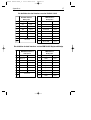
Environmental
Operating temperature
Humidity
0° C ~ 40° C
0% ~ 95% RH (non-condensing)
Safety
Laser safety
Electrical safety
Flammability rate
IEC 825-1 (1993) Class I, U.S. 21CFR1040 Class IIa
EN 60950 second edition
UL1950 (third edition), c-UL (according CSA22.2.950-95)
94V-0
EM Compatibility
Radio and TV interference
Harmonic current emissions
EM-immunity
ElectroStatic Discharge (ESD)
Radio frequency immunity
Electrical fast transient
EN 55022 Class B (1994), FCC part 15 Class A (1992)
EN 61000-3-2 (1995)
EN 50082-1 (1992) based on:
IEC 801-2 (1991)
IEC 801-3 (1984) / ENV 50140 (1993)
IEC 801-4 (1988)
C. TROUBLESHOOTING
This section contains information on solving problems you may encounter when
using the scanner. If troubles occur, take a moment to read the information in
this section. However, before referring to the diagnostic tips make sure that the
scanner is installed as described in Chapter 2 and that all cables are properly
connected.
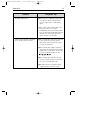
Problem
The scanner is on, but a bar code cannot
be read. The LED is red.
Diagnostic Tips
■ The scanner window is dirty. Clean the
■ scanner window as described in the
■ Maintenance section.
■ The presented bar code type is not
■ enabled. Select the bar code type with
■ the Configuration Guide.
■ The scanner is disabled by the host.
■ Refer to Section 1.6.
■ The bar code type presented to the
■ scanner is not supported by the Castor.