1
Castor manual deel_1
03-11-2000 10:06
12
Pagina 12
Installing the MaxiScan 2400 VS
The MaxiScan 2400 VS is designed to be installed horizontally (in the counter).
Instructions for installation are given in Section 2.1.
Due to many POS systems on the market, a large number of communication
cables is available. Make sure that you have the right cable to connect the
scanner to your POS or computer.
NOTES
■ The scanner and the host system must be switched off before starting the
installation of the scanner. By following this precaution you prevent any
electrical damage.
■ You are advised to install the scanner in an air circulated place out of direct
sunlight.
2.1 INSTALLING THE SCANNER IN COUNTER
Follow these steps to install the scanner in the counter:
1. Locate the optimum scanner position in the counter surface. Pay attention to
the product flow, distance to the counter edge and convenience for the
operator.
2. Choose one of the following mounting options to install the Maxiscan 2400
VS:
A. Using the bottom of the Maxiscan 2400 VS as support,
B. Using the horizontal mount (separately ordered).
A. Using the bottom of the Maxiscan 2400 VS as support
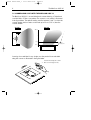
- Cut a hole in the counter surface following the illustration below.
- Design a supporting shelf following the illustration precisely.
SIDE VIEW
75 mm
206 mm
1. Hole
in Counter
241 mm
2. Supporting shelf