1
UDP MESSAGING
FORMATING MESSAGE
In the simplest system, the text/data to be displayed is sent to the Marquee. If nothing more than the
text/data is transmitted out the UDP message then the DEFAUL COLOR and DEFAULT DISPLAY
METHOD is used to display the text/data.
In other cases the user may wish to change the color of certain pieces of text/data or change the
manor the message is displayed on the Marquee. This changing of the default color and display
method is accomplished by adding what is called a MODIFIER.
A MODIFIER can be used to override the default color or display mode of the Marquee. The user
simple inserts the modifier in the message being sent and then the Marquee adjust it’s operation
ocordinly.A color modifier always start with an @ follow by a 1 character color code.
SIZE CHANGED MODIFIERS
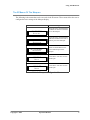
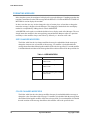
The follow table lists the size change modifiers that may be embedded with the message to
change the character size of text/data of the message. If a modifier is included within the
message then all text/data following this modifier will be the size specified. If a second modifier
is included then the text/data of the message that follows this modifier will be the specified size.
Table 1—SIZE MODIFIERS
MODIFIER
SIZE
@2
Text/data following this modifier
will be 2 inch.
@3
Text/data following this modifier
will be 3 inch.
@4
Text/data following this modifier
will be 4 inch.
COLOR CHANGED MODIFIERS
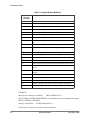
The follow table lists the color change modifiers that may be embedded with the message to
change the color of text/data of the message. If a modifier is included within the message then
all text/data following this modifier will be the color specified. If a second modifier is included
then the text/data of the message that follows this modifier will be the specified color.
42
Operation Manual
Copyright © 2006