1
B Continued Using a DIRECTV Coax Network
Configuring the DIRECTV Receivers for
Automatic Switching
To establish communications between the
TracVision system and each SWM-compatible
DIRECTV receiver for automatic satellite
switching, you need to set each receiver to a static
IP address and enter that address, along with the
receiver's location, in the TV-Hub's web interface.
Static IP Address Range WITHOUT an Onboard Network
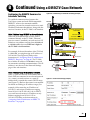
If the DECA Broadband Kit or Genie DVR is
connected directly to the TV-Hub's "Ethernet"
port (no router is installed), set each receiver's IP
address to any address ranging from 192.168.x.2
to 192.168.x.149, where x=1<the last 2 digits in
the TV-Hub’s serial number>.
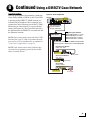
For example, if the serial number of the TV-Hub
is 140901484, you might assign an IP address of
192.168.184.2 (see Figure 66). Refer to the
instructions in “Assigning Static IP Addresses to
DIRECTV Receivers” on page 40. The TV-Hub
has a hidden IP address of 192.168.x.1 reserved
for automatic switching communications. This IP
address is not shown on the Network Settings
page of the web interface.
Static IP Address Range WITH an Onboard Network
If the TV-Hub and the DECA Broadband Kit or
Genie DVR are connected to an onboard network
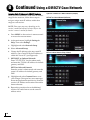
(i.e., router), set each receiver to a static IP
address that is outside the router's DHCP range
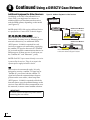
(see Figure 67). (Refer to the router's user manual
for details on finding its IP address range.) For
example, if the router has an IP address of
192.168.1.1 and assigns IP addresses ranging
from 192.168.1.100 to 192.168.1.149 via DHCP,
you could set each receiver's IP address to any
address ranging from 192.168.1.150 to
192.168.1.254. Refer to the instructions in
“Assigning Static IP Addresses to DIRECTV
Receivers” on page 40.
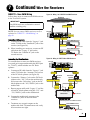
Figure 66: IP Addressing for Automatic Switching (Example)
TV-Hub
TV-Hub Serial Number
140901484
SWM Splitter
192.168.184.1
TV-Hub IP Address
for Automatic Switching
Receiver #1
Static IP Address: 192.168.184.2
AC Power
Receiver #2
Static IP Address: 192.168.184.3
AC Power
DC to RF
Adapter
DECA
Power
Supply
AC Power
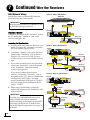
Figure 67: Router DHCP Settings (Example)
39