1
2
Continued Mount the Antenna
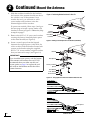
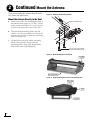
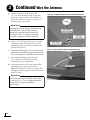
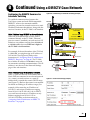
h. Secure each mounting bracket to the roof
rack with a retaining plate, two hex socket
screws, and two jam nuts (supplied in kit). Use
a 1.75" screw at the end of each bracket and
use a 2" screw at the base of each bracket (see
Figure 11). After securing all four brackets to
the crossbars, verify that all cushions (two
within each bracket) are pressed firmly
against the crossbars providing a solid grip.
i.
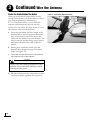
Attach a protective cover onto each clamp.
The covers simply snap into place at the
sides of the brackets (see Figure 12).
IMPORTANT!
Two different sizes of covers are provided in
the kitpack. Install the two larger covers on
the rear brackets and the smaller covers on the
front brackets.
Figure 11: Securing the Brackets to the Crossbars
Cover
2"
Hex Socket
Screws
1.75"
Mounting
Bracket
Roof Rack
Crossbar
Retaining
Plate
Jam Nuts
Figure 12: Attaching the Cover
7