1
CONTENTS
IMPORTANT NOTICES ...................................................................................................................... - 3 For USA .......................................................................................................................................... - 3 For Canada .................................................................................................................................... - 3 For Hand-held Product with RF Functions ................................................................................... - 3 For Product with Laser .................................................................................................................. - 4 Safety Precautions ........................................................................................................................ - 4 Care & Maintenance ..................................................................................................................... - 4 RELEASE NOTES .............................................................................................................................. - 5 INTRODUCTION .................................................................................................................................... 1
Inside the Package............................................................................................................................ 2
Accessories & Interface Options ...................................................................................................... 3
Product Highlights ............................................................................................................................. 4
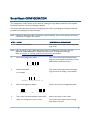
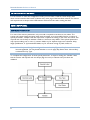
SmartScan CONFIGURATION............................................................................................................... 5
Enter Configuration Mode................................................................................................................. 6
Read a Setup Label........................................................................................................................... 6
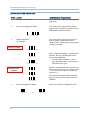
Configure Parameters.................................................................................................................. 6
List the Current Settings .............................................................................................................. 9
Restore Defaults .......................................................................................................................... 9
Exit Configuration Mode.................................................................................................................... 9
USING THE BARCODE SCANNER....................................................................................................... 11
1.1 Battery (1166/1266 Only) .......................................................................................................11
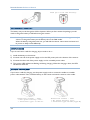
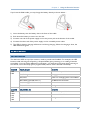
1.1.1 Installing the Battery........................................................................................................11
1.1.2 Charging the Battery ........................................................................................................12
1.2 Notifications.............................................................................................................................. 13
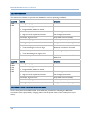
1.2.1 Scanner LED.....................................................................................................................13
1.2.2 Scanner Beep ................................................................................................................... 14
1.2.3 Cradle LEDs – Bluetooth Cradle 3666 ........................................................................... 14
1.2.4 Cradle LEDs – Bluetooth Cradle 3667 ........................................................................... 15
1.3 Read Redundancy ....................................................................................................................16
1.4 Scan Modes .............................................................................................................................. 16
1.4.1 Continuous Mode ............................................................................................................. 18
1.4.2 Test Mode .........................................................................................................................18
1.4.3 Repeat Mode ....................................................................................................................18
1.4.4 Momentary Mode ............................................................................................................. 18
1.4.5 Alternate Mode.................................................................................................................18
1.4.6 Laser Mode....................................................................................................................... 18
1.4.7 Auto Off Mode...................................................................................................................18
1.4.8 Auto Power Off Mode .......................................................................................................19
1.5 Auto-Sense Mode (1100 Only).................................................................................................19
1.6 Scanner Time-out ..................................................................................................................... 19