1
Chapter 6. ADVISION Setup Parameters
COMMAND
LINE OPTIONS
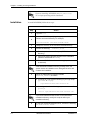
This information is provided only for reference purposes. The command line
options listed in Table 6-3 supersede all other options and are entered when
typing the ADVISION command.
Table 6-3. Command Line Options
Option
Definition
-error_file=<filename>
Informs ADVISION of where to output the error data, other than
.advision_errors.
-ovw
Required for HP OpenView integration; notifies the process to register with HP OpenView for ADTRAN object selections.
-server
Required for HP OpenView integration; notifies process to connect
with .advdb (ADVISION database server) to identify the configuration of objects for display.
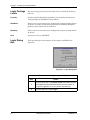
Database
Server (advdb)
The database base server, as a default, supports 10,000 ADTRAN objects including IP-addressable units, proxied units, and their option cards. If the
maximum supported value is reached, the daemon exits with an error message stating that maximum number of objects has been reached.
Changing the Number
of Supported Objects
To change the number of supported objects, edit the advdb startup command in the following file to include as a command line argument “-nxxx,”
where xxxx is the number of objects to be supported:
$ADVISION_INSTALL/advdb.lrf
Then, restart advdb by entering the following on the command line:
$OV_BIN/ovstart advdb
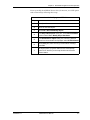
The command line argument can also be used to decrease the number of
supported objects and hence the amount of memory required by advdb.
This should only be done if the number of ADTRAN devices is known to be
small.
61950025L1-1
ADVISION User Manual
6-3