1
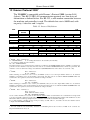
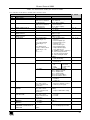
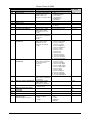
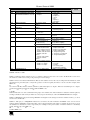
Kramer Electronics, Ltd.
USER MANUAL
Model:
VS-88HC
8x8 Home Entertainment Matrix Switcher
Contents
Contents
1
2
2.1
3
3.1
4
4.1
5
6
6.1
6.2
Introduction
Getting Started
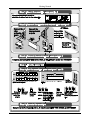
Quick Start
Overview
Terminology Used in this User Manual
Your VS-88HC 8x8 Home Entertainment Matrix Switcher
Using the IR Transmitter
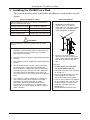
Installing the VS-88HC on a Rack
Connecting the VS-88HC
Connecting the VS-88HC Rear Panel
Connecting and switching the Audio Signals
1
1
1
3
4
4
9
10
11
11
13
6.2.1
Digital Audio Input Output Switching
14
6.3
Setting the Dipswitches
15
6.3.1
Setting the Self Address #
15
7
7.1
7.2
Controlling the VS-88HC
Controlling via RS-232 (for example, using a PC)
Controlling via RS-485
16
16
17
7.2.1
Set the Dipswitches
17
7.3
Controlling the VS-88HC via the ETHERNET Port
19
7.3.1
7.3.2
7.3.3
Connecting the ETHERNET Port directly to a PC (Crossover Cable)
Connecting the ETHERNET Port via a Network Hub (Straight-Through Cable)
Configuring the Ethernet Port
19
20
20
8
8.1
8.2
Operating the VS-88HC
Displaying Unit Characteristics
Choosing the Audio-Follow-Video or Breakaway Option
21
21
22
8.2.1
8.2.2
Setting the Audio-Follow-Video Option
Setting the Breakaway Option
22
22
8.3
8.4
Switching OUT-IN Combinations
Confirming Settings
22
23
8.4.1
8.4.2
Toggling between the At Once and Confirm Modes
Confirming a Switching Action
23
23
8.5
Storing/Recalling Input/Output Configurations
24
8.5.1
8.5.2
Storing an Input/Output Configuration
Recalling an Input/Output Configuration
24
24
8.6
8.7
9
9.1
Setting and Adjusting the Audio Delay Time
Locking the Front Panel
Flash Memory Upgrade
Switcher Flash Memory Upgrade
25
26
27
27
9.1.1
Downloading from the Internet
27
i
Contents
9.1.2
9.1.3
Connecting the PC to the RS-232 Port
Upgrading Firmware
27
28
9.2
Ethernet Flash Memory Upgrade
32
9.2.1
9.2.2
9.2.3
Downloading from the Internet
Connecting the PC to the RS-232 Port
Upgrading Firmware
32
33
33
10
11
11.1
11.2
12
Technical Specifications
Table of Hex Codes for Serial Communication
Hex Codes for Switching
Hex Codes for Setting the Audio Delay Time
Kramer Protocol 2000
34
35
35
36
38
Figures
Figure 1: VS-88HC 8x8 Home Entertainment Matrix Switcher Front Panel
Figure 2: VS-88HC 8x8 Home Entertainment Matrix Switcher Rear Panel
Figure 3: VS-88HC Underside View
Figure 4: Connecting the VS-88HC 8x8 Home Entertainment Matrix Switcher
Figure 5: Connecting the VS-88HC Digital Audio Signals
Figure 6: Dipswitch Settings
Figure 7: Connecting a PC without using a Null-modem Adapter
Figure 8: Cascading Individual Units in a Control Configuration via RS-485
Figure 9: Local Area Connection Properties Window
Figure 10: Internet Protocol (TCP/IP) Properties Window
Figure 11: Storing and Recalling using the Input / Output Buttons
Figure 12: Splash Screen
Figure 13: Atmel – Flip Window
Figure 14: Device Selection Window
Figure 15: Device Selection Window
Figure 16: Loading the Hex
Figure 17: RS-232 Window
Figure 18: Atmel – Flip Window (Connected)
Figure 19: Atmel – Flip Window (Operation Completed)
Figure 20: The KFR-Programmer Window
ii
5
7
9
12
14
15
16
18
19
20
24
28
28
29
29
30
30
31
31
33
KRAMER: SIMPLE CREATIVE TECHNOLOGY
Contents
Tables
Table 1: Terminology Used in this User Manual
Table 2: Front Panel VS-88HC 8x8 Home Entertainment Matrix Switcher Features
Table 3: Rear Panel VS-88HC 8x8 Home Entertainment Matrix Switcher Features
Table 4: VS-88HC 8x8 Underside Features
Table 5: Dipswitch Settings
Table 6: Self Address # Dipswitch Settings
Table 7: 7-segment Display Information
Table 8: Maximum Delay Time according to Sampling Rate
Table 9: DELAY Button Response
Table 10: Technical Specifications of the VS-88HC
Table 11: Hex Codes for Switching Video Channels via RS-232/RS-485
Table 12: Hex Codes for Switching Audio Channels via RS-232/RS-485
Table 13: Hex Codes for Setting the Audio Delay Time
Table 14: Hex Codes for Increasing the Audio Delay Time
Table 15: Protocol Definitions
Table 16: Instruction Codes for Protocol 2000
4
6
8
9
15
15
21
25
25
34
35
36
37
37
38
39
iii
Introduction
1
Introduction
Welcome to Kramer Electronics (since 1981): a world of unique, creative and
affordable solutions to the infinite range of problems that confront the video,
audio and presentation professional on a daily basis. In recent years, we have
redesigned and upgraded most of our line, making the best even better! Our
500-plus different models now appear in 8 Groups1, which are clearly defined
by function.
Congratulations on purchasing your VS-88HC 8x8 Home Entertainment
Matrix Switcher, which is ideal for the following typical applications:
Professional audio/video studios
Home cinema DVD applications
The package includes the following items:
VS-88HC 8x8 Home Entertainment Matrix Switcher
Power cord and Null-modem adapter
Windows®-based Kramer control software2
Windows®-based Ethernet Configuration Manager and Virtual Serial
Port Manager
Infra-red remote control transmitter (including the required battery and a
separate user manual3)
This user manual3
2
Getting Started
We recommend that you:
Unpack the equipment carefully and save the original box and packaging
materials for possible future shipment
Review the contents of this user manual
Use Kramer high performance high resolution cables4
2.1 Quick Start
This quick start chart summarizes the basic setup and operation steps.
1 GROUP 1: Distribution Amplifiers; GROUP 2: Video and Audio Switchers, Matrix Switchers and Controllers; GROUP 3:
Video, Audio, VGA/XGA Processors; GROUP 4: Interfaces and Sync Processors; GROUP 5: Twisted Pair Interfaces;
GROUP 6: Accessories and Rack Adapters; GROUP 7: Scan Converters and Scalers; and GROUP 8: Cables and Connectors
2 Downloadable from our Web site at http://www.kramerelectronics.com
3 Download up-to-date Kramer user manuals from our Web site: http://www.kramerelectronics.com
4 The complete list of Kramer cables is on our Web site at http://www.kramerelectronics.com
1
Getting Started
2
KRAMER: SIMPLE CREATIVE TECHNOLOGY
Overview
3
Overview
The Kramer VS-88HC is a matrix switcher designed for high quality home
entertainment. It is a true 8x8 matrix switcher for HDTV compatible,
component video (Y, Pb/Cb, Pr/Cr), digital audio (S/PDIF) and analog
unbalanced stereo audio signals, letting you simultaneously route any of the
eight inputs to any or all of the eight outputs. The component video, S/PDIF
and analog audio signals are on RCA connectors. The S/PDIF
INPUT/OUTPUT 2 is also available on optical (TOSlink) input/output
connectors.
The VS-88HC features:
A resolution of up to 1080p, fully loaded
An audio channel sampling rate of up to 192kHz, including
multi-channel audio (suitable for multi-channel applications,
like AC3)
A built-in digital audio delay line on OUTPUT 2, which corrects
lip sync errors, so that the audio delay will match the video delay
DC coupled video inputs and outputs
Audio-follow-video and breakaway options, as well as input
and output analog audio level control
Storing and recalling of 16 setups
A TAKE button for precise switch control
A LOCK button to prevent tampering with the front panel
A 7-segment display showing the status
Control the VS-88HC using the front panel buttons, or remotely via:
RS-232 and RS-485 serial commands transmitted by a touch
screen system, PC, or other serial controller
The Kramer infra-red remote control transmitter
The ETHERNET
An external remote IR Receiver (optional)
To achieve the best performance:
Connect only good quality connection cables, thus avoiding
interference, deterioration in signal quality due to poor
matching, and elevated noise levels (often associated with low
quality cables)
Avoid interference from neighboring electrical appliances that
may adversely influence signal quality and position your Kramer
VS-88HC away from moisture, excessive sunlight and dust
3
Your VS-88HC 8x8 Home Entertainment Matrix Switcher
3.1 Terminology Used in this User Manual
Table 1 defines some terms that are used in this user manual:
Table 1: Terminology Used in this User Manual
Term
Definition
802.3
The standard specification for ETHERNET that is maintained by the Institute of Electrical
and Electronics Engineers (IEEE).
Dynamic Host
Allows the network administrator to distribute IP addresses from a central point and
Configuration
automatically send a new IP address when an Ethernet point is plugged into a different
Protocol (DHCP)
network location
Gateway
A network position serving as an entry to another network. On the Internet, a node or
stopping point can be either a gateway node or a host (end-point) node.
IP Address
A 32-binary digit number that identifies each sender or receiver (within a network via a
particular server or workstation) of data (HTML pages or e-mails) that is sent in packets
across the Internet. Every device connected to an IP network must have a unique IP
address. This address is used to reference the specific unit.
Local Area Network Computers sharing a common communications line or wireless link, which often share a
(LAN)
server within a defined geographic area.
Media Access
A computer's unique hardware number (or address) in a LAN or other network. On an
Control (MAC)
Ethernet LAN, the (MAC) address is identical to the Ethernet address.
Address
Transmission
The basic communication language or protocol of the Internet that breaks the message
Control
into appropriately sized packets for the network, and can be used as a communications
Protocol/Internet
protocol in an intranet or an extranet.
Protocol (TCP/IP)
4
Your VS-88HC 8x8 Home Entertainment Matrix Switcher
Figure 1 and Table 2 define the VS-88HC 8x8 Home Entertainment Matrix
Switcher front panel:
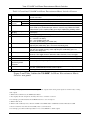
4
KRAMER: SIMPLE CREATIVE TECHNOLOGY
Your VS-88HC 8x8 Home Entertainment Matrix Switcher
Figure 1: VS-88HC 8x8 Home Entertainment Matrix Switcher Front Panel
5
Your VS-88HC 8x8 Home Entertainment Matrix Switcher
Table 2: Front Panel VS-88HC 8x8 Home Entertainment Matrix Switcher Features
#
Feature
1
IR Receiver
2
3
4
5
POWER Switch
SELECTOR OUTPUT
1
Buttons
INPUT
TAKE Button
6
7
8
STATUS 7-segment
Display
LOCK Button
DELAY Button
9
STO /+ Button
10 RCL /- Button
11 AFV Button
12 AUDIO Button
13 VIDEO Button
14 ANALOG AUDIO
OUTPUT LEVEL
Trimmers7
15 OFF Button
16 ALL Button
Function
The red LED is illuminated when receiving signals from the infra-red remote
control transmitter
Illuminated switch for turning the unit ON or OFF
Select the output to which the input is switched (from 1 to 8)
Select the input to switch to the output (from 1 to 8)
2
Pressing TAKE toggles the mode between the Confirm mode and the At
Once mode (user confirmation per action is unnecessary). When the TAKE
button flashes (in the confirm mode), pressing it implements pending actions
Displays the selected video INPUT switched to the OUTPUT (marked above
3
each input)
Disengages/engages the front panel switches
Press to toggle the output 2 DELAY feature between:
On – activates the delay
Set – sets the delay time and
Off – turns off the delay (see section 8.6)
4
Pressing STO, followed by an output button, stores the current setting ; when
adjusting the audio delay, press to increase the delay time
Pressing the RCL button and the corresponding OUTPUT key recalls a setup
from the non-volatile memory; when adjusting the audio delay, press to
decrease the delay time
When illuminated 5, the subsequent actions relate to the video and audio
channels. The audio channels follow the video channels. Press to toggle
When illuminated 6, the subsequent actions relate to audio. Press to toggle
When illuminated6, the subsequent actions relate to video. Press to toggle
Turn to adjust the output signal levels (from 1 to 8)
An OFF-OUTPUT combination disconnects that output from the inputs; an
OFF-ALL combination disconnects all the outputs
Pressing ALL followed by an INPUT button, connects that input to all outputs8
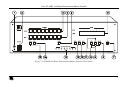
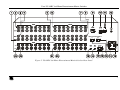
Figure 2 and Table 3 define the VS-88HC 8x8 Home Entertainment Matrix
Switcher rear panel:
1 The digital audio inputs are switched only to digital audio outputs and the analog audio inputs are switched only to analog
audio outputs
2 When in the Confirm mode, the TAKE button flashes
3 Also displays the audio sample rate, the delay time and so on. Refer to section 8.1
4 For example, press STO and then the OUTPUT button # 3 to store in setup # 3
5 When in AFV mode
6 When in audio breakaway mode, either the AUDIO or the VIDEO button is illuminated and the AFV button is OFF
7 Insert a screwdriver into the hole and carefully rotate it, to trim the level
8 For example, press ALL and then input button # 2 to connect INPUT 2 to all the outputs
6
KRAMER: SIMPLE CREATIVE TECHNOLOGY
Your VS-88HC 8x8 Home Entertainment Matrix Switcher
Figure 2: VS-88HC 8x8 Home Entertainment Matrix Switcher Rear Panel
7
Your VS-88HC 8x8 Home Entertainment Matrix Switcher
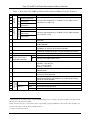
Table 3: Rear Panel VS-88HC 8x8 Home Entertainment Matrix Switcher Features
#
8
9
Function
Component
Component
5
6
7
INPUTS
4
Feature
S/PDIF
Y RCA Connectors
U/Cb/Pb RCA
Connectors
V/Cr/Pr RCA
Connectors
S/PDIF
Y RCA Connectors
U/Cb/Pb RCA
Connectors
V/Cr/Pr RCA
Connectors
RS-232 DB 9F Port
OUTPUTS
1
2
3
10 RS-485 Terminal Block Port
11 Setup Dipswitches
12 REMOTE IR 3.5mm Mini Jack
13 Power Connector with Fuse
14 OPTIONAL OPTICAL
OUT
IN
15 AUDIO ON CHAN. 2
TOSLINK Connector
16 ETH Factory Reset Button
17 ETHERNET Connector
18 ETH PROG Button
20
21
22
23
ANALOG
AUDIO
19 FLASH PROG Button
OUTPUTS
INPUTS
LEFT
RIGHT
LEFT
RIGHT
Connect to the digital audio source (from INPUT 1 to 8)
Connect to the component (Y, U/Cb/Pb, V/Cr/Pr) video source
(from INPUT 1 to INPUT 8)
Connect to the digital audio acceptor (from OUTPUT 1 to 8)
Connect to the component (Y, U/Cb/Pb, V/Cr/Pr) video acceptor
(from OUTPUT 1 to 8)
Connect to the PC or the Remote Controller via a null-modem
connection
Pins B (-) and A (+) are for RS-485; Pin G may be connected to the
shield (if required)
Dipswitches for setup of the unit (1, 2 and 3 are for setting the
Self Address #; and 4 is for RS 485 termination)
Connect to an external IR receiver unit for controlling the machine via
an IR remote controller (instead of using the front panel IR receiver)1
AC connector enabling power supply to the unit
Connect to the digital audio acceptor
Connect to the digital audio source
Press to reset to factory default definitions2:
IP number 192.168.1.39
Mask – 255.255.255.0
Gateway – 192.168.1.1
Connects to the PC or other Serial Controller through computer
networking LAN
Push in to upgrade ETH firmware (see section 9.2);
release for normal operation
3
Push in for “Program” to upgrade the switcher microcontroller to the
latest Kramer firmware (see section 9.1.2), or release (the factory
default) for normal operation
Connect to the left audio acceptor (from OUTPUT 1 to 8)
Connect to the right audio acceptor (from OUTPUT 1 to 8)
Connect to the left audio source
Connect to the right audio source
1 Optional. Can be used instead of the front panel (built-in) IR receiver to remotely control the VS-88HC (only if the internal
IR connection cable has been installed)
2 First disconnect the power cord and then connect it again while pressing the ETH Factory Reset button. The unit will power
up and load its memory with the factory default definitions
3 Using a screwdriver if required
8
KRAMER: SIMPLE CREATIVE TECHNOLOGY
Your VS-88HC 8x8 Home Entertainment Matrix Switcher
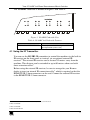
The VS-88HC underside is defined in Figure 3 and Table 4:
Figure 3: VS-88HC Underside View
Table 4: VS-88HC 8x8 Underside Features
Feature
Function
INPUT AUDIO LEVELS Trimmers Turn to adjust the RIGHT and/or the LEFT
1
input signal levels (from 1 to 8)
4.1 Using the IR Transmitter
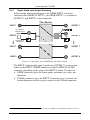
You can use the RC-IR2 IR transmitter to control the machine via the built-in
IR receiver on the front panel or, instead, via an optional external IR
receiver2. The external IR receiver can be located 15 meters away from the
machine. This distance can be extended to up to 60 meters when used with
three extension cables3.
Before using the external IR receiver, be sure to arrange for your Kramer
dealer to insert an internal IR connection cable4, which is required so that the
REMOTE IR 3.5mm connector can be used. Connect the external IR receiver
to the REMOTE IR 3.5mm connector.
1 Insert a screwdriver into the hole and carefully rotate it, to trim the level
2 P/N: 95-0104050
3 P/N: 95-0103050
4 P/N: 505-70434010-S
9
Installing the VS-88HC on a Rack
5
Installing the VS-88HC on a Rack
This section describes what to do before installing on a rack and how to rack
mount.
Before Installing on a Rack
Before installing on a rack, be sure that the environment is
within the recommended range:
How to Rack Mount
To rack-mount a machine:
1
Attach both ear brackets to the
machine. To do so, remove the
screws from each side of the machine
(5 on each side), and replace those
screws through the ear brackets.
2
Place the ears of the machine
against the rack rails, and insert the
proper screws (not provided) through
each of the four holes in the rack
ears.
Operating temperature range +5 to +45 Deg. Centigrade
Operating humidity range
5 to 65% RHL, non-condensing
Storage temperature range
-20 to +70 Deg. Centigrade
Storage humidity range
5 to 95% RHL, non-condensing
CAUTION!!
When installing on a 19" rack, avoid hazards by taking
care that:
1 It is located within the recommended environmental
conditions, as the operating ambient temperature of a
closed or multi unit rack assembly may exceed the
room ambient temperature.
2 Once rack mounted, enough air will still flow around the
machine.
3 The machine is placed straight in the correct horizontal
position.
4 You do not overload the circuit(s). When connecting
the machine to the supply circuit, overloading the
circuits might have a detrimental effect on overcurrent
protection and supply wiring. Refer to the appropriate
nameplate ratings for information. For example, for
fuse replacement, see the value printed on the product
label.
5 The machine is earthed (grounded) in a reliable way
and is connected only to an electricity socket with
grounding. Pay particular attention to supply
connections other than direct connections to the
branch circuit (for example, the use of power strips),
and that you use only the power cord that is supplied
with the machine.
10
Note that:
In some models, the front panel
may feature built-in rack ears
Detachable rack ears can be removed
for desktop use
Always mount the machine in the rack
before you attach any cables or
connect the machine to the power
If you are using a Kramer rack adapter
kit (for a machine that is not 19"), see
the Rack Adapters user manual for
installation instructions (you can
download it at:
http://www.kramerelectronics.com)
KRAMER: SIMPLE CREATIVE TECHNOLOGY
Connecting the VS-88HC
6
Connecting the VS-88HC
This section describes how to connect the VS-88HC. In particular, how to:
Connect the VS-88HC rear panel (see section 6.1)
Connect the audio signals (see section 6.2)
Set the dipswitches (see section 6.3)
6.1 Connecting the VS-88HC Rear Panel
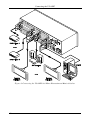
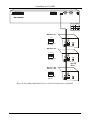
To connect the VS-88HC, as the example in Figure 4 illustrates, do the
following1:
1. Connect up to eight component video sources2 (for example, eight DVD
players) to the three INPUT RCA connectors Y, U/Cb/Pb and V/Cr/Pr
(from INPUT 1 to INPUT 8) and connect the corresponding digital
audio sources to the S/PDIF3 RCA connectors4 (see section 6.2).
2. Connect5 the eight sets of three OUTPUT RCA connectors Y, U/Cb/Pb
and V/Cr/Pr (from OUTPUT 1 to OUTPUT 8) to up to eight video
acceptors (for example, eight plasma displays), and connect the
corresponding S/PDIF6 RCA and/or ANALOG AUDIO OUTPUTS
LEFT and RIGHT RCA connectors to the eight digital and/or analog
audio acceptors7 respectively (see section 6.2)
3. Set the dipswitches (see section 6.3).
4. If required, connect a PC and/or controller to the RS-232 port (see
section 7.1) and/or the RS-485 port (see section 7.2) and/or the
ETHERNET port (see section 7.3).
5. Connect the power cord8 (not shown in Figure 4).
1 Switch OFF the power on each device before connecting it to your VS-88HC. After connecting your VS-88HC, switch on
its power and then switch on the power on each device. DO NOT push in the rear panel Flash Program “FLASH PROG”
button (see Table 3) and/or the ETH PROG switch. These are only used for upgrading to the latest Kramer firmware (see
section 9)
2 Although in this example eight inputs are connected, you can connect less inputs
3 Or alternatively, a TOSLINK connector on channel 2 (IN)
4 Simultaneously, you can also connect analog audio sources to the ANALOG AUDIO INPUTS LEFT and RIGHT RCA
connectors. The analog sources switch only to the analog outputs and the digital inputs switch only to the digital outputs
(including the optical input and output)
5 When less than eight outputs are required, connect only those outputs of the VS-88HC that are required, and leave the other
outputs unconnected
6 And/or a TOSLINK connector on channel 2 (OUT)
7 For example, an AV receiver or the audio connector of the plasma display
8 We recommend that you use only the power cord that is supplied with this machine
11
Connecting the VS-88HC
Figure 4: Connecting the VS-88HC 8x8 Home Entertainment Matrix Switcher
12
KRAMER: SIMPLE CREATIVE TECHNOLOGY
Connecting the VS-88HC
6.2 Connecting and switching the Audio Signals
The digital audio inputs and outputs (including the optical input and output)
and the analog audio inputs and outputs switch separately. There is no
conversion between the analog and the digital formats.
In other words, you can only switch a digital audio input to the digital audio
outputs, and similarly, you can only switch an analog audio input to the analog
audio outputs (but when switching audio signals1, the analog and digital signals
switch simultaneously). For example, when switching INPUT 1 to OUTPUT 7,
the analog INPUT 1 is switched to the analog OUTPUT 7 and simultaneously,
the digital INPUT 1 is switched to the digital OUTPUT 7.
The VS-88HC 8x8 Home Entertainment Matrix Switcher inputs and outputs
audio signals in the following formats:
Eight ANALOG AUDIO LEFT and RIGHT inputs that can be outputted
to eight ANALOG AUDIO LEFT and RIGHT outputs on RCA
connectors (from INPUT 1 to INPUT 8 and from OUTPUT 1 to
OUTPUT 8, respectively)
Eight S/PDIF inputs that can be outputted to eight S/PDIF outputs on
RCA connectors (from INPUT 1 to INPUT 8, and from OUTPUT 1 to
OUTPUT 8, respectively)
One TOSLINK input and one TOSLINK output for INPUT 2 and
OUTPUT 2 (digital audio only)
1 In the AFV and AUDIO modes (see section 8.2)
13
Connecting the VS-88HC
6.2.1
Digital Audio Input Output Switching
In the example illustrated in Figure 5, the S/PDIF INPUT 1 source is
switched to the S/PDIF OUTPUT 21, the S/PDIF INPUT 7 is switched to
OUTPUT 8, and INPUT 8 is not connected.
INPUT 1
OUTPUT 1
S/PDIF
S/PDIF
The button is
not illuminated
INPUT 2
INPUT 2
S/PDIF
The button is
illuminated
TOSLINK
S/PDIF
OUTPUT 2
TOSLINK
INPUT 7
OUTPUT 7
S/PDIF
INPUT 8
OUTPUT 8
S/PDIF
S/PDIF
Figure 5: Connecting the VS-88HC Digital Audio Signals
The INPUT 2 digital audio signal (switched to OUTPUT 7) can be routed
either via the INPUT 2 S/PDIF connector or the IN OPTICAL AUDIO
connector, depending on the setup of the INPUT 2 button. To select the:
S/PDIF connector, press the button gently and make sure it does not
illuminate
TOSlink connector, press the INPUT 2 button for over 2 seconds; the
button illuminates and the signal is routed via the TOSlink connector
1 The digital audio signal on channel 2 is outputted simultaneously to the S/PDIF and the TOSLINK OUTPUT 2 connectors
14
KRAMER: SIMPLE CREATIVE TECHNOLOGY
Connecting the VS-88HC
6.3 Setting the Dipswitches
Figure 6 and Table 5 define the factory default dipswitches:
OFF
1 2 3 4
ON
Figure 6: Dipswitch Settings
Table 5: Dipswitch Settings
DIPS
6.3.1
Function
Description
1, 2, 3
Self Address
Set the MACHINE # (see section 6.3.1)
4
RS-485 Term
ON for RS-485 Line Termination with 120
OFF for no RS-485 Line Termination
Setting the Self Address #
To control a unit via RS-232 or RS-485, each unit has to be identified via its
unique Self Address #. Set the Self Address #1 on a VS-88HC unit via
dipswitches 1, 2 and 3, according to Table 6.
Table 6: Self Address # Dipswitch Settings
Self
Address #
DIPSWITCH
1
2
3
1
OFF
OFF
OFF
2
OFF
OFF
ON
3
OFF
ON
OFF
4
5
OFF
ON
ON
OFF
ON
OFF
6
ON
OFF
ON
7
ON
ON
OFF
8
ON
ON
ON
When connecting more than one VS-88HC unit, set a different self address #
on each unit. You do not have to number the units in the sequence order in
which they connect to the PC, but it is essential that each unit is assigned a
unique machine number.
1 When using a single unit, set the unit to Self Address # 1
15
Controlling the VS-88HC
7
Controlling the VS-88HC
You can control the VS-88HC via:
RS-232 (see section 7.1)
RS-485 (see section 7.2)
The Ethernet (see section 7.3)
The IR remote control transmitter1
7.1 Controlling via RS-232 (for example, using a PC)
To connect a PC2 to the VS-88HC unit, using the Null-modem adapter
provided with the machine (recommended):
Connect the RS-232 DB9 rear panel port on the Master VS-88HC unit to
the Null-modem adapter and connect the Null-modem adapter with a
9-wire flat cable to the RS-232 DB9 port on your PC
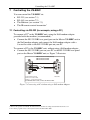
To connect a PC to the VS-88HC unit, without using a Null-modem adapter:
Connect the RS-232 DB9 port on your PC to the RS-232 DB9 rear panel
port on the Master VS-88HC unit, as Figure 7 illustrates
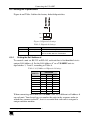
PIN 5 Connected to PIN 5 (Ground)
PIN 3 Connected to PIN 2
PIN 2 Connected to PIN 3
Female DB9 (From PC)
Male DB9
PIN 4 Connected to PIN 6
PINS 8, 7, 1 Connected together
If a Shielded cable is used, connect the shield to PIN 5
Figure 7: Connecting a PC without using a Null-modem Adapter
1 Refer to the separate user manual. Download it from our Web site at http://www.kramerelectronics.com
2 Or a master program remote control system such as the Kramer RC-3000
16
KRAMER: SIMPLE CREATIVE TECHNOLOGY
Controlling the VS-88HC
7.2 Controlling via RS-485
You can control up to eight VS-88HC units via an RS-485 controller, for
example, a PC (equipped with an RS-485 interface) or a Master
Programmable Remote Control system such as the Kramer RC-3000.
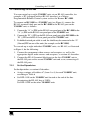
To connect an RC-3000 to a VS-88HC unit (see Figure 8), connect the
RS-485 terminal block port on the RC-3000 to the RS-485 port on the
VS-88HC unit, as follows:
1. Connect the “A” (+) PIN on the RS-485 rear panel port of the RC-3000 to the
“A” (+) PIN on the RS-485 rear panel port of the VS-88HC unit
2. Connect the “B” (-) PIN on the RS-485 rear panel port of the RC-3000 to the
“B” (-) PIN on the RS-485 rear panel port of the VS-88HC unit
3. If shielded twisted pair cable is used, the shield may be connected to the “G”
(Ground) PIN on one of the units (for example, on the RC-3000)
To cascade up to eight individual VS-88HC units, via RS-485, as illustrated
in Figure 8, do the following:
1. Connect the component video sources and acceptors, as well as the
appropriate digital audio sources and acceptors, as section 6.1 describes.
2. Connect the RS-485 terminal block port on the first VS-88HC unit to
the RS-485 port on the second VS-88HC unit and so on, connecting all
the RS-485 ports.
7.2.1
Set the Dipswitches
Set the dipswitches, as section 6.3 describes:
Assign a unique self address #1 (from 1 to 8) for each VS-88HC unit,
according to Table 6
Set DIP 4 ON on the VS-88HC unit located at the end of the line
(terminating the RS-485 line at 120 ).
Set DIP 4 OFF on the other VS-88HC units
1 In any order
17
Controlling the VS-88HC
KEYBOARD EXTENSION
OUT
IN
1 2 3 4 5 6 7 8 9 10 11 12 13 14 15 16
REMOTE CONTACT
1 2 3 4 5
6
7 8 G
RS-485
RS-232 IN
12 VDC
RS-232 OUT
RS-485 PINOUT
_
G
+
B
A
Machine # 1
1234
RS-485 Term
DIP OFF
Machine # 2
1234
RS-485 Term
DIP OFF
Up to 8
Units
1234
RS-485 Term
DIP ON
Figure 8: Cascading Individual Units in a Control Configuration via RS-485
18
KRAMER: SIMPLE CREATIVE TECHNOLOGY
Controlling the VS-88HC
7.3 Controlling the VS-88HC via the ETHERNET Port
You can connect the VS-88HC via the Ethernet, using a crossover cable (see
section 7.3.1) for direct connection to the PC or a straight through cable (see
section 7.3.2) for connection via a network hub or network router.
7.3.1
Connecting the ETHERNET Port directly to a PC (Crossover
Cable)
You can connect the Ethernet port of the VS-88HC to the Ethernet port on
your PC, via a crossover cable with RJ-45 connectors.
This type of connection is recommended for identification of the factory default
IP Address of the VS-88HC during the initial configuration
After connecting the Ethernet port, configure your PC as follows:
1. Right-click the My Network Places icon on your desktop.
2. Select Properties.
3. Right-click Local Area Connection Properties.
4. Select Properties.
The Local Area Connection Properties window appears.
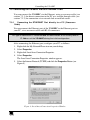
5. Select the Internet Protocol (TCP/IP) and click the Properties Button (see
Figure 9).
Figure 9: Local Area Connection Properties Window
19
Controlling the VS-88HC
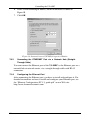
6. Select Use the following IP address, and fill in the details as shown in
Figure 10.
7. Click OK.
Figure 10: Internet Protocol (TCP/IP) Properties Window
7.3.2
Connecting the ETHERNET Port via a Network Hub (StraightThrough Cable)
You can connect the Ethernet port of the VS-88HC to the Ethernet port on a
network hub or network router, via a straight-through cable with RJ-45
connectors.
7.3.3
Configuring the Ethernet Port
After connecting the Ethernet port, you have to install and configure it. For
detailed instructions on how to install and configure your Ethernet port, see
the “Ethernet Configuration (FC-11) guide.pdf” on our Web site:
http://www.kramerelectronics.com
20
KRAMER: SIMPLE CREATIVE TECHNOLOGY
Operating the VS-88HC
8
Operating the VS-88HC
You can operate your VS-88HC via:
The front panel buttons
RS-232/RS-485 serial commands transmitted by a touch screen system,
PC, or other serial controller
Infra-red remote control transmitter
This section describes:
The 7-segment display
How to use the front panel buttons
How to set and adjust the audio delay time
8.1 Displaying Unit Characteristics
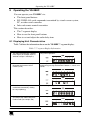
Table 7 defines the information shown on the VS-88HC 7-segment display:
Table 7: 7-segment Display Information
Displayed Information
When:
The video and audio inputs switched
to the outputs (for example, input 2 is
switched to output 1 and output 3)
During normal operation:
The machine name immediately
followed by the firmware version
number (1.0 01)
Immediately after switching on the power; and when
simultaneously pressing the three INPUT buttons 1, 2 and 3, for 3
seconds:
The audio and video setup to be
recalled after momentarily showing
the setup # (blinking)
When recalling a setup:
The digital audio sampling rate in kHz
1
(for example, 96) and the delay time
in milliseconds (for example, 296)
When setting the audio delay time:
1 To set the delay time, see section 8.6
21
Operating the VS-88HC
8.2 Choosing the Audio-Follow-Video or Breakaway Option
You can switch the digital audio (S/PDIF) signals and the analog audio
signals in one of two ways, either:
Audio-follow-video (AFV), in which all operations and status indicators
relate to both the video and the audio channels1; or
Breakaway, in which video and audio channels switch independently
8.2.1
Setting the Audio-Follow-Video Option
To set the audio-follow-video (AFV) option:
1. Press the AFV button.
The AFV button illuminates. The audio will follow the video2.
2. Press the TAKE button to confirm the modification (reconfiguring
the audio according to the video).
8.2.2
Setting the Breakaway Option
To set the breakaway option, press either the AUDIO (for audio control only)
or the VIDEO (for video control only) button:
If the AUDIO button illuminates, all switching operations relate to the
audio section.
If the VIDEO button illuminates, all switching operations relate to the
video section
8.3 Switching OUT-IN Combinations
To switch a video/audio input to a video/audio output, do the following:
1. Press an OUTPUT button (from 1 to 8 or ALL).
The corresponding 7-segment display blinks.
2. Press an INPUT button (from 1 to 8 or OFF).
The selected input switches to the selected output.
For example, press the ALL button and then the INPUT button # 3 to connect
input # 3 to all the outputs.
1 Audio and video connections are the same
2 If the audio input-output status does not correspond to the video input-output status, the 7-segment display shows the audio
status, the audio button illuminates and the take button blinks. The machine enters the Confirm mode
22
KRAMER: SIMPLE CREATIVE TECHNOLOGY
Operating the VS-88HC
8.4 Confirming Settings
You can choose to work in the At Once or the Confirm mode.
In the At Once mode (TAKE button is not illuminated):
Pressing an OUT-IN combination implements the switch immediately
You save time as execution is immediate and actions require no user
confirmation
No protection is offered to correct an erroneous action
In the Confirm mode (TAKE button is lit):
You can key-in an action and then confirm it by pressing the TAKE
button
Every action requires user confirmation, protecting against erroneous
switching
Execution is delayed until the user confirms the action1 by pressing the
TAKE button
8.4.1
Toggling between the At Once and Confirm Modes
To toggle from the At Once to the Confirm mode, do the following:
1. Press the TAKE button to toggle between the At Once mode (in which the
TAKE button is not lit) and the Confirm mode (in which the TAKE button
illuminates).
Actions now require user confirmation and the TAKE button illuminates.
2. Press the illuminated TAKE button to toggle from the Confirm mode back to
the At Once mode.
Actions no longer require user confirmation and the TAKE button no longer
illuminates.
8.4.2
Confirming a Switching Action
To confirm a switching action (in the Confirm mode), do the following:
1. Press an OUT-IN combination.
The corresponding 7-segment display blinks. The TAKE button also blinks.
2. Press the blinking TAKE button to confirm the action.
The corresponding 7-segment display no longer blinks. The TAKE button
illuminates.
1 Failure to press the TAKE button within one minute (the Timeout) will abort the action
23
Operating the VS-88HC
8.5 Storing/Recalling Input/Output Configurations
You can store and recall1 up to 16 input/output configurations using the eight
OUTPUT buttons and the eight INPUT buttons, as Figure 11 illustrates:
Figure 11: Storing and Recalling using the Input / Output Buttons
8.5.1
Storing an Input/Output Configuration
To store the current status in memory, do the following:
1. Press the STO/+ button.
The STO/+ button blinks.
2. Press one of the 16 INPUT/OUTPUT buttons. Press the blinking
TAKE button to confirm the action.
The memory stores the data at that reference.
8.5.2
Recalling an Input/Output Configuration
To recall an input/output configuration, do the following:
1. Press the RCL/- button.
The RCL/- button blinks.
2. Press the appropriate INPUT / OUTPUT button (the button #
corresponding to the setup #). That setup configuration will blink in
the Audio and Video 7-segment display and the TAKE button, and
will only be implemented after pressing the TAKE button.
The memory recalls the stored data from that reference.
Tip: If you cannot remember which of the 16 input/output-configurations is the one
that you want, set the VS-88HC to the Confirm mode and manually scan all the
input/output configurations until you locate it.
1 The 16 input/output configurations (or setups) also include the relevant audio-follow-video / breakaway option definition
24
KRAMER: SIMPLE CREATIVE TECHNOLOGY
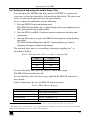
Operating the VS-88HC
8.6 Setting and Adjusting the Audio Delay Time
You can adjust the S/PDIF audio delay time for OUTPUT 2 to correct lip
sync errors so that the audio delay will match the video delay. The delay time
can be set and stored separately for each input channel.
To set or adjust the audio delay, do the following:
1. Press the DELAY button on the front panel.
The DELAY button blinks; the 7-segment display shows the sampling rate (in
kHz) and the delay time in milliseconds.
2. Press the STO/+ and RCL/- buttons to increase or decrease the delay time1
respectively.
3. Once the delay time is set, press the DELAY button again to accept the delay
time value.
The DELAY button illuminates and the 7-segment display goes back to
displaying the inputs switched to the outputs.
The maximal delay time is set according to the input sampling rate2, as
described in Table 8:
Table 8: Maximum Delay Time according to Sampling Rate
Sampling Rate
[kHz]
Maximum Delay Time
[msec]
32
999
44
740
48
680
96
340
To cancel the delay time, press the DELAY button once again.
The DELAY button light turns off.
To reset the delay time to 0 (zero), press and hold the DELAY button for a
few seconds.
Table 9 summarizes the way the DELAY button responds:
Table 9: DELAY Button Response
When the DELAY button:
Blinks
Illuminates
Then:
You can view the sampling rate and the delay time
value, or adjust the delay time
OUTPUT 2 audio delay is on
Is not illuminated
OUTPUT 2 audio delay is off
Is pressed for a few seconds
Delay time resets to 0 (zero)
1 Press and hold the STO/+ or RCL/- buttons for a faster increase or decrease of the audio delay time respectively
2 The sampling rate is specified by the source signal and cannot be changed by the switcher. The switcher automatically
adjusts the maximum delay time value according to the sampling rate
25
Operating the VS-88HC
8.7 Locking the Front Panel
To prevent changing the settings accidentally or tampering with the unit via
the front panel buttons, lock1 your VS-88HC. Unlocking releases the
protection mechanism.
To lock the VS-88HC:
Press the LOCK button
The LOCK button blinks. After pressing the LOCK button a second time,
the front panel is locked. Pressing any other buttons will have no effect
To unlock the VS-88HC:
Press the illuminated LOCK button
The LOCK button blinks
When pressing it a second time, the LOCK button no longer illuminates
and the front panel unlocks
1 Nevertheless, even though the front panel is locked you can still operate via Ethernet, RS-232 and RS-485, as well as via the
Kramer IR Remote Control Transmitter
26
KRAMER: SIMPLE CREATIVE TECHNOLOGY
Flash Memory Upgrade
9
Flash Memory Upgrade
The VS-88HC lets you upgrade both microcontrollers:
The Switcher Microcontroller (see section 9.1)
The Ethernet Microcontroller (see section 9.2)
9.1 Switcher Flash Memory Upgrade
The VS-88HC firmware is located in FLASH memory, which lets you
upgrade1 to the latest Kramer firmware version in minutes! The process
involves:
Downloading from the Internet (see section 9.1.1)
Connecting the PC to the RS-232 port (see section 9.1.2)
Upgrading Firmware (see section 9.1.3)
9.1.1
Downloading from the Internet
You can download the up-to-date file2 from the Internet. To do so:
1. Go to our Web site at www.kramerelectronics.com and download the file:
“FLIP_VS88HC.zip” from the Technical Support section.
2. Extract the file: “FLIP_VS88HC.zip” to a folder (for example, C:\Program
Files\Kramer Flash).
3. Create a shortcut on your desktop to the file: “FLIP.EXE”.
9.1.2
Connecting the PC to the RS-232 Port
Before installing the latest Kramer firmware version on a VS-88HC unit, do
the following:
1. Connect the RS-232 DB9 rear panel port according to section 7.1.
2. Push the rear panel FLASH PROG button3 to Program using a small
screwdriver.
3. Switch the unit ON.
Note: this sequence is critical – first push the FLASH PROG button and then turn
on the unit
1 Upgrade should be carried out by skilled technical personnel. Failure to upgrade correctly will result in the malfunction of
the machine
2 The files indicated in this section are given as an example only. File names are liable to change from time to time
3 Item 19 in Table 3
27
Flash Memory Upgrade
9.1.3
Upgrading Firmware
Follow these steps to upgrade the firmware:
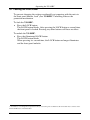
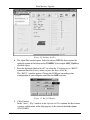
1. Double click the desktop icon: “Shortcut to FLIP.EXE”.
The Splash screen appears as follows:
Figure 12: Splash Screen
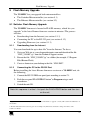
2. After a few seconds, the Splash screen is replaced by the “Atmel – Flip”
window:
Figure 13: Atmel – Flip Window
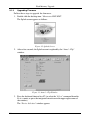
3. Press the keyboard shortcut key F2 (or select the “Select” command from the
Device menu, or press the integrated circuit icon in the upper right corner of
the window).
The “Device Selection” window appears:
28
KRAMER: SIMPLE CREATIVE TECHNOLOGY
Flash Memory Upgrade
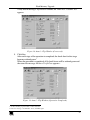
Figure 14: Device Selection Window
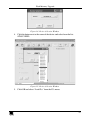
4. Click the button next to the name of the device and select from the list:
AT89C51RD2:
AT89C51RD2
T89C51RD2
Figure 15: Device Selection Window
5. Click OK and select “Load Hex” from the File menu.
29
Flash Memory Upgrade
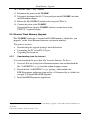
Figure 16: Loading the Hex
6. The Open File window opens. Select the correct HEX file that contains the
updated version of the firmware for VS-88HC (for example 88M_V1p2.hex)
and click Open.
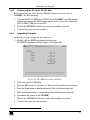
7. Press the keyboard shortcut key F3 (or select the “Communication / RS232”
command from the Settings menu, or press the keys: Alt SCR).
The “RS232” window appears. Change the COM port according to the
configuration of your computer and select the 9600 baud rate:
Figure 17: RS-232 Window
8. Click Connect.
In the “Atmel – Flip” window, in the Operations Flow column, the Run button
is active, and the name of the chip appears as the name of the third column:
AT89C51RD2.
30
KRAMER: SIMPLE CREATIVE TECHNOLOGY
Flash Memory Upgrade
Verify that in the Buffer Information column, the “HEX File: VS88HC.hex”
appears.
VS88HC.hex
Figure 18: Atmel – Flip Window (Connected)
9. Click Run.
After each stage of the operation is completed, the check-box for that stage
becomes colored green1.
When the operation is completed, all 4 check-boxes will be colored green and
the status bar message: Memory Verify Pass appears2:
VS88HC.hex
Figure 19: Atmel – Flip Window (Operation Completed)
1 See also the blue progress indicator on the status bar
2 If an error message: “Not Finished” shows, click Run again
31
Flash Memory Upgrade
10. Close the “Atmel – Flip” window.
11. Disconnect the power on the VS-88HC.
12. If required, disconnect the RS-232 rear panel port on the VS-88HC unit from
the Null-modem adapter.
13. Release the FLASH PROG button on the rear panel (Table 3).
14. Connect the power to the VS-88HC.
Upon initialization, the new VS-88HC software version shows in the
STATUS 7-segment Display.
9.2 Ethernet Flash Memory Upgrade
The VS-88HC firmware is located in FLASH memory, which lets you
upgrade1 to the latest Kramer firmware version in minutes!
The process involves:
Downloading the upgrade package from the Internet
Connecting the PC to the RS-232 port
Upgrading the firmware
9.2.1
Downloading from the Internet
You can download the up-to-date file2 from the Internet. To do so:
1. Go to our Web site at http://www.Kramerelectronics.com and download the
file: “SetKFRETH11-xx.zip” from the technical support section.
2. Extract the file “SetKFRETH11-xx.zip” package, which includes the
KFR-Programmer application setup and the .s19 firmware file, to a folder (for
example, C:\Program Files\KFR Upgrade).
3. Install the KFR-Programmer Application.
1 Upgrade should be carried out by skilled technical personnel. Failure to upgrade correctly will result in the malfunction of
the machine
2 File names are liable to change from time to time
32
KRAMER: SIMPLE CREATIVE TECHNOLOGY
Flash Memory Upgrade
9.2.2
Connecting the PC to the RS-232 Port
Before installing the latest Kramer Ethernet firmware version on the
VS-88HC, do the following:
1. Connect the RS-232 DB9 port (COM 1) on the VS-88HC to a Null-modem
adapter and connect the Null-modem adapter with a 9-wire flat cable to the
RS-232 DB9 COM port on your PC.
2. Push in the ETH PROG button, located on the machine rear side.
3. Connect the power on your machine.
9.2.3
Upgrading Firmware
Follow these steps to upgrade the firmware:
1. Double click the KFR-Programmer desktop icon.
The KFR-Programmer window appears (see Figure 20).
Figure 20: The KFR-Programmer Window
2. Select the required COM Port1.
3. Press the File button to select the .s19 firmware file included in the package.
4. Press the Send button to download the file. The Send button lights red.
5. Wait until downloading is completed and the red Send button turns off.
6. Disconnect the power on the VS-88HC.
7. Release the ETH PROG button, located on the machine rear panel.
8. Connect the power on your machine.
1 To which the VS-88HC is connected on your PC
33
Technical Specifications
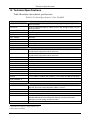
10 Technical Specifications
Table 10 includes the technical specifications:
1
Table 10: Technical Specifications of the VS-88HC
Video Components
INPUTS:
OUTPUTS:
MAX. OUTPUT LEVEL:
RESOLUTION:
DIFF. GAIN:
DIFF. PHASE:
K-FACTOR:
S/N RATIO:
CROSSTALK (all hostile):
COUPLING:
Audio Components
INPUTS:
OUTPUTS:
MAX. OUTPUT LEVEL:
BANDWIDTH:
S/N RATIO:
CROSSTALK (all hostile):
COUPLING:
AUDIO THD + NOISE:
AUDIO 2nd HARMONIC:
S/PDIF SAMPLE RATE:
RESOLUTION:
JITTER:
MAXIMUM DELAY TIME
FOR CHANNEL 2:
DELAY RESOLUTION:
General
CONTROLS:
POWER SOURCE:
DIMENSIONS:
WEIGHT:
ACCESSORIES:
OPTIONS
8 sets of component video (Y, Pb/Cb, Pr/Cr) 1Vpp, 0.7Vpp, 0.7Vpp / 75
RCA connectors
on
8 sets of component video (Y, Pb/Cb, Pr/Cr) 1Vpp, 0.7Vpp, 0.7Vpp / 75
RCA connectors
2.8Vpp
Up to 1080p, fully loaded
0.11%
0.82 Deg
<0.05%
75.5dB @5MHz
-49.5dB @5MHz
DC
on
8 S/PDIF digital audio, on RCA connectors; 1 TOSLINK optical
8 audio stereo, 5Vpp/150 on RCA connectors
8 S/PDIF digital audio, on RCA connectors; 1 TOSLINK optical
8 audio stereo, 5Vpp/150 on RCA connectors
21Vpp
>100kHz
83dB
-79dB @20MHz
Input: AC; output: AC
0.055% @1kHz
0.008% @1kHz
Up to 192kHz
Up to 24 bits
<1.5ns (50Hz to 100kHz) without delay, <3.5ns (50Hz to 100kHz) with delay
32kHz – 999ms; 44.1kHz – 740ms; 48kHz – 680ms; 96kHz – 340ms
1ms
Analog audio level: -50dB to 48dB; front panel buttons, Ethernet, RS-232,
RS-485, IR remote control, dipswitch address selector
100-264 VAC, 50/60 Hz; 14mA
19-inch (W), 7-inch (D) 3U (H) rack-mountable
4.9kg (10.8lbs.) approx.
Power cord, Null modem adapter, Windows®-based Kramer control software,
Windows®-based Ethernet Configuration Manager and Virtual Serial Port
Manager, Infra-red remote control transmitter
External IR receiver unit2
1 Specifications are subject to change without notice
2 Kramer P/N: 95-0103050
34
KRAMER: SIMPLE CREATIVE TECHNOLOGY
Table of Hex Codes for Serial Communication
11 Table of Hex Codes for Serial Communication
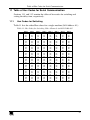
Sections 11.1 and 11.2 contain the tables of hex codes for switching and
setting the delay time, respectively.
11.1
Hex Codes for Switching
Table 11 lists the video Hex values for a single machine (Self Address # 1):
Table 11: Hex Codes for Switching Video Channels via RS-232/RS-485
OUT 1
OUT 2
OUT 3
OUT 4
OUT 5
OUT 6
OUT 7
OUT 8
IN 1
IN 2
IN 3
IN 4
IN 5
IN 6
IN
IN 8
35
Table of Hex Codes for Serial Communication
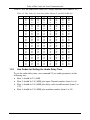
Table 12 lists the audio Hex values for a single machine (Self Address # 1):
Table 12: Hex Codes for Switching Audio Channels via RS-232/RS-485
11.2
IN 1
OUT 1
02
OUT 2
02
OUT 3
02
OUT 4
02
OUT 5
02
OUT 6
02
OUT 7
02
OUT 8
02
IN 2
02
02
02
02
02
02
02
02
IN 3
02
02
02
02
02
02
02
02
IN 4
02
02
02
02
02
02
02
02
IN 5
02
02
02
02
02
02
02
02
IN 6
02
02
02
02
02
02
02
02
IN
02
02
02
02
02
02
02
02
IN 8
02
02
02
02
02
02
02
02
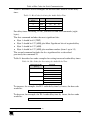
Hex Codes for Setting the Audio Delay Time
To set the audio delay time, use command 22 (set audio parameter) in the
following way:
Byte 1 should be 22 (16H)
Byte 2 should be 128 (80H) plus input Channel number (from 1 to 8)
Byte 3 should be 128 (80H) plus delay value in milliseconds (from 1 to
127)
Byte 4 should be 128 (80H) plus machine number (from 1 to 15)
36
KRAMER: SIMPLE CREATIVE TECHNOLOGY
Table of Hex Codes for Serial Communication
Table 13 describes several examples for the hex codes used to set the delay
time:
Table 13: Hex Codes for Setting the Audio Delay Time
Delay Time
[msec]
For
0
5
64
127
IN 1
IN 2
IN 3
IN 4
Command
I6
I6
I6
I6
81
82
83
84
80
85
84
FF
81
81
81
81
For delay times exceeding 127ms, you need to send two commands (eight
bytes).
The first command includes the most significant bits:
Byte 1 should be 63 (7FH1)
Byte 2 should be 127 (80H) plus Most Significant bits of required delay
Byte 3 should be 127 (80H)
Byte 4 should be 127 (80H) plus machine number (from 1 up to 15)
The second command includes the less significant bits as described
previously for command 22.
Table 14 describes hex code examples for setting increased audio delay times:
Table 14: Hex Codes for Increasing the Audio Delay Time
Delay Time for IN 1
[msec]
128
130
200
680
Command
7F
I6
7F
I6
7F
I6
7F
I6
80
81
80
81
80
81
80
81
81
80
81
82
81
C8
85
A8
81
81
81
81
81
81
81
81
To increase, for example, the IN 1 audio delay time by 1msec, the hex code
would be:
I8
82
8C
81
To decrease, for example, the IN 4 audio delay time by 1msec, the hex code
would be:
I8
84
8D
81
1 According to instruction 63 in the protocol (see section 12)
37
Kramer Protocol 2000
12 Kramer Protocol 20001
The VS-88HC is compatible with Kramer’s Protocol 2000 (version 0.48)
(below). This RS-232/RS-485 communication protocol uses four bytes of
information as defined below. For RS-232, a null-modem connection between
the machine and controller is used. The default data rate is 9600 baud, with
no parity, 8 data bits and 1 stop bit.
Table 15: Protocol Definitions
MSB
0
7
LSB
DESTINATION
D
6
INSTRUCTION
N5
5
N4
4
N3
3
N2
2
N1
1
N0
0
I6
6
I5
5
I4
4
INPUT
I3
3
I2
2
I1
1
I0
0
O6
6
O5
5
O4
4
OUTPUT
O3
3
O2
2
O1
1
O0
0
OVR
6
X
5
M4
4
MACHINE NUMBER
M2
2
M1
1
M0
0
1st byte
1
7
2nd byte
1
7
3rd byte
1
7
M3
3
4th byte
1st BYTE:
Bit 7 – Defined as 0.
D – “ DESTINATION” :
0 - for sending information to the switchers (from the PC);
1 - for sending to the PC (from the switcher).
N5…N0 – “ INSTRUCTION”
The function that is to be performed by the switcher(s) is defined by the INSTRUCTION (6 bits). Similarly, if a function is
performed via the machine’s keyboard, then these bits are set with the INSTRUCTION NO., which was performed. The
instruction codes are defined according to the table below (INSTRUCTION NO. is the value to be set for N5…N0).
2nd BYTE:
Bit 7 – Defined as 1.
I6…I0 – “ INPUT” .
When switching (ie. instruction codes 1 and 2), the INPUT (7 bits) is set as the input number which is to be switched.
Similarly, if switching is done via the machine’s front-panel, then these bits are set with the INPUT NUMBER which was
switched. For other operations, these bits are defined according to the table.
3rd BYTE:
Bit 7 – Defined as 1.
O6…O0 – “ OUTPUT” .
When switching (ie. instruction codes 1 and 2), the OUTPUT (7 bits) is set as the output number which is to be switched.
Similarly, if switching is done via the machine’s front-panel, then these bits are set with the OUTPUT NUMBER which was
switched. For other operations, these bits are defined according to the table.
4th BYTE:
Bit 7 – Defined as 1.
Bit 5 – Don’t care.
OVR – Machine number override.
M4…M0 – MACHINE NUMBER.
Used to address machines in a system via their machine numbers. When several machines are controlled from a single serial
port, they are usually configured together with each machine having an individual machine number. If the OVR bit is set, then
all machine numbers will accept (implement) the command, and the addressed machine will reply.
For a single machine controlled via the serial port, always set M4…M0 = 1, and make sure that the machine itself is
configured as MACHINE NUMBER = 1.
1 You can download our user-friendly “ Software for Calculating Hex Codes for Protocol 2000” from our Web site:
http://www.kramerelectronics.com
38
KRAMER: SIMPLE CREATIVE TECHNOLOGY
Kramer Protocol 2000
Table 16: Instruction Codes for Protocol 2000
Note: All values in the table are decimal, unless otherwise stated.
#
0
1
INSTRUCTION
DESCRIPTION
RESET VIDEO
SWITCH VIDEO
2
SWITCH AUDIO
3
STORE VIDEO STATUS
4
5
7
RECALL VIDEO STATUS
REQUEST STATUS OF A
VIDEO OUTPUT
REQUEST STATUS OF AN
AUDIO OUTPUT
VIS SOURCE
8
BREAKAWAY SETTING
9
VIDEO / AUDIO TYPE SETTING
10
REQUEST VIS SETTING
11
REQUEST BREAKAWAY
SETTING
12
REQUEST VIDEO / AUDIO
TYPE SETTING
13
SET HIGHEST MACHINE
ADDRESS
REQUEST HIGHEST MACHINE
ADDRESS
REQUEST WHETHER SETUP
IS DEFINED / VALID INPUT IS
DETECTED
6
14
15
DEFINITION FOR SPECIFIC INSTRUCTION
INPUT
OUTPUT
0
0
Set equal to video input
Set equal to video output which is
which is to be switched
to be switched
(0 = disconnect)
(0 = to all the outputs)
Set equal to audio input
Set equal to audio output which
which is to be switched
is to be switched
(0 = disconnect)
(0 = to all the outputs)
Set as SETUP #
0 - to store
1 - to delete
Set as SETUP #
0
Set as SETUP #
Equal to output number whose
status is reqd
Set as SETUP #
Equal to output number whose
status is reqd
Set as input # when
0 - No VIS (immediate)
OUTPUT byte = 6;
1 - Input # 1
OR
2 - External digital sync
set as output # when
3 - External analog sync
4 - Dynamic sync
OUTPUT byte = 7;
OR
5 - Inter-machine sync
set as blank period
6 - Input # (INPUT byte)
(in steps of 25ms) when
7 - Output #(INPUT byte)
OUTPUT byte = 32;
8 - User-defined sync
OR
32 - RGBHV seamless switching
set = 0. *****
64 - Set for delayed switch
65 - Execute delayed switch
66 - Cancel delayed switch
setting
0
0 - audio-follow-video
1 - audio breakaway
1
0 - FOLLOW mode
1 - Normal mode
0 - for video
0 - CV
4 - SDI
1 - YC
5 - CV+YC
2 - YUV
6 - VGA scaler
3 - RGBS
7 - DVI
1 - for audio
O0=0 – Unbalanced audio
O0=1 – Balanced audio
O1=0 – Digital audio
O1=1 – Analog audio
O4=0, O3=0, O2=0-Mono
O4=0, O3=0,O2=1-Stereo
2 - for VGA and DVI
1 - 640X480
2 - 800X600
3 - 1024X768
Set as SETUP #, or
0 - VIS source
set to 126 or 127 to
1 - Input # or output # of source
request if machine has
2 - Vertical sync freq (Hz)
this function
Set as SETUP #, or
0 - Request audio breakaway
set to 126 or 127 to
setting
request if machine has
1 - Request “FOLLOW” setting
this function
Set as SETUP #, or
0 - for video
set to 126 or 127 to
1 - for audio
request if machine has
2 - for VGA
this function
0 - for video
Set equal to highest machine
1 - for audio
address
0 - for video
0
1 - for audio
SETUP #
0 - for checking if setup is defined
or
1 - for checking if input is valid
Input #
NOTE
1
2, 15
2
2, 3, 15
2, 3, 15
4, 3
4, 3
2, 5, 17, 18
2
15
2
3, 4, 6, 7
3, 4, 6, 15
3, 4, 6
2
4
8
39
Kramer Protocol 2000
#
16
17
18
19
20
21
22
23
24
25
26
30
31
32 to
35
40
42
40
INSTRUCTION
DESCRIPTION
ERROR / BUSY
DEFINITION FOR SPECIFIC INSTRUCTION
INPUT
OUTPUT
For invalid / valid input (i.e. 0 - error
OUTPUT byte = 4 or
1 - invalid instruction
OUTPUT byte = 5),
2 - out of range
this byte is set as the input 3 - machine busy
#
4 - invalid input
5 - valid input
RESERVED
RESET AUDIO
0
0
STORE AUDIO STATUS
Set as SETUP #
0 - to store
1 - to delete
RECALL AUDIO STATUS
Set as SETUP #
0
SET VIDEO PARAMETER
Equal to input / output
Set as parameter value
number whose video
parameter is to be set
(0 = all)
SET AUDIO PARAMETER
Equal to input / output
Set as parameter value
number whose parameter
is to be set
(0 = all)
INCREASE / DECREASE VIDEO Equal to input / output
0 - increase video gain
PARAMETER
number whose video
1 - decrease video gain
parameter is to be
2 - increase contrast
increased / decreased
3 - decrease contrast
(0 = all)
4 - increase brightness
5 - decrease brightness
6 - increase colour
7 - decrease colour
8 - increase hue
9 - decrease hue
16 - increase H-phase
17 - decrease H-phase
18 - increase V-position
19 - decrease V-position
INCREASE / DECREASE AUDIO Equal to input / output
0 - increase output
PARAMETER
number whose parameter 1 - decrease output
is to be increased /
2 - increase left output
decreased
3 - decrease left output
(0 = all)
4 - increase right output
5 - decrease right output
6 - increase input
7 - decrease input
8 - increase left input
9 - decrease left input
10 -increase right input
11 - decrease right input
REQUEST AUDIO PARAMETER Equal to input / output
0
number whose parameter
is requested
REQUEST VIDEO PARAMETER Equal to input / output
0
number whose video
parameter is requested
LOCK FRONT PANEL
0 - Panel unlocked
0
1 - Panel locked
REQUEST WHETHER PANEL
0
0
IS LOCKED
RESERVED
DIRECT MEMORY SAVE
AUDIO PARAMETER
SETTINGS FOR
INSTRUCTIONS 22, 24, 25
Memory address
INPUT Bit:
I0=input; 1=output
I1 - Left
I2 - Right
Data
0 - Gain
1 - Bass
2 - Treble
3 - Midrange
4 - Mix On
NOTE
9, 25
10
1
2, 3
2, 3
2, 11, 24
2, 11, 24
24
24
6, 24
6, 24
2
16
10
20
24
KRAMER: SIMPLE CREATIVE TECHNOLOGY
Kramer Protocol 2000
#
43
44
45
56
57
58
59
60
61
62
63
INSTRUCTION
DEFINITION FOR SPECIFIC INSTRUCTION
DESCRIPTION
INPUT
OUTPUT
VIDEO PARAMETER SETTINGS 1 – Input
0 - video gain
FOR INSTRUCTIONS 21, 23, 26 2 – Output
1 - contrast
2 - brightness
3 - colour
4 - hue
5 - H-phase
6 - V-position
MEDIA CONTROL
Set equal to switch
Switch data
number
REQUEST MEDIA CONTROL
Set equal to switch
0
SETTINGS
number
CHANGE TO ASCII
0
1 - SVS protocol
2 - Generic protocol
SET AUTO-SAVE
I3 - no save
0
I4 - auto-save
EXECUTE LOADED DATA
Set as 0, or as SETUP #.
1-Take
2-Cancel
LOAD VIDEO DATA
Set equal to video input
Set equal to video output
(0 = disconnect)
(0 = to all the outputs)
(127 = load SETUP #)
or SETUP #
LOAD AUDIO DATA
Set equal to audio input
Set equal to audio output
(0 = disconnect)
(0 = to all the outputs)
(127 = load SETUP #)
or SETUP #
IDENTIFY MACHINE
1 - video machine name
0 - Request first 4 digits
2 - audio machine name
1 - Request first suffix
3 - video software version 2 - Request second suffix
4 - audio software version 3 - Request third suffix
5 - RS422 controller name 10 - Request first prefix
6 - RS422 controller
11 - Request second prefix
version
12 - Request third prefix
7 - remote control name
8 - remote software
version
9 - Protocol 2000 revision
DEFINE MACHINE
1 - number of inputs
1 - for video
2 - number of outputs
2 - for audio
3 - number of setups
3 - for SDI
4 - for remote panel
5 - for RS-422 controller
EXTENDED DATA
7 MSBs for INPUT data
7 MSBs for OUTPUT data
NOTE
24
19
12, 2
22, 3
22, 23
22, 23
13
14
20
NOTES on the above table:
NOTE 1 - When the master switcher is reset, (e.g. when it is turned on), the reset code is sent to the PC. If this code is sent to
the switchers, it will reset according to the present power-down settings.
NOTE 2 - These are bi-directional definitions. That is, if the switcher receives the code, it will perform the instruction; and if
the instruction is performed (due to a keystroke operation on the front panel), then these codes are sent. For example, if the
HEX code
01
85
88
83
was sent from the PC, then the switcher (machine 3) will switch input 5 to output 8. If the user switched input 1 to output 7
via the front panel keypad, then the switcher will send HEX codes:
41
81
87
83
to the PC.
When the PC sends one of the commands in this group to the switcher, then, if the instruction is valid, the switcher replies by
sending to the PC the same four bytes that it was sent (except for the first byte, where the DESTINATION bit is set high).
NOTE 3 - SETUP # 0 is the present setting. SETUP # 1 and higher are the settings saved in the switcher'
s memory, (i.e. those
used for Store and Recall).
NOTE 4 - The reply to a "REQUEST" instruction is as follows: the same instruction and INPUT codes as were sent are
returned, and the OUTPUT is assigned the value of the requested parameter. The replies to instructions 10 and 11 are as per
the definitions in instructions 7 and 8 respectively. For example, if the present status of machine number 5 is breakaway
setting, then the reply to the HEX code
0B
80
80
85
would be HEX codes
41
Kramer Protocol 2000
4B
80
81
85
NOTE 5 – For the OUTPUT byte set as 6, the VIS source is the input selected using the OUTPUT byte. Similarly, for the
OUTPUT byte set as 7, the VIS source is the output selected using the OUTPUT byte. Note also, that on some machines the
sync source is not software selectable, but is selected using switches, jumpers, etc!
NOTE 6 – If INPUT is set to 127 for these instructions, then, if the function is defined on this machine, it replies with
OUTPUT=1. If the function is not defined, then the machine replies with OUTPUT=0, or with an error (invalid instruction
code).
If the INPUT is set to 126 for these instructions, then, if possible, the machine will return the current setting of this function,
even for the case that the function is not defined. For example, for a video switcher which always switches during the VIS of
input #1, (and its VIS setting cannot be programmed otherwise), the reply to the HEX code
0A
FE
80
81 (ie. request VIS setting, with INPUT set as 126dec)
would be HEX codes
4A
FE
81
81 (ie. VIS setting = 1, which is defined as VIS from input #1).
NOTE 7 – Setting OUTPUT to 0 will return the VIS source setting as defined in instruction #7. Setting to 1 will return the
input # or output # of the sync source (for the case where the VIS source is set as 6 or as 7 in instruction #7). Setting to 2
returns the vertical sync frequency (0 for no input sync, 50 for PAL, 60 for NTSC, 127 for error).
NOTE 8 - The reply is as in TYPE 3 above, except that here the OUTPUT is assigned with the value 0 if the setup is not
defined / no valid input is detected; or 1 if it is defined / valid input is detected.
NOTE 9 - An error code is returned to the PC if an invalid instruction code was sent to the switcher, or if a parameter
associated with the instruction is out of range (e.g. trying to save to a setup greater than the highest one, or trying to switch an
input or output greater than the highest one defined). This code is also returned to the PC if an RS-232 instruction is sent
while the machine is being programmed via the front panel. Reception of this code by the switcher is not valid.
NOTE 10 – This code is reserved for internal use.
NOTE 11 – For machines where the video and / or audio parameter is programmable.
NOTE 12 - Under normal conditions, the machine'
s present status is saved each time a change is made. The "power-down"
save (auto-save) may be disabled using this code. Note that whenever the machine is turned on, the auto-save function is set.
NOTE 13 - This is a request to identify the switcher/s in the system. If the OUTPUT is set as 0, and the INPUT is set as 1, 2,
5 or 7, the machine will send its name. The reply is the decimal value of the INPUT and OUTPUT. For example, for a 2216,
the reply to the request to send the audio machine name would be (HEX codes):
7D
96
90
81 (i.e. 128dec+ 22dec for 2nd byte, and 128dec+ 16dec for 3rd byte).
If the request for identification is sent with the INPUT set as 3 or 4, the appropriate machine will send its software version
number. Again, the reply would be the decimal value of the INPUT and OUTPUT - the INPUT representing the number in
front of the decimal point, and the OUTPUT representing the number after it. For example, for version 3.5, the reply to the
request to send the version number would be (HEX codes):
7D
83
85
81 (i.e. 128dec+ 3dec for 2nd byte, 128dec+ 5dec for 3rd byte).
If the OUTPUT is set as 1, then the ASCII coding of the lettering following the machine’s name is sent. For example, for the
VS-7588YC, the reply to the request to send the first suffix would be (HEX codes):
7D
D9
C3
81 (i.e. 128dec+ ASCII for “ Y” ; 128dec+ ASCII for “ C” ).
NOTE 14 - The number of inputs and outputs refers to the specific machine which is being addressed, not to the system. For
example, if six 16X16 matrices are configured to make a 48X32 system (48 inputs, 32 outputs), the reply to the HEX code
3E
82
81
82 (ie. request the number of outputs)
would be HEX codes
7E
82
90
82
ie. 16 outputs
NOTE 15 – When the OVR bit (4th byte) is set, then the “ video” commands have universal meaning. For example, instruction
1 (SWITCH VIDEO) will cause all units (including audio, data, etc.) to switch. Similarly, if a machine is in “ FOLLOW”
mode, it will perform any “ video” instruction.
NOTE 16 - The reply to the “ REQUEST WHETHER PANEL IS LOCKED” is as in NOTE 4 above, except that here the
OUTPUT is assigned with the value 0 if the panel is unlocked, or 1 if it is locked.
NOTE 17 – For clean switching of RGBHV video, the “ seamless switching” option may be used. The blanking period for the
transition of the RGB sources may be set in this case, in steps of 25 milliseconds.
42
KRAMER: SIMPLE CREATIVE TECHNOLOGY
Kramer Protocol 2000
For example, to set for 350ms blanking time (14 steps), send HEX codes
07
8E
A0
81
NOTE 18 – Delayed execution allows switching after a delay dictated by RS-232. To do this, the user sends instruction 7 with
the “ Set for delayed switch” option (64dec) before sending the switch command (instruction 1) or pressing via front panel.
The switch is not executed (unless timed-out) until the “ Execute delayed switch” code is sent, or the “ Set for delayed switch”
code is sent again. (The mode is automatically cancelled after implementation of the switch if the “ execute” command is
used).
For example, to connect input 4 to output 3 after a delay, send HEX codes
07
80
C0
81
(set for delayed switch)
01
84
83
81
(switch code)
then, after the required delay, send HEX codes
07
80
C1
81
(execute delayed switch)
to implement the switch.
NOTE 19 – After this instruction is sent, the unit will respond to the ASCII command set defined by the OUTPUT byte. The
ASCII command to operate with the HEX command set must be sent in order to return to working with HEX codes.
NOTE 20 – When data (ie. the INPUT and/or OUTPUT bytes) of more than 7 bits is required, this instruction is sent before
sending the instruction needing the additional bits. The data in this intruction then becomes the Most Significant Bits of that
next instruction. For example, to set the audio gain (instruction 22) of output 3 to 681dec (2A9hex), you would first send
HEX codes
3F
80
85
81
and then send HEX codes
16
83
A9
81.
To set the audio gain of output 6 to 10013dec (271Dhex), first send HEX codes
3F
80
CE
81
followed by HEX codes
16
86
9D
81.
NOTE 21 – To store data in the non-volatile memory of the unit, eg. the EEPROM for saving SETUPS. The EEPROM
address is sent using the INPUT byte, and the data to be stored is sent using the OUTPUT byte. To use this instruction, it is
necessary to understand the memory map, and memory structure of the particular machine.
NOTE 22 – Instruction 59 and instruction 60 load data for sending to the crosspoint switcher (or for storing in a SETUP), ie.
the data is “ lined-up” to be executed later. Instruction 58 executes the loaded data.
NOTE 23 – If the INPUT byte is set as 127dec, then the data stored in a SETUP is loaded. The SETUP # is in the OUTPUT
byte.
NOTE 24 – Further information needed in instructions 21, 22, 25 and 26, is sent using instruction 42 – which is sent prior to
the instruction. For example, to request the audio gain value of right input # 9, send hex codes
2A
84
80
81
and then send HEX codes
19
89
81
81.
To set MIX mode, send hex codes
2A
81 84
81
and then send HEX codes
16
NOTE 25 – For units which detect the validity of the video inputs, Instruction 16 will be sent whenever the unit detects a
change in the state of an input (in real-time).
For example, if input 3 is detected as invalid, the unit will send the HEX codes
10
83
84
81
If input 7 is detected as valid, then the unit will send HEX codes
10
87
85
81.
43
44
KRAMER: SIMPLE CREATIVE TECHNOLOGY
For the latest information on our products and a list of Kramer
distributors, visit our Web site: www.kramerelectronics.com,
where updates to this user manual may be found.
We welcome your questions, comments and feedback.
Safety Warning:
Disconnect the unit from the power supply before
opening/servicing.
Caution
Kramer Electronics, Ltd.
Web site: www.kramerelectronics.com
E-mail: [email protected]
P/N: 2900-000247 REV 1