1
Controlling the VS-88HC
7.2 Controlling via RS-485
You can control up to eight VS-88HC units via an RS-485 controller, for
example, a PC (equipped with an RS-485 interface) or a Master
Programmable Remote Control system such as the Kramer RC-3000.
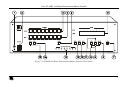
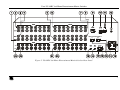
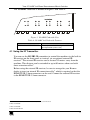
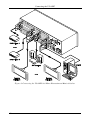
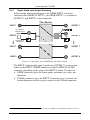
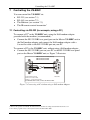
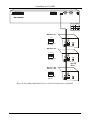
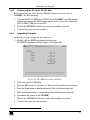
To connect an RC-3000 to a VS-88HC unit (see Figure 8), connect the
RS-485 terminal block port on the RC-3000 to the RS-485 port on the
VS-88HC unit, as follows:
1. Connect the “A” (+) PIN on the RS-485 rear panel port of the RC-3000 to the
“A” (+) PIN on the RS-485 rear panel port of the VS-88HC unit
2. Connect the “B” (-) PIN on the RS-485 rear panel port of the RC-3000 to the
“B” (-) PIN on the RS-485 rear panel port of the VS-88HC unit
3. If shielded twisted pair cable is used, the shield may be connected to the “G”
(Ground) PIN on one of the units (for example, on the RC-3000)
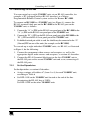
To cascade up to eight individual VS-88HC units, via RS-485, as illustrated
in Figure 8, do the following:
1. Connect the component video sources and acceptors, as well as the
appropriate digital audio sources and acceptors, as section 6.1 describes.
2. Connect the RS-485 terminal block port on the first VS-88HC unit to
the RS-485 port on the second VS-88HC unit and so on, connecting all
the RS-485 ports.
7.2.1
Set the Dipswitches
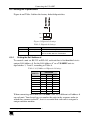
Set the dipswitches, as section 6.3 describes:
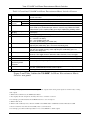
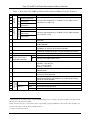
Assign a unique self address #1 (from 1 to 8) for each VS-88HC unit,
according to Table 6
Set DIP 4 ON on the VS-88HC unit located at the end of the line
(terminating the RS-485 line at 120 ).
Set DIP 4 OFF on the other VS-88HC units
1 In any order
17