Download Analog Rytm Quickstart Guide
Transcript
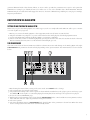
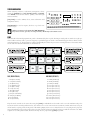
3 Navigate between the letters in this menu using the [ARROW] keys. 4 Release [FUNCTION] to insert the letter. Repeat the procedure for each successive letter. 5 Press [YES/SAVE] when you are done naming. THE SEQUENCER BASIC PATTERN OPERATIONS The sequencer of the Analog Rytm stores information in patterns. A pattern controls the playback of each of the drum tracks and the FX track by the trigs entered on the sequencer. SELECTING A PATTERN 1 Press the [BANK GROUP] key to toggle bank group. If, for example, bank group A-D is selected, patterns in banks A, B, C and D can be accessed. 2 Next, press a [BANK] key followed by a [TRIG] key (1-16) to select a pattern within the selected bank. Patterns containing data are shown by half-bright red <TRIG> LEDs. The currently active pattern is shown by a full-bright red <TRIG> LED. Empty pattern slots are shown with unlit <TRIG> LEDs. 3 To select, for example, pattern B05, select bank group A-D using the [BANK GROUP] key. Then press and hold [BANK B/F] and press [TRIG] key 5. PATTERN CONTROL Pressing [PLAY] will start the playback of a pattern. Pause by pressing [PLAY] again. Pressing [STOP] will stop the playback of all tracks. The sound will be cut off, but effects like the delay will continue to be heard until the delay repeats have faded out. Quickly press [STOP] twice to stop playback of all tracks and fade out the send effects. PATTERN MODES When changing patterns, the new pattern can be started in three ways. Toggle between the PATTERN modes by pressing [FUNCTION] + [BANK GROUP]. The LCD screen will briefly show which mode is activated. The <PATTERN MODE> LED will permanently show which mode is active. DIRECT START will immediately change patterns. The new pattern will start playing from the beginning. Shown by a red <PATTERN MODE> LED. DIRECT JUMP will immediately change patterns. The new pattern will start playing from the position where the previous pattern left off. Shown by a green <PATTERN MODE> LED. SEQUENTIAL will change patterns after the pattern currently playing reaches its end. This mode is the default mode. Shown by an unlit <PATTERN MODE> LED. PATTERN RECORDING MODES The Analog Rytm offers two main modes of inputting trigs when creating a pattern: GRID RECORDING mode and LIVE RECORDING mode. To create a new pattern, first select an empty pattern slot in one of the banks. TRIG TYPES Two types of trigs, note trigs and trigless locks, can be entered in the RECORDING modes. Note trigs trig notes (Sounds of the chosen drum track) while trigless locks can be used to apply parameter locks without trigging notes (see PARAMETER LOCKS on the following page). Setting SYN and SMP (on the TRIG page) to zero on a trig will turn it into a trigless lock. Note trigs are indicated by full-bright <TRIG> LEDs and trigless locks are indicated by half-bright <TRIG> LEDs. <TRIG> LEDs above steps not containing any trigs remain unlit. 18