1
use accessory functions F1 and F2 to operate it. It is very easy to use and
program. No accessory address mapping is needed.
Programming Accessory Decoders with CV #513
1. Press PROG until you reach “Prog Prog Track.”
2. Press ENTER until “CV #” displays.
3. Enter 513. Press ENTER.
4. Enter the accessory decoder address. Press ENTER.
Read your accessory decoder manual for proper addressing.
2
Operation
Quick Start
Connecting to Your Layout
Selecting Accessory Decoders
1. Press ACCY. Using 0 - 9, enter the accessory decoder address. Press
ENTER.
2. “1or2” will display reminding you to press only 1 or 2 to control the
accessory. Press 1 to turn the accessory on and 2 to turn it off. You can
keep pressing 1 or 2 until you are done with accessory.
3. Press ENTER to escape accessory operation.
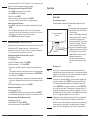
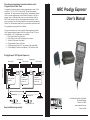
Follow the diagram to connect the Command Station (base unit) to your
layout.
Prodigy Command Station
(base unit)
Accessory Routes (Prodigy Advance Cab only)
Green Plug
Grouping of turnouts (or accessories) can be consisted to form a route. The
Prodigy Express2 DCC system allows up to 31 routes and up to 8
accessories in each route. Please do not set a route number higher than
31, nor add more than 8 accessories into one route.
Setting Accessory Decoder Routes (Master Cab only)
(Prodigy Advance Cab only)
1. Press SYS and 5.
2. “Route SET” appears in display. Press ENTER.
3. Enter route number (1 – 31). Press ENTER.
4. “Add Accy #” will display. Using 0 - 9, enter an accessory address (1 to
255).
If you want this accessory (turnout points) to move in a direction opposite
its normally programmed direction (reverse polarity), use DIRECTION to
set its direction. Press ENTER.
5. “Add Accy #” will display again, prompting you to add another accessory
into the route. Repeat above steps to enter up to 8 accessories into one
route.
6. When finished setting up your route, press ENTER.
Power
Running a Loco
Note
2-12 Operation
Use the DIRECTION key to set the loco’s direction. Use the THROTTLE
knob to set the loco’s speed. The selected loco will begin moving. For
increasing or decreasing the loco’s speed by 1, please tap the +1 or -1
key. Do not hold the -1 key, since this is also the DEL key and will delete
the loco. To toggle the headlight (F0) on or off, press 0.
Note
MRC Prodigy Advance
To run a loco, you have to first know its address. Most decoders you
purchase have the factory default address #3. If you purchase a decoder
equipped loco, its address may be its road number. Read your decoder
and/or loco manual for your decoder address.
To select a loco, press the LOCO key. Using the numeric keypad (0 - 9),
enter the loco address. Press ENTER. You have just acquired the loco.
The Cab will automatically remember the loco address for later recall.
Running Accessory Routes
(Prodigy Advance Cab only)
1. Press ROUTE. Enter the Route number you wish to run. Press ENTER.
2. “1or2” will display reminding you to press only 1 or 2 to select the route.
Clearing Accessory Routes (Master Cab only)
(Prodigy Advance Cab only)
1. Press SYS and 0. Then press ENTER.
2. Enter the route number. Then press ENTER.
To Main Track
To
Program
Track
1. Plug the power supply into the base unit.
2. Plug the AC line cord (110VAC, 60Hz)
into a wall outlet.
3. Using a small flat-bladed screwdriver,
attach two wires (22 AWG or heavier)
from the Main Track layout to the
terminals marked Main Track and two
wires from the Program Track to the
terminals marked Program Track
4. Plug one end of the cable into the Cab/
Handheld and the other into a Cab Jack
on the base unit. Do not use the jack
labeled “Booster”, as this is for future
upgrades and power boost.
If you have more than one cab, you
need an extention box for your extra
cab.
A blinking loco address indicates that another Cab is also controlling that
loco. This is just a reminder and does not affect your control of the loco.
However, since two Cabs are trying to control the same loco simultaneously,
the loco may not act as you expect. One operator will have to relinquish
control of the loco by deleting the loco from his Cab for proper operation.
MRC Prodigy Advance
Operation 2-1