1
SMPTOX3 version 2.0 User's Manual
Page 8
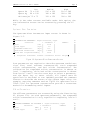
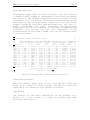
Low
Epson FX
72 x 120
Epson LQ
60 x 120
HP Laserjet 75 x 75
Medium
216 x 120
180 x 180
150 x 150
High
216 x 240
180 x 360
300 x 300
While in the other screens available under this option, the
run information screen can be accessed by pressing the F5
key.
Ups trea m River Pa ra m eters :
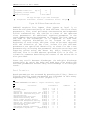
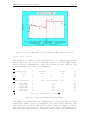
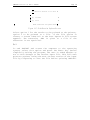
The Upstream River Parameters input screen is shown in
Figure 3-5.
647
5
UPSTREAM RIVER PARAMETERS:
:4L<
5
K)3M
5
August Calibration, Copper
*
Calibration
*
Parameters
5
Flow
(cfs)
93.94
*
5
5
Total Copper
(ug/L) *
2.9
*
5
5
Suspended Solids Conc.
(mg/L) *
13.5
5
Bed Solids Concentration
(mg/L) *
5
River mile of upstream boundary
5
5
5
5
94N8
)
F1-Upstream
*
5
Comments
*
*
*
F2-Effluent
*
5
*
5
*
5
*
5
*
5
2.000e5
*
*
F3-Reach
44.68
F4-Observed
*
5
*
5
F5-Info
F10-Quit)
Fig u re 3-5: Ups trea m River Pa ra m eters Screen
Four parameters are required to describe upstream conditions:
river flow, total toxicant concentration, total suspended
solids concentration, and bed solids concentration. The
calibration for suspended solids concentration is absent at
level 1 complexity, while bed solids concentration is absent
from levels 1 and 2. Use the arrow keys to select a parameter,
and the Enter key to enter values. All inputs must be
specified for the model to run. SMPTOX3 provides the comments
feature to describe the nature of the chosen input value. For
example, entering comments such as "7Q10" for upstream flow or
"95th %ile" for upstream concentration provide a convenient
method for documenting model inputs.
Efflu entPa ra m eters :
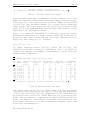
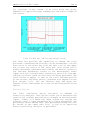
The effluent parameters are accessed by using the function key
F2 (Figure 3-6). As with upstream parameters, the suspended
solids concentration is only required in complexity levels 2
and 3.
5
647
EFFLUENT PARAMETERS FOR DISCHARGE 1:
:4L<
5
*
K)3M
Flow
(MGD)
5
Total Copper
(ug/L) *
5
5
*
*
5
August Calibration, Copper
Parameter *
Calibration
5
Comments
38.33
*
5
8.3
*
5
*
5