1
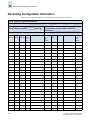
Recording Configuration Information
12
Sample IOCP Configuration File for SilkWorm 3900, 4100,
24000, and 48000 Switches
The channel subsystem controls communication between a configured channel, the control unit, and the
device. The I/O Configuration Dataset (IOCDS) defines the channels, control units, and devices to the
designated logical partitions (LPARs) within the server; this is defined using the Input/Output
Configuration Program (IOCP). The IOCP statements are typically built using the hardware
configuration dialog (HCD). The interactive dialog is used to generate your Input/Output Definition
File (IODF), invoke the IOCP program, and subsequently build your production IOCDS.
Each FICON director in a fabric must have a unique domain ID and a unique switch ID. The switch ID
used in the IOCP definitions can be any value between x’00’ to x’FF’. The domain ID range for
directors is hex x'01' to x'EF' or decimal 1 to 239. When defining the switch IDs in the IOCP definitions,
ensure that you use values within the FICON director’s range.
The switch ID has to be assigned by the user and must be unique within the scope of the definitions
(IOCP and HCD).
The domain ID is assigned by the manufacturer and can be customized to a different value. It must be
unique within the fabric.
Brocade recommends that the switch ID (in IOCP or HCD) be set to the same value as the domain ID of
the FICON director, which is defined to the FICON director at installation time. This simplifies the
configuration and reduces confusion by having a common designation across all definitions.
For more information on switch numbering, refer to the IBM publication FICON® Implementation
Guide (SG24-6497-00).
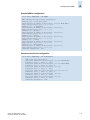
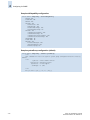
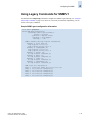
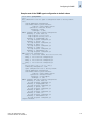
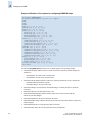
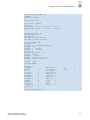
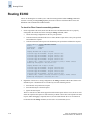
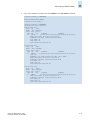
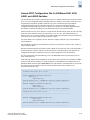
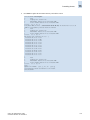
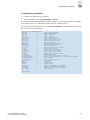
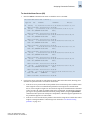
In the following sample IOCP configuration file, the UNIT value for FICON CUP definitions is 2032
for any FICON director regardless of vendor or platform. So all SilkWorm 3900, SilkWorm 4100, or
SilkWorm 24000 switches require UNIT=2032 for the CUP definition. All Domain IDs are specified in
hex values in the IOCP (and not in decimal values); the Domain IDs in the example are for
demonstration purposes only.
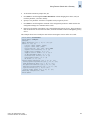
*-----------------------------------------------------------------* SilkWorm 24000 Domain_ID=61 (in hex)
*-----------------------------------------------------------------CNTLUNIT CUNUMBR=0D8,UNITADD=00,UNIT=2032,
PATH=(50,51),
LINK=(61FE,61FE)
IODEVICE ADDRESS=(0D8,1),CUNUMBR=0D8,UNIT=2032,STADET=Y,UNITADD=00
*--------------------------------------------------------------CNTLUNIT CUNUMBR=0D9,UNITADD=00,UNIT=2032,
PATH=(8A,8B),
LINK=(22FE,22FE)
IODEVICE ADDRESS=(0D9,1),CUNUMBR=0D9,UNIT=2032,STADET=Y,UNITADD=00
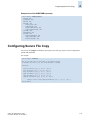
*-----------------------------------------------------------------* SilkWorm 3900 Domain_ID=25 (in hex)
*-----------------------------------------------------------------*
CNTLUNIT CUNUMBR=0DB,UNITADD=00,UNIT=2032,
PATH=(5A,5B),
LINK=(25FE,25FE)
IODEVICE ADDRESS=(0DB,1),CUNUMBR=0DB,UNIT=2032,STADET=Y,UNITADD=00
*
*------------------------------------------------------------------
Fabric OS Administrator’s Guide
Publication Number: 53-1000239-01
12-23