1
Long press
to power off the instrument.
Power off Automatically
The instrument will be power off automatically after three minutes of inactivity.
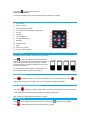
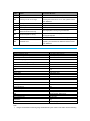
Keypad List
1.
OK / Confirm
2.
Return / Cancel
3.
Area/Volume/Pythagorean
4.
Tilt / Auto Level / Auto Height / Triangle area
5.
Go Left
6.
Go Right
7.
Go up/ Addition(+)
8.
Go down/Subtraction(-)
9.
Bluetooth
10. Reference Point
11. Menu
12. Clear off / Power off
13. Power on / Measurement
Reference Setup
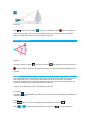
The default reference setting: the bottom of the instrument.
Press
to switch the reference point between the top,
bottom, tripod, and end-piece of the instrument. There is a
beep warning tone when a reference point is changed.
The reference point will return to default every time when
the unit is powered off.
I.E. the measuring reference point is from the bottom of
the instrument every time when it’s powered on.
Single Measurement
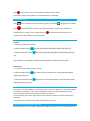
Press
to activate the laser. Aim the laser at the object which is to be measured and press
again to take measurement. Results will be seen on the screen’s display immediately.
Continuous Measurement (max/min distance)
Long press
to activate continuous measurement. Under this mode minimum or maximum distance
can be measured from a fixed measuring position by sweeping ideal points.
Note: Continuous measurement will stop after 5 minutes.
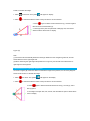
Area Measurement
Press
once to activate area measuring function. The symbol
Press
to take the first side distance measurement (e.g. length).
will appear on the display.