1
Press
again to take the second side distance measurement (e.g. width).
The results of length, width, perimeter, and area will be seen on the display.
Volume Measurement
Press
twice to activate the volume measuring function. The symbol
Press
to activate the laser, and aim at the target. Press again to take the first side distance
measurement (e.g. Length). Then, respectively press
will appear on the display.
to measure the width and height. The
resulting volume will be display in the summary line.
Addition/Subtraction
Distance
1. Take a measurement of a distance.
2. Press the addition button
3. Press the subtraction button
. The next measurement’s data will be added to the former one.
. The next measurement’s data will be subtracted from the former
one.
This operation can be repeated. The results will be displayed in the main area of the screen.
Area/Volume
1. First take a measurement of area or volume.
2. Press the addition button
, and measure the second area/volume. This measurement will be
added to the former one.
3. Press the subtraction button
, and measure the second area/volume. This measurement will be
subtracted from the former one.
Indirect Measurement
This device can measure distance to inaccessible points, such as the distance to a wall which is blocked
by obstacles or the height of a tree, using a trigonometric function. To ensure measuring accuracy,
indirect measurements should be based on the following conditions:
(1) The measuring points of the object which is to be measured should be on the same horizontal or
vertical line.
(2) Put the device at a fixed but horizontally and vertically rotary tripod.
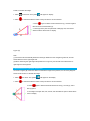
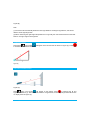
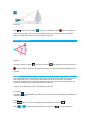
Indirect Measurement: Pythagoras Two Points
As shown (Figure A), if a user wants to measure the height of the pink line, he can use Pythagoras Two