1
GE Healthcare
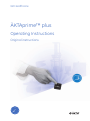
ÄKTAprime™ plus
Operating Instructions
Original instructions
Table of Contents
Table of Contents
1
Introduction ..........................................................................................................
1.1
1.2
1.3
1.4
2
3
4
5
6
7
5
Important user information .............................................................................................................
Regulatory information ......................................................................................................................
Instrument ...............................................................................................................................................
Monitoring and evaluation ...............................................................................................................
6
7
10
13
Safety instructions ...............................................................................................
14
2.1
2.2
2.3
2.4
Safety precautions ...............................................................................................................................
Labels .........................................................................................................................................................
Emergency procedures ......................................................................................................................
Recycling information .........................................................................................................................
14
22
23
24
Installation ............................................................................................................
26
3.1
3.2
3.3
3.4
3.5
Site requirements ..................................................................................................................................
Transport ..................................................................................................................................................
Unpacking ................................................................................................................................................
Connections ............................................................................................................................................
Spare parts and accessories ...........................................................................................................
26
26
27
27
27
Operation ..............................................................................................................
28
4.1
4.2
4.3
4.4
4.5
Operation overview .............................................................................................................................
Starting the instrument ......................................................................................................................
Preparations before start ..................................................................................................................
Performing a run ...................................................................................................................................
Procedures after a run .......................................................................................................................
28
28
29
34
36
Maintenance .........................................................................................................
38
5.1
5.2
5.3
5.4
5.5
5.6
5.7
General ......................................................................................................................................................
User maintenance schedule ...........................................................................................................
Cleaning ....................................................................................................................................................
Component maintenance ................................................................................................................
Disassembly and assembly of components and consumables .....................................
Calibration ................................................................................................................................................
Storage ......................................................................................................................................................
38
39
41
42
42
43
44
Troubleshooting ...................................................................................................
45
6.1
6.2
6.3
6.4
UV curve problems ...............................................................................................................................
Conductivity curve problems ..........................................................................................................
pH curve problems ...............................................................................................................................
Pressure curve problems ..................................................................................................................
45
46
48
51
Reference information ........................................................................................
52
7.1
52
Specifications .........................................................................................................................................
ÄKTAprime plus Operating Instructions 28-9597-89 AA
3
Table of Contents
7.2
7.3
7.4
7.5
Chemical resistance ............................................................................................................................
System recommendations ...............................................................................................................
Literature ..................................................................................................................................................
Ordering information ..........................................................................................................................
52
55
56
56
A
Electrical and communication connections ....................................................
57
B
Connection diagram - Liquid flow path ...........................................................
58
C
Tubing ....................................................................................................................
59
4
ÄKTAprime plus Operating Instructions 28-9597-89 AA
1 Introduction
1 Introduction
Purpose of the Operating
Instructions
The Operating Instructions provides you with the instructions needed to handle the
ÄKTAprime plus system in a safe way.
Prerequisites
In order to operate the system in the way it is intended, the following pre-requisites must
be fulfilled:
•
You should have a general understanding of how the PC and Windows™ works (if a
computer is used).
•
You should understand the concepts of liquid chromatography.
•
You must read and understand the Safety Instructions.
•
The instrument and software should be installed, configured and calibrated according
to the Installation Guide.
In this chapter
This chapter contains important user information, and a general description of the
ÄKTAprime plus system and its intended use.
ÄKTAprime plus Operating Instructions 28-9597-89 AA
5
1 Introduction
1.1 Important user information
1.1 Important user information
Read this before using the
ÄKTAprime plus system
All users must read the safety instructions in the ÄKTAprime plus User Documentation
to fully understand the safe use of the ÄKTAprime plus system, before installing, using,
or maintaining the system.
Do not operate the ÄKTAprime plus system in any other way than described in the user
documentation. Otherwise, you may be exposed to hazards that can lead to personal
injury, and you may cause damage to the equipment.
Intended use
ÄKTAprime plus is a compact liquid chromatography system designed for one-step
purification of proteins at laboratory scale.
The ÄKTAprime plus system is intended for research use only, and shall not be used in
any clinical procedures, or for diagnostic purposes.
Safety notices
This user documentation contains WARNINGS, CAUTIONS and NOTICES concerning the
safe use of the product. See definitions below.
Warnings
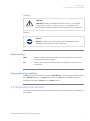
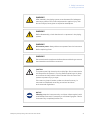
WARNING
WARNING indicates a hazardous situation which, if not avoided,
could result in death or serious injury. It is important not to proceed
until all stated conditions are met and clearly understood.
6
ÄKTAprime plus Operating Instructions 28-9597-89 AA
1 Introduction
1.1 Important user information
Cautions
CAUTION
CAUTION indicates a hazardous situation which, if not avoided,
could result in minor or moderate injury. It is important not to
proceed until all stated conditions are met and clearly understood.
Notices
NOTICE
NOTICE indicates instructions that must be followed to avoid
damage to the product or other equipment.
Notes and tips
Note:
A Note is used to indicate information that is important for trouble-free
and optimal use of the product.
TIP:
A tip contains useful information that can improve or optimize your
procedures.
Typographical conventions
Software items are identified in the text by bold italic text. A colon separates menu levels,
thus File:Open refers to the Open command in the File menu. Hardware items are
identified in the text by bold text (e.g., Power switch).
1.2 Regulatory information
This section describes the directives and standards that are fulfilled by the ÄKTAprime
plus system.
ÄKTAprime plus Operating Instructions 28-9597-89 AA
7
1 Introduction
1.2 Regulatory information
Manufacturing information
The Declaration of Conformity includes the following information:
Requirement
Content
Name and address of manufacturer
GE Healthcare Bio-Sciences AB
Björkgatan 30, SE-751 84 Uppsala, Sweden
Name and address of person responsible
for Technical File
Peter Löwendahl, Björkgatan 30
Name and ID of notified body
INTERTEK SEMKO AB, NB 0413
Place and date of declaration
Uppsala, Sweden, May 2009
Identity of person authorized to sign DoC
Peter Löwendahl
SE-751 84 Uppsala, Sweden
CE Conformity
This product complies with the European directives listed in the table, by fulfilling the
corresponding harmonized standards. A copy of the Declaration of Conformity is available
on request.
Directive
Title
2006/42/EC
Machinery Directive (MD)
2006/95/EC
Low Voltage Directive (LVD)
2004/108/EC
ElectroMagnetic Compatibility (EMC) Directive
International standards
This product fulfills the requirements of the following standards:
Standard
Description
EN 61010-1, IEC
61010-1, UL 61010-1,
Safety requirements for electrical
equipment for measurement, control,
and laboratory use
CAN/CSA-C22.2
Notes
No. 61010-1
8
ÄKTAprime plus Operating Instructions 28-9597-89 AA
1 Introduction
1.2 Regulatory information
Standard
Description
Notes
EN 61326-1
EMC emissions and immunity requirements for electrical equipment for
measurement, control and laboratory
use
Harmonized with
2004/108/EC
EN-ISO 12100-1,
12100-2
Safety of machinery - Basic concepts,
general principles for design
Harmonized with
2006/42/EC
EN-ISO 14121-1,
14121-2
Safety of machinery - Principles of
risk assessment
Harmonized with
2006/42/EC
CE Marking
The CE marking and the corresponding Declaration of conformity is valid for the
instrument when it is:
•
used as a stand-alone unit, or
•
connected to other CE marked instruments, or
•
connected to other products recommended or described in the user documentation,
and
•
used in the same state as it was delivered from GE Healthcare, except for alterations
described in the user documentation.
The Declaration of conformity is valid only for systems that are marked with the
CE-marking.
Regulatory compliance of
connected equipment
Any equipment connected to the ÄKTAprime plus system should meet the safety
requirements of EN 61010-1/IEC 61010-1, or relevant harmonized standards. Within EU,
connected equipment must be CE marked.
ÄKTAprime plus Operating Instructions 28-9597-89 AA
9
1 Introduction
1.3 Instrument
1.3 Instrument
Product description
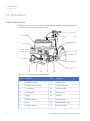
ÄKTAprime plus is a compact liquid chromatography system designed for one-step
purification of proteins at laboratory scale.
17
1
16
2
15
3
14
4
13
5
12
11
6
7
8
9
10
Figure 1.1: The main parts of the instrument.
10
Part
Function
Part
Function
1
Fraction collector
10
Switch valve
2
Monitor and controller
11
Conductivity cell
3
LCD display
12
Flow restrictor
4
Push buttons
13
UV flow cell
5
Pump
14
Column
6
Pressure sensor
15
Sample loop
7
Mixer
16
Flow diversion valve
8
Injection valve
17
Column holder
ÄKTAprime plus Operating Instructions 28-9597-89 AA
1 Introduction
1.3 Instrument
Part
Function
9
Buffer valve
Part
Function
The Power switch is located at the rear of the system.
Navigation menu
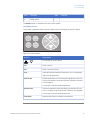
The system is operated from the push buttons and LCD display at the front panel.
end
hold
/cont
feed
tube
pause
/cont
OK
Esc
Figure 1.2: Push buttons.
Button
or
Description
Find a specific menu option
OK
Enter a menu.
Esc
Return one menu level.
end
Interrupt method operation before the run is completed.
Stop manual operation.
hold /cont
Hold method time or volume and the gradient at the current concentration. Pump and fraction collector continue
uninterrupted.
Continue the normal method operation.
pause /cont
Pause all operation without ending the method. All functions, including pump and fraction collector, are stopped.
Continue the normal method operation.
feed tube
ÄKTAprime plus Operating Instructions 28-9597-89 AA
Advance the fraction collector one position.
11
1 Introduction
1.3 Instrument
Basic flow path
P
M
V2
pH
UV
IN
C
IN
V1
SW
F
B
W
Figure 1.3: Basic flow path.
12
Stage
Part
Description
1
P, V1
Pump P pumps buffer from a buffer container connected to the
buffer valve V1.
2
SW, B
To form a gradient the switch valve (SW) can be used to pull liquid
from buffer container (B).
3
M
The mixer (M) mixes the buffers.
4
V2
Sample is applied from the sample loop connected to injection
valve (V2) that has been previously filled manually using a syringe.
5
UV, C, pH
From the injection valve, the flow is directed to the column, and
then to the UV, Conductivity, and optional pH monitor.
6
F, W
From the monitors, the flow is directed to the Fraction collector
F or the Waste W.
ÄKTAprime plus Operating Instructions 28-9597-89 AA
1 Introduction
1.4 Monitoring and evaluation
1.4 Monitoring and evaluation
PrimeView™ software
PrimeView is a software that allows real time monitoring, evaluation and report generation
on an external computer.
For more information about PrimeView evaluation system, see the PrimeView User
Manual supplied.
Paper chart recorder
It is possible to connect a chart recorder to ÄKTAprime plus to get real time monitoring.
For more information see the ÄKTAprime plus User Manual.
ÄKTAprime plus Operating Instructions 28-9597-89 AA
13
2 Safety instructions
2 Safety instructions
This chapter describes safety compliance, safety labels, general safety precautions,
emergency procedures, power failure and recycling of ÄKTAprime plus system.
2.1 Safety precautions
Introduction
The ÄKTAprime plus instrument is powered by mains voltage and handles pressurized
liquids that may be hazardous. Before installing, operating or maintaining the system,
you must be aware of the hazards described in this manual. Follow the instructions
provided to avoid personal injury or damage to the equipment.
The safety precautions in this section are grouped into the following categories:
•
General precautions
•
Using flammable liquids
•
Personal protection
•
Installing and moving the instrument
•
System operation
•
Maintenance
General precautions
Always follow these General precautions to avoid injury when using the ÄKTAprime plus
instrument.
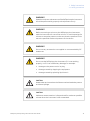
WARNING
Do not operate the ÄKTAprime plus instrument in any other way
than described in the ÄKTAprime plus and PrimeView manuals.
14
ÄKTAprime plus Operating Instructions 28-9597-89 AA
2 Safety instructions
2.1 Safety precautions
WARNING
Operation and user maintenance of the ÄKTAprime plus instrument
should be performed by properly trained personnel only.
WARNING
Before connecting a column to the ÄKTAprime plus instrument,
read the instructions for use of the column. To avoid exposing the
column to excessive pressure, make sure that the pressure limit is
set to the specified maximum pressure of the column.
WARNING
Do not use any accessories not supplied or recommended by GE
Healthcare.
WARNING
Do not use the ÄKTAprime plus instrument if it is not working
properly, nor if it has suffered any damage, for example:
•
damage to the power cord or its plug
•
damage caused by dropping the equipment
•
damage caused by splashing liquid onto it
CAUTION
Waste tubes and containers shall be secured and sealed to prevent
accidental spillage.
CAUTION
Make sure waste container is dimensioned for maximum possible
volume when the instrument is left unattended.
ÄKTAprime plus Operating Instructions 28-9597-89 AA
15
2 Safety instructions
2.1 Safety precautions
NOTICE
Avoid condensation by letting the unit equilibrate to ambient
temperature.
Using flammable liquids
When using flammable liquids with the ÄKTAprime plus instrument, follow these
precautions to avoid any risk of fire or explosion.
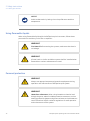
WARNING
Fire Hazard. Before starting the system, make sure that there is
no leakage.
WARNING
A fume hood or similar ventilation system shall be installed when
flammable or noxious substances are used.
Personal protection
WARNING
Always use appropriate personal protective equipment during
operation and maintenance of ÄKTAprime plus system.
WARNING
Hazardous substances. When using hazardous chemical and
biological agents, take all suitable protective measures, such as
wearing protective glasses and gloves resistant to the substances
used. Follow local and/or national regulations for safe operation
and maintenance of the system.
16
ÄKTAprime plus Operating Instructions 28-9597-89 AA
2 Safety instructions
2.1 Safety precautions
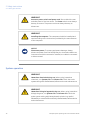
WARNING
Spread of biological agents. The operator has to take all necessary
actions to avoid spreading hazardous biological agents in the
vicinity of the instrument. The facility should comply with the
national code of practice for biosafety.
WARNING
High pressure. The ÄKTAprime plus instrument operates under
high pressure. Wear protective glasses at all times.
Installing and moving the
instrument
WARNING
Supply voltage. Make sure that the supply voltage at the wall outlet
corresponds to the marking on the instrument, before connecting
the power cord.
WARNING
Protective ground. The ÄKTAprime plus instrument must always
be connected to a grounded power outlet.
WARNING
Power cord. Only use power cords delivered or approved by GE
Healthcare.
ÄKTAprime plus Operating Instructions 28-9597-89 AA
17
2 Safety instructions
2.1 Safety precautions
WARNING
Access to power switch and power cord. Do not block the rear
and side panel of the instrument. The Power switch must always
be easy to access. The power cord must always be easy to
disconnect.
WARNING
Installing the computer. The computer should be installed and
used according to the instructions provided by the manufacturer
of the computer.
NOTICE
Disconnect power. To prevent equipment damage, always
disconnect power from the ÄKTAprime plus instrument before an
instrument module is removed or installed, or a cable is connected
or disconnected.
System operation
WARNING
Hazardous chemicals during run. When using hazardous
chemicals, run System CIP and Column CIP to flush the entire
system tubing with distilled water, before service and maintenance.
WARNING
Hazardous biological agents during run. When using hazardous
biological agents, run System CIP and Column CIP to flush the
entire system tubing with bacteriostatic solution (e.g. NaOH)
followed by a neutral buffer and finally distilled water, before service
and maintenance.
18
ÄKTAprime plus Operating Instructions 28-9597-89 AA
2 Safety instructions
2.1 Safety precautions
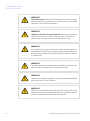
WARNING
There must always be a sample loop connected to ports 2 and 6
of the injection valve. This is to prevent liquid spraying out of the
ports when switching the valve. This is especially dangerous if
hazardous chemicals are used.
CAUTION
Hazardous chemicals in UV flow cell. Make sure that the entire
flow cell has been flushed thoroughly with bacteriostatic solution,
for example NaOH, and distilled water, before service and
maintenance.
NOTICE
If the ÄKTAprime plus is kept in a cold room, cold cabinet or similar,
keep the system switched on in order to minimize the risk of
condensation. (The UV lamp can be turned off to save lamp life
time when the system is not in use.)
NOTICE
When switching off the cold cabinet, make sure that you also switch
off the ÄKTAprime plus system and leave the door to the cold
cabinet open to avoid overheating.
Maintenance
WARNING
Electrical shock hazard. All repairs should be done by service
personnel authorized by GE Healthcare. Do not open any covers
or replace parts unless specifically stated in the user
documentation.
ÄKTAprime plus Operating Instructions 28-9597-89 AA
19
2 Safety instructions
2.1 Safety precautions
WARNING
Disconnect power. Always disconnect power from the instrument
before replacing any component on the instrument, unless stated
otherwise in the user documentation.
WARNING
Hazardous chemicals during maintenance. When using hazardous
chemicals for system or column cleaning, wash the system or
columns with a neutral solution in the last phase or step.
WARNING
Do not perform any type of maintenance work while the system is
powered electrically or when the piping system is pressurized. Note
that the piping system can be pressurized even when the system
is closed down.
WARNING
Only spare parts that are approved or supplied by GE Healthcare
may be used for maintaining or servicing the system.
WARNING
Make sure that the piping system is completely leakage free before
performing any CIP on the system.
WARNING
NaOH is corrosive and therefore dangerous to health. When using
hazardous chemicals, avoid spillage and wear protective glasses
and other suitable personal protective equipment.
20
ÄKTAprime plus Operating Instructions 28-9597-89 AA
2 Safety instructions
2.1 Safety precautions
WARNING
After assembly, the piping system must be tested for leakage at
maximum pressure for continued protection against injury risks
due to fluid jets, burst pipes or explosive atmosphere.
WARNING
Before disassembly, check that there is no pressure in the piping
system.
WARNING
Disconnect power. Always disconnect power from the instrument
before replacing fuses.
WARNING
Decontaminate the equipment before decommissioning to ensure
that hazardous residues are removed.
CAUTION
The system uses high intensity ultra-violet light. Do not remove the
UV lamp while the system is running. Before replacing a UV lamp,
ensure that the lamp cable is disconnected from the rear of the
system to prevent injury to eyes.
If the mercury lamp is broken, make sure that all mercury is
removed and disposed according to national and local
environmental regulations.
NOTICE
Cleaning. Keep the instrument dry and clean. Wipe regularly with
a soft damp tissue and, if necessary, a mild cleaning agent. Let the
instrument dry completely before use.
ÄKTAprime plus Operating Instructions 28-9597-89 AA
21
2 Safety instructions
2.2 Labels
2.2 Labels
This section describes the safety labels and labels concerning hazardous substances
that are attached to the ÄKTAprime plus instrument. For information about marking of
the computer equipment, refer to the manufacturer’s instructions.
Labels on the instrument
The illustration below shows an example of the identification label that is attached to
the ÄKTAprime plus instrument.
Sample
xxxxx™
XX-XXXX-XX
Code No: XXXXXXXX
Serial No: XXXXXXX
Mfg Year: 2009
Voltage:
Frequency:
Power max:
Fuse:
Made in Sweden
GE Healthcare Bio-Sciences AB
751 84 Uppsala Sweden
N12406
289xxxxxaa
Symbols used in safety labels
Label
Meaning
Warning! Read the user documentation before using the system. Do not
open any covers or replace parts unless specifically stated in the user
documentation.
The system complies with the requirements for electromagnetic compliance
(EMC) in Australia and New Zealand.
The system complies with applicable European directives.
22
ÄKTAprime plus Operating Instructions 28-9597-89 AA
2 Safety instructions
2.2 Labels
Labels concerning hazardous
substances
Label
Meaning
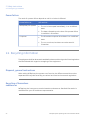
This symbol indicates that the waste of electrical and electronic equipment
must not be disposed as unsorted municipal waste and must be collected
separately. Please contact an authorized representative of the manufacturer for information concerning the decommissioning of equipment.
This symbol indicates that the product contains hazardous materials in
excess of the limits established by the Chinese standard SJ/T11363-2006
Requirements for Concentration Limits for Certain Hazardous Substances
in Electronics.
2.3 Emergency procedures
This section describes how to do an emergency shutdown of the ÄKTAprime plus system.
The section also describes the result in the event of power failure.
Emergency shutdown
In an emergency situation, do as follows to stop the run:
Step
Action
1
To pause the run without ending the method, press the Pause button located
at the instrument front.
2
If required, switch off power to the instrument by pressing the Main power
switch to the 0 position. The run is interrupted immediately.
ÄKTAprime plus Operating Instructions 28-9597-89 AA
23
2 Safety instructions
2.3 Emergency procedures
Power failure
The result of a power failure depends on which unit that is affected.
Power failure to...
will result in...
ÄKTAprime plus system
•
The run is interrupted immediately, in an undefined
state
•
The data collected up to the time of the power failure
is available in PrimeView
•
The PrimeView computer shuts down in an undefined
state
•
The run continues, but data cannot be saved in
PrimeView
Computer
2.4 Recycling information
The equipment shall be decontaminated before decommissioning and all local regulations
shall be followed with regard to scrapping of the equipment.
Disposal, general instructions
When taking ÄKTAprime plus system out of service, the different materials must be
separated and recycled according to national and local environmental regulations.
Recycling of hazardous
substances
ÄKTAprime plus instrument contains hazardous substances. Detailed information is
available from your GE Healthcare representative.
24
ÄKTAprime plus Operating Instructions 28-9597-89 AA
2 Safety instructions
2.4 Recycling information
Disposal of electrical
components
Waste of electrical and electronic equipment must not be disposed as unsorted municipal
waste and must be collected separately . Please contact an authorized representative
of the manufacturer for information concerning the decommissioning of equipment.
ÄKTAprime plus Operating Instructions 28-9597-89 AA
25
3 Installation
3 Installation
ÄKTAprime plus is delivered in protective packing material and shall be unpacked with
great care.
Any equipment connected to ÄKTAprime plus must fulfill applicable standards and local
regulations.
A video describing the installation process, is supplied with each ÄKTAprime plus system.
For detailed information on Installation, see ÄKTAprime plus Installation Guide.
3.1 Site requirements
Parameter
Requirement
Electrical power
100-240 V, 50-60 Hz
Ambient temperature
4°C to 40°C
Placement
Stable laboratory bench e.g. 120 × 80 cm
Humidity
20 to 95%, non-condensing
3.2 Transport
The equipment can be transported on a trolley capable of supporting at least 20 kg.
NOTICE
Lift the system in the upright position. Do not use the fractionation
arm as a lifting handle.
Before moving the system:
•
disconnect all cables and tubing connected to peripheral components and liquid
containers.
•
remove any loose items from the top of the system.
•
grasp the system firmly by placing the fingers under the base of the main unit and
lift.
For more information on Transport, see ÄKTAprime plus Installation Guide.
26
ÄKTAprime plus Operating Instructions 28-9597-89 AA
3 Installation
3.3 Unpacking
3.3 Unpacking
•
Check the equipment for damage before starting assembly and installation.
•
Document any damage and contact your local GE Healthcare representative.
Remove straps and packing material and stand equipment upright before starting
installation.
3.4 Connections
Communication
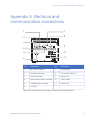
Connect the system according to the electrical drawings in Appendix A Electrical and
communication connections, on page 57.
Ensure that PrimeView software is installed on the computer. (Only if PrimeView is used
as an evaluation system).
Flow path
All parts and tubing are mounted on the system at delivery.Connect a waste tube, buffer
and sample bottles, and optional accessories.
Electrical power
Connect the power cord to a grounded power outlet specified in Section 3.1 Site
requirements, on page 26.
3.5 Spare parts and accessories
For correct up to date information on spare parts and accessories visit:
www.gelifesciences.com/AKTA
ÄKTAprime plus Operating Instructions 28-9597-89 AA
27
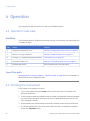
4 Operation
4 Operation
This chapter provides instructions for the use of ÄKTAprime plus.
4.1 Operation overview
Workflow
The typical workflow in ÄKTAprime plus, after turning on the system, can be divided into
a number of steps.
Step
Action
Section
1
Prepare the system for a run
Section 4.3 Preparations before start, on page 29
2
Start a run using a method
Section 4.4 Performing a run, on page 34
3
During a run - view and change parameters
Viewing the run, on page 35
4
Procedures after a run
Section 4.5 Procedures after a run, on page 36
5
Evaluate the results
See PrimeView user documentation.
Liquid flow path
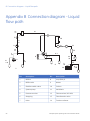
See Appendix B Connection diagram - Liquid flow path, on page 58 for an illustration of
the liquid flow path in ÄKTAprime plus.
4.2 Starting the instrument
If the system is not already turned on:
28
1
Turn on the system using the Power switch at the rear panel. The system now
performs a self-test.
2
First the system name and software version number are displayed. Several messages
are then shown during the self-test. If an error is detected during the self-test, an
error message is shown.
3
All parameters are automatically set to factory default values during the self-test.
4
The self-test takes about 30–40 seconds. When the test is completed, the display
shows the Templates menu.
ÄKTAprime plus Operating Instructions 28-9597-89 AA
4 Operation
4.2 Starting the instrument
The system can be used for most applications after 15 min of lamp
warm-up but the full specifications are not obtained until after 1 hour.
Note:
4.3 Preparations before start
Buffer preparation
Prepare buffers according to ÄKTAprime plus cue cards.
Sample preparation
1
2
Adjust the sample composition to the binding buffer by:
•
diluting the sample in binding buffer, or
•
buffer exchange using HiTrap™ Desalting or HiPrep™ 26/10 Desalting column.
Filter the sample through a 0.45 µm filter.
Purification setup
Removing storage solution from the flow path
At delivery and during storage, the flow path is filled with 20% ethanol. This should be
removed before continuing the setup.
Note:
Do not use buffer with high salt concentration to flush out the ethanol.
It might cause too high backpressure.
To flush out the ethanol using deionized water:
1
Put the inlet tubing A1–A8 that is used and B in deionized water.
Note:
2
3
At delivery, only A1 and B are installed.
Put all waste capillaries, W1–W3, in waste.
Select Templates in the main menu using the
and
buttons and press OK.
4
Select Application Template and press OK.
5
Select System Wash Method and press OK.
6
Choose to wash the A2–A8 inlet tubing that is used by pressing OK at those cursor
positions. A1 and B will always be washed.
Note:
7
At delivery, only A1 and B are installed.
Scroll to OK and press the OK button.
ÄKTAprime plus Operating Instructions 28-9597-89 AA
29
4 Operation
4.3 Preparations before start
8
Press OK to start the method.
9
When the method is finished, replace the first collection tube. It will contain a small
amount of water after the system wash.
Purging the pump and inlet tubing
If there are large amounts of air in the tubing or if you suspect air in the pump, use the
Purge kit to purge the flow path. Air bubbles that still are trapped in the pump (causing
increased pulsation) can be removed by flushing 100% ethanol through the pump. These
two procedures are described in the following two sections.
Purging the flow path using the Purge kit:
1
Remove the stop plug from the pump.
2
Connect the Purge kit to the pump.
3
Put the used inlet tubing in the appropriate buffers.
4
Run the pump at 0.1 ml/min.
9
10
ml
8
7
6
5
4
3
2
1
Filling inlet tubing A1–A8:
1
Go to Set Buffer Valve using the arrow buttons.
2
Set the chosen A inlet and press OK. The valve switches to the selected port.
3
Draw buffer with the purge syringe until liquid enters the syringe.
4
Repeat step 1–3 until all chosen A inlet tubing is filled.
Filling inlet tubing B:
30
1
Go to Set Concentration %B and set the concentration to 100%.
2
Press OK. The switch valve turns to the inlet B port.
3
Draw buffer with the purge syringe until liquid enters the syringe.
4
Replace the purge tubing with the stop plug.
5
Stop the pump by pressing end and then OK.
ÄKTAprime plus Operating Instructions 28-9597-89 AA
4 Operation
4.3 Preparations before start
Flushing the pump with 100% ethanol:
1
Put inlet tubing A1 in deionized water.
2
Run the pump at 40 ml/min for 1 min and press pause/cont.
3
Move inlet tubing A1 to 100% ethanol
4
Press pause/cont, run the pump for 10–20 s and press pause/cont.
5
Set the flow rate to 5 ml/min using the arrow buttons.
6
Press pause/cont, run the pump for at least 30 s and press pause/cont.
7
Move inlet tubing A1 to deionized water.
8
Press pause/cont and run the pump for 1 min.
9
Finish by pressing end and then OK.
Preparing the tubing and column
1
Put inlet tubing A1 in the binding buffer.
2
Put inlet tubing B in the elution buffer.
3
Put the three waste capillaries (brown color) from port 4 and 5 on the injection valve
and port NO on the fraction collector valve in waste.
4
Connect a column, for example a HisTrap™ HP 1 ml column, between port 1 on the
injection valve and the upper port of the UV flow cell. Use a suitable length of PEEK
tubing and 1/16" male connectors.
1
2
3
4
No.
Description
No.
Description
1
From injection valve
3
HisTrap column
2
1/16" male connector
4
UV cell
Note:
Other unions and connectors might be required for other columns.
ÄKTAprime plus Operating Instructions 28-9597-89 AA
31
4 Operation
4.3 Preparations before start
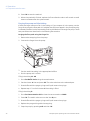
Preparing the fraction collector
1
Fill the fraction collector rack with, for example, 18 mm tubes (minimum 40 pcs.).
2
Adjust the height of the delivery arm using the lock knob (1) so that the bottom of
the tube sensor (2) is about 5 mm below the top of the tubes. The tubes should always
be below the horizontal mark on the tube sensor.
1
5 mm
2
3
If necessary, adjust the length of the tubing exposed according to the sequence
shown below (the hole in the delivery arm used in step 3 and 4 is only used for
adjusting the tubing length).
1.
3.
4.
2.
5.
32
ÄKTAprime plus Operating Instructions 28-9597-89 AA
4 Operation
4.3 Preparations before start
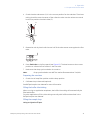
4
Check that the tube sensor (1) is in the correct position for the tube size. The eluent
tubing should be over the center of the collection tube. Use the red sensor control
knob (2) to position the tube holder (3).
3
2
1
5
Rotate the rack by hand until the rear half of the tube sensor rests against the first
tube.
6
Press feed tube on the front panel (see Figure 1.2). The bowl moves to the correct
position to collect the first fraction in the first tube.
7
Make sure that drop synchronization is turned on.
Note:
Drop synchronization can NOT be used at flowrates above 3 ml/min.
Preparing the monitors
1
Check the UV lamp filter position and the lamp position.
2
Calibrate the pH electrode (optional).
See ÄKTAprime plus User Manual for more information.
Filling the buffer inlet tubing
When running an application templates, the buffer inlet tubing will automatically be
filled with buffer.
For other applications, fill the inlet tubing manually with buffer as described in the
ÄKTAprime plus User Manual.
Filling the sample loop
Using an injection fill port
ÄKTAprime plus Operating Instructions 28-9597-89 AA
33
4 Operation
4.3 Preparations before start
1
Connect a sample loop between port 2 and 6 on the injection valve. Make sure that
the sample loop is large enough for your sample.
2
Connect a luer female/1/16" male union to port 3.
3
Fill a syringe with five loop volumes of deionized water or binding buffer.
4
Fit the syringe in the Luer union (1) and carefully inject the buffer.
1
3
5
Remove the syringe and fill it with at least two loop volumes of the sample.
6
Carefully inject the sample into the sample loop. Do NOT remove the syringe after
the injection because the loop might otherwise be emptied due to self-drainage or
air may be introduced in the flow path.
4.4 Performing a run
Selecting template and starting
the run
34
1
Select Templates in the main menu and press OK.
2
Select Application Template and press OK.
3
Select the appropriate template, for example His Tag Purification HisTrap, and press
OK.
4
Set the sample volume and press OK.
5
Press OK to start the purification run.
ÄKTAprime plus Operating Instructions 28-9597-89 AA
4 Operation
4.4 Performing a run
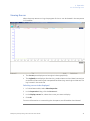
Viewing the run
When the pump starts running, the progress of the run can be viewed in the two panes
in PrimeView.
•
The Curves pane displays monitor signal values graphically.
•
The Logbook pane displays all actions (e.g. method start and end, base instructions
and method instructions) and unexpected conditions (e.g. warnings and alarms). The
log is saved in the result file.
Selecting curves to be displayed
1
In PrimeView module, select View:Properties.
2
In the Properties dialog, click the Curves tab.
3
In the Display curves list, select the curves you want to display.
4
Click OK.
For more information on customizing the view panes, see PrimeView User Manual.
ÄKTAprime plus Operating Instructions 28-9597-89 AA
35
4 Operation
4.4 Performing a run
Ending the run
Press OK at the Method Complete prompt. This will cause all valves to return to their
default positions.
To stop the run on a system before it is finished:
1
Press the end button.
2
Select yes and press OK.
Error indication
When a warning or an alarm is issued from a system, an error code is displayed. See
ÄKTAprime plus User Manual for guidance.
Evaluate the results
PrimeView Evaluation module provides facilities for the presentation and evaluation of
separation results.
To start PrimeView Evaluation module, click PrimeView Evaluation icon on the Windows
desktop.
See ÄKTAprime plus User Manual and PrimeView User Manual for how to evaluate the
results.
4.5 Procedures after a run
Cleaning after a run
NOTICE
Do not allow solutions which contain dissolved salts, proteins or
other solid solutes to dry out in the UV flow cell.
36
ÄKTAprime plus Operating Instructions 28-9597-89 AA
4 Operation
4.5 Procedures after a run
NOTICE
Do not allow particles to enter the UV flow cell as damage to the
flow cell might occur.
Buffers not containing any salt can be left in the system for a short time after a run, even
overnight (not in the pH electrode, see instructions below).
NOTICE
If a buffer containing salt has been used, the flow path must be
flushed with deionized water.
To flush the flow path:
1
Fill a syringe with five times the sample loop volume of deionized water.
2
Rinse the sample loop by injecting the water through the fill port on the injection
valve.
3
Put all used inlet tubings in water.
4
In the Templates menu, select Application Template and then System Wash Method.
5
Select the used inlet ports. Inlets A1 and B will always be washed.
6
Press OK to start the method. The system flow path is now automatically flushed.
For information on cleaning and long-term storage, see Section 5.3 Cleaning, on page 41
and Section 5.7 Storage, on page 44.
ÄKTAprime plus Operating Instructions 28-9597-89 AA
37
5 Maintenance
5 Maintenance
This chapter provides instructions for routine component maintenance and a
maintenance schedule.
5.1 General
Regular maintenance is important for safe and trouble-free operation of your instrument.
The user should perform daily and monthly maintenance. Preventive maintenance should
be performed on a yearly basis by qualified service personnel.
For maintenance of a specific component, carefully read the component manual and
follow the instructions. To avoid personal injury when performing maintenance on the
ÄKTAprime plus instrument, follow the instructions below.
WARNING
Electrical shock hazard. All repairs should be done by service
personnel authorized by GE Healthcare. Do not open any covers
or replace parts unless specifically stated in the user
documentation.
WARNING
Disconnect power. Always disconnect power from the instrument
before replacing any component on the instrument, unless stated
otherwise in the user documentation.
WARNING
Hazardous chemicals during maintenance. When using hazardous
chemicals for system or column cleaning, wash the system or
columns with a neutral solution in the last phase or step.
38
ÄKTAprime plus Operating Instructions 28-9597-89 AA
5 Maintenance
5.1 General
WARNING
Do not perform any type of maintenance work while the system is
powered electrically or when the piping system is pressurized. Note
that the piping system can be pressurized even when the system
is closed down.
CAUTION
Fire hazard. Follow instructions in the ÄKTAprime plus User Manual
for correct installation of a new UV-lamp. If the lamp is not installed
properly it may be overheated and cause a fire hazard.
NOTICE
When using hazardous chemicals, take all suitable protective
measures, such as wearing protective glasses and gloves resistant
to the chemicals used. Follow local regulations and instructions for
safe operation and maintenance of the system.
NOTICE
Cleaning. Keep the instrument dry and clean. Wipe regularly with
a soft damp tissue and, if necessary, a mild cleaning agent. Let the
instrument dry completely before use.
5.2 User maintenance schedule
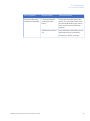
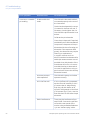
Table 5.1 provides a guide to maintenance operations and intervals at which these
operations should be performed by the user. The user is however responsible for deciding
the type of operations and length of intervals necessary to maintain system function
and safety.
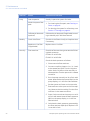
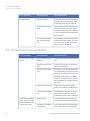
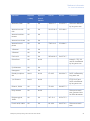
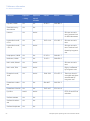
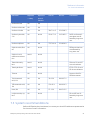
Table 5.1: User maintenance schedule
ÄKTAprime plus Operating Instructions 28-9597-89 AA
39
5 Maintenance
5.2 User maintenance schedule
Interval
Action
Instructions/reference
Daily
Leak inspection
Visually inspect the system for leaks.
Wash the system flow
path
1
For cleaning the flow path, see Cleaning-InPlace, on page 41.
2
For leaving the system for a few days, see
Section 5.7 Storage, on page 44.
Weekly
Monthly
Calibrate pH electrode
(optional)
Calibrate the pH electrode (if applicable) according to Monitor pH/C-900 User Manual.
Check inlet filters
Check the inlet filters visually and replace them
if necessary.
Replace on-line filter
(if applicable)
Replace the on-line filter.
Flow restrictor
Check that flow restrictor generates the following back-pressure:
FR-904: 0.4 ±0.05 MPa
FR-902: 0.2 ±0.05 MPa
Check the back-pressure as follows:
40
1
Disconnect the flow restrictor.
2
Connect a capillary (approx. 1 m, i.d. 1 mm)
to the waste port (port 5) on the injection
valve. Set the injection valve manually to
Waste position. Put the open end in a waste
container.
3
Run the pump manually at 10 ml/min with
water. Note the back-pressure (Bp1) on the
pump display, or in the Run Data window.
4
Set the system to Pause and connect the
flow restrictor to the open end of the capillary (observe the IN marking). Put the flow
restrictor in the waste container.
5
Press Continue so that the pump run at 10
ml/min with water. Note the back-pressure
(Bp2) on the pump display, or in the Run
Data window.
6
Calculate the back-pressure generated by
the flow restrictor (Bp2-Bp1). Replace it if it
is not within limit.
ÄKTAprime plus Operating Instructions 28-9597-89 AA
5 Maintenance
5.2 User maintenance schedule
Interval
Action
Instructions/reference
Yearly
Valve inspection
Check for external or internal leakage. Replace
channel plate and distribution plate yearly or
when required. Refer to the relevant valve instruction sheet.
5.3 Cleaning
Cleaning before
maintenance/service
Before maintenance/service is performed, the system owner must first clean the system
and complete a Decontamination Report. Contact GE Healthcare for further information.
Cleaning-In-Place
All components in the system are designed for ease of CIP.
After repeated separation cycles, contaminating material might progressively build up
in the system and on the column. This material may not have been removed by the
cleaning step described above. The nature and degree of contamination depends on
the sample and the chromatographic conditions employed. These should be considered
when designing a cleaning protocol.
Routine cleaning should be performed at intervals aimed at prevention rather than
cleaning the system from growth or contamination.
WARNING
Make sure that the piping system is completely leakage free before
performing any CIP on the system.
Make sure that the process control method for cleaning flushes all possible flow paths
in the system. After cleaning, rinse the entire system with water or suitable liquid until
the piping/tubing system is completely free from the CIP solution (monitors in the system
can be used as detectors). Do not leave NaOH or other cleaning agents in the system
for long periods.
ÄKTAprime plus Operating Instructions 28-9597-89 AA
41
5 Maintenance
5.3 Cleaning
WARNING
Hazardous chemicals during maintenance. When using hazardous
chemicals for system or column cleaning, wash the system or
columns with a neutral solution in the last phase or step.
WARNING
NaOH is corrosive and therefore dangerous to health. When using
hazardous chemicals, avoid spillage and wear protective glasses
and other suitable personal protective equipment.
See also Section 5.7 Storage, on page 44
5.4 Component maintenance
Maintenance and preventive replacement of parts of the major components are described
in the respective manuals included in the system documentation.
The system documentation also includes a spare part list to be used to find common
spare parts and their code numbers for ordering. This list can also be found online at
www.gelifesciences.com/AKTA.
5.5 Disassembly and assembly of components and
consumables
The operator must carefully read and understand the instructions supplied for each
component before disassembly and assembly of the component. When replacing
consumables, such as tubing and tubing connectors, all neccessary safety precautions
must be taken. Contact your local GE Healthcare representative if further information
or help is needed.
WARNING
Disconnect power. Always disconnect power from the instrument
before replacing any component on the instrument, unless stated
otherwise in the user documentation.
42
ÄKTAprime plus Operating Instructions 28-9597-89 AA
5 Maintenance
5.5 Disassembly and assembly of components and consumables
WARNING
Before disassembly, check that there is no pressure in the piping
system.
WARNING
After assembly, the piping system must be tested for leakage at
maximum pressure for continued protection against injury risks
due to fluid jets, burst pipes or explosive atmosphere.
5.6 Calibration
The table below lists the type and frequency of calibrations that can be done on the
instrument. Refer to PrimeView user documentation and to the individual component
User Manuals and Instructions for descriptions of how to perform these calibrations.
The calibrations are performed from PrimeView by selecting System:Calibrate in System
Control.
Component
How often
pH monitor (if applicable)
Every day.
Pump (if applicable)
When required.
Pressure reading
When required.
Conductivity
flow cell
Cell constant
Only necessary if specific conductivity with high
accuracy is measured (Cond_Calib).
Temperature
Must be done when changing the conductivity
flow cell (Temp).
Entering a
new cell constant
Must be done when changing the conductivity
flow cell (Cond_Cell).
ÄKTAprime plus Operating Instructions 28-9597-89 AA
43
5 Maintenance
5.7 Storage
5.7 Storage
General recommendation
For storage, the system must first be cleaned as described in Cleaning-In-Place, on
page 41. After cleaning, the system must be filled with 0.01 M NaOH or 20% ethanol
solution.
Columns and media shall be stored according to their respective instructions.
Storage conditions
The following conditions shall be maintained while the system is in storage:
•
Temperature: +2 to +30°C (preferably room temperature)
•
Relative humidity: 0 to 95%, non-condensing (preferably low humidity).
After storage, clean the system, calibrate all monitors, and perform a leakage test before
using the system.
44
ÄKTAprime plus Operating Instructions 28-9597-89 AA
6 Troubleshooting
6 Troubleshooting
6.1 UV curve problems
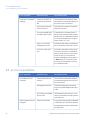
Error symptom
Possible cause
Corrective action
Ghost peak
Dirt or residues in the
flow path from previous runs. Air in the
eluents.
Clean the system. Make sure air is
removed.
Residue in the column
from previous runs
Clean the column according to the
column instructions.
Incorrect mixer function
Check the mixer function by placing a stirrer bar on top of the mixer
housing. The stirrer bar should rotate when the system is in Run
mode. The mixer function can also
be checked by running the installation test.
Dirty UV cell
Clean the UV cell by flushing Decone 90, Deconex 11 or equivalent.
Impure buffer
Check if the signal is still noisy with
water.
Air in the pump or in
the UV cell
Purge the pump according to
Pump User Manual. Run a system
wash with buffer.
Noisy UV-signal, signal drift or instability
ÄKTAprime plus Operating Instructions 28-9597-89 AA
45
6 Troubleshooting
6.1 UV curve problems
Error symptom
Possible cause
Corrective action
Low sensitivity
Aging UV lamp
Check the lamp run time according
to and replace if necessary. Refer
to ÄKTAprime plus User Manual.
UV lamp in wrong position
Check that the lamp position and
the filter position are both set to
the wavelength to be used, 280 nm
or 254 nm. Refer to ÄKTAprime plus
User Manual.
The theoretical extinction coefficient too
low
Calculate the theoretical extinction
coefficient of the protein. If it is zero or very low at 280 nm, the protein cannot be detected.
6.2 Conductivity curve problems
Error symptom
Possible cause
Corrective action
Baseline drift or noisy
signal
Air in the pump or the
flow cell
Use a flow restrictor after the flow
cell.
Leaking tube connections
Tighten the clamps. If necessary,
replace the clamps.
Incorrect mixer function
Check the mixer function by placing a stirrer bar on top of the mixer
housing. The stirrer bar should rotate when the system is in Run
mode. The mixer function can also
be checked by running the installation test.
Dirty conductivity cell
Clean the conductivity cell by
flushing 1 M NaOH or 20% ethanol.
Column not equilibrated
Equilibrate the column. If necessary, clean the column using a
method plan for column cleaning.
Dirty flow cell
Clean the flow cell according to
procedure in Monitor User Manual.
Decrease in ambient
temperature
Use a temperature compensation
factor. See Monitor User Manual.
Conductivity measurement with the same
buffer appears to decrease over time
46
ÄKTAprime plus Operating Instructions 28-9597-89 AA
6 Troubleshooting
6.2 Conductivity curve problems
Error symptom
Possible cause
Corrective action
Waves on the gradient
Incorrect pump function
Check that the pump is operating
and is programmed correctly.
Dirty mixing chamber
Check that the mixing chamber is
free from dirt or particles.
Insufficient mixing
chamber volume
Change to a larger mixing chamber volume if necessary.
Incorrect motor function
Check the motor operation. Place
a hand on the mixer and start it by
starting the pump at a low flow
rate. You should both hear and feel
the mixer motor and stirrer when
they are spinning.
Ghost peaks appear
in the gradient profile
Air in the flow cell
Check for loose tubing connections. Use the flow restrictor.
Unlinear gradients or
slow response to %B
changes
Dirty tubing
Wash the tubing and check pump
is operating properly.
Incorrect mixer volume
Change to smaller mixer volume.
ÄKTAprime plus Operating Instructions 28-9597-89 AA
47
6 Troubleshooting
6.2 Conductivity curve problems
Error symptom
Possible cause
Corrective action
Incorrect or unstable
reading
Loose connection of
conductivity flow cable
Check that the conductivity flow
cell cable is connected properly to
the rear of the instrument.
Incorrect pump and
valves function
Check that the pump and valves
operate correctly.
Incorrect temperature
compensation factor
If temperature compensation is
being used, check that the temperature sensor is calibrated, and that
the correct temperature compensation factor is in use.
Dirty or incorrectly
calibrated column
Check that the column is equilibrated. If necessary clean the column.
Incorrect mixer function
Check the operation of the mixer.
The mixer function is checked by
placing a stirrer bar on top of the
mixer housing. The stirrer bar
should rotate when the system is
in Run mode. The mixer function
can also be checked by running
the installation test.
Error symptom
Possible cause
Corrective action
No response to pH
changes
Faulty electrode connection
Check that the electrode cable is
connected properly to the rear of
the instrument.
Damaged electrode
The electrode glass membrane
may be cracked. Replace the electrode.
Incorrectly connected
pH monitor
Check that the pH monitor is correctly connected according to the
User Manual.
Dirty pH electrode
Clean the pH electrode as detailed
in Monitor pH/C-900 User Manual.
6.3 pH curve problems
Small response to pH
changes
If the problem remains, replace the
pH electrode.
48
ÄKTAprime plus Operating Instructions 28-9597-89 AA
6 Troubleshooting
6.3 pH curve problems
Error symptom
Possible cause
Corrective action
Slow pH response or
Calibration impossible
Contaminated electrode glass membrane
Check the electrode glass membrane. If it is contaminated, clean
the electrode following the instructions in Monitor pH/C-900 User
Manual.
Membrane has dried
out
If the membrane has dried out, the
electrode may be restored by
soaking it in buffer overnight.
ÄKTAprime plus Operating Instructions 28-9597-89 AA
49
6 Troubleshooting
6.3 pH curve problems
Error symptom
Possible cause
Corrective action
Incorrect or unstable
pH reading
Problem with electrode
Check that the electrode cable is
connected properly to the rear of
the instrument.
Check that the electrode is correctly inserted in the flow cell and, if
necessary, hand-tighten the nut.
Check that the pH electrode is not
broken.
Calibrate the pH electrode.
Clean the pH electrode if required,
see Monitor pH/C-900 User Manual.
Compare the response of the pH
electrode with that of another pH
electrode. If the response differ
greatly, the electrode may require
cleaning or replacement.
In organic solvents such as
ethanol, methanol and acetonitrile,
stable pH measurements are not
possible since dehydration of the
membrane will occur. It is recommended that the pH electrode is
not used in applications using organic solvents. Mount the dummy
electrode instead.
50
Incorrect pump or
valve operation
Check that the pump and valves
operate correctly.
Air in the flow cell
If air in the flow cell is suspected,
tap the flow cell carefully or tilt it
to remove the air. Alternatively,
flush the cell with buffer at 20
ml/min (E 100 system) or 10 ml/min
(E 10 system) for 1/2 min. Use the
flow restrictor FR-902 after the pH
electrode.
Static interference
There may be interference from
static fields. Connect the pH flow
cell and the rear panel of the
monitor using a standard laboratory 4 mm “banana plug” cable.
ÄKTAprime plus Operating Instructions 28-9597-89 AA
6 Troubleshooting
6.3 pH curve problems
Error symptom
Possible cause
Corrective action
pH values vary with
varied back pressure
Problem with the
electrode
Replace the pH electrode.
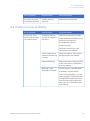
6.4 Pressure curve problems
Error symptom
Possible cause
Corrective action
Erratic flow, noisy
baseline signal, irregular pressure trace
Air bubbles passing
through or trapped in
the pump
Check all connections for leaks.
Check that there is sufficient eluent
present in the reservoirs.
Use degassed solutions.
Purge the pump.
Follow the instructions in ÄKTAprime plus User Manual.
Inlet or outlet check
valves not functioning
correctly
Clean the valves in according to
ÄKTAprime plus User Manual.
Piston seal leaking
Replace the piston seal according
to the instructions in ÄKTAprime
plus User Manual.
Blockage or part
blockage of flowpath
Flush through to clear blockage.
If necessary, replace tubing.
Check inlet tubing filter. It can become clogged if unfiltered buffers
or samples are applied. See instructions for flushing through at the
end of the run in ÄKTAprime plus
User Manual.
ÄKTAprime plus Operating Instructions 28-9597-89 AA
51
7 Reference information
7 Reference information
This chapter contains technical data, regulatory and other information.
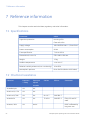
7.1 Specifications
Parameter
Value
Ingression protection
Housing: IP20
Flow cells: IP44
Supply voltage
100-120/220-240 V ~, 50 to 60 Hz
Power consumption
90 VA
Fuse specification
T 1.0 AH 250 V
Dimensions (H × W × D)
530 × 400 × 450 mm
Weight
13 kg
Ambient temperature
+4 to +40 °C
Relative humidity tolerance (non-condensing)
10 to 95%
Atmospheric pressure
84 to 106 kPa (840 to 1060 mbar)
7.2 Chemical resistance
Chemical
Exposure
Exposure
< 1 day
up to 2
months
Acetaldehyde
OK
OK
Acetic acid, < 5%
OK
OK
Acetic acid, 70%
OK
Acetonitrile
Acetone, 10%
52
CAS no.
EEC no.
OK
64-19-7
200-580-7
OK
OK
75-05-8
200-835-2
OK
Avoid
Comments
FFKM, PP and PE
swell.
PVDF is affected by
long term use.
ÄKTAprime plus Operating Instructions 28-9597-89 AA
7 Reference information
7.2 Chemical resistance
Chemical
Exposure
Exposure
CAS no.
EEC no.
Comments
< 1 day
up to 2
months
Ammonia, 30%
OK
OK
7664-41-7
231-635-3
Silicone is affected
by long-term use.
Ammonium chloride
OK
OK
12125-02-9
235-186-4
Ammonium bicarbonate
OK
OK
Ammonium nitrate
OK
OK
Ammonium sulphate
OK
OK
7783-20-2
231-984-1
1-Butanol
OK
OK
2-Butanol
OK
OK
Citric acid
OK
OK
29340-81-6
249-576-7
Chloroform
OK
Avoid
Cyclohexane
OK
OK
Detergents
OK
OK
Dimethyl sulphoxide
Avoid
Avoid
1, 4-Dioxane
Avoid
Avoid
Ethanol, 100%
OK
OK
Ethyl acetate
OK
Avoid
Ethylene glycol,
100%
OK
OK
107-21-1
203-473-3
Formic acid, 100%
OK
OK
64-18-6
200-579-1
ÄKTAprime plus Operating Instructions 28-9597-89 AA
Kalrez™, CTFE, PP
and PE are affected
by long term use.
67-68-5
200-664-3
PVDF is affected by
long term use.
ETFE, PP, PE and
PVDF are affected
by long term use.
75-08-1
200-837-3
Silicone not resistant. Pressure limit
for PEEK decreases.
Silicone not resistant.
53
7 Reference information
7.2 Chemical resistance
Chemical
Exposure
Exposure
< 1 day
up to 2
months
Glycerol, 100%
OK
OK
Guanidinium hydrochloride
OK
OK
Hexane
OK
Avoid
Hydrochloric acid,
0.1 M
OK
OK
Hydrochloric acid,
> 0.1 M
OK
Avoid
Isopropanol, 100%
OK
OK
67-63-0
200-661-7
Methanol, 100%
OK
OK
74-93-1
200-659-6
Nitric acid, diluted
OK
Avoid
Silicone not resistant.
Nitric acid, 30%
Avoid
Avoid
Elgiloy is affected
by long term use.
Phosphoric acid,
10%
OK
Avoid
7664-38-2
231-633-2
Potassium carbonate
OK
OK
584-08-7
209-529-3
Potassium chloride
OK
OK
7447-40-7
231-211-8
Pyridine
Avoid
Avoid
Sodium acetate
OK
OK
Sodium bicarbonate
OK
OK
Sodium bisulphate
OK
OK
54
CAS no.
EEC no.
56-81-5
200-289-5
Comments
Silicone not resistant. Pressure limit
for PEEK decreases.
7647-01-0
231-595-7
Silicone not resistant.
Silicone not resistant. Titanium is affected by long term
use.
Titanium, aluminium oxide and glass
are affected by
long term use.
ETFE, PP and PE not
resistant.
ÄKTAprime plus Operating Instructions 28-9597-89 AA
7 Reference information
7.2 Chemical resistance
Chemical
Exposure
Exposure
CAS no.
EEC no.
< 1 day
up to 2
months
Sodium borate
OK
OK
Sodium carbonate
OK
OK
Sodium chloride
OK
Sodium hydroxide,
2M
Comments
OK
7647-14-5
231-598-3
OK
Avoid
1310-73-2
215-185-5
Sodium sulphate
OK
OK
7757-82-6
231-820-9
Sulphuric acid, diluted
OK
Avoid
Sulphuric acid,
medium concentration
Avoid
Avoid
Tetrachloroethylene
Avoid
Avoid
Silicone, PP and PE
are not resistant.
Tetrahydrofuran
Avoid
Avoid
ETFE, CTFE, PP and
PE are not resistant.
Toluene
OK
Avoid
Pressure limit for
PEEK decreases.
Trichloroacetic
acid, 1%
OK
OK
76-03-9
200-927-2
Trifluoroacetic acid,
1%
OK
OK
176-05-1
200-929-3
Urea, 8M
OK
OK
57-13-6
200-315-5
o-Xylene and p-Xylene
OK
Avoid
PVDF and borosilicate glass are affected by long term
use.
PEEK and titanium
are affected by
long term use.
PP and PE are affected by long term
use.
7.3 System recommendations
Refer to ÄKTAprime plus User Manual, or contact your local GE Healthcare representative
for the most current information.
ÄKTAprime plus Operating Instructions 28-9597-89 AA
55
7 Reference information
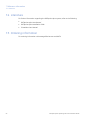
7.4 Literature
7.4 Literature
For further information regarding the ÄKTAprime plus system, refer to the following:
•
ÄKTAprime plus User Manual
•
ÄKTAprime plus Installation Guide
•
PrimeView User Manual
7.5 Ordering information
For ordering information visit www.gelifesciences.com/AKTA.
56
ÄKTAprime plus Operating Instructions 28-9597-89 AA
A Electrical and communication connections
Appendix A Electrical and
communication connections
1
7
2
8
3
pH-Ground
Drop Sensor Frac Valve
Recorder
RS-232
Rec. On/off
pH-Probe
Conductivity Flow Cell
UV
9
4
Mains
UV-lamp
l
Voltage
100-120 / 220-240 V ~ autorange
Frequency
50-60 Hz
0
l
0
5
10
Power max
90 VA
11
6
(SYSTEM NO.)
(CODE NO.)
No.
Connection
No.
Connection
1
RS-232 to computer
7
pH electrode
2
Flow diversion valve
8
Conductivity flow cell
3
Fraction collector
9
Optical unit
4
Measurement data to recorder
10
Power switch
5
On/off signals to recorder
11
Power inlet
6
UV lamp
Figure A.1: Electrical and communication connections for ÄKTAprime plus.
ÄKTAprime plus Operating Instructions 28-9597-89 AA
57
B Connection diagram - Liquid flow path
Appendix B Connection diagram - Liquid
flow path
G2
98
G3
7
300
G4
6
650
5
10
G1
87
UV
4
G5
11
Cond
250
AB
510
12
3
A
170
A1
2
3
1 8
4 5
8
7
6
1 76
2
5
3 4
W1
1100
W2
G6
2
B
1250
1250
pH
550
1000
W2
W1
F1
13
410
9
14
1
W3
1000
W3
58
No.
Description
No.
Description
1
Buffers
8
Loop (500 μl)
2
Buffer valve
9
Waste
3
Gradient switch valve
10
Column
4
System pump
11
Male/Male
5
Pressure monitor
12
Flow restrictor (0.2 MPa)
6
Stop plug
13
Flow diversion valve
7
Mixer
14
Fraction collector
ÄKTAprime plus Operating Instructions 28-9597-89 AA
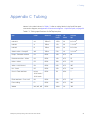
C Tubing
Appendix C Tubing
Names in the Label column in Table C.1 refer to tubing labels in the liquid flow path
connection diagram, see Appendix B Connection diagram - Liquid flow path, on page 58.
Table C.1: Tubing specifications for ÄKTAprime plus
Use
Label
Material
Length
(mm)
I.D.
(mm)
Volume
(μl)
Inlet A11
A1
Teflon™
1250
2.9
8.2 × 10³
Inlet A1
A
Teflon
170
2.9
1.1 × 10³
Inlet A2
B
Teflon
1250
2.9
8.2 × 10³
Switch valve - Pump A3
AB
Teflon
510
1.6
1.0 × 10³
Pump - Pressure monitor
G1
PEEK
150
0.75
66
Pressure monitor - Mixer
G2
PEEK
120
0.75
53
Mixer - Valve
G3
PEEK
300
0.75
133
Valve - UV (Column)
G4
PEEK
650
0.75
287
UV - Cond
G5
PEEK
250
0.75
110
Cond - Flow restrictor
Union,
1/16" male /
1/16" male
PEEK
38
0.50
7
Flow restrictor – Frac. coll.
G6
PEEK
550
0.75
243
Frac. tubing
F1
PEEK
410
0.75
181
Waste
W1, W2, W3
PEEK
1000
1.0
785
ÄKTAprime plus Operating Instructions 28-9597-89 AA
59
For local office contact information, visit
www.gelifesciences.com/contact
GE Healthcare Bio-Sciences AB
Björkgatan 30
751 84 Uppsala
Sweden
www.gelifesciences.com/AKTA
GE, imagination at work and GE monogram are trademarks of General Electric
Company.
Drop Design, HiPrep, HisTrap, HiTrap, PrimeView, ÄKTA and ÄKTAprime are
trademarks of GE Healthcare companies.
All third party trademarks are the property of their respective owners.
© 2009 General Electric Company – All rights reserved.
First published Aug. 2009
All goods and services are sold subject to the terms and conditions of sale of
the company within GE Healthcare which supplies them. A copy of these terms
and conditions is available on request. Contact your local GE Healthcare
representative for the most current information.
PrimeView: Any use of this software is subject to GE Healthcare Standard
Software End-User License Agreement for Life Sciences Software Products.
GE Healthcare Europe GmbH
Munzinger Strasse 5, D-79111 Freiburg, Germany
GE Healthcare UK Limited
Amersham Place, Little Chalfont, Buckinghamshire, HP7 9NA, UK
GE Healthcare Bio-Sciences Corp.
800 Centennial Avenue, P.O. Box 1327, Piscataway, NJ 08855-1327, USA
GE Healthcare Japan Corporation
Sanken Bldg.3-25-1, Hyakunincho Shinjuku-ku, Tokyo 169-0073, Japan
imagination at work
28-9597-89 AA 10/2009