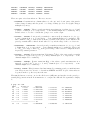
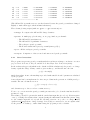
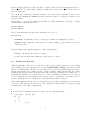
1
• Use in SIESTA:
J.M. Soler, E. Artacho, J.D. Gale, A. Garcia, J. Junquera, P. Ordejon, D. Sanchez-Portal,
“The SIESTA method for ab initio O(N) materials simulation”, Jour. Phys.: Condens.
Matter, 14, 2745-2779 (2002).
3
COMPILING THE PROGRAM
Edit makefile in the main source directory, and modify, if needed, the defaults for Fortran
compiler and auxiliary file containing date and time routines (not standard in Fortran77).
Type make. After a short while you will have the executable (called atm) in that same directory.
The program should work for any atom without recompilation.
Directory Tutorial in the source distribution contains a set of scripts to automate the process
of running ATOM and to analyze the results. The file-manipulation details involved in each
of the basic functions of all-electron calculations, generation of pseudopotentials, and testing of
the pseudopotentias, are taken care of by ae.sh, pg.sh, and pt.sh, respectively. These scripts
need to know where the ATOM executable atm is. If you have moved the Tutorial directory
around, or you do not have the source, the default location might not be right for you. The
easiest way to fix it is to define an environmental variable ATOM PROGRAM. Assuming atm is in
/somedir/somewhere, you would do:
ATOM_PROGRAM=/somedir/somewhere/atm ; export ATOM_PROGRAM
setenv ATOM_PROGRAM /somedir/somewhere/atm
# sh-derived shells
# csh-derived shells
Due to the shortcommings of the basic (GNUplot) plotting package used in the Tutorial section,
it is also necessary to copy some scripts from a central repository. Again, if the default does not
work for you, define the ATOM UTILS DIR variable:
ATOM_UTILS_DIR=/somewhere ; export ATOM_UTILS_DIR
setenv ATOM_UTILS_DIR /somewhere
4
4.1
# sh-derived shells
# csh-derived shells
USING THE ATOM PROGRAM
All-electron calculations
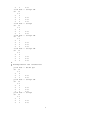
Assume we want to find the orbital eigenvalues, total energy, and/or charge density of Si in
its ground state. (You should now go to the Tutorial/All electron directory and try the
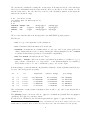
following.) Our input file is named si.ae.inp and contains the lines (see Sect. 5 for more
details):
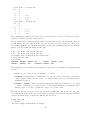
ae Si ground state all-electron
Si
ca
0.0
3
2
3
0
2.00
0.00
3
1
2.00
0.00
#2345678901234567890123456789012345678901234567890
3
Ruler