1
Bachelor thesis – MiS20, the robotic soccer simulator
Hans Dollen
Wim Fikkert
3.4. Control
The data model, partially described in paragraph 3.3, will stand at the base of the MiS20. It contains all
data which needs to be managed by the Mission Impossible Simulator. The way this data is managed will
be described in this chapter. User interactions can be derived from the requirements which where
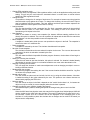
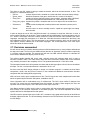
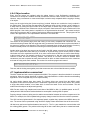
described in chapter 2, using UML use cases. Figure 3.10 displays all interactions with the MiS20 the user
can undertake.
Figure 3.12. User use cases
Each oval in figure 3.12 indicates an interaction with the simulator which a user can perform. We also
created two groups of interactions (encircled in gray) because they are very similar to each other.
Figure 3.12 displays all user interactions which are possible with the MiS20. These also include
interactions which may not be implemented during this project. The reason why those interactions (“select
first person robot (FPR) cam” for example) are included in figure 3.12 is that, according to the requirement
stated in paragraph 2.1.5, the simulator must be designed in such a way that extensions are taken into
account when designing.
•
•
•
•
Selecting topdown camera mode:
The user selects the top down camera vantage point. The entire field is shown which results in
almost the same view which would be generated using the camera system.
Select First Person Robot (FPR) camera mode:
The user selects this camera mode after which an object (robot or ball) can be selected in the field
view. The camera is then set behind the selected object which results in a pursuit camera.
Select free camera mode:
The user selects this mode after which he (or she) can rotate, translate and zoom the camera
through the field view until another camera mode is selected.
Change collision detection mode:
When the user changes this mode via the menu the collision detection and handling functions will
either be or not be used according to the new setting when new vectors for the objects are
calculated. All objects can pass through each other and through the walls.
27