1
LCD DISPLAY FUNCTIONS
Program Mode Display Windows
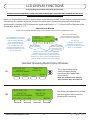
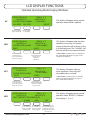
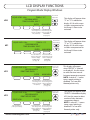
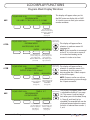
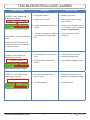
#7A
ENABLE
Press this button to
ENABLE Fill Timer
this will advance
you to display
#7B ( below)
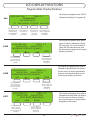
#7B
This display will appear when “FILL
TIMER” is selected on display #6.
This is a prompt to ENABLE or DISABLE
the Automatic Fill Timer. The Fill Timer
gives the option of an automatic fill
every 24, 48, or 72 hours at a specified
time of day. These settings are
programmed in the 2 menus that follow.
LIQUID LEVEL X.Xin
TEMP-A X˚C
PROGRAM MODE
FILL TIMER IS CURRENTLY: DISABLED
DISABLE
MAIN MENU
Press this button to
DISABLE Fill Timer
this will return you
to display #6
Main Menu 3
(see page 16)
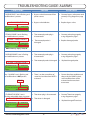
LIQUID LEVEL X.Xin
TEMP-A X˚C
PROGRAM MODE
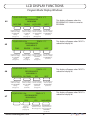
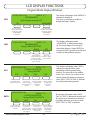
SELECT INTERVAL FOR FILL TIMER
24 HOURS
48 HOURS
This display will appear when
“ENABLE” is selected on display #7A.
Use this menu to set the time interval
that the automatic fill will occur.
72 HOURS MAIN MENU
Press this button to
Press this button to Press this button to Press this button to
select a 24 hour time select a 48 hour time select a 72 hour
discard changes and
interval and advance interval and advance time interval and return to display #6:
to display #7C. (below) to display #7C. (below) advance to display
MAIN MENU 3
#7C. (below)
(see page 16)
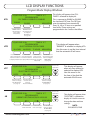
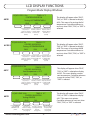
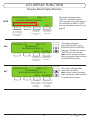
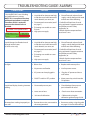
#7C
LIQUID LEVEL X.Xin
TEMP-A X˚C
PROGRAM MODE
SELECT TIME TO START FILL ??:??
ENTER
Press this button to
advance to display
#16: Main Menu 3
(see page 16)
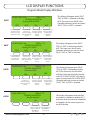
#8
HR<->MIN
MAIN MENU
Press this button to
move the curser
between
Hours and Minutes
Press this button to
advance to display
#6: MAIN MENU 3.
(see page 16)
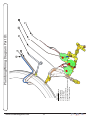
LIQUID LEVEL X.Xin
TEMP-A X˚C
PROGRAM MODE
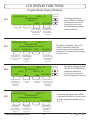
CURRENT DATE/TIME: XX/XX/XX XX:XX:XX
These arrows
adjust value
These arrows
adjust value
MAIN MENU
Press this button to Press this button to
move cursor left. move cursor right.
www.custombiogenics.com
Press this button to
return to display
#4: MAIN MENU
(see page 16)
17
This display will appear
when any time interval is
selected on display #7B.
Use this menu to set
the time of day that the
automatic fill will occur.
This display will appear when
“DATE/TIME” is selected on
display #4. Use this menu to
change the date and time
settings.
NOTE:
DAY/MONTH/YEAR