1
<Toc> <Ind>
2.5
<2. Configuring the Power and Energy Meter>
2-11
Saving the Setup Data
Saving to a File by Specifying a Name
The setup data (input parameters, parameter setting, and display pattern setting) can be
saved to a file by specifying the file name.
Note
The extensions to setup data files are .P3D for the PR300 and .U1D for the UPM100/UPM101.
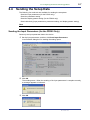
1. From the File menu, choose Save As.
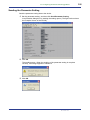
The Save As dialog box opens.
2. Specify the save destination, enter the file name, and click Save.
The setup data is saved.
Saving (Overwriting) to the File
From the File menu, choose Save. You can also click the Save icon on the toolbar. The
setup data is saved (overwritten).
IM 77C01Y01-01E