1
<Toc> <Ind>
1.4
1-5
<1. Before Using the Software>
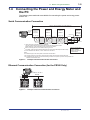
Connecting the Power and Energy Meter and
the PC
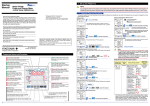
The following three methods are available for connecting the power and energy meter
and the PC.
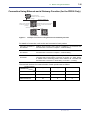
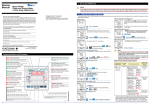
Serial Communication Connection
Approx. 1200 m maximum (31 units maximum)
PR300
UPM100
UPM101
ML2 *2
RS-232C RS-232C/RS-485
straight
Converter
(Yokogawa)
cable
PR300
UPM100
UPM101
PR300
UPM100
UPM101
*3
Short circuit
(A−) (B+) (SG)
RS-485
(A−) (B+) (SG)
RS-485
(A−) (B+) (SG)
RS-485
120 (built-in)
(TERM) (A−) (B+) (SG)
PC
*1
Terminator
(FG)
*1 120 Ω externally connected (parts no.: L3035RK)
Use the resistor externally connected without using the built-in resistor of ML2.
Make resistance of the terminator the same as that of the resistor.
*2 When connecting the ML2, use it without returning an echo.
For details, refer to the ML2 RS232-C/RS-485 Converter User’s Manual (IM 77J04L02-01E).
*3 For the UPM100 and UPM101, 120 Ω resistors are not built in.
Set the communication
method of PR300,
UPM100 and UPM101
to Modbus/RTU.
Notes:
The PR300 employs a two-wire system for RS-485 communication.
SG: The SG terminal is connected to match the signal level of the RS-485 communication line.
FG: All shielded wires must be connected and then grounded at one place to provide noise protection for
RS-485 communication lines.
Figure1.2
Example of Serial Communication Connection
Ethernet Communication Connection (for the PR300 Only)
PC
IP address: 192.168.1.1
HUB
Ethernet
LAN
connection
IP address: 192.168.1.2
Figure1.3
IP address: 192.168.1.3
Example of Ethernet Communication Connection
IM 77C01Y01-01E