1
PowerFlex 70 Adjustable Frequency AC Drive Quick Start
Step 4
English-9
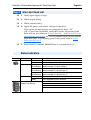
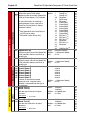
Start-Up Check List
❏ 1. Verify input supply voltage.
❏ 2. Check output wiring.
❏ 3. Check control wiring.
❏ 4. Apply AC power and control voltages to the drive.
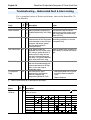
If any of the six digital inputs are configured to Stop – CF
(CF = Clear Fault) or Enable, verify that signals are present or the
drive will not start. Refer to Troubleshooting – Abbreviated Fault &
Alarm Listing on page 16 for a list of potential digital input conflicts.
If the STS LED is not flashing green at this point, refer to Status
Indicators on page 9.
❏ 5. Select Start-Up method: SMART Start or Assisted Start-Up.
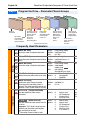
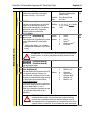
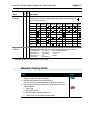
Status Indicators
Name
STS
PORT
MOD
NET A
NET B
Color
Green
State
Flashing
Steady
Yellow
Flashing,
Drive Stopped
Flashing,
Drive Running
Steady,
Drive Running
Red
Flashing
Steady
Refer to the Communication
Adapter User Manual.
Description
Drive ready, but not running and no faults are present.
Drive running, no faults are present.
An inhibit condition exists, the drive cannot be started.
Check parameter 214 [Start Inhibits].
An intermittent type 1 alarm condition is occurring.
Check parameter 211 [Drive Alarm 1].
A continuous type 1 alarm condition exists.
Check parameter 211 [Drive Alarm 1].
A fault has occurred.
A non-resettable fault has occurred.
Status of DPI port internal communications (if present).
Status of communications module (when installed).
Status of network (if connected).
Status of secondary network (if connected).