1
How to …
Login into PortaBilling after the installation
The default username is “pb-root” and the password is “pb-root” as well.
After you login for the first time, you will be requested to change the
password – please remember the new password you choose.
Charge my calling card customers XX/min
extra when they call a toll-free line
This is very easy to do with PortaBilling’s Accessibility feature:
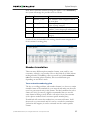
1. Create two tariffs – one with your normal rates (for example 0.13
dollar/min for calls to Czech Republic) and the other one with
“toll-free” rates, including your toll-free costs there (for example,
0.17 dollar/min for calls to Czech Republic).
TIP: When calculating the price for the toll-free line, it is not enough to
add together your ordinary price plus the costs of one minute on the tollfree line. In order to make a 3-minute call, the customer will spend about
4 minutes on the line while listening to voice prompts, entering a PIN /
destination and waiting for an answer. Additionally, situations where a
customer will enter an incorrect PIN or be unable to reach his party at all
should be taken into account. Therefore, usually:
TollFree_ Price = Ordinary_Price + X*Toll_FreeCost
where X is a ratio between the total duration of incoming toll-free calls
and the total duration of outgoing calls.
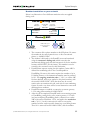
2. Make sure your IVR script supports the “Access Code” feature
(using the “PortaBilling Original CLD” RADIUS attribute).
PortaOne’s TCL developers can help you add this feature to your
application.
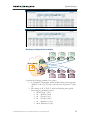
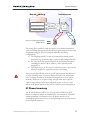
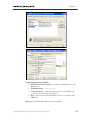
3. Create a product for your calling cards and make two entries in
Accessibility:
• one with an Access Code equal to your toll-free number and
“Toll-free tariff”
• another with an Access Code equal to your local access
number and “Ordinary tariff”.
© 2000-2006 PortaOne, Inc. All rights Reserved. www.portaone.com
96