1
IMU-E604 Manual, Revision G
Appendix A
Serial Command Summary
A.0 Summary of Commands
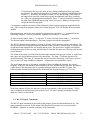
The following commands are available but only following initialization with a double space bar. The
first space bar must be within 1 second following the exclamation mark. The next two space bars must
be after the initialization header (if selected) but before start up of data. We suggest waiting 2 seconds
after sending the "!" and <space>.
"!" <space>
“!”<space><space><space>
"I" or "i"
"R" or "r"
"F" or "f"
"K" or "k"
"C" or "c"
"V" or "v"
"^"
"_"
"~"
"?"
"@"
"("
"#"
"$"
"""
"&"
"*"
"+"
":"
">"
"{"
"}"
Reinitialize
Reinitialize and allow command mode.
Normal Operating mode. Hard wire switches are disabled.
Put Reference Command. Hard wire switches are disabled.
Free Mode. Hard wire switches are disabled.
Clear all Mode Commands, Disable Wire Input
Velocity Invalid Command. Hard wire switches are disabled.
Velocity Valid Command (Sending a "V", enables).
Set to Binary Output
Set to Decimal Output
Read RAM From 0000 TO 00FF
Read EEPROM From B600 TO B6FF
Replace one word of the EEPROM.
Load multiple bytes to the EEPROM
Add to one word ""
Subtract from one word of the EEPROM.
All current modes set are saved on EEPROM.
Select data for output.
Enable/Disable Initialization Message
Toggle RS-232 Output
Toggle RS-232 on Request
Set Current Output Channels (See Below)
Write any RAM or EEPROM Location (Consult Factory)
Read any RAM or EEPROM location (Consult Factory)
The changes in output format (binary, decimal), selected channels, are temporary until a single
quotation mark (") is sent.
Phone: (715) 839-0628
Fax: (715) 839-8248
EMail: [email protected]
19