1
S4 Tech Inc
Appendix A: Video Motion Detection Setup Tips
Avoid Looking into High Brightness Areas
Do not point the camera at the sun or towards the locations where sunrise or sunset occur. Also do not
point the cameras at directly at where bright lights will turn on at night. The bright light from the sun
or artificial lighting will make the image wash out and may trigger video motion alarms. It is best to
point the camera downward and to capture the area of interest from above.
Use the Proper Lens
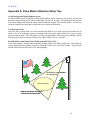
Select the lens (3.6mm, 6mm, or 12mm) such that the field of view of the lens just covers the area of
interest. If you are looking at a gate for example, then select a lens whose field of view just covers the
gate and entrance path. This will greatly increase your probability of detection as the intruder will fill
a larger portion of the viewing area than a lens whose field of view is a lot wider.
Exclude Objects that Flutter in the Wind from the Field of View
Trees, flags, banners, laundry lines, and other movable objects will flutter in the wind. This fluttering
causes motion detection alarms if they are within the field of view of a DOG camera. Please do not
include such objects in the field of view when sighting.
Lens field of view matches
area of interest
Area of Interest
Objects that flutter in wind are
excluded from field of view
25