1
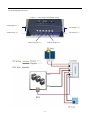
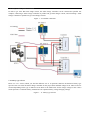
2.8.2 Surge Protection Since PV arrays are often mounted on an elevated structure and thus are more susceptible to lightning strikes, protection from lightning-induced power surges and other transient power disturbances between the PV array and the Solar Charge Controller charge controller are strongly recommended. Because the Solar Charge Controller have wider input voltage range 15-55VDC. 2.8.3 Over-current Protection If the controller detects an overload, it will automatically resets the over current protection system every 6 minutes. If the default is still present, the controller will shut off and wait another 6 minutes. This will occur continuously until the problem is corrected. Controller 12/24 VDC Table 1 – 5: Minimum wire size Minimum Wire Size #8AWG 2.8.4 Long-distance wire runs If there is a significant distance between the PV array and the controller and/or the controller and the battery, larger wires can be used to reduce the voltage drop and improve performance. To use a larger size wire, use a splicer block (terminal block) intended for this purpose. This allows the larger cable size from the batteries to be “spliced” to the smaller wire size connected to the controller. Split-bolt kerneys can also be used for wire splices. Follow manufactures recommendations for torque and mounting (if required). Splicer blocks and split-bolt kerneys are available from renewable energy suppliers. 2.9 PV Charge And Load Control Mode Wiring The procedure below is illustrated in Figure 1 – 9. WARNING: Shock Hazard PV arrays generate voltage whenever light strikes the surface of the array. Before connecting the Solar Charge Controller charge controller, cover or disconnect the array to prevent any current from being generated. 1. Connect the PV array’s positive (+) output to the terminal marked PV positive (+) on the Solar Charge Controller charge controller and tighten the screw. 2. Connect the PV array’s negative (–) output to the terminal marked PV negative (–) on the Solar Charge Controller charge controller and tighten the screw. 3. Connect the terminal marked battery negative (–) on the Solar Charge Controller charge controller to the negative (–) battery terminal and tighten the screw. 4. Connect the terminal marked battery positive (+) on the Solar Charge Controller charge controller to the positive (+) battery terminal and tighten the screw. 5. Connect the terminal marked load negative (–) on the Solar Charge Controller charge controller to the negative (–) load terminal and tighten the screw. 6. Connect the terminal marked load positive (+) on the Solar Charge Controller charge controller to the positive (+) battery terminal and tighten the screw. 7. Connect a cable from the controller’s other terminal marked load negative (–) to the negative terminal of your DC load and tighten the screw. - 20 -