1
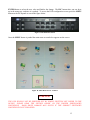
Figure 19: Power Down Menu Screen.................................................................................................... 14
Figure 20: Power Down Button .............................................................................................................. 14
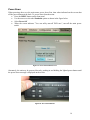
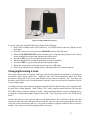
Figure 21: Plug in USB Storage Device. ................................................................................................ 17
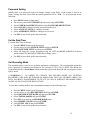
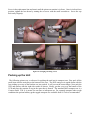
Figure 22: Changing//Focusing a Lens ................................................................................................... 18
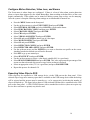
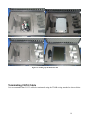
Figure 23: Packing Up the DOG Base Kit.............................................................................................. 19
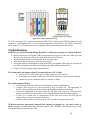
Figure 24: CAT-5 Termination Wiring .................................................................................................. 20
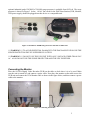
NOTE: THIS MANUAL SERVES AS A GUIDE TO RAPIDLY SETTING UP AND USING
THE DOG SYSTEM. SPECIFIC DETAILS OF DVR OPERATION ARE DEFERRED TO
THE ENCLOSED DVR USER MANUAL WHICH COMES PACKAGED WITH EACH KIT.
Digital Observation Guard System Description
The Digital Observation Guard (DOG) from S4 Tech is a rapidly deployable self-contained security
and surveillance system designed for the CENTCOM operational environment. The DOG is a
standalone security system that has been designed to be portable, rugged, cost effective, easy to install
in the field, and easy to maintain.
The DOG system consists of an H.264 Digital Video Recorder (DVR) unit capable of simultaneously
displaying live video, recording live video, and performing motion detection for the cameras in the
DOG system. The system takes power from any 100-240VAC 50/60Hz power source and distributes
video, power, and data signals to the remote rugged low-light camera units up to 1500ft away using
standard CAT-5 cable with standard connectors. This distribution is accomplished via the DOG Video
Power Data (VPD) unit and specialized circuitry at the remote cameras. The pan/tilt unit’s power and
control signals can also be sent over the same CAT-5 cable when this option is used. Video data is
collected, displayed, and recorded at the Digital Video Recorder (DVR) unit. Motion detection, user
triggered alarms, and storage parameters are all set up in the DVR menus.
Installation of the rugged low-light camera modules only requires mounting the module to a wall or
pole and connecting a single standard CAT-5 cable with an RJ-45 connector through the weather
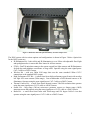
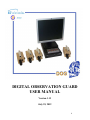
resistant connector on the camera module. The DOG Base Kit is shown in Figure 1 below.
2